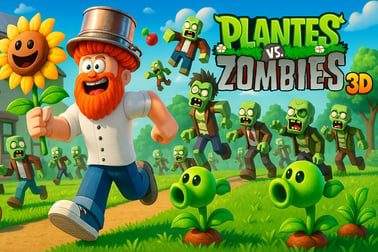
Plants Vs Zombies 3d は3Dであなたの庭を守り、強力な植物をアンロックし、ストーリーと競技モードでゾンビの波を止めることができます。









Plants Vs Zombies 3d
Introduction to Plants Vs Zombies 3d
Plants Vs Zombies 3d takes the classic garden defense formula you know and love and drops it straight into a fully 3D battlefield. Instead of just watching the lanes from above, you step into a third person defense game where you can move around the yard, place plants in real space, and react in real time as zombie waves push toward your house.
This browser-based 3d tower defense game keeps the heart of the original Plants vs Zombies style but reimagines it with modern 3D graphics, over-the-shoulder camera angles, and more action-focused gameplay. You still build a smart garden defense strategy, but now you also control a character on the field, dodging enemies and positioning your plants with precision.
Across multiple zombie survival levels, you’ll unlock new plants, learn when to spend or save resources, and discover powerful combos that can wipe out entire lanes of enemies. After you’re comfortable with the single-player story, you can jump into an online competitive mode to test your skills against real players and see whose strategy holds up best under pressure.
If you’re into 3D strategy, enjoy lane-based defenses, or just want a fresh spin on a cult-favorite series, Plants Vs Zombies 3d is an easy recommendation you can play free in your browser.
Plants Vs Zombies 3d Control Guide
Because this is a third person defense game rather than a traditional top-down tower defense, getting comfortable with the controls is key. Exact inputs can vary slightly by platform or site, but here’s a typical layout for browser play on desktop:
- W / A / S / D – Move your character around the garden in full 3D.
- Mouse Move – Aim the camera and look around.
- Left Mouse Button – Place selected plant or interact (for example, pick up sun or confirm an action).
- Right Mouse Button – Cancel plant placement or deselect.
- Number Keys (1–9) – Quickly select different plants in your hotbar.
- Spacebar – Often used for jumping, dodging, or context actions (depending on the version you’re playing).
- Esc – Pause the game, open settings, or return to the main menu.
On mobile versions offered by some portals, the controls are simplified:
- Virtual joystick – Move your character.
- Swipe or drag – Rotate the camera and aim.
- Tap plant icons – Select plants from your toolbar.
- Tap on the ground – Place plants in the selected tile or spot.
Because Plants Vs Zombies 3d blends action with strategy, smooth movement and quick plant selection matter. Before tackling higher zombie survival levels or jumping into online competitive mode, spend a few waves just getting used to how your character turns, how far you can place plants, and how quickly you can cycle through your loadout with number keys or taps.
Plants Vs Zombies 3d Features
Plants Vs Zombies 3d stands out among browser-based strategy games by delivering a more immersive twist on the familiar lawn defense formula. Here are some of the key features that define the experience:
- Fully 3D garden battlefield – Move freely around the yard, check angles, and watch zombies approach from a real third-person perspective.
- Deep 3D tower defense gameplay – Every plant you place still works like a tower, but positioning, line of sight, and 3D distance add extra layers to your garden defense strategy.
- Progressive plant unlocks – Start with simple pea shooters and defensive nuts, then unlock mines, splash-damage plants, and utility plants as you clear zombie survival levels.
- Varied zombie types – Standard walkers, coneheads, flag zombies that move faster, and beefy boss zombies each demand different defensive setups.
- Boss encounters – Some levels feature powerful bosses designed to pressure your entire layout, forcing you to adapt mid-wave.
- Story and challenge progression – Work through a campaign-like structure with increasingly complex layouts, tougher enemy mixes, and limited slots for plants.
- Online competitive mode – Many versions let you battle other players by racing to survive longer, score higher, or break through each other’s defenses.
- Pick-up-and-play design – Short, wave-based structure that fits quick sessions while still offering meaningful long-term progression.
Put together, these features make Plants Vs Zombies 3d more than just a reskin of the classic formula. It’s a third person defense game where your positioning, timing, and reflexes matter just as much as your plant lineup.
Performance & Troubleshooting
Even though Plants Vs Zombies 3d runs in the browser on most gaming portals, it’s still a 3D WebGL game and can be demanding on older devices. If you experience lag, stuttering, or input delay, try the tips below:
Improve Performance on Desktop
- Close extra tabs and apps – Free up RAM and CPU so the browser can focus on running this 3d tower defense game.
- Lower in-game graphics – Many versions let you reduce quality settings like shadows, textures, or post-processing from the pause or options menu.
- Update your browser – Modern browsers handle WebGL much better, which is crucial in a 3D title.
- Disable browser extensions – Heavy ad blockers or overlays can interfere with performance or input.
Fix Input or Control Issues
- Click into the game window – If WASD or mouse look isn’t responding, make sure the game frame has focus.
- Reset controls – Use the options menu to restore default bindings if something feels off.
- Check keyboard layout – Non-standard layouts can change where WASD is; switch to a standard layout for smoother control.
WebGL or Loading Problems
- Enable hardware acceleration in your browser settings to improve 3D rendering.
- Try a different browser – Chrome、Edge、Firefox、and similar modern browsers usually run Plants Vs Zombies 3d best.
- Clear cache – If the game fails to load or keeps crashing, clearing your browser cache and reloading can often fix corrupted assets.
If you’re playing on mobile and run into frame drops, lower your screen brightness, close background apps, and consider a different browser app if your default one struggles with 3D content.
Can I Play Plants Vs Zombies 3d Offline?
Plants Vs Zombies 3d is typically offered as a browser-based 3D tower defense game hosted on gaming portals. In most cases, that means you’ll need an active internet connection to:
- Load the game assets and 3D engine.
- Save progress on the server side or through the platform’s profile system.
- Use any online competitive mode or multiplayer features.
Some versions of the game can be downloaded for Windows or Android from independent creators, and those builds may support offline play once installed. However, when you’re playing directly in a browser tab, you should assume online connectivity is required the entire time.
To avoid losing progress mid-match, it’s best to play on a stable network connection, especially when you’re tackling longer zombie survival levels or ranked competitive sessions.
Survive 3D Zombie Waves With Powerful Garden Defenses
The core of Plants Vs Zombies 3d is still about holding the line. Zombies march in lanes toward your house, and your goal is to build a layered garden defense strategy that slows, weakens, and eventually wipes them out before they reach you.
Layering Your Defenses
Think in layers rather than single lines of plants:
- Frontline blockers – Wall-nut style plants and other tough defenders soak damage and delay zombies.
- Primary damage dealers – Peashooters or stronger offensive plants sit behind the walls, firing continuously down the 3D lanes.
- Area control plants – Mines and explosive plants handle clustered zombies or bail you out when a lane gets overwhelmed.
The 3D angle means you can walk up close to check exact positions, but it also makes gaps more dangerous because fast zombies and flag carriers can slip through before you notice.
Managing Sun and Resources
Most plants cost sun or an equivalent resource, so you’re constantly choosing between planting more economy or more firepower. In early waves:
- Drop at least one or two resource-generating plants safely in the back.
- Build simple damage in the busiest lanes first.
- Only then spend extra on heavier defenses and bombs.
Because you can physically move around, you can also position yourself to quickly gather sun drops, preventing them from fading away and giving you more options mid-wave.
Tips to Unlock New Plants and Beat Tough Zombie Bosses
Progression is what keeps Plants Vs Zombies 3d engaging over many sessions. Every set of completed zombie survival levels usually unlocks new plants or upgrades, and boss fights gate many of the most useful options.
Smart Plant Unlock Strategy
- Prioritize economy plants early – More sun production speeds up every later unlock by letting you clear levels faster and experiment with stronger setups.
- Grab one solid splash-damage plant – AoE attackers help control late waves and are vital when bosses spawn minions.
- Unlock defensive staples – A good wall plant and at least one “panic button” plant (like a mine) should be in your lineup as soon as possible.
Beating Boss Zombies
Bosses in this 3D tower defense setting often have more health, special armor, or unique movement patterns. To handle them:
- Double-layer your walls on the expected boss lane to buy extra time.
- Stack focused damage – Two or three high-damage shooters focusing one lane will melt a boss faster than spreading damage evenly across all lanes.
- Save explosives – Don’t waste your best mines or bombs on small fry. Keep them ready for when the boss closes in.
- Watch movement in 3D – Some bosses may sidestep or push through your front line. Use your character’s movement to re-check that your placement lines up correctly.
If you’re stuck on a specific boss, replay earlier levels to practice a new garden defense strategy or unlock an extra plant that fills a gap in your current lineup.
Single-Player Story and Competitive Modes Explained
Plants Vs Zombies 3d usually offers at least two core experiences: a structured single-player progression and an online competitive mode that puts your strategy up against other players’ skills.
Single-Player / Story Progression
In single-player, you advance through themed zombie survival levels with gradually escalating difficulty:
- Early stages teach basic planting, resource generation, and lane coverage.
- Mid-game introduces faster zombies, shielded enemies, and trickier lawn layouts with obstacles.
- Late game layers in bosses, mixed waves, and limited plant slots that force you to specialize.
Your rewards often include new plants, cosmetic touches, or access to tougher challenge levels that really stress-test your 3d tower defense game skills.
Online Competitive Mode
Competitive play can take different forms depending on the platform, but common formats include:
- Survival races – Both players face waves at the same time; whoever survives longest or scores higher wins.
- Mirror matches – You and an opponent get similar plant options and level layouts, so victory comes down to strategy and timing.
- Ranked ladders – Some sites track wins and losses over time, giving you a visible rating to climb.
Because you can’t pause in online matches, it’s smart to master your plant hotkeys and general third person defense game movement in single-player before diving into ranked or timed modes.
Best Plant Combinations for Every 3D Lane
Choosing the right plant combinations is where Plants Vs Zombies 3d becomes especially strategic. Each lane in the 3D space can behave differently depending on obstacles, angles, and zombie spawns, so aim for flexible setups.
Core Lane Templates
- Standard lane
1 frontline wall → 2 basic shooters behind → 1 support plant (slow or buff).
This works on most neutral lanes with average traffic. - Heavy-traffic lane
2 stacked walls → 1 splash-damage plant → 1–2 strong shooters.
Use this where you expect flag zombies or boss entries. - Economy lane
1 cheap blocker → 1 shooter → 1–2 sun producers safely in the back.
Place this in a lane that sees fewer zombies early on.
Synergistic Combos
- Slow + splash – A slowing plant in front followed by an area-damage attacker behind can erase clustered waves.
- Wall + mine – Put a mine just behind a wall plant so when the front line falls, the next zombie triggers a huge explosion.
- Buff + multi-shooter – Damage-boosting support plants turn lanes with multi-shot attackers into absolute shredders.
Because you can walk around in this 3D space, regularly zoom your camera and physically check that plants are aligned and not blocked by decorations or terrain. Clean lines of fire are just as important as the plants you pick.
Game Controls and Basic Strategy for New Players
For new players, Plants Vs Zombies 3d can feel like a lot: you’re moving a character, watching multiple lanes, and managing resources all at once. A simple starting plan helps you stay in control.
Step-by-Step Opening Strategy
- First 30 seconds: Move to a safe back corner and plant your first sun producer. Collect every sun drop you see.
- After first few zombies: Place one basic shooter in the busiest lane, then a wall plant in front of it.
- Mid-wave: Mirror that basic setup across all lanes: 1 wall + 1 shooter per lane.
- Late-wave: Add a second shooter or a splash plant to lanes that are under the heaviest attack.
Positioning Yourself in 3D
- Stand where you can see the most lanes at once without rotating the camera too much.
- Only run up close when you need precise plant placement or to grab sun before it disappears.
- Use quick glances and small camera turns rather than swinging wildly every time a new zombie spawns.
As you get more comfortable with the controls and pacing, experiment with riskier, more aggressive layouts that rely on stronger offense and fewer walls. Because it’s a third person defense game, your own movement and awareness can sometimes make up for a thinner defensive line—just don’t get greedy on higher difficulties.
よくある質問
Plants Vs Zombies 3d とは何ですか?
Plants Vs Zombies 3d は、さまざまな防衛を植え、ゾンビの波があなたの家に到達するのを阻止する3Dタワーディフェンスゲームです。
Plants Vs Zombies 3d は無料で遊べますか?
はい、対応するゲームサイトのブラウザで無料で遊ぶことができます。
プレイするために何かをインストールする必要がありますか?
ほとんどのブラウザプラットフォームではインストール不要で即座にプレイできますが、PCやモバイル版のいくつかでは任意のダウンロードが提供されることがあります。
Plants Vs Zombies 3d は子供向けに安全ですか?
このゲームはカートゥーン風の植物とゾンビを特徴とし、穏やかで現実的でないアクションが含まれているため、一般的には年長の子供や家族向けに適しています。
より多くの植物とレベルをアンロックするにはどうすれば良いですか?
レベルをクリアし、ゲーム内通貨を獲得し、メインストーリーやチャレンジモードを進めることで、新しい植物とステージをアンロックします。