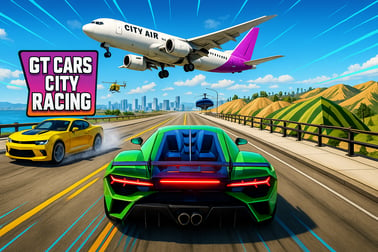
Gt Cars City Racing lar deg kjøre superbiler, konkurrere, og gjøre mega ramp-stunts i en livlig Toy City-verden. Spill gratis i solo- eller 2-spiller-modus på nett.










Gt Cars City Racing
Introduction to GT Cars City Racing
GT Cars City Racing er et raskt, fargerikt bilspill i åpen verden som tar deg inn i en vill Toy City, fylt med ramper, looper, roboter og enorme hindringer å knuse. Det blander stemninger fra bybil-simuleringsopplevelser med et overdådig online bilstunt-spill, slik at du kan cruise rolig gjennom lekebyen eller kaste deg ut i mega ramp-stunts som får superbilene dine til å sveve over skyline.
Inspirert av GT Cars Mega Ramps-serien utvider denne oppfølgeren alt: en større åpen verden, villere utfordringer og flere måter å kjøre på alene eller i to-spiller-regime på samme skjerm. Enten du vil utforske, jakte på de beste superbilene, eller kjempe mot venner i head‑to‑head-løp, er GT Cars City Racing laget for å holde deg hoppende mellom modusene og oppdage nye triks.
Spillet kan spilles helt i nettleseren, så du kan hoppe rett inn i Toy City uten nedlastinger. Dens lyse visuals og arkade‑fysikk gjør tingene spennende, men fortsatt tilgjengelig for yngre spillere og mer avslappede sjåfører som bare vil prøve ville stunts uten å bekymre seg for realistiske krasjer.
GT Cars City Racing Control Guide
Selv om GT Cars City Racing ser kaotisk ut, er kontrollene enkle og responsive. Du vil bruke typiske kjøreelementer, med noen ekstra for nitro, kamera og tilbakestilling av bilen etter røffe landinger.
Player 1 controls (keyboard)
- W / Up Arrow – Accelerate
- S / Down Arrow – Brake / Reverse
- A / Left Arrow – Steer left
- D / Right Arrow – Steer right
- Shift – Nitro boost (if available)
- Space – Handbrake (for drifts and tight turns)
- R – Reset car / respawn on track or ramp
- C – Change camera view
Player 2 controls (on shared keyboard)
In two player racing, the second player gets a separate key set. Depending on the build or platform, these may vary slightly, but they typically map to other unused keys so both players can drive at once without overlap.
- I / K – Accelerate / Brake
- J / L – Steer left / right
- Right Shift / N – Nitro (when available)
- U – Handbrake or special action
If your version shows a control help screen, check it before starting your first race. You can usually pause or open options to re‑view the control layout anytime.
GT Cars City Racing Game Modes
GT Cars City Racing isn’t just a simple race‑to‑the‑finish game. It’s built around three big experiences that blend racing, stunts, and open world driving. Each mode changes how you use your car and how risky you can be with speed and jumps.
Toy City: Sandbox driving and challenges
Toy City is the heart of the game and the main open world car game mode. Here you’re free to drive anywhere, explore, and experiment with stunts without a strict timer or race rules.
- Roam a toy‑themed city filled with huge ramps, loops, and platforms.
- Smash into robots, roll giant marbles, or even trigger wild events like blasting the Moon (in supported versions).
- Practice long jumps, flips, and precision landings without the pressure of racing opponents.
- Hunt for new ramps and hidden areas to test each supercar’s handling.
This mode feels closest to a city driving simulator, but with arcade physics and toy‑like obstacles that constantly tempt you to go off‑road and hit a ramp.
Face to Face: Competitive racing mode
Face to Face is the game’s core racing experience and where two player racing truly shines.
- Race against AI or a friend across lanes that send cars charging toward each other.
- Each lap or segment can swap your car for another model, forcing you to adapt quickly.
- Finish first over multiple runs to win the event.
- Dodge oncoming rivals, weave through obstacles, and manage speed carefully to avoid big crashes.
Face to Face gives GT Cars City Racing its classic “win the race” structure, making it ideal when you want a clear objective rather than free roaming.
Mega Ramps: High‑risk stunt challenges
Mega Ramps is where the game turns into a pure online car stunt game experience.
- Start at the top of giant ramps that drop almost vertically.
- Build maximum speed to launch off the end of the ramp.
- Fly over gaps, smash obstacles, and try to land on narrow platforms or roads below.
- Earn points for distance, accuracy, and surviving brutal landings.
This mode focuses on spectacular mega ramp stunts, so don’t worry if you crash a lot while learning. Use the reset function to quickly try again until you nail the perfect jump.
Where to Play GT Cars City Racing
GT Cars City Racing is available as a free browser game on multiple gaming portals. That means:
- No download is required – you play directly in your web browser.
- The game is usually built in HTML5 / WebGL, so it works on modern desktop browsers like Chrome, Edge, Firefox, and Safari.
- You can access Toy City, mega ramp stunts, and two player racing on most supported platforms without creating an account.
To get the best performance:
- Use an up‑to‑date browser.
- Close heavy background tabs or apps while playing.
- Make sure your internet connection is stable while the game loads (after that, bandwidth needs are usually low).
Once loaded, you can move between Toy City, Face to Face, and Mega Ramps from the in‑game menu, unlocking cars and trying new routes as you go.
Is GT Cars City Racing Safe to Play Online?
GT Cars City Racing is designed as a family‑friendly racing and stunt game. There’s no graphic violence, no realistic damage to drivers, and the setting is a colorful toy world rather than a gritty city. That makes it a good pick for kids and teens who like fast cars and mega ramps.
Some safety and content notes:
- Content rating: Typically suitable for ages 6+ or similar, depending on the platform.
- Violence: Cars can crash and flip, but there’s no blood, no characters in view, and no realistic injury.
- Chat: Standard browser versions usually don’t include open chat or messaging. Two player racing is local, on the same device.
- Payments: Most web versions are fully free to play. Avoid third‑party sites that ask for suspicious downloads or payments.
Parents should still supervise younger children’s web browsing generally, but GT Cars City Racing itself keeps things light, bright, and focused on racing and stunts.
Explore Toy City: Open-World Driving and Stunts
Toy City is what sets GT Cars City Racing apart from more traditional racers. Instead of sticking to a single track, you get a compact open world car game map where just driving around feels like playing in a giant toy box.
Here’s what to look out for as you explore:
- 360° loops and spirals: Build up speed and commit fully to loops to avoid falling off halfway through.
- Floating platforms: Many ramps lead to sky platforms where you can chain multiple jumps back to the city.
- Robots and props: Hit giant toy robots, bowling pins, marbles, and other oversized toys for fun reactions.
- Water challenges: Some tracks skim along water or require careful speed control to avoid sinking or falling off.
Toy City doubles as a training ground. Use it to:
- Practice handling different supercars at low and high speeds.
- Test braking distances before entering Face to Face races.
- Figure out how each car behaves on takeoffs and landings before diving into mega ramp stunts.
Don’t rush through it—cruising Toy City is one of the best ways to unlock your favorite driving style.
Game Modes Guide: Toy City, Face to Face, and Mega Ramps
Each mode rewards a slightly different approach. Knowing what to expect helps you get more out of GT Cars City Racing.
Toy City mode
- Focus: Exploration, casual driving, experimentation.
- Best for: Learning controls, testing cars, discovering stunt spots.
- Playstyle tips: Drive slower at first to map the city in your head; once you know where ramps and loops are, start chaining them together for long stunt runs.
Face to Face mode
- Focus: Competitive racing with car swaps and intense lane battles.
- Best for: Players who enjoy pure racing and close finishes.
- Playstyle tips: Stay calm when your car changes; adjust braking earlier if you get a heavier or faster supercar mid‑race.
Mega Ramps mode
- Focus: Extreme mega ramp stunts and survival landings.
- Best for: Players who love high speed jumps, flips, and risky landings.
- Playstyle tips: Don’t hold full throttle on your first attempts; learn how much speed each ramp needs, then push harder once you’re comfortable.
Switch between these three often. For example, warm up in Toy City, push your skills in Mega Ramps, then cool down with a few Face to Face races against a friend.
Tips for Performing Epic Stunts and Mega Ramp Jumps
Landing clean mega ramp stunts is what makes this online car stunt game so addictive. Use these tips to turn wild jumps into consistent, stylish landings.
1. Control your approach speed
More speed isn’t always better. Too fast and you’ll overshoot platforms; too slow and you’ll slam the ramp edge.
- Use short taps of the accelerator instead of holding it down from the very top of longer ramps.
- Memorize which ramps need full speed and which require a quick lift before the edge.
2. Keep the car level in the air
Your car’s angle on takeoff decides most of your landing.
- Let off the accelerator just before the jump to avoid nose‑down launches.
- If the game allows air control, use small steering or throttle inputs to level the car mid‑flight.
3. Use handbrake for tighter setups
The handbrake is useful before you hit a ramp, not just for drifting corners.
- Tap handbrake to quickly line up with narrow ramps or sky platforms.
- Approach diagonally, then snap the car straight right before hitting the ramp.
4. Learn when to reset
If a jump has gone wrong—your car is spinning, or you’re clearly missing the landing—don’t wait for the crash.
- Hit R to reset quickly and try again.
- Use failed attempts to gauge whether you needed more or less speed.
5. Experiment with different cars
Not every supercar handles ramps the same:
- Lighter cars may flip more easily but are great for agile stunt lines.
- Heavier cars feel more stable on takeoff and landing but might need more ramp speed.
Rotate through your garage in Mega Ramps until you find the best match for your playstyle.
How to Play GT Cars City Racing in 2 Player Mode
Two player racing is one of the most fun parts of GT Cars City Racing, letting you turn Toy City and Face to Face events into split‑second, side‑by‑side battles on a shared keyboard.
Starting 2 Player mode
- Launch GT Cars City Racing in your browser.
- From the main menu, look for a “2 Player” or “Multiplayer” option.
- Choose your mode – Face to Face races are usually the most intense for two players.
- Each player selects a car. In some builds, car selection may be shared, while others allow separate picks.
- Review the on‑screen control layout for both players, then start the race.
Tips for fun 2 player races
- Sit side by side so neither player blocks the other’s view of the screen.
- Agree on a few warm‑up races so both players can get used to their controls.
- Try different mode combos: one session of Face to Face, then a free roam duel in Toy City to see who can pull off the best stunt within a time limit.
- Consider house rules, like “no nitro on the first lap” or “points for biggest crash and best landing.”
Because the game is local multiplayer, there’s no need to worry about online matchmaking or lobbies—just launch and play together instantly.
Best Supercars to Unlock and Master in the City
Supercars are the stars of GT Cars City Racing. While exact models and stats vary by version, there are clear archetypes you’ll want to master for different activities in Toy City, Face to Face, and Mega Ramps.
1. Balanced starter car
This is usually the first car you get—and it’s better than you think.
- Why it’s good: Stable handling, moderate speed, forgiving drift behavior.
- Best for: Learning ramps in Toy City and your first Face to Face races.
2. High-speed hypercar
Sleek, low to the ground, and very fast in a straight line.
- Why it’s good: Perfect for long mega ramp stunts and high‑speed highway sections.
- Watch out for: Sensitive steering at top speeds—small inputs go a long way.
3. Grip-focused racer
Feels heavier but sticks to the road once you understand its weight.
- Why it’s good: Great for technical Face to Face tracks with lots of corners.
- Best for: Players who prefer smooth racing lines over wild drifting.
4. Drift-happy stunt car
Desgined to slide more, ideal for stylish driving.
- Why it’s good: Easy to throw sideways into corners or onto ramps.
- Best for: Advanced players who want flashy stunts in Toy City.
How to choose the right car for each mode
- Toy City: Use drift‑friendly or balanced cars so you can handle random obstacles and tight turns.
- Face to Face: Pick something with stable handling and good acceleration; a tiny edge in control can win close races.
- Mega Ramps: Hypercars or heavier, stable supercars usually work best for clean takeoffs and survivable landings.
As you unlock more cars, revisit older routes. A ramp that felt impossible in your starter car might become easy—and more fun—with a faster or more controllable supercar.
Vanlige spørsmål
Hva er Gt Cars City Racing?
Gt Cars City Racing er et 3D-nettleserbasert kjørespill hvor du utforsker en åpen verden Toy City, racer på ansikt-til-ansikt-baner, og utfører enorme stunts på mega ramper.
Kan jeg spille Gt Cars City Racing med en venn?
Ja. Gt Cars City Racing støtter lokal 2-spiller-modus på samme enhet, slik at dere kan konkurrere eller kjøre sammen ved hjelp av delt tastaturkontroller.
Er Gt Cars City Racing gratis å spille?
Ja, Gt Cars City Racing er gratis å spille i nettleseren din. Du trenger ikke å laste ned noe eller opprette en konto for å begynne å kjøre.
Hvilke spillmoduser er tilgjengelige i Gt Cars City Racing?
Spillet inkluderer Toy City fri kjøring, Face to Face racing, og Mega Ramp-stuntnivåer, hver med forskjellige utfordringer og måter å kjøre på.
Er Gt Cars City Racing trygt for barn?
Gt Cars City Racing er et ikke-voldelig bilspill fokusert på racing, hopp og triks, noe som gjør det generelt egnet for barn og familier.