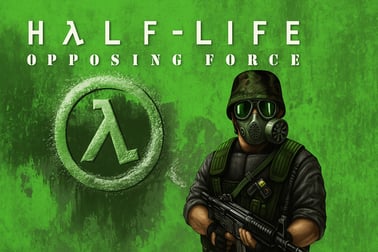
Halflife Opposing Force drops you into Black Mesa as a U.S. Marine with new weapons, enemies, and a gripping sci‑fi campaign to battle through.

























Halflife Opposing Force
Overview of Halflife Opposing Force
Halflife Opposing Force is a classic FPS expansion to the original Half-Life, dropping you back into the chaotic Black Mesa facility but from a fresh perspective. Instead of playing as Gordon Freeman, you step into the boots of Corporal Adrian Shephard, a U.S. Marine in the Hazardous Environment Combat Unit (HECU). The result is a tightly paced sci fi shooter that mixes military tactics, intense firefights, and atmospheric storytelling in a rich single player campaign.
Released in 1999 and built on Valve’s GoldSrc engine, Opposing Force quickly earned a reputation as one of the best expansion packs ever made. It keeps the smart level design and scripted sequences players loved in Half-Life, but layers in tougher enemies, new alien species, and strategic squad control. If you enjoy a story-driven military action game with classic gunplay and sci-fi twists, this expansion still holds up remarkably well on modern PCs.
Because Opposing Force is so tightly tied to Black Mesa and the original events of Half-Life, it’s especially appealing for players who want to see the other side of the conflict—what it’s like to fight through the disaster as one of the “bad guys” who were originally trying to shut the facility down.
How to Play Halflife Opposing Force
Halflife Opposing Force is a traditional first-person shooter at its core, but it adds a few wrinkles that set it apart from the base game. You’ll still explore corridors, climb through ventilation shafts, and fight your way across labs, warehouses, and outdoor canyons in and around Black Mesa, but you’ll do it with Marine training and gear rather than a scientist’s toolkit.
Moment to moment, gameplay revolves around:
- Exploration: Navigate the Black Mesa facility and surrounding areas, searching for key items, paths, and scripted events that move the story forward.
- Combat: Engage hostile aliens, Black Ops units, and environmental hazards using an expanded arsenal of human and alien weapons.
- Squad play: Occasionally command small groups of Marines with different specialties, using their abilities to support your push through heavy resistance.
- Environmental puzzles: Activate power, fix machinery, find alternate routes, or use the environment to bypass or defeat enemies.
The game is primarily a single player campaign, with tightly designed chapters that flow seamlessly from one area to the next. There’s no open world, but levels feel large and interconnected thanks to multiple paths, verticality, and hidden secrets. As a classic fps, Opposing Force leans on precise shooting, ammo and health management, and smart positioning rather than modern RPG systems or heavy customization.
Halflife Opposing Force Features
Opposing Force might be an expansion, but it introduces a substantial list of new features that help it stand out even decades later:
- New playable perspective: Play as U.S. Marine Corporal Adrian Shephard, offering a military-focused take on the Black Mesa disaster instead of the scientist viewpoint of Half-Life.
- Expanded arsenal: Wield new weapons like the Desert Eagle, M40A1 sniper rifle, wrench, knife, a living Shock Roach, and powerful experimental gear in addition to familiar Half-Life staples.
- New alien race: Encounter Race X, a mysterious faction fighting both humans and Xen creatures, adding more chaos to the Black Mesa facility.
- Squad command system: Lead small units of HECU Marines—medics, engineers, and heavy weapons specialists—issuing basic commands to support your objectives.
- Classic level design: Carefully structured levels with scripted sequences, surprises, and memorable set pieces keep the pace moving without feeling repetitive.
- Story-driven single player campaign: The narrative runs parallel to Half-Life, giving new context to key events and teasing deeper mysteries with appearances from the G-Man.
- Multiplayer support: Classic online and LAN modes let you use both old and new weapons in competitive matches, preserving that late-’90s shooter feel.
All of this is wrapped in the familiar look and feel of a late-90s sci fi shooter, complete with bold lighting, atmospheric ambient audio, and a slightly grittier, more militaristic tone than the original Half-Life.
Return to Black Mesa as a U.S. Marine
One of the biggest draws of Halflife Opposing Force is its unique perspective on the Black Mesa incident. Instead of playing as a silent physicist caught in the chaos, you’re a trained soldier dropped into the disaster with orders and a chain of command, at least at first.
You begin the game en route to Black Mesa as part of the HECU deployment. After a violent crash, you wake up separated from your unit, deep within the collapsing facility. From that point on, Opposing Force leans into the feeling of being stranded behind enemy lines—only the “enemy” keeps changing.
- Initially, your mission is clear: secure the area, neutralise resistance, and help contain the situation.
- As the game progresses: you discover that the command structure is breaking down and that your superiors may be more interested in covering up the incident than rescuing survivors.
- Eventually, survival becomes your main objective: you’re fighting aliens, hostile Black Ops troops, and even the remnants of your own side as the government moves to erase all evidence at Black Mesa.
This shift from confident Marine to desperate survivor is a big part of what makes the campaign compelling. You still get that military action game fantasy—running with squads, using military hardware, tackling coordinated assaults—but it’s blended with the tension and isolation that made the original Half-Life so memorable.
New Weapons, Enemies, and Squad Commands
Opposing Force adds a range of fresh tools and threats that spice up its classic fps combat loop.
Expanded Arsenal
Beyond the standard Half-Life weapons, Opposing Force arms you with:
- Desert Eagle: A powerful sidearm that punches well above its weight, great for precise headshots at mid-range.
- M40A1 sniper rifle: A scoped rifle ideal for picking off distant enemies, especially Black Ops units.
- Pipe wrench and combat knife: New melee options that replace the crowbar and give you more flexibility in close-quarters encounters.
- Shock Roach: A living alien weapon that fires energy blasts and regenerates ammo over time, doubling as a sci-fi “organic gun.”
- Experimental and heavy weapons: Including powerful alien technology and support tools that make certain battles more tactical.
New Foes
Alongside familiar Xen aliens, you’ll face:
- Race X creatures: A new alien faction with unique movement patterns and attack styles that force you to adjust your tactics.
- Male and Female Black Ops units: Elite human operatives who use grenades, stealth, and flanking manoeuvres to overwhelm careless players.
- Heavier machinery: Such as helicopters and armoured enemies that demand more advanced tactics and smart use of cover.
Squad Command System
For sections of the campaign, Opposing Force introduces basic squad control, letting you act more like a Marine leader than a lone gunman.
- Medics: Can heal you and your squad, making them crucial in long firefights.
- Engineers: Use explosives and tools to open sealed doors or clear obstacles, unlocking new paths.
- Heavy weapons specialists: Carry heavier firepower to tear through fortified enemy positions.
You issue simple commands such as follow, hold position, or attack, and you’re rewarded for keeping your team alive through tough encounters. This light tactical layer helps Opposing Force stand out from other sci fi shooter expansions of its era.
Story Overview: Adrian Shephard’s Mission
The narrative in Halflife Opposing Force is tightly woven into the original Half-Life storyline, but you never play the same scenes from the same angle. Instead, you catch glimpses of Freeman’s trail while you’re dealing with your own escalating crisis.
You play as Corporal Adrian Shephard, a Marine in the HECU. Your mission seems straightforward at first: assist in stabilising the situation at Black Mesa, eliminate hostile elements, and follow orders from command. But almost immediately, things go south.
- Crash landing: Your transport is shot down or sabotaged on approach, scattering your unit and leaving you isolated in the facility.
- Worsening conditions: As you connect with surviving Marines, it becomes clear that aliens are flooding in, the chain of command is under strain, and the government’s response is growing more extreme.
- Black Ops intervention: A covert Black Ops team arrives with orders to erase evidence, which includes any remaining scientists and soldiers. You’re suddenly a loose end.
- Race X invasion: A second alien faction pushes into the fray, smashing any sense of control the military hoped to impose on Black Mesa.
- G-Man’s presence: The mysterious G-Man occasionally appears, silently watching events and reminding you that larger forces are at play behind the scenes.
Without diving into spoilers, Shephard’s journey is less about heroically saving the day and more about surviving an impossible situation. The story gives fans of the series a fresh angle on one of gaming’s most famous disasters, making it a must-play single player campaign for anyone who cares about Half-Life lore.
PC Requirements and How to Start Playing
Because Halflife Opposing Force is a late-’90s classic fps, its system requirements are extremely light by modern standards. Almost any contemporary PC can run it smoothly.
Typical Minimum Requirements (Modern Context)
- OS: Windows (modern versions typically support it via Steam)
- Processor: Practically any modern dual-core CPU
- Memory: 4 GB RAM or more is more than enough
- Graphics: Any integrated or dedicated GPU that supports basic DirectX/OpenGL
- Storage: A few gigabytes of free space for Half-Life and its expansion
Exact numbers can vary slightly depending on your distribution platform and OS, but in practice, you don’t need gaming hardware to enjoy this military action game.
How to Start Playing
To jump into Opposing Force legitimately and safely:
- Obtain Half-Life and Opposing Force from an official distributor: Typically, this means buying them from a reputable PC storefront.
- Install the base game first (if required): Some setups expect the original Half-Life to be present before adding the expansion, though on modern platforms they’re usually stand-alone entries in your library.
- Install Opposing Force: Follow the platform’s instructions to download and install the game.
- Launch the game from your library: Choose “New Game” from the main menu to begin the single player campaign, or select “Multiplayer” for online/LAN matches if supported.
- Adjust your settings: Before playing, set your resolution, mouse sensitivity, and key bindings to your liking for smoother control.
Once set up, you can experience the full story-driven single player campaign from start to finish with no extra downloads necessary, aside from any optional updates provided by your platform.
Performance & Troubleshooting
Because Halflife Opposing Force is built on the GoldSrc engine, it typically runs very well on modern hardware. Still, classic PC games can sometimes behave oddly on new operating systems. Here are a few performance and troubleshooting tips:
- Run in native resolution: Set the in-game resolution to match your display for the sharpest image. If the game only supports lower resolutions, enable GPU scaling or windowed mode.
- Use compatibility mode (Windows): If you run into crashing or display glitches, try running the game in compatibility mode for an older version of Windows via the executable’s properties.
- Update GPU drivers: Modern drivers usually handle old titles well, but if you see flickering, missing textures, or odd colours, update your graphics drivers and restart.
- Try OpenGL or Direct3D modes: In the video settings, toggle between rendering modes (if available) to see which runs best on your system.
- Disable unnecessary overlays: Overlays from recording software or chat apps can cause instability. Disable them temporarily if you run into issues.
- If you purchased the game from a major PC storefront, check its community hub or support section for specific fixes—longtime fans have documented solutions to most common problems for this classic fps.
Tips for Surviving Alien Threats and Black Ops
Opposing Force can be challenging, especially on higher difficulties. These practical tips will help you get through the Black Mesa facility in one piece:
- Conserve ammo: Treat ammunition as a limited resource. Use melee weapons (wrench/knife) on weaker enemies or when they’re caught off guard.
- Prioritise threats: Take out Black Ops snipers, alien ranged attackers, and explosive-carrying enemies first. Leaving them alive can shred your health in seconds.
- Use cover intelligently: Peek around corners, use crates and pillars for protection, and avoid standing in open hallways during firefights.
- Leverage your squad: When you have Marines with you, let heavy weapons soldiers initiate fights and medics keep everyone topped up. Keep them alive by not charging blindly.
- Watch for ambushes: Opposing Force loves surprising players with enemies dropping from ceilings, teleporting in, or kicking in doors. Move slowly and be ready to backpedal.
- Listen to audio cues: Many enemies have distinct growls, clicks, or radio chatter that telegraph their presence before you see them.
- Explore thoroughly: Side rooms, vents, and hidden ledges often hide extra ammo, armour, or health kits that make the next battle far easier.
- Save often: Use multiple save slots and quick-save regularly. Classic shooters like this expect you to learn from mistakes and try again.
Following these strategies will help you survive the toughest encounters and enjoy the full depth of this single player campaign without getting stuck on any one encounter for too long.
Is Halflife Opposing Force Safe to Play?
Halflife Opposing Force is designed as a mature, story-driven sci fi shooter with military themes and combat-focused gameplay. From a technical and content perspective, here’s what to keep in mind:
Technical Safety
- Official platforms: Always purchase and download the game from reputable, official sources. This ensures your copy is free from malware or unauthorized modifications.
- No invasive DRM: As a classic fps from the late ’90s, its copy protection demands are generally much lighter than many modern games.
- Online play: If you choose to use multiplayer, stick to trusted servers and avoid installing random mods or unofficial executables from unknown sites.
Content & Age Appropriateness
- Violence: Opposing Force features firearms, explosions, and combat against aliens and human enemies, typical of a military action game from its era.
- Gore level: There is blood and some dismemberment in line with late-’90s shooters, but the visual fidelity is lower than modern titles.
- Language & themes: Expect military radio chatter, tense scenarios, and themes of government cover-ups and survival under extreme conditions.
Parents and guardians should review the game’s rating information on official storefronts to decide if it’s appropriate for younger players. For teens and adults interested in a historically important classic fps with strong single-player design, Halflife Opposing Force is generally considered safe and stable to play when obtained from official services.
Часті запитання
What is Halflife Opposing Force about?
Halflife Opposing Force is a first-person shooter expansion in which you play as U.S. Marine Adrian Shephard, sent to the Black Mesa facility after a science experiment goes wrong and unleashes alien forces.
Do I need the original Half-Life to enjoy Opposing Force?
Opposing Force was designed as an expansion to the original Half-Life, but its story is understandable on its own. Playing the original helps you recognise locations, characters, and events from a new perspective.
Is Halflife Opposing Force suitable for kids?
The game includes combat, aliens, and some graphic violence, so it is generally recommended for teens and older players. Parents should review the age rating and content before allowing younger children to play.
What kind of gameplay does Opposing Force offer?
Opposing Force offers a story-driven single-player campaign with first-person shooting, light puzzle-solving, squad commands, and a mix of human and alien enemies in a sci-fi military setting.
Can I use different weapons in Halflife Opposing Force?
Yes. You can use a variety of weapons, including classic firearms, military gear, and unique alien-based weapons, giving you several ways to handle combat situations.