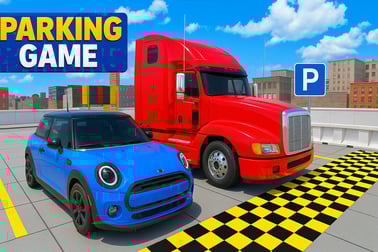
Car And Truck Parking lets you test your driving skills with tight turns, big lorries, and precision car parking in realistic 3D browser levels.











Car And Truck Parking
Introduction to Car And Truck Parking
Car And Truck Parking is a realistic parking simulator that puts your precision driving skills to the test with both compact cars and massive cargo lorries. Instead of racing, this 3D lorry parking game focuses on accuracy, timing, and control as you squeeze long trailers and everyday cars into tight spaces without a single scratch.
You'll weave through cones, avoid barriers, and handle sharp turns in a variety of hard parking challenges. Each level is designed to feel like a real parking lot or depot, with kerbs, ramps, and narrow lanes that punish sloppy steering. Whether you're into cargo lorry driving or careful car manoeuvring, the game delivers a satisfying mix of challenge and control.
Because it runs right in your browser, you can jump into car and lorry driving in seconds—no downloads or installs needed. It's easy to start, but mastering every obstacle requires patience, practice, and smart use of the camera and keyboard controls.
Car And Truck Parking Control Guide
The controls in Car And Truck Parking are straightforward, but using them smoothly is what separates beginners from pros. Here's how to handle vehicles in this realistic parking simulator:
Keyboard Movement Controls
- W or Up Arrow – Accelerate and move forward
- S or Down Arrow – Brake and move backward (reverse)
- A or Left Arrow – Steer left
- D or Right Arrow – Steer right
Most players find the arrow keys more natural for gentle adjustments, while others prefer WASD for faster reactions. Try both and see which layout gives you better micro-control in tight spots.
Camera & View Controls
- Mouse drag – Rotate the camera around your vehicle (if enabled)
- Mouse scroll / keys – Zoom in and out (in supported modes)
- Camera toggle key – Switch between views (bumper cam, follow cam, or top-down, if available)
Switching the camera is essential in this 3D lorry parking game. A closer view helps with judging distances to cones and walls, while a higher view is better for planning your path in long trailer levels.
Other Useful Inputs
- R – Restart the current level (quick reset after a crash)
- Esc – Pause menu and options
- Spacebar – Handbrake or instant stop (if the game mode supports it)
Mastering these inputs turns clumsy car and lorry driving into smooth, confident movements, especially when you're threading a heavy vehicle through tiny gaps.
Car And Truck Parking Game Modes
Car And Truck Parking offers several ways to enjoy its realistic parking simulator gameplay, from easy warm-up levels to brutal tests of timing and precision.
Level-Based Parking Challenges
The core of the game is a series of structured levels that slowly increase in difficulty. Early stages focus on simple forward parking with compact cars, then quickly add:
- Narrow lanes that force slower, more careful steering
- Reverse-only parking spots
- Tight turns around barrels, cones, and parked vehicles
- One-way paths with no room for wide corrections
As you advance, trucks and cargo trailers appear, turning every small mistake into a potential collision.
Car vs. Truck Missions
- Car missions – Shorter wheelbase, faster acceleration, ideal for learning angles and speed control.
- Lorry missions – Long vehicles and trailers, slow turning, and huge rear overhangs that swing wide in corners.
This mix keeps the experience fresh. One level you'll be slotting a small car between SUVs, the next you're guiding a cargo lorry through a busy warehouse yard where every wall matters.
Timed & Precision Challenges
Many levels in this 3D lorry parking game include extra objectives like:
- Time limits – Reach the highlighted parking zone before the clock runs out.
- Minimal collisions – Complete the course without hitting objects, or with a limited number of allowed bumps.
- Star ratings – Earn more stars for clean, fast, and accurate parking.
These optional targets turn simple car and lorry driving into a replayable challenge where you're always trying to shave off seconds and reduce mistakes.
Where to Play Car And Truck Parking
Car And Truck Parking is designed as a browser-based 3D parking game, making it easy to jump in from most modern desktop and laptop computers.
Playing in Your Browser
You can play the game directly in your browser with no download:
- Supported devices – Windows, macOS, and most Linux desktops and laptops.
- Supported browsers – Recent versions of Chrome, Edge, Firefox, and other WebGL-capable browsers.
- No signup needed – In most cases you can start a session instantly and begin clearing parking levels.
Just make sure hardware acceleration is enabled in your browser so the 3D graphics and realistic parking physics run smoothly.
Desktop vs. Laptop Experience
- Desktop PCs typically handle high graphics settings, smoother shadows, and longer draw distances.
- Laptops with integrated graphics may need lower quality settings for stable frame rates.
Either way, the core experience of tight turns, hard parking challenges, and cargo lorry driving remains fully intact.
Offline Play Availability for Car And Truck Parking
Because Car And Truck Parking runs primarily as an online browser game, it generally requires an active internet connection to load and play.
Online Requirements
- The game assets, 3D models, and levels are delivered over the web.
- Your browser needs network access when you first launch or refresh the game page.
- Progress or settings may be tied to online sessions, depending on the platform.
Once a session is loaded, some browsers may temporarily cache assets, but there's no guarantee of reliable offline play.
What If You Want Offline Practice?
If the platform hosting Car And Truck Parking offers a dedicated downloadable or mobile version, that might allow limited offline play. However, when playing directly in a standard browser window, you should consider it an online-only parking simulator and plan to have a stable connection whenever you want to dive into new levels.
Master Tight Parking Spots with Cars and Trucks
The heart of Car And Truck Parking is its tight, unforgiving spaces. These levels train you to treat every inch of clearance as precious. Here's how to approach them effectively in this realistic parking simulator.
Plan Before You Move
Rushing leads to scrapes. Before you touch the accelerator:
- Rotate the camera to see the full path and final parking zone.
- Identify obstacles on both sides—kerbs, poles, parked vehicles.
- Check how much room you have to swing the front and back of the lorry.
This kind of planning is especially vital in cargo lorry driving where trailers can swing wide and clip corners.
Use Slow, Controlled Inputs
In hard parking challenges, speed is your enemy. To keep control:
- Feather the forward and reverse keys instead of flooring them.
- Tap steering keys briefly to avoid over-rotating the vehicle.
- Stop completely before switching from forward to reverse to keep the vehicle stable.
Small, deliberate movements give you more time to correct your angle before hitting boundaries.
Angle Your Approach
Trying to drive straight into a tiny spot rarely works. Instead:
- Start a little wider than the parking space.
- Turn in early so your vehicle lines up with the parking zone.
- Use reverse to straighten the car or lorry as you slide into the space.
This technique works for both small cars and long lorries, but it's especially important when the parking lane is blocked on one side.
How to Control Heavy Vehicles in Tricky Parking Levels
Heavy lorries don't behave like cars. In this 3D lorry parking game, understanding how big vehicles move makes the difference between clean runs and constant restarts.
Understand the Turning Radius
Lorries have a much larger turning circle, so you need more space and earlier steering.
- Begin turning sooner when entering corners.
- Leave extra clearance on the inside of the turn to avoid clipping obstacles.
- Expect the front and back of the lorry to swing out more than a compact car.
Control Your Speed on Narrow Paths
Tricky levels often place barriers close to your wheels, forcing precise throttle control:
- Use short taps of the forward key to inch along.
- Stay ready on the reverse or brake key to correct a bad angle instantly.
- Use the handbrake (if available) to lock your position before adjusting the steering.
Manage Reverse Parking with Trailers
Reverse cargo lorry driving is where this realistic parking simulator really tests you:
- Remember that steering left makes the trailer bend right, and vice versa when reversing.
- Turn the wheel gently—oversteering causes the trailer to jackknife.
- If the trailer angle gets too sharp, pull forward to straighten out and try again.
Practising these moves in easier levels will pay off later when you're reversing into tight warehouse docks.
Tips to Become a Pro at 3D Truck and Car Parking
Want to consistently clear hard parking challenges and beat your own times? These practical tips can accelerate your progress in Car And Truck Parking.
Use the Camera Like a Tool
- Check your rear and side clearances frequently before committing to a turn.
- Zoom out on large maps to see the entire route, then zoom in for tight maneuvers.
- Switch to a higher or top-down view for accurate alignment with parking lines.
Memorize Common Angles
Over time, you'll notice many levels use similar layouts:
- Practice how far to pull forward before reversing into a side space.
- Learn how sharply to turn to align with long parallel spots.
- Get used to the "feel" of when your car or truck is perfectly straight.
The more your muscle memory develops on the keyboard, the smoother your car and truck driving will be.
Focus on Clean Runs, Then on Speed
When you first tackle a level:
- Ignore the timer and simply aim for a collision-free finish.
- Once you can park cleanly, start trimming seconds with earlier turns and fewer stops.
- Use restarts generously—every attempt is valuable practice.
This approach turns a challenging realistic parking simulator into a satisfying skill builder.
Game Modes and Challenges in This Parking Simulator
Car And Truck Parking includes a variety of layouts and objectives to keep gameplay fresh and engaging.
Progressive Difficulty Curves
Levels generally ramp up in complexity:
- Beginner stages – Wide lanes, few obstacles, compact cars, relaxed time limits.
- Intermediate stages – Mixed car and lorry missions, tighter turns, more objects to avoid.
- Advanced stages – Narrow ramps, multi-turn approaches, long vehicles, and strict win conditions.
Obstacle-Focused Challenges
Some maps function almost like puzzle levels in a 3D lorry parking game:
- Maze-like depot layouts with dead ends.
- Bottleneck entrances that require perfect steering.
- Offset parking spaces that demand multi-step maneuvers.
Score, Stars, and Achievements
Depending on the platform version, you may be graded on:
- Time taken to reach the spot.
- Number of collisions with walls or cones.
- Overall accuracy—how well you're centered in the parking area.
Chasing higher scores and cleaner runs gives the game long-term replay value for players who love perfecting their parking style.
Keyboard Controls and Best Settings for Smooth Parking
To get the best experience out of this realistic parking simulator, you'll want to tune both your control style and your visual settings.
Optimizing Keyboard Input
- Sit closer to the keys so you can tap them lightly instead of pressing hard.
- Choose either WASD or arrow keys and stick with it to build muscle memory.
- Keep one hand dedicated to steering and the other to forward/reverse and camera control.
Best Graphics Settings for Smooth Play
If your frame rate feels choppy in this 3D lorry parking game, tweak settings like:
- Graphics quality – Lowering from high to medium or low can greatly improve smoothness.
- Shadows and reflections – Disabling or reducing them helps weaker GPUs.
- Resolution – Smaller windowed modes often perform better than full-screen on older hardware.
Audio and Feedback
Sound can actually help your car and lorry driving precision:
- Engine noise gives you a sense of speed without looking at the HUD.
- Collision sounds warn you instantly if you're scraping along a wall.
- UI beeps or prompts can signal time warnings or near-perfect parking.
By combining tuned controls with sensible graphics and audio settings, Car And Truck Parking feels responsive, fair, and deeply satisfying—ideal for players who love the challenge of tight, technical parking rather than simple racing.
Frequently Asked Questions
What is Car And Truck Parking?
Car And Truck Parking is a 3D driving simulator where you park both cars and heavy lorries in tight spots while avoiding obstacles and crashes.
Can I play Car And Truck Parking for free?
Yes, you can play Car And Truck Parking for free in your browser without downloading anything.
How do I control the vehicles in Car And Truck Parking?
Use W, A, S, D or the arrow keys to drive and steer. On some devices you can also use the mouse or on-screen controls to operate the vehicle.
Is Car And Truck Parking suitable for children?
Yes, Car And Truck Parking is family-friendly. It focuses on skilful driving, precision parking, and problem-solving rather than violence.
Do different levels get harder in Car And Truck Parking?
Yes, as you progress the levels become more challenging, with narrower roads, tighter parking spaces, and more obstacles to avoid.