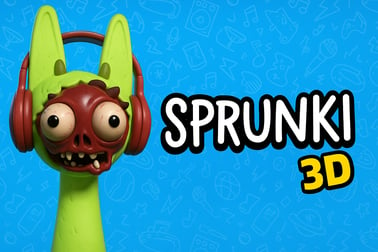
Sprunki 3d 让你在充满活力的 3D 世界中构建层叠的节拍。拖拽、放置并重新混音角色,探索可爱恐怖的氛围,并在网上分享你的曲目。














Sprunki 3d
Sprunki 3d 介绍
Sprunki 3d 是一款充满趣味的 3D 音乐创作游戏,它会把你的浏览器变成一个全面的互动声音沙箱。与在平面菜单上滚动不同,你在一个三维空间中构建曲目,那里充满了古怪的角色、发光的道具和可爱恐怖的氛围。场景中的每个对象都可以触发循环、效果或节奏层,让你像在歌曲里走动一样塑造节拍。
在其核心,Sprunki 3d 是一个 浏览器节拍混音器:你在场景中拖放并摆放音源,构建复杂的 groove。由于一切都生活在 3D 中,空间布局很重要。离“舞台”更近的角色可能听起来更大声、更加突出,而背景中的元素会带来更细腻的氛围层。这感觉不像在点按钮,而更像在指挥一个微型、既可爱又诡异的管弦乐队。
游戏采用了一种 "可爱恐怖音频冒险" 风格。视觉效果色彩丰富、卡通化,但仍有阴影、故障效果和有些偏离的音效线索,让人愉快地感到不安。它's 仍然完全适合家庭使用,只是带有略微闹鬼的扭转,适合 Sprunki 世界观。
无论你是节拍制作老手还是初次尝试,Sprunki 3d 让你轻松进行实验。没有错误的答案、没有失败的状态、没有压力。你只要将角色、声音和效果组合在一起,直到你打造出你喜爱的曲目。然后你可以调整 3D 布局、改变情绪,并一次又一次发现新的组合。
Sprunki 3d 控制
Sprunki 3d 旨在让你在浏览器中流畅运行,提供简单的控制,即便你从未使用过音乐工具也会觉得自然。游戏专注于拖放交互和基本的相机移动,让你保持创造的流动。
鼠标与键盘控制
- 移动相机:点击并拖动 鼠标右键以绕着 3D 场景旋转。
- 平移视图:按住 鼠标中键 或 Shift + 右拖 以横向或纵向滑动摄像机。
- 放大/缩小:使用 鼠标滚轮 靠近角色或拉回以获得全舞台视图。
- 选择角色或对象:对任一角色、垫板或道具进行 左键单击 以高亮显示。
- 放置角色:将角色从 底部或侧边栏 拖入 3D 播放区域。
- 移除角色:将角色从舞台拖出或放到一个 垃圾箱 / X 图标上,或在选中时按 Delete,具体取决于你正在玩的版本。
- 切换循环或声音: 点击舞台上已存在的角色以静音/取消静音,或在支持时在变体之间切换。
- 播放/暂停整合混音: 点击 播放/暂停 按钮,通常位于界面底部中间或右上角。
可选键盘快捷键
一些 Sprunki 3d 构建或模组会增加额外的快捷键以简化体验:
- 空格键: 启动或停止主播放。
- 数字键(1–9): 快速选择角色组、预设场景或模式库。
- R: 重置场景,清除所有角色和声音。
- Esc: 打开游戏内菜单或设置覆盖。
你不需要记住所有细节就能享受游戏。Sprunki 3d 是宽容的:移动相机、放入几个角色、点击播放,你就已经在创作音乐。
Sprunki 3d 的特色
Sprunki 3d 将相当深度融入基于浏览器的音乐玩具中。它在易用性与创造灵活性之间取得平衡,使其对休闲玩家以及有志成为节拍制作人的玩家都充满吸引力。
- 完全的 3D 声音乐园: 在一个空间化的 3D 环境中构建节拍,而不是在平面网格中,将你的混音变成一个视觉雕塑。
- 基于角色的声音设计: 每个角色通常代表一个特定的循环、乐器或音效,从鼓声、低音到合成短音和诡异的耳语。
- 互动声音沙箱: 互换角色、在场景中移动它们,并将它们叠层成层,以发现新的组合,没有固定的“正确玩法”。
- 可爱恐怖的美学: 享受舒适卡通设计与轻度恐怖元素的混合——闪烁的灯光、阴森的背景以及既怪异又可爱的生物。
- 基于循环的作曲: 将同步循环混合在共享的节拍上,这样你的曲目始终保持在拍点上。
- 逐步增加复杂度: 从简单的鼓循环开始,然后添加低音、和弦、人声裁剪和效果,直到你拥有完整曲目。
- 基于浏览器的便捷性: 无需下载或安装;Sprunki 3d 直接在现代浏览器中运行。
- 3D 在线节拍制作: 调整角色的位置、深度,有时还会调整高度,以在你的混音中产生微妙的变化。
- 家庭友好探索: 没有跳闸或露骨内容,适合喜欢略带诡异主题的年轻玩家。
这些特性让 Sprunki 3d 从传统音乐工具和标准节奏游戏中脱颖而出。它像一个声音的玩具箱,先以玩耍为主,随后再追求打磨。
性能与故障排除
由于 Sprunki 3d 是一个在浏览器中运行的 3D 音乐创作游戏,性能在很大程度上取决于你的设备和浏览器设置。下面是一些实用技巧,帮助一切顺利运行。
推荐的浏览器
- Google Chrome(最新版本) — 在多数情况下提供最佳整体性能与 WebGL 支持。
- Microsoft Edge(基于 Chromium) — 性能与 Chrome 相似;也是一个强选项。
- Mozilla Firefox(最新版本) — 运行良好,但 3D 性能可能因系统而异。
确保在浏览器设置中启用硬件加速,以便 3D 场景能够高效使用你的 GPU。
常见问题与快速修复
- 游戏无法加载: 清除浏览器缓存,禁用页面上的激进广告拦截或脚本拦截,然后刷新。确保 JavaScript 已启用。
- 黑屏或空白的 3D 窗口: 更新图形驱动程序,重新启动浏览器,或尝试不同的浏览器以排除 WebGL 问题。
- 音频卡顿或噼啪声: 关闭其他占用大量 CPU 的标签页或应用,如有可能,降低游戏内的画质设置,避免在游戏时进行流媒体或大下载。
- 多角色时延迟: 从 3D 场景中移除一些角色,或者在 Sprunki 3d 的选项中降低分辨率与效果(若版本包含设置菜单)。
- 输入无响应: 直接点击游戏框架以重新聚焦,然后再次尝试使用键盘或鼠标。一些浏览器在音频启动前需要用户交互。
何时降低设置
如果你使用的是较旧的笔记本或低配设备,以下设置可能有帮助:
- 将 渲染质量 或 效果 在游戏中降低(如果有滑块或开关可用)。
- 在一个 较小的浏览器窗口 中进行游戏,而不是全屏。
- 关闭流媒体服务、较重的下载或后台游戏。
这些小调整可以让 Sprunki 3d 的表现更加敏捷,特别是当你的 3D 舞台充满声音源时。
Sprunki 3d 在线游玩安全吗?
Sprunki 3d 通常托管在已建立的浏览器游戏平台和粉丝社区平台上,目标是安全且对广大玩家友好。尽管每个托管站点各异,以下是在安全与内容方面的一般要点。
内容与年龄友好性
- 视觉风格: 卡通化的 3D 角色和环境,通常带有温和的恐怖元素(诡异的光线、吓人的眼睛、故障效果),但没有血腥画面。
- 音频内容: 抽象的人声、音效和音乐循环。核心体验中没有露骨语言或成人主题。
- 玩法: 仅限创意混音与探索;没有暴力、突然出击或竞争压力。
这使 Sprunki 3d 通常适合青少年及以上年龄的玩家,尤其是那些喜欢略带 creepy 但 playful 风格的玩家。
在线与浏览器安全提示
- 在你认知或被可信游戏中心推荐的 可信网站 上游玩 Sprunki 3d。
- 避免从未知来源下载额外文件或 补丁;游戏旨在直接在浏览器中运行。
- 使用最新安全软件并保持浏览器更新。
- 若托管页面出现侵入性弹窗或可疑广告,关闭标签并寻找替代站点。
只要你坚持在合法的平台上,Sprunki 3d 就是一个安全、富有创造性的在线音乐和 3D 节拍混合方式。
Dive Into a 3D Music Playground: What Makes This Remix Experience Unique
Most browser music games limit you to flat timelines or lane-based rhythm inputs. Sprunki 3d breaks that mold by giving you a full 3D music playground where sound and space are tightly connected. Instead of editing a track from above, you're effectively walking around inside your composition.
The big twist is how visual placement changes the vibe of your mix. Clusters of drum characters near the center create an intense, driving groove. Spread them out, and the rhythm feels more open and airy. Move a spooky vocal to the back of the scene and it becomes a distant echo, more texture than spotlight. This spatial logic turns the game into a low-pressure lesson in basic mixing and sound staging without using technical studio terms.
Because Sprunki 3d is an interactive sound sandbox, there's no fixed goal or score. You choose how wild or minimal you want your tracks to be. Some players go for dense, glitchy chaos with every character active, while others prefer sparse ambient soundscapes with just a few voices echoing in the 3D world.
This flexibility, combined with the charmingly unsettling art direction, makes Sprunki 3d feel like a toy, an instrument, and a tiny virtual concert stage all at once.
How to Create Layered Beats in a Fully 3D Sound Space
Building satisfying tracks in Sprunki 3d is less about music theory and more about experimenting with layers and positions. Here's a simple approach if you're just starting out in this 3D music creation game.
1. Start With a Solid Foundation
- Drop in drum characters or rhythm loops first. They act as your tempo anchor.
- Position them near the center of the stage so their impact feels strong and clear.
- Hit play and listen until the basic groove feels comfortable.
2. Add Bass and Low-End Support
- Choose 1–2 bass or low synth characters.
- Place them slightly behind or beside your main drums to avoid overcrowding the same visual spot.
- Avoid stacking too many low-frequency sounds at once; it can make your mix feel muddy.
3. Sprinkle Melodies and Chords
- Introduce melodic characters (keys, bells, pads, or vocal hooks).
- Spread them around the mid and upper parts of the scene so they feel like they're swirling above your rhythm section.
- Listen for repetition. If two loops clash, try turning one off or repositioning it.
4. Use Atmosphere for Depth
- Add subtle ambient characters or creepy FX at the edges or farther back in the 3D space.
- Keep these quieter and spaced out; they're there to add depth and mood rather than dominate the groove.
5. Adjust the Spatial Mix
- Move characters closer together for an intense, compact sound.
- Spread them out for a wider, more relaxed feel.
- Experiment with height (if supported) to make some sounds feel "above" or "below" the listener.
By following these steps, you'll turn Sprunki 3d's 3D beat making online into something that feels almost like conducting: shifting performers around the stage until the entire ensemble clicks together.
Controls, Tips, and Tricks for Building Your First 3D Track
Once you're familiar with the basic controls, you can start using small tricks to create more polished results in Sprunki 3d.
Creative Tips for New Players
- Limit your palette: Stick to 5–8 characters at first. This makes it easier to hear what each one contributes.
- Mute to discover: One by one, mute characters while the mix plays. If muting something makes the track sound cleaner, consider leaving it out or moving it.
- Use symmetry: Place similar sounds on opposite sides of the scene to create a balanced stereo feel.
- Build in stages: Start with drums, add bass, then melody, then FX. Resist the urge to drop everything in at once.
- Play with density: Have sections where only a couple of characters play, then gradually ramp up to full intensity.
Workflow Tricks
- Zoom and inspect: Zoom in on individual characters to remember what they sound like, then zoom out to hear the full mix.
- Group by color or type: If certain characters look visually similar, use that to create "sections" of your orchestra.
- Save your favorites (if supported): Some builds may let you save scenes or presets. Use this to keep your best mixes for later tweaking.
With these tips, your first 3D track becomes less of a random experiment and more of a guided journey toward a satisfying, layered composition.
Cute Horror Vibes and Visual Effects in the Sprunki Universe
One of the standout elements of Sprunki 3d is its unique mix of adorable and unsettling. The game's "cute horror" energy comes through in both sound and visuals, giving your sessions a distinct mood that you won’t find in typical music tools.
Character Design
- Characters often have big, expressive eyes, simple shapes, and exaggerated animations.
- Subtle details – cracks, dark rings around eyes, glitchy limbs – add just enough creepiness to keep things interesting.
- Each design hints at its sound: spikier shapes for harsher FX, soft blobs for pads or atmospheres, and quirky creatures for vocals.
Environmental Effects
- Lighting: Dim rooms, colored spotlights, and glowing props that pulse in time with the music.
- Backgrounds: Slightly warped environments, fog, or subtle motion that makes the scene feel alive.
- Glitches & overlays: Occasional visual flickers or distortions that match the off-kilter audio style.
Because Sprunki 3d leans into this aesthetic without going full horror, it hits a sweet spot: spooky enough to feel special, but still welcoming and fun to explore for most players.
Browser Requirements and Performance Settings for Smooth 3D Play
To get the best experience from Sprunki 3d's 3D music engine, it helps to know what your browser and device should support. This ensures your interactive sound sandbox stays fluid and responsive, even when your stage is full.
Minimum Device Guidelines
- CPU: A modern dual-core processor or better.
- RAM: At least 4 GB (8 GB recommended if you like to keep many tabs open).
- GPU: Integrated graphics from recent years or any entry-level dedicated GPU.
- OS: Updated versions of Windows, macOS, or a modern Linux distro.
Recommended Browser Settings
- Enable hardware acceleration in your browser settings.
- Keep your browser on the latest version for the best WebGL and audio support.
- Allow autoplay with sound or interact with the game once to unlock audio if your browser blocks it.
In-Game Performance Options
Depending on the version of Sprunki 3d you're playing, you may see options such as:
- Graphics Quality: Low, Medium, High – lower this if frame rate drops when many characters are active.
- Post-Processing Effects: Toggles for bloom, depth of field, or motion blur – disabling them can significantly improve performance.
- Resolution Scale: Rendering the 3D scene at a smaller internal resolution improves speed at the cost of sharpness.
Tuning these sliders for your hardware helps keep Sprunki 3d smooth and responsive, so your creative focus stays on the music rather than on performance hiccups.
\r\n常见问题解答
Sprunki 3d 是什么?
Sprunki 3d 是一款基于浏览器的音乐游戏,在 3D 空间中放置角色,以构建分层节拍、节奏和声音景观,并配有俏皮的视觉效果。
玩 Sprunki 3d 需要下载任何东西吗?
无需下载。你可以直接在支持 3D 图形的现代网页浏览器中玩 Sprunki 3d,例如 Chrome、Edge 或 Firefox。
Sprunki 3d 对儿童友好吗?
是的,Sprunki 3d 设计为家庭友好。它具有丰富多彩的视觉效果和轻度诡异的主题,没有露骨内容,适合大多数年龄段。
我可以在 Sprunki 3d 中创作自己的音乐吗?
是的。每个角色代表不同的声音或循环。通过在 3D 中拖拽并排列它们,你可以制作自定义曲目、尝试时序并重新混音你自己的歌曲。
Sprunki 3d 使用哪些控制?
你通常使用鼠标拖放角色、旋转 3D 场景,并与元素互动。某些版本还支持用于相机移动的键盘快捷键。