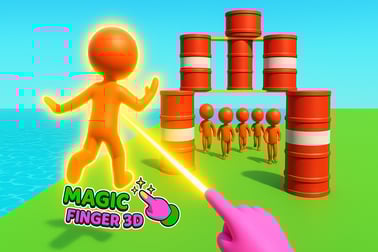
Magic Finger आपको अपनी जादुई स्पर्श का उपयोग करके एलियनों को फेंकने, विस्फोट ट्रिगर करने, और एक मज़ेदार फिज़िक्स-आधारित एक्शन गेम में मैदान पर नियंत्रण करने देता है।
Magic Finger
Magic Finger का परिचय
Magic Finger एक तेज़-गति वाला फिज़िक्स-आधारित कैज़ुअल गेम है जिसमें एक जादुई स्पर्श दुश्मनों को हवा में लॉन्च कर सकता है, बैरलों को फोड़ सकता है, और एलियनों के पूरे मैदान को साफ कर सकता है। ब्राउज़र में सीधे WebGL एक्शन गेम के रूप में खेला जाने वाला यह गेम रैगडॉल फिजिक्स, सरल नियंत्रण और अत्यधिक विस्फोटों को एक साथ मिलाकर निरंतर स्टिकमैन-हल्ला बनाता है। अगर आप दुश्मनों को इधर-उधर फेंकना, प्रतिक्रियाओं को जोड़ना, और स्मार्ट पोजिशनिंग सीखना पसंद करते हैं, तो यह मैजिक टच ब्राउज़र गेम आपके लिए बना है.
आप एक शक्तिशाली जादूगर के रूप में खेलते हैं जिसकी उंगली टेलीकिनेटिक हथियार की तरह काम करती है। हर स्तर आपको 3D स्टिकमैन एरिना में डालता है जो एलियन्स, प्रॉप्स, और घातक पर्यावरणीय खतरे से भरी होती है। आपका मिशन हमेशा एक जैसा रहता है: अपनी शक्तियों का प्रयोग करके मैदान साफ करना। आप यह कैसे करते हैं यह आपके ऊपर है—एलियनों को एक-दूसरे पर फेंक दें, बम फेंक दें, या प्लेटफॉर्म से उन्हें खाली में उड़ाकर शून्य में भेज दें।
क्योंकि Magic Finger सीधे ब्राउज़र में डेस्कटॉप और मोबाइल दोनों पर चल सकता है, यह त्वरित सेशनों के लिए उपयुक्त है। आप किसी स्तर में कूद सकते हैं, विभिन्न रणनीतियाँ आज़मा सकते हैं, और वास्तविक फिज़िक्स और कार्टून-हल्ले के साथ दुश्मनों को इधर-उधर फेंकने की तत्काल संतुष्टि महसूस कर सकते हैं।
Magic Finger नियंत्रण गाइड
Magic Finger नियंत्रण बेहद सरल बनाए रखा गया है ताकि आप रणनीति और समय पर केंद्रित रहें, न कि जटिल इनपुट पर। चाहे आप माउस, टचपैड, या टचस्क्रीन से खेल रहे हों, आपकी उंगली या कर्सर ही आपका जादुई उपकरण है।
Desktop नियंत्रण (माउस / टचपैड)
- क्लिक करें और होल्ड रखें: 3D स्टिकमैन एरिना में एक एलियन या वस्तु पकड़ें।
- ड्रैग: दुश्मनों को हवा में खींचें, उनकी ट्रैजेक्टरी निर्धारित करें, या बैरल्स और प्रॉप्स की स्थिति बदलें।
- रिलीज़: पकड़ी हुई दुश्मन या वस्तु को फेंक दें। आपकी ड्रैग दिशा और गति निर्धारित करेंगी कि वह कितनी दूर और कितनी तेजी से उड़ती है।
- खाली जगह पर क्लिक करें: अक्सर पर्यावरण के साथ इंटरैक्ट करने या एलियनों के बीच लक्ष्यों को जल्दी बदलने के लिए इस्तेमाल किया जाता है।
मुख्य अनुभूति बहुत ही “drag and flick” है। आपकी स्वाइप जितनी अधिक आत्मविश्वासपूर्ण और तेज़ होगी, आपकी थ्रो उतनी ही शक्तिशाली होगी। यह एक क्लासिक फिज़िक्स-आधारित कैज़ुअल गेम मैकेनिक है जिसे तुरंत सहज महसूस किया जा सकता है, यहाँ तक कि छोटे खिलाड़ियों के लिए भी।
मोबाइल & टैबलेट नियंत्रण (टच)
- टैप और होल्ड: एक एलियन या चलने योग्य वस्तु चुनें और उठाएं।
- अपनी उंगली को स्लाइड करें: उस दिशा को लक्ष्य करें जहाँ आप अपने लक्ष्य को लॉन्च करना चाहते हैं।
- अपनी उंगली उठाएं: रिलीज़ करें और देखें कि एलियन उड़ान भरे, टकराएँ, या प्लेटफॉर्म से गिर जाए।
टच नियंत्रण यहाँ विशेष रूप से प्राकृतिक लगते हैं, क्योंकि Magic Finger सचमुच आपके “मैजिक टच” के बारे में है। छोटे स्क्रीन पर, खेल अक्सर विशाल हिटबॉक्स और थोड़ा-सा सहायतार्थ लक्ष्य-निर्धारण के साथ मदद करता है ताकि आपके थ्रो संतोषजनक हों न कि निराशाजनक।
बुनियादी नियंत्रण सुझाव
- छोटे ड्रैग्स नियंत्रित थ्रो के लिए और किनारों से त्वरित धक्का देने के लिए सबसे अच्छे होते हैं।
- लंबे, तेज ड्रैग्स पावर और दूरी बढ़ाते हैं — एलियनों को विस्फोटक बैरल में फेंकने के लिए अच्छे हैं।
- हमेशा नीचे से थोड़ा ऊपर लक्ष्य करें जहाँ आप चाहते हैं कि एलियन गिरे; गुरुत्वाकर्षण उन्हें लक्ष्य क्षेत्र में खींच देगा।
Magic Finger सुविधाएँ
जबकि Magic Finger को पकड़ना आसान है, इसमें कई सुविधाएं हैं जो इसे WebGL एक्शन गेम को ताजा और पुन: खेलने योग्य बनाए रखती हैं।
मुख्य सुविधाएँ
- फिज़िक्स-चालित गेमप्ले: हर थ्रो, टक्कर और गिरावट गतिशील फिज़िक्स का उपयोग करती है। एलियन्स गिरते हैं, उछलते हैं, और आप कितनी दूर और कितनी तेजी से उन्हें फेंकते हैं, इस पर निर्भर करता है।
- 3D स्टिकमैन एरिना कॉम्बैट: स्तर कॉम्पैक्ट एरिनाओं में खेलते हैं जो प्लेटफॉर्म, गैप्स, रैंप्स और खतरों से भरे होते हैं, जिससे पोजिशनिंग और कोण मायने रखते हैं।
- क्रिएटिव एलियन बैटल ऑनलाइन: हर स्तर एक मिनी alien battle online चुनौती है, जिसमें आप वातावरण के साथ प्रयोग करते हैं बजाय सिर्फ अटैक बटन दबाने के।
- विस्फोटक वस्तुएँ: बैरल्स, बम, और अन्य प्रॉप्स चेन रिएक्शन बनाते हैं। एक सही स्थित फेंकी गई थ्रो एक ही बार में आधे एलियनों को साफ कर सकता है।
- प्रगाढ़ कठिनाई: स्तर शुरू में सरल होते हैं, फिर अधिक दुश्मन, सशस्त्र एलियंस, बड़े मैदान, और कठिन लेआउट जोड़ते हैं।
- उपलब्ध और कौशल-आधारित: कोई भी पकड़ सकता है और फेंक सकता है, लेकिन नियंत्रण, समय और कॉम्बो थ्रो में महारत हासिल करना कैज़ुअल खिलाड़ियों को सच में जादुई मास्टर से अलग करता है।
इन प्रणालियों के साथ Magic Finger सिर्फ एक मज़ाकिया रैगडॉल खिलौना नहीं बनता—यह एक हल्का रणनीति पहेली बन जाता है जिसमें आप लगातार सोचते हैं: मैं पहले किस एलियन को फेंकूँ? क्या मैं उस बैरल को हिट कर सकता हूँ? क्या मैं उन्हें बीच आकाश में टकरा सकता हूँ?
Performance & Troubleshooting
क्योंकि Magic Finger ब्राउज़र में एक WebGL एक्शन गेम के रूप में चलता है, प्रदर्शन अक्सर आपके डिवाइस, ब्राउज़र और इंटरनेट कनेक्शन पर निर्भर करता है। नीचे दिए गए उपायों से गेम सुचारू रूप से चलाया जा सकता है।
Recommended Browser Setup
- आधुनिक ब्राउज़र का उपयोग करें: WebGL सक्षम Chrome, Edge, Firefox, या Safari।
- अतिरिक्त टैब बंद करें: बहुत अधिक खुले टैब या पृष्ठभूमि डाउनलोड फ्रेम ड्रॉप या स्टटर कर सकते हैं।
- भारी एक्सटेंशन अक्षम करें: एड-ब्लॉकर और स्क्रिप्ट ब्लॉकर कभी-कभी Unity WebGL गेम्स में दखल दे सकते हैं; अगर गेम लोड नहीं हो रहा तो अपने गेमिंग साइट को व्हाइटलिस्ट करें।
Common Issues & Fixes
- Game won’t load or stuck on black screen:
- पृष्ठ को ताज़ा करें और थोड़ा और इंतज़ार करें—3D स्टिकमैन एरिना का पहला लोड समय ले सकता है।
- ब्राउज़र कैश क्लियर करें, फिर रीलोड करें।
- यह जाँचें कि हार्डवेयर एक्सेलेरेशन और WebGL आपके ब्राउज़र सेटिंग्स में सक्षम हैं।
- Laggy or choppy performance:
- स्क्रीन रेज़ॉल्यूशन या ज़ूम स्तर घटा दें ताकि रेंडरिंग लोड कम हो।
- स्ट्रीमिंग एप्स और अन्य CPU-भारी प्रोग्राम बंद करें।
- लैपटॉप पर पावर से कनेक्ट करें और “High performance” पावर मोड चुनें।
- Touch input not detected on mobile:
- डिवाइस को रोटेट करें (पोर्ट्रेट बनाम लैंडस्केप) अगर लेआउट अटका दिखे।
- पेज को रीफ़्रेश करें और सुनिश्चित करें कि आप ऐसा कम-शक्त ब्राउज़र मोड में नहीं हैं जो स्क्रिप्ट ब्लॉक करता है।
अगर अभी भी समस्या बनी रहे, एक ही डिवाइस पर किसी अन्य समर्थित ब्राउज़र में स्विच करना WebGL एक्शन गेम के मुद्दों को अक्सर तुरंत ठीक कर देता है।
Is Magic Finger Safe to Play Online?
Magic Finger एक परिवार-मैत्रीपूर्ण फिज़िक्स-आधारित कैज़ुअल गेम के रूप में डिज़ाइन किया गया है जिसमें सरल, कार्टून-स्टाइल हिंसा है। एलियंस और स्टिकमैन फेंके जाते हैं, किनारों से गिरते हैं, और विस्फोट होते हैं, लेकिन वास्तविक खून, gore या डरावने चित्र नहीं हैं।
Safety & Content
- Violence style: Slapstick, physics-based tossing and explosions with low-poly models. It looks more like action comedy than serious combat.
- No chat or messaging: As a single-player browser title, there’s typically no player-to-player chat, reducing exposure to harmful language or harassment.
- Ads: Depending on the hosting site, short ads may appear before or between levels. Children should be reminded not to click unknown external links or download anything prompted by third-party ads.
Parents looking for a light, action-focused magic touch browser game will generally find Magic Finger appropriate for older kids and teens who are comfortable with cartoon fighting and explosions.
How to Play Magic Finger and Control the Battlefield
Winning in Magic Finger is all about using your environment and physics to your advantage. Your magic finger doesn’t just grab aliens—it controls the whole arena.
Step-by-Step Gameplay Flow
- Survey the arena: Before grabbing anything, quickly scan for explosive barrels, high ledges, narrow bridges, and clusters of aliens.
- Pick a priority target: Armed aliens, groups standing near barrels, or enemies close to edges should be your first picks.
- Grab and aim: Click/tap and drag your target upwards and slightly back to build momentum, then swing in the direction of other aliens or hazards.
- Release at the right moment: Time your throw so the arc lands in the middle of a group of enemies or directly onto a barrel or bomb.
- Chain your throws: As soon as one alien is flying, grab another to keep the battlefield under control and prevent enemies from spreading out.
Treat every level like a mini puzzle. The smartest throws usually beat brute-force tossing. For example, a single alien thrown into an explosive barrel can clear several enemies at once, making it more efficient than throwing them one by one off the platform.
Using the Environment
- Edges & cliffs: The quickest win condition in many stages is to send aliens flying off the edge. Short, precise flicks near ledges work best.
- Platforms & gaps: Toss aliens onto unstable platforms or into narrow gaps where it’s harder for them to escape.
- Props as weapons: Some levels let you grab non-enemy objects (like crates or bombs) and turn them into improvised projectiles.
Once you think of the arena as your weapon, you’ll start winning levels faster and with far fewer throws.
Tips and Tricks to Defeat Aliens with Your Magic Touch
To truly master this alien battle online experience, you’ll need more than just basic aim. These tips help you squeeze maximum power out of your magic finger.
Combat & Strategy Tips
- Go for groups first: Always check where aliens are packed tightly and plan throws that hit multiple enemies or trigger explosions in the middle of crowds.
- Target armed aliens early: As levels progress, some aliens may fire back or present more danger. Remove them first to keep the battlefield safer.
- Use enemies as ammo: Instead of throwing a crate at an alien, throw an alien at the crate that’s near others—double the impact for one action.
- Keep enemies off-balance: Repeatedly throwing or bumping the same alien makes it harder for them to move into advantageous positions.
Advanced Physics Tricks
- Angle your throws: Sideways throws across the arena can bounce aliens into one another, creating cascading collisions.
- Combo throws: Toss one alien upward, quickly grab another and throw them into each other midair for flashy double knockouts.
- Use vertical space: Throw enemies straight up when you need a moment to regroup—they’ll fall back down into harm’s way, often hitting others.
The more you experiment, the more you’ll discover clever ways to manipulate the battlefield. That’s the heart of a satisfying physics based casual game: turning simple rules into endlessly creative outcomes.
Game Features: Physics, Explosions, and Crazy Stickman Battles
Magic Finger stands out because it takes a simple idea—grab and throw—and pushes it to wild extremes in a 3D stickman arena.
Physics-Driven Chaos
- Ragdoll enemies: Aliens flop, twist, and spin realistically when they collide, making every throw look different.
- Variable impact: The speed and angle of your throw change how far and how hard enemies fly, so your input always matters.
Explosive Interactions
- Barrels & bombs: These are your best friends. Aim enemies into them for massive area damage.
- Chain explosions: Some levels let blasts trigger other hazards, creating satisfying domino effects.
Stickman-Style Action
- Clean low-poly art: The simple, stylized look keeps the focus on motion and impact, not visual clutter.
- Clear silhouettes: Enemies, barrels, and props are easy to spot at a glance, even on mobile screens.
All together, these elements make Magic Finger feel like a playable physics playground and a fast-paced action puzzler at the same time.
Levels, Enemies, and Power Ups in Magic Finger
As you push deeper into the game, Magic Finger steadily ramps up the challenge with new layouts and tougher enemies.
Level Design & Progression
- Early levels: Small arenas, few aliens, clear edges to knock enemies off quickly. Great for learning how throws work.
- Mid-game: Taller platforms, more props, and multiple spawn points force you to think carefully about positioning.
- Later stages: Larger arenas with varied elevation, moving threats, and enemies that can hit back or resist simple pushes.
Enemy Variety
- Basic aliens: Go down with a single good throw or explosion.
- Armed aliens: Require quick targeting and may force you to use cover or rapid-fire throws.
- Large or “tank” aliens: Might need multiple hits or well-placed environmental damage to defeat.
Power Ups & Upgrades
Depending on the version or platform, Magic Finger may include upgrades that strengthen your telekinetic grip or allow new ways to defeat enemies, such as stronger throws or enhanced environmental effects. These make higher levels feel steadily more manageable, turning your character into a true master of the arena.
Play Magic Finger Online on Desktop and Mobile
One of the best things about Magic Finger is how easy it is to jump in and play from almost any modern device. As a magic touch browser game built with WebGL, it’s made for quick, no-download sessions.
Desktop Play
- Platforms: Windows, macOS, and many Linux systems via a compatible browser.
- Best for: Players who prefer mouse precision and bigger screens for reading the arena and lining up throws.
Mobile & Tablet Play
- Platforms: Android and iOS devices through mobile browsers that support WebGL.
- Best for: Players who like direct touch controls and playing on the go, whether at home, on the couch, or during a commute.
As long as you have a stable connection and a modern browser, you can dive into alien-flinging, physics-heavy action in seconds. No large download, no lengthy setup—just open the game page and start throwing enemies around your 3D stickman arena.
अक्सर पूछे जाने वाले प्रश्न
Magic Finger क्या है?
Magic Finger एक कैज़ुअल फिजिक्स-आधारित एक्शन गेम है जिसमें आप एक जादुई उंगली का इस्तेमाल करके दुश्मनों को फेंकते हैं, विस्फोटों को ट्रिगर करते हैं, और हर स्तर से एलियनों को साफ करते हैं।
Magic Finger कैसे खेलते हैं?
डेस्कटॉप पर, माउस से क्लिक करें, ड्रैग करें, और दुश्मनों या वस्तुओं को फ्लिक करें। मोबाइल पर, एलियनों को फेंकने और पर्यावरण के साथ इंटरैक्ट करने के लिए अपनी उंगली से टैप, होल्ड, और स्वाइप करें।
Magic Finger क्या मुफ्त में खेला जा सकता है?
हाँ, Magic Finger ब्राउज़र में मुफ्त खेला जा सकता है। कुछ प्लेटफॉर्म संस्करणों में जहाँ आप खेल रहे हैं उसके अनुसार वैकल्पिक विज्ञापन या इन-ऐप खरीदारी हो सकती है।
क्या मैं Magic Finger मोबाइल डिवाइस पर खेल सकता हूँ?
हाँ, Magic Finger WebGL के साथ बना है और आधुनिक मोबाइल ब्राउज़र में काम करता है, इसलिए आप स्मार्टफोन और टैबलेट पर बड़े क्लायंट डाउनलोड किए बिना खेल सकते हैं।
Magic Finger क्या बच्चों के लिए उपयुक्त है?
Magic Finger कार्टून-स्टाइल एलियंस और गैर-वास्तविक एक्शन को प्रस्तुत करता है, जो आम तौर पर बड़े बच्चों और परिवारों के लिए उपयुक्त है। माता-पिता को पहले खेल की सामग्री और प्लेटफॉर्म रेटिंग की समीक्षा करनी चाहिए।