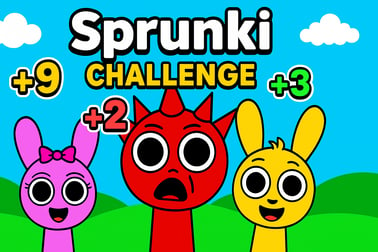
Sprunki Challenge เป็นเกมมิกซ์เสียงออนไลน์ฟรี ลาก วาง และมิกซ์เสียงแบบเดี่ยวหรือแบบ 2 ผู้เล่น ปลดล็อกจังหวะสยองขวัญ และสร้างเพลงที่เป็นเอกลักษณ์










Sprunki Challenge
ภาพรวมของ Sprunki Challenge
Sprunki Challenge เป็นเกมมิกซ์เสียงออนไลน์ฟรีที่ให้คุณสร้างจังหวะที่ติดหู ทดลองกับชั้นเสียง และต่อสู้กับเพื่อนในดวลจังหวะที่เร็วแรง ได้รับแรงบันดาลใจจากเกมแนวบีทีแบบ Incredibox รูปแบบเบราว์เซอร์นี้รวมการควบคุมลากและวางเข้ากับตัวละครที่เคลื่อนไหว ภาพที่ตอบสนอง และโหมดสยองขวัญที่เซอร์ไพรส์เพื่อเพิ่มความตึงเครียด มันเรียบง่ายพอสำหรับเด็กๆ ให้เพลิดเพลิน แต่ลึกพอสำหรับใครก็ได้ที่ชื่นชอบการมิกซ์เสียงแบบโต้ตอบและความท้าทายในจังหวะ
เพราะ Sprunki Challenge ทำงานตรงในเบราว์เซอร์ของคุณ จึงไม่ต้องดาวน์โหลดอะไร คุณเพียงเปิดหน้าเกม กดเล่น และเริ่มมิกซ์เสียง คุณสามารถสร้างเพลงของคุณเองในโหมดเดี่ยว หรือเข้าสู่การต่อสู้แบบ 2 player music game ที่ความเร็ว ความแม่นยำ และความคิดสร้างสรรค์จะตัดสินว่าใครจะกลายเป็น Sprunki DJ ผู้ชนะ ผู้เล่นแต่ละคนมีเสียงและอนิเมชันเฉพาะตัว และเมื่อคุณรวมพวกมันเข้าด้วยกัน คุณจะปลดล็อกเพลงที่เป็นอรรถรสครบถ้วนที่ให้ความรู้สึกเหมือนเพลงจริง
เกมนี้เข้ากันได้อย่างลงตัวกับหมวดหมู่ เช่น Music, Kids, และ Casual gaming เซสชันมีความสั้นและสามารถเล่นซ้ำได้ ทำให้คุณสร้างจังหวะได้อย่างรวดเร็ว ลองโหมดสยองขวัญ หรือท้าทายเพื่อนในการดวลจังหวะ ไม่ว่าคุณจะเป็นผู้ปกครองที่กำลังมองหา เกมสร้างจังหวะสำหรับเด็ก หรือผู้เล่นทั่วไปที่ต้องการทดลองกับลูป Sprunki Challenge มอบวิธีเล่นที่ปลอดภัย สีสันสดใส และแสดงออกได้อย่างน่าประทับใจในการเล่นกับเสียง
Sprunki Challenge Control Guide
การควบคุมใน Sprunki Challenge ถูกออกแบบให้เรียบง่ายอย่างตั้งใจเนื้อๆ เพื่อให้คุณสามารถมุ่งเน้นไปที่เสียงแทนกลไก ทั้งหมดขับเคลื่อนด้วยการลาก-วางและการคลิกง่ายๆ ทำให้เหมาะสำหรับเด็กๆ ผู้เล่นทั่วไป และผู้ที่เพิ่งเริ่มเล่นเกมท้าทายจังหวะบนเบราว์เซอร์
Mouse and Touch Controls
- ลาก & ปล่อย ไอคอน: คลิก (หรือลากทัช) ไอคอนเสียงที่ด้านล่างของหน้าจอ แล้วลากไปยังช่องตัวละครเพื่อกำหนดเสียงนั้น
- ลบเสียง: ลากไอคอนไปไกลๆ หรือแตะไอคอน X เล็กๆ (ถ้ามี) ใต้ตัวละครเพื่อปิดเสียงหรือลบส่วนของพวกเขา
- เล่น/หยุดตัวละคร: ใช้ไอคอนหูฟังหรือไอคอนเสียงด้านล่างแต่ละตัวละครเพื่อโซโล ปิดเสียง หรือสลับเสียงเฉพาะ
- เปิดโหมดสยองขวัญ: ลากปุ่มสีดำหรือไอคอนหมวกดำ หรือแตะตัวเรียกสยองที่มุมเพื่อเปลี่ยนตัวละครเป็นเวอร์ชันสยอง
Keyboard Input (If Supported by Your Platform)
เวอร์ชันส่วนใหญ่ของ Sprunki Challenge ออกแบบให้เป็นประสบการณ์เมาส์หรือทัชอย่างจริงจัง แต่แพลตฟอร์มบางแห่งอาจรองรับ:
- Spacebar: สลับเล่น/หยุดทั้งหมด (ในบางเวิร์ค)
- Number keys: เลือกไอคอนหรือตำแหน่งตัวละครบางส่วนอย่างรวดเร็ว
เนื่องจากการควบคุมอาจแตกต่างเล็กน้อยระหว่างเว็บไซต์ที่ให้บริการ ควรเลื่อนเมาส์เหนือองค์ประกอบอินเทอร์เฟซหรือมองห tooltip บนหน้าจอ ไม่ว่าจะบนแพลตฟอร์มไหน แนวคิดหลักยังคงเดิม: ลากเสียงไปยังตัวละคร วางชั้นเสียง และปรับมิกซ์แบบเรียลไทม์
Sprunki Challenge Game Modes
Sprunki Challenge มีหลายวิธีในการเล่นที่ตอบโจทย์ทั้งผู้สร้างเดี่ยวและผู้เล่นที่แข่งขัน โดยแต่ละโหมดถูกสร้างขึ้นบนการมิกซ์เสียงแบบอินเทอร์แอคทีฟ แต่จุดมุ่งหมายและจังหวะอาจแตกต่างกันมาก
Core Modes & Variants
- Solo Mixing Mode: ประสบการณ์ online music mixer game แบบคลาสสิก คุณมี Sprunki ตัวละครทั้งหมดเจ็ดตัวและคลังไอคอนดนตรีประมาณ 20 ไอคอน เป้าหมายของคุณคือการทดลอง วางชั้นเสียง ปลดล็อกเพลงเต็ม และค้นหาชุดค่าผสมที่คุณชื่นชอบ
- 2 Player Rhythm Duels: การหันเชิงแข่งขันที่ทำให้ Sprunki กลายเป็น 2 player music game ผู้เล่นสองคนแบ่งหน้าจอเดียวกัน แข่งกันทำคะแนนถึงคะแนนเป้าหมาย (มักจะ 2000 คะแนน) คุณจะสลับตัวละครที่มีคะแนนต่ำ ปรับการเลือกเสียงของคุณ และพยายามเติมบาร์ให้เต็มก่อน
- Horror Mode: เวอร์ชันที่มีธีมซึ่งทำให้ตัวละครบางตัวมีภาพลักษณ์ที่ดูมืดลง เอฟเฟกต์เสียงที่เข้มข้นขึ้น มันไม่เปลี่ยนกฎพื้นฐาน แต่ทำให้เสียงของคุณดราม่ามากขึ้นและน่ากลัว
Objectives & Win Conditions
- In Solo Mode: ไม่มีเงื่อนไขชนะที่แน่นอน “เป้า” คือการสร้างเสียงที่คุณพอใจ คุณสามารถท้าทายตัวเองเพื่อสร้างแนวต่างๆ หรือพยายามเปิดใช้งานชุดค่าผสมพิเศษทั้งหมด
- In 2 Player Mode: ผู้เล่นคนแรกที่ทำคะแนนถึงเป้าหมายด้วยการสร้างมิกที่มีประสิทธิภาพจะชนะดวล คะแนนนั้นสะท้อนถึงจำนวนตัวละครที่ใช้งานได้ ชุดและชั้นจังหวะที่คุณรักษาไว้
โครงสร้างนี้ทำให้ Sprunki Challenge ยืดหยุ่น: เป็น sandbox ที่ผ่อนคลายสำหรับเด็กที่รักการสร้างสรรค์ และเป็นเกมท้าทายจังหวะเชิงแข่งขันบนเว็บเมื่อคุณอยากดวลกับเพื่อน
Performance & Troubleshooting
ด้วย Sprunki Challenge ที่ทำงานบนเว็บเบราว์เซอร์ ประสิทธิภาพขึ้นอยู่กับอุปกรณ์ที่คุณใช้งาน เบราว์เซอร์ที่เลือก และการเชื่อมต่ออินเทอร์เน็ต ด้านล่างนี้เป็นวิธีง่ายๆ เพื่อให้เกมลื่นไหลและตอบสนอง
Optimizing Performance
- Use a Modern Browser: Chrome, Edge, Firefox, or Safari (latest versions) usually deliver the best audio timing and visual performance.
- Close Extra Tabs: Multiple streaming videos, downloads, or heavy web apps can cause audio stutters in music games. Close or pause them before playing.
- Disable Unnecessary Extensions: Ad blockers and script-heavy extensions sometimes interfere with HTML5 games. If you notice issues, try a private/incognito window.
- Check Your Internet: While the game itself doesn’t need huge bandwidth, a weak or unstable connection can affect loading times and cause small hiccups.
Common Issues & Quick Fixes
- No Sound or Very Low Volume:
- Ensure your device volume and browser tab volume are both turned up.
- Check the game’s own volume icons; you may have muted characters.
- Try reloading the page or switching browsers if the issue persists.
- Game Freezes or Lags:
- Refresh the page to reload assets cleanly.
- Close other apps (especially RAM-heavy ones) on low-end devices.
- Lower your browser’s hardware acceleration settings if you suspect GPU issues, then restart the browser.
- Controls Not Responding:
- Click inside the game frame once to ensure it has focus.
- On touch devices, clean your screen and avoid multi-touch gestures if they’re not supported.
- Clear browser cache if you’ve played an older build that might conflict.
If your device is older or has very limited RAM, stick to solo mode and fewer active tabs—this reduces stutter in your interactive sound mixing sessions.
Is Sprunki Challenge Safe to Play Online?
Sprunki Challenge is generally considered a family-friendly, browser-based music game. It focuses on creative beat-building, character animations, and simple competitive scoring. That makes it a strong pick for parents seeking a beat making game for kids that’s fun without being overly intense or graphic.
Content & Age Suitability
- Core Content: Cartoon-style characters, musical loops, rhythm icons, and light visual effects. No realistic violence or explicit themes.
- Horror Mode: Some characters adopt a spooky or eerie aesthetic, with darker sounds and visuals. These are still stylized and not realistic, but very sensitive young children might find them a bit intense.
- Language: Interface text and in-game prompts are simple and clean, suitable for kids and teens.
Online Safety Tips
- Supervision for Younger Kids: Because the game is played in a web browser, an adult should help younger children access trusted sites and avoid clicking unrelated ads or external links.
- No Personal Data Required: Most platforms don’t require registration to play Sprunki Challenge, which reduces privacy concerns.
- Check the Host: Always open the game from reputable gaming portals or your favorite safe kids’ site.
With basic supervision and good browsing habits, Sprunki Challenge is a safe and engaging choice for kids who love interactive music games.
How to Play Sprunki Challenge Online: Controls and Basics
Getting started with Sprunki Challenge takes only a few seconds. The interface is built around characters, icons, and a simple scoreboard in versus mode.
Step-by-Step Beginner Guide
- Launch the Game: Open Sprunki Challenge in your browser and wait for the loading bar to complete.
- Choose Mode: Depending on the platform, you may pick between Solo and 2 Player. Solo is ideal for learning the basics.
- Meet the Characters: You’ll see a row of Sprunki characters on screen. These are your performers. Each can hold one sound at a time.
- Assign Sounds: At the bottom, you’ll find multiple icons (beats, melodies, effects, vocals). Drag one icon onto a character. After a short delay, that character starts performing its loop.
- Layer the Mix: Add more icons to other characters to build a full track. Rhythm, bass, melody, and effects all stack in real time.
- Fine-Tune Your Track: Use the mute/headphone/volume icons beneath each character to adjust which parts are heard. Experiment until your mix feels balanced.
- Try Horror Variants: Drag the black button (or similar horror trigger) onto a character to switch them into a creepier version with alternate sounds.
There’s no wrong way to play. If you treat Sprunki Challenge like a sandbox, you’ll quickly understand how different icons and characters interact—and that’s where the magic of this online music mixer game really appears.
Game Modes Explained: Solo Mixing vs 2 Player Rhythm Duels
Sprunki Challenge stands out because it works both as a chill creative tool and as a competitive rhythm challenge browser game. The two main modes serve very different moods.
Solo Mixing Mode
Solo mode is all about creativity and discovery:
- No Time Limit: Take your time building, tearing down, and rebuilding tracks.
- Explore All Icons: Test every sound, listen to how loops lock together, and find hidden combinations.
- Learn the Sound Palette: Because there’s no opponent, you can focus on how bass, drums, vocals, and effects stack and evolve.
This mode is perfect for kids who just want to play with sound, and for players exploring the game’s full musical range before they start dueling friends.
2 Player Rhythm Duels
In 2 player mode, Sprunki Challenge turns into a 2 player music game where each move affects your score:
- Local Multiplayer: Two players share the same screen, taking turns or controlling different sides depending on the platform.
- Race to the Target Score: A typical goal is 2000 points. The first to fill their bar wins.
- Swap Low-Score Characters: To climb faster, you’ll replace weak combinations with stronger ones, constantly optimizing your lineup.
This mode is more intense than solo play. You’re not just making cool beats; you’re managing time, reacting quickly, and trying to out-think your opponent. It’s an ideal pick for siblings or friends who want a light-hearted musical showdown.
Tips and Tricks to Master Beat Mixing in Sprunki Challenge
Even though Sprunki Challenge is easy to pick up, mastering its beat making systems takes a bit of strategy. These tips will help you sound better and score higher.
Build a Strong Musical Foundation
- Start with Rhythm: Lay down drums or percussive loops first. A stable beat makes everything else feel more cohesive.
- Add Bass Next: Bass lines lock into the rhythm and give your track weight. Avoid stacking too many heavy sounds at once, or your mix can feel cluttered.
- Layer Melodies and Vocals: Melodic icons and vocal sounds should sit on top of your rhythm and bass. Add them gradually so you don’t overwhelm the groove.
Use Mute and Solo Creatively
- Dynamic Drops: Temporarily mute drums or bass for a bar or two to create “drops” that make your track more exciting.
- Spotlight Characters: Solo a single vocal or lead sound for a moment to give your mix a memorable hook.
Scoring Strategies for 2 Player Duels
- Replace Weak Loops Quickly: If a character doesn’t seem to contribute much to your score, swap its icon for a stronger one.
- Stay Calm Under Pressure: It’s tempting to spam icons, but sloppy layering can slow you down. Precise, confident moves win matches.
- Memorize Powerful Combos: Over time, you’ll notice which sets of loops push your bar up the fastest. Reuse these in future matches.
The more you play, the faster you’ll be able to read icons, anticipate sounds, and shape professional-sounding mixes in just a few seconds.
Sprunki Characters, Sounds, and Horror Mode Overview
Characters are the heart of Sprunki Challenge. Each one is a performer waiting for instructions, and every assigned icon transforms them into a unique musical role.
Characters and Sound Roles
- Seven Core Sprunki Characters: Most versions give you a cast of seven performers, each capable of playing different loops.
- Twenty Music Icons: These symbols cover drums, bass, chords, melodies, vocal lines, and FX, giving you a full mini-studio inside your browser.
- Instant Feedback: Characters visually react to their assigned sound—dancing, moving, or changing posture as they perform.
Exploring Horror Mode
- How to Activate: Drag the black button or black hat icon over a character to trigger its horror variant.
- Visual Changes: Characters may gain darker outfits, glowing eyes, or creepier animations—still stylized, but with a spooky twist.
Horror mode is especially fun around Halloween or when you want your interactive sound mixing to feel more dramatic. Because the mode is still cartoonish, it keeps Sprunki Challenge within a kid-friendly tone while adding a bit of suspense.
Best Browser Setups for a Smooth Sprunki Challenge Experience
Since Sprunki Challenge is a browser game, your setup matters more than raw hardware power. A clean, optimized browser will make your music loops tighter and your visuals more responsive.
Recommended Browsers and Settings
- Use Up-to-Date Browsers: Chrome, Edge, Firefox, and Safari all handle HTML5 audio well when updated to the latest version.
- Enable Hardware Acceleration: This can help animations render more smoothly, especially on laptops and desktops.
- Allow Audio Autoplay: Some browsers block autoplaying sound by default. If you see prompts, allow audio for the site hosting Sprunki Challenge.
Network and Device Considerations
- Stable Connection: While the game doesn’t need a lot of bandwidth, a stable connection avoids mid-game reloads.
- Headphones for Accuracy: Use wired or low-latency wireless headphones to hear timing more clearly, especially in rhythm duels.
- Moderate Screen Resolution: On slower machines, avoid extremely high-resolution displays or full-screen on 4K monitors to reduce load.
With the right browser choices and a bit of setup, Sprunki Challenge becomes a smooth, responsive online music mixer game where you can enjoy every beat, combo, and horror-mode twist without lag getting in the way.
คำถามที่พบบ่อย
Sprunki Challenge คืออะไร?
Sprunki Challenge เป็นเกมดนตรีบนเว็บเบราว์เซอร์ที่คุณลากและวางไอคอนเสียงลงบนตัวละครเพื่อสร้างจังหวะของคุณเอง คุณสามารถเล่นคนเดียวหรือในดวลจังหวะแบบ 2 ผู้เล่น ทดลองกับชุดค่าผสมต่างๆ และแม้กระทั่งสลับไปเป็นโหมดสยองขวัญที่มีสไตล์ได้
ฉันจะเล่น Sprunki Challenge อย่างไร?
ใช้เมาส์หรือการควบคุมสัมผัสของคุณเพื่อลากไอคอนเสียงไปยังตัวละคร ไอคอนแต่ละอันจะเปิดใช้งานจังหวะ ทำนอง หรือเอฟเฟกต์ที่แตกต่างกัน ผสมตัวละครหลายตัวเพื่อสร้างเพลงเต็มๆ ปิดเสียงหรือเปิดเสียงของพวกเขาได้ตามต้องการ และในโหมด 2 ผู้เล่น แข่งกันเพื่อให้ได้คะแนนถึงเป้าหมายก่อน
Sprunki Challenge เล่นฟรีหรือไม่?
ใช่, Sprunki Challenge เล่นฟรีทั้งหมดในเบราว์เซอร์ของคุณ ไม่ต้องดาวน์โหลด และคุณสามารถเริ่มมิกซ์เพลงได้ทันทีตราบใดที่คุณมีการเชื่อมต่ออินเทอร์เน็ตและอุปกรณ์ที่รองรับ
เด็กๆ สามารถเล่น Sprunki Challenge อย่างปลอดภัยได้ไหม?
ใช่, Sprunki Challenge ถูกออกแบบให้เหมาะกับครอบครัวและเด็กๆ มุ่งเน้นที่จังหวะ ความคิดสร้างสรรค์ และการควบคุมลากและวางที่ง่าย บางเวอร์ชันรวมโหมดสยองขวัญแบบเบาๆ พร้อมตัวละครที่น่ากลัว เพื่อที่ผู้ปกครองจะสามารถดูแลเด็กๆ ได้หากจำเป็น
ฉันต้องติดตั้งอะไรบ้างเพื่อเล่น Sprunki Challenge หรือไม่?
ไม่ต้องติดตั้งอะไร Sprunki Challenge ทำงานโดยตรงในเว็บเบราว์เซอร์สมัยใหม่เช่น Chrome, Edge และ Firefox เพียงเปิดหน้าของเกม กดเล่น และเริ่มลากไอคอนเพื่อสร้างมิกซ์เพลงของคุณเอง