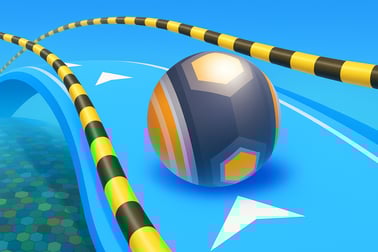
Sky Ball Racing lets you race a 3D ball on sky-high tracks, dodge obstacles, and collect coins. Play instantly in your browser on any device.









Sky Ball Racing
Overview of Sky Ball Racing
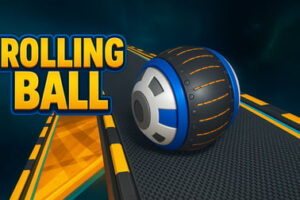
Sky Ball Racing is a fast-paced online ball racing game where you guide a 3D ball along a narrow sky track obstacle course without falling into the clouds below. It blends arcade reflexes with light sports and casual gameplay, making it perfect for quick sessions or extended runs as you chase high scores and cosmetic unlocks.
You roll along floating platforms, ramps, turns, and gaps while dodging moving obstacles and hazards. The further you go, the faster the pace, and the more precise your balance has to be. It feels a bit like a 3D balance ball runner mixed with a speed-focused racing game.
Because everything runs in your browser, you can jump into this online ball racing game in seconds. There’s no huge download, just instant rolling action with smooth controls and colorful sky environments. Whether you’re practicing solo or challenging a friend in 2 player mode, Sky Ball Racing is all about timing, control, and keeping calm when the track gets narrow.
How to Play Sky Ball Racing
Sky Ball Racing is designed to be easy to start but tricky to master. You only need a few basic inputs, but the sky track obstacle course quickly tests your reactions, balance, and planning.
Basic Rules & Mechanics
The core goal is simple: stay on the track and reach the finish line without falling off. Along the way, you’ll collect coins, avoid obstacles, and try to complete each level as cleanly and quickly as possible.
- Stay on the path: Your ball constantly moves forward along a narrow path ball race suspended in the sky.
- Avoid falling: If you slide off the edge or miss a platform, you’ll fall and have to restart from the checkpoint or level start.
- Dodge obstacles: Barriers, moving blocks, gaps, and shifting platforms force you to adjust your speed and position.
- Collect coins and rewards: Pick up coins and special items to unlock new balls, skies, and visual upgrades.
- Finish the course: Reach the goal line to complete the level and move on to tougher tracks.
Each level ramps up the challenge with tighter roads, sharper bends, and more aggressive obstacles. Because it’s a 3D balance ball runner, you’re constantly adjusting your angle and timing to maintain control.
Sky Ball Racing Control Guide
Controls are intentionally simple so you can focus on reacting to the course. The exact mapping can vary slightly by device, but the basic inputs are:
- Keyboard (Desktop/Laptop):
- Left / Right Arrow or A / D – Move the ball left or right on the track.
- Up Arrow / W – In some layouts, used for accelerating on certain ramps or confirming menu choices.
- Spacebar / Enter – Confirm selections, restart level, or pause depending on the build.
- Mouse / Touch:
- Click and drag (or tap and drag) left or right to steer the ball.
- Single tap / click – Confirm menu options and restart.
Because Sky Ball Racing is an online ball racing game, everything is tuned for fast response. It’s a good idea to play a couple of early levels just to get used to how quickly the ball responds to your steering.
Objectives & Win Conditions
Every run in Sky Ball Racing is built around a handful of clear objectives that keep you coming back for “just one more try.”
- Reach the finish line: The primary win condition is to complete the sky track obstacle course without falling off or taking too much damage, depending on the mode.
- Collect coins and keys: Along each path, you’ll spot coins and sometimes special keys or tokens. Collecting them lets you unlock new balls, skies, and cosmetic rewards.
- Beat your personal best: Many players treat Sky Ball Racing as a score-chasing game—finishing faster, collecting more coins, or clearing runs with zero falls.
- Complete challenges: Some versions of the game include objective-style missions, such as finishing a level without hitting an obstacle or staying on a narrow road for a set time.
As you improve, you’ll find yourself aiming for cleaner, more efficient runs: hugging the inside of corners, taking controlled risks on narrow sections, and timing your moves so you rarely slow down.
Where to Play Sky Ball Racing
Sky Ball Racing is built using modern HTML5 / WebGL technology, so it’s optimized for instant play directly in your browser. You don’t need to install a separate client or worry about heavy updates—just open the game page, load, and roll.
You can typically play Sky Ball Racing in:
- Desktop browsers: Chrome, Firefox, Edge, Safari, and other modern browsers that support WebGL and JavaScript.
- Laptops: Windows, macOS, and many Linux distributions work well as long as the browser is up to date.
- Mobile browsers: Many Android and iOS devices can run the game in their default browsers, though performance can vary by device age and power.
For the smoothest experience with this 3D balance ball runner, use a reasonably recent browser version and avoid having too many tabs or heavy apps open at the same time.
Is Sky Ball Racing Safe to Play?
Sky Ball Racing is designed as a family-friendly casual game. The core gameplay focuses on reaction speed, balance, and coordination on a floating sky track. There’s no graphic violence, no mature themes, and it’s suitable for a wide range of ages.
- Content: Cartoon-style 3D graphics, bright skies, and simple obstacles like blocks and barriers.
- No explicit material: No adult content, gore, or strong language.
- Browser-based: The game runs directly in your browser, so you’re not installing an unknown executable file.
As with all online games, younger players should still have basic supervision, and it’s smart to play on reputable browser gaming platforms. But within that environment, Sky Ball Racing is a safe, light-hearted online ball racing game focused on arcade-style fun.
How to Play Sky Ball Racing and Stay on the Track
Surviving the early levels is easy. Mastering the later stages, where the narrow path ball race becomes brutally tight and obstacles stack up, is where skill matters. Here’s a simple step-by-step flow to keep you on the track:
- Start slow, not flashy: In the first seconds of a run, focus on feeling the ball’s inertia. Small taps or light steering are usually better than big swings.
- Look ahead, not at your feet: Keep your eyes slightly ahead on the sky track obstacle course so you’re reacting to what’s coming, not what’s already under the ball.
- Use gentle, continuous inputs: Big, jerky moves are the fastest way to slip off the edge. Try smooth, gradual steering instead.
- Center up on straight sections: Whenever the road straightens out, guide the ball back to the center. This gives you buffer space on both sides when the next turn or obstacle appears.
- Slow mentally, not physically: Even when the ball speeds up, keep your mental pace steady. Rushing your reactions usually causes over-corrections.
- Learn from falls: When you fail, ask: did you turn too late, or too far? Adjust one thing on the next attempt instead of changing everything at once.
With practice, you’ll develop a rhythm: slide into a bend early, straighten out before the next obstacle, then re-center before the following section. That rhythm is the difference between panic and flow.
Tips to Master Narrow Sky Roads and Tricky Obstacles
Sky Ball Racing starts as a relaxed casual game but quickly turns into a high-stakes narrow path ball race with little room for error. These tips help you handle the worst of the course design.
Handling Narrow Paths
- Micro-corrections only: On very narrow strips, try tapping the keys or making tiny drags instead of holding them. Your goal is to “wiggle” into balance, not swing side to side.
- Align early before gaps: When you see a gap or jump coming, align your ball with the middle of the platform well in advance, not at the last second.
- Aim for visual markers: Use edges, seams, or shadow lines on the track as aiming guides to help you stay centered.
Dodging Moving Obstacles
- Watch the pattern first: If you’re new to a level, it’s okay to lose a life observing how a barrier moves. Knowing the pattern makes the next try much easier.
- Move with the opening: Start steering just before the safe gap appears, not after it’s already open. Think “lead” your moves slightly.
- Stay calm after a near miss: The instinct is to over-correct when you almost hit something. Resist that; go back to smooth input immediately.
Managing Speed and Momentum
- Anticipate speed ramps: Some ramps and slopes increase your speed sharply. As you approach them, shift a little closer to the center and be ready for quicker steering.
- Don’t fight momentum too hard: If you’re already drifting left, it’s safer to ease your way back to center than to snap to the right and risk the opposite edge.
- Practice one tough section repeatedly: If a specific part keeps beating you, replay that level a few times focusing only on that section. Muscle memory is huge in a 3D balance ball runner.
Unlock New Balls, Skies, and Rewards as You Race
Beyond beating levels, a big part of Sky Ball Racing’s appeal is unlocking fresh visuals and rewards as you improve. It keeps each session feeling rewarding, even when you’re stuck on a hard stage.
How to Earn Coins and Rewards
- Collect coins on the track: Floating coins line many segments of the road. Risky side coins usually pay more but require sharper control.
- Complete levels: Finishing a track often grants a bonus reward based on your performance.
- Replay for better runs: Going back to earlier levels to grab missed coins is a smart way to stock up while practicing.
Cosmetic Unlocks
- New ball skins: Swap your default ball for different colors, patterns, and effects, making your rolling ball racing game runs feel more personalized.
- Sky themes and environments: Unlock alternate skies or track backdrops for a fresh look—sunset skies, neon nights, or misty clouds are common variants.
- Trail and effect upgrades (where available): Some versions add glow trails or particle effects to your ball for extra style.
None of these upgrades are required to beat levels, but they add long-term goals beyond simply finishing tracks. Completing challenges and gathering coins as you roll through the sky gives every run a sense of progression.
Single Player vs 2 Player Sky Ball Racing Modes
Sky Ball Racing supports both focused solo play and high-energy competitive runs with a friend on the same device.
Single Player Mode
- Best for learning: Use single player to get comfortable with steering, timing, and track layouts at your own pace.
- Progression focused: Unlock levels, balls, and skies by steadily improving your performance.
- Less visual clutter: With only one ball on screen, it’s easier to concentrate on the narrow path ball race and obstacle patterns.
2 Player Mode
- Split controls, shared screen: Each player uses a different set of keys or control zone on the same keyboard or device.
- Competitive pressure: It’s harder to stay calm on a sky track obstacle course when you see your friend inches from beating you to the finish.
- Perfect for parties or quick duels: Short rounds make it easy to swap players or run best-of-three races.
Two player matches turn Sky Ball Racing into a social arcade experience. You’re juggling your own ball, the track hazards, and the constant temptation to glance over at your opponent’s lane.
Browser Controls and Devices Supported for Sky Ball Racing
Because Sky Ball Racing is an online ball racing game built for browsers, it runs on a wide selection of devices as long as they’re reasonably up to date.
Supported Devices
- Desktop PCs & Laptops: Windows, macOS, and many Linux systems with a modern browser.
- Chromebooks: Most newer Chromebooks handle HTML5 and WebGL titles comfortably, making them a good fit.
- Tablets & Phones: Many iOS and Android devices can play via the built-in browser, though lower-end hardware may need reduced background activity for smooth performance.
Recommended Browser Settings
- Enable hardware acceleration: This usually helps 3D games render more smoothly.
- Keep your browser updated: Newer versions typically have better WebGL and performance optimizations.
- Close heavy tabs: Streaming, dozens of open tabs, or other 3D sites can steal resources and cause lag.
On touch devices, you’ll steer through swipe or drag controls. On desktops and laptops, keyboard input generally gives the most precise control for tight sections of the sky track obstacle course.
Frequently Asked Questions
What is Sky Ball Racing?
Sky Ball Racing is a 3D browser game where you roll a ball along narrow sky-high tracks, avoid obstacles, and collect coins and rewards as you race to the finish.
How do I play Sky Ball Racing?
Use the arrow keys or A/D on keyboard, or swipe and drag on mobile, to move the ball left and right. Stay on the track, dodge barriers, and grab coins to improve your score.
Can I play Sky Ball Racing for free?
Yes. Sky Ball Racing is free to play in your browser with no download required. Just open the game page, press play, and start rolling.
Is Sky Ball Racing suitable for kids?
Yes. Sky Ball Racing is family-friendly, with simple controls and non-violent gameplay that focuses on reflexes, balance, and timing.
Do I need to create an account to play Sky Ball Racing?
No account is required to start playing. Some platforms may offer optional login to save progress or unlock extra features, but you can play as a guest.