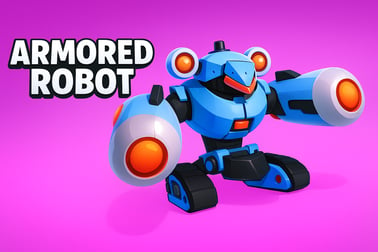
Armored Robot lets you pilot customizable mechs in fast PvP arena battles. Upgrade weapons, armor, and abilities to dominate every robot fight.




















Armored Robot
Introduction to Armored Robot
Armored Robot is a fast-paced online mech battle game where you pilot towering war machines in intense PvP arenas. Step into a high-tech robot arena shooter filled with explosive weapons, tactical cover, and constant action. Whether you love close-range brawls or long-range sniping, this browser-based mech battle game lets you build and pilot your own customizable war machines and challenge players from all over the world.
The core of Armored Robot is competitive PvP mech combat. You’ll drop into compact maps, hunt for the best vantage points, and outmaneuver rival pilots in real time. Each mech can be tuned to your favorite playstyle, from agile skirmishers to slow but heavily armored juggernauts. Add in a mix of classic arena modes and chaotic battle royale robots matches, and you’ve got a shooter you can jump into for quick rounds or long sessions.
Because it runs in a browser, you can play Armored Robot online without major downloads. Just load the game, customize your mech, and dive straight into the action. If you enjoy action, shooter, and multiplayer games with sci-fi flair, Armored Robot fits perfectly into your rotation.
Armored Robot Control Guide
Armored Robot is designed to be easy to pick up, even if you’re new to mech games. The controls will feel familiar if you’ve played other online shooters or robot arena shooters before.
Keyboard & Mouse Controls (Browser)
- W / A / S / D – Move your mech forward, left, backward, and right.
- Mouse Move – Aim your weapons and look around the arena.
- Left Mouse Button – Primary fire (main weapon).
- Right Mouse Button – Secondary fire or alternate weapon, if equipped.
- Spacebar – Jump or activate jump jets / boosters (depends on your mech build).
- Shift (hold) – Sprint or engage thrusters for short bursts of speed.
- R – Reload your current weapon (where applicable).
- 1, 2, 3, 4 – Switch between weapons or special abilities on your war machine.
- F – Interact with objectives, capture points, or special map elements (if present in a mode).
- Esc – Open the in-game menu and settings.
Basic Control Tips
- Keep your crosshair at head height for faster target acquisition.
- Use strafing (A and D) while shooting to make yourself harder to hit.
- Practice short burst fire with automatic weapons to maintain accuracy.
- Combine boosts, jumps, and cover to dodge enemy fire instead of tanking damage.
Once you’ve played a few matches, the controls quickly become second nature, letting you focus on positioning, team play, and mech builds.
Key Features
Armored Robot blends the best elements of mech games, shooters, and battle royales into one accessible browser experience. Here are the standout features that define the game.
- Intense robot arena shooter combat – Fast rounds, tight maps, and constant firefights keep every match engaging.
- Customizable war machines – Swap chassis, armor, weapons, and modules to build your ideal mech for PvP mech combat.
- Multiple game modes – Jump into traditional team battles or try survival-based battle royale robots matches where only one mech walks out.
- Progression and upgrades – Earn currency and resources to unlock new parts, upgrade gear, and refine your builds over time.
- Skill-based PvP – Victory depends on your aim, movement, and tactical decisions, not just your level.
- Browser-based play – No big client download needed; you can play online directly from your browser.
- Accessible yet tactical – Simple control scheme but deep build options, map knowledge, and team synergy for advanced players.
Together, these features make Armored Robot a strong pick if you’re searching for an online mech battle game that fits nicely between casual play and competitive, skill-based combat.
Performance & Troubleshooting
Armored Robot is built to run smoothly in modern browsers, but performance can vary based on your hardware and connection. If you’re experiencing lag, low frame rates, or connection drops, try the tips below.
Improving Game Performance
- Lower graphics settings: In the options menu, reduce effects quality, shadows, and resolution if your frame rate is low.
- Close background apps: Shut down other browser tabs, streaming services, and heavy applications that may be using CPU, RAM, or bandwidth.
- Check your connection: For smoother PvP mech combat, use a wired connection (Ethernet) when possible, or move closer to your Wi‑Fi router.
- Update your browser: Make sure you’re on the latest version of Chrome, Firefox, Edge, or another supported browser.
- Disable VPNs or proxies: These can increase latency and cause stutters in online matches.
Common Issues & Quick Fixes
- Game won’t load: Refresh the page, clear your browser cache, and ensure scripts/cookies are enabled for the site.
- Input lag or sluggish controls: Lower graphics settings, turn off unnecessary browser extensions, and close other tabs.
- Frequent disconnects: Test your internet speed, avoid downloads or streaming in the background, and if possible, reboot your router.
- No sound: Check in-game audio sliders, confirm the tab isn’t muted, and verify your device’s sound output settings.
If issues persist, check the platform’s help or FAQ section for any current server status updates or known bugs.
Is Armored Robot Safe to Play Online?
Armored Robot is designed as a family-friendly action shooter. The focus is on robots and mechanical warfare rather than realistic human violence, which makes it more approachable for younger players while still delivering plenty of high-energy action for older ones.
Safety & Content
- Fictional robot combat: Battles are between machines, not people, and there’s no graphic gore.
- Online multiplayer: Players compete in live matches, so usernames and in-game chat may expose you to user-generated content.
- Optional purchases: Some platforms may offer cosmetic items or progression boosts; always review spending settings for kids.
Tips for Parents & Younger Players
- Encourage turning off or limiting global chat if your child is playing.
- Use platform-level parental controls to manage access to chat and purchases.
- Set session time limits so long play sessions don’t interfere with school or sleep.
Within these guidelines, Armored Robot is generally safe and appropriate for players who enjoy sci-fi action and robot shooters.
How to Build the Ultimate Mech in Armored Robot
One of the biggest draws of Armored Robot is the ability to construct customizable war machines tailored to your style. Building a dominant mech is about more than just slapping on your strongest gun; you’ll want synergy between armor, mobility, and firepower.
Step 1: Choose Your Chassis Role
Start by deciding your mech’s primary role in a match:
- Assault Mech: Balanced armor and damage, ideal for frontline pushes and general play.
- Tank Mech: Heavy armor and shields, slower movement, built to absorb damage and anchor objectives.
- Scout / Skirmisher: Light armor but high speed and agility, great for flanking and hit-and-run tactics.
- Support Mech: Focused on utility modules like shields, repairs, or crowd control weapons.
Your chassis determines baseline health, speed, and sometimes weapon slots, so pick the frame that matches what you want to do in the arena.
Step 2: Balance Armor and Mobility
In a robot arena shooter, pure armor without mobility is often a liability. Aim for a mix that supports your role:
- Frontliners should invest in medium-to-heavy armor with moderate thrusters.
- Flankers should lean into lightweight plating and high booster power to dodge and reposition.
- Snipers can sit in the mid-range: enough armor to survive being spotted, but not so heavy they can’t relocate.
Remember that extra armor often comes with weight penalties, affecting movement and sometimes weapon handling.
Step 3: Select Complementary Weapons
Pair weapons that cover different ranges and situations:
- Primary: Your main damage dealer, like a rapid-fire cannon or energy rifle.
- Secondary: A backup for your primary’s weaknesses—shotguns for close defense or rockets for burst damage.
- Utility Slot (if available): Mines, drones, or debuff weapons that create pressure or zone control.
A well-rounded Armored Robot build might combine a mid-range automatic weapon with a close-range powerhouse so you’re not helpless when enemies rush you.
Step 4: Optimize Modules & Passives
Modules and passive upgrades can turn a decent mech into an apex predator:
- Offensive modules: Damage boosts, faster reloads, or improved critical hit chances.
- Defensive modules: Extra shielding, damage reduction, or emergency repair bursts when health is low.
- Mobility modules: Shorter boost cooldowns, faster sprint, or higher jump jets.
Try to avoid random stacking of bonuses. Instead, build around a theme. For example, a dueling mech might stack burst damage and shield modules, while a skirmisher mech doubles down on mobility and cooldown reduction.
PvP Tactics: Winning Arena Battles in Armored Robot
Building a strong mech is only half the equation. To win consistently in PvP mech combat, you’ll need smart tactics and map awareness.
Control the High Ground
In most maps, high ground offers better sightlines and easier defense. Use jump jets and boosters to reach elevated platforms that give you clear shots while exposing only part of your mech. From there, you can cover teammates, deny enemy pushes, and retreat more easily.
Use Cover and Corners
- Peek and shoot: Use buildings, crates, and walls to expose only small parts of your mech when firing.
- Corner baiting: Pretend to retreat around a corner, then quickly step back out as enemies chase you, catching them in your crosshairs.
- Line-of-sight breaks: When under heavy fire, break sight with terrain instead of trying to outgun multiple targets at once.
Focus Fire and Target Priority
In team-based robot arena shooter matches, aim discipline wins games:
- Call out and focus weakened enemies to quickly turn fights into 4v3 or 3v2 situations.
- Target high-damage but fragile mechs first; removing them drastically lowers enemy burst potential.
- Coordinate with allies to stagger your pushes so you’re engaging together, not trickling in one by one.
Adapt Mid-Match
If the enemy team is dominating with long-range builds, swap to faster mechs that can close distance. If you’re being rushed constantly, switch to heavier armor and area-denial weapons. Armored Robot rewards players who adjust their loadouts based on what they’re facing.
Best Weapons and Loadouts for Every Playstyle
Armored Robot supports a wide range of playstyles, and the best loadout depends on how you like to fight. Below are sample setups that work well in many mech battle game scenarios.
Aggressive Brawler
- Primary: Shotgun or heavy plasma blaster.
- Secondary: Short-range missiles or a fast-firing SMG.
- Armor: Medium to heavy armor plating.
- Modules: Damage boost, shield overcharge, and cooldown reduction for dashes.
This loadout excels at pushing points, diving enemies behind cover, and winning tight corridors in small arenas.
Mid-Range All-Rounder
- Primary: Assault cannon or balanced laser rifle.
- Secondary: Burst rockets for finishing fleeing targets.
- Armor: Balanced armor with moderate speed.
- Modules: Recoil control, faster reload, and moderate damage resistance.
If you’re new to Armored Robot, this all-rounder loadout is forgiving and effective in almost any mode or map.
Long-Range Sniper
- Primary: Railgun or high-damage precision rifle.
- Secondary: Mid-range rifle or pistol for self-defense.
- Armor: Medium armor with enhanced boosters for repositioning.
- Modules: Scope stabilization, critical hit chance, and shield recharge speed.
This is perfect if you like anchoring high ground, supporting teammates, and deleting exposed enemies before they can react.
Mobile Harasser
- Primary: Lightweight rapid-fire weapon.
- Secondary: Mines or sticky explosives to trap pursuers.
- Armor: Light armor with maximum mobility.
- Modules: Dash cooldown reduction, speed buffs, and evasive bonuses (like reduced damage while boosting).
Use this in battle royale robots modes to keep moving, pick off stragglers, and exit losing fights quickly.
Progression, Upgrades, and Rewards in Armored Robot
Progression in Armored Robot keeps you coming back, rewarding you for each battle and helping you refine your favorite mechs.
Earning Currency and Resources
- Match rewards: You’ll earn in-game currency and experience for playing matches, with bonuses for wins and strong performances.
- Daily objectives: Complete simple challenges, like winning a set number of games or dealing a certain amount of damage.
- Events and limited-time modes: Special events can offer extra rewards or unique cosmetic items.
Upgrading Your Mechs
- Weapon upgrades: Improve damage, accuracy, reload speed, or ammo capacity.
- Armor and chassis upgrades: Increase health, shield strength, or resistance to specific damage types.
- Module enhancements: Unlock stronger or more specialized modules as you climb through the progression system.
Upgrades deepen your options but don’t replace skill. Smart movement, aim, and teamwork still decide most fights.
Unlocking New Gear
As you play, you’ll unlock new weapons, parts, and cosmetic customizations. Mixing newly unlocked gear into your existing builds keeps the game fresh and encourages experimentation. If you hit a wall against certain opponent types, a new weapon or module can open up entirely new strategies.
Beginner Tips for Dominating Your First Robot Battles
Starting out in a competitive mech battle game can be intimidating, but a few fundamentals will help you quickly improve in Armored Robot.
1. Start with Balanced Builds
Avoid extremes at first. Don’t go ultra-light or ultra-heavy until you understand map flow. A balanced mech with mid-range weapons gives you tools for most situations while you learn.
2. Stick With Your Team
In your early matches, shadow more experienced players. You’ll survive longer, get more shots off, and naturally learn common routes, choke points, and sightlines.
3. Aim for Center Mass First
Headshots or weak-point shots are powerful, but hitting them consistently takes practice. Early on, focus on tracking and landing reliable shots on the body before worrying about precision.
4. Learn One Map at a Time
Each arena in this robot arena shooter has its own rhythm. Pick a favorite map and pay close attention to:
- Main lanes of attack.
- Safe flanking routes.
- High ground positions and good sniper nests.
- Places where players commonly clash.
Knowing where fights usually happen makes it easier to position yourself for advantage.
5. Review and Adjust Your Loadouts
After a few games, ask yourself:
- Am I dying too fast? Consider more armor or defensive modules.
- Can’t finish enemies? Upgrade weapons or shift to higher-burst options.
- Always arriving late to fights? Add mobility or lighter components.
Small tweaks over time will turn your early beginner builds into polished, deadly war machines that can hang in any lobby.
With these tips and strategies, you’ll be ready to jump into Armored Robot, build powerful mechs, and rise through the ranks of online PvP mech combat. Gear up, customize your robot, and step into the arena—the next match is waiting.
Frequently Asked Questions
What is Armored Robot?
Armored Robot is a browser-based action game where you pilot customizable mechs in fast-paced arena battles against other players or AI opponents.
Is Armored Robot free to play?
Yes, Armored Robot is free to play. You can jump into battles without paying, and optional in-game purchases may be available for cosmetic or progression boosts.
Do I need to download anything to play Armored Robot?
No download is required. You can play Armored Robot directly in your web browser as long as you have a stable internet connection.
Can I customize my mech in Armored Robot?
Yes. You can equip different weapons, armor, and special abilities to create a mech build that fits your preferred playstyle, from long-range sniper to close-range brawler.
Is Armored Robot suitable for kids?
Armored Robot features robot and mech combat with no realistic gore, making it generally family-friendly. Parents should still review the game’s content to ensure it fits their preferences.