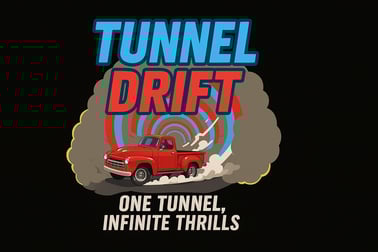
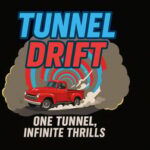
Tunnel Drift is a fast 3D tunnel racer. Drift a heavy truck through a rotating tube, dodge obstacles, collect rings, and chase endless high scores.














Tunnel Drift
Overview of Tunnel Drift
Tunnel Drift is a fast-paced endless tunnel racing game where you drift a heavy truck through a glowing 3D tube that never stops moving. The entire tunnel rotates a full 360°, forcing you to constantly adjust your position to avoid obstacles and grab score-boosting rings. With its slick neon visuals, simple controls, and addictive high-score chase, Tunnel Drift feels like a classic 3D drifting arcade game built for modern browsers.
Every run is an online drifting challenge. The tunnel layout changes dynamically, the speed ramps up, and obstacles appear with less warning the longer you survive. That makes Tunnel Drift perfect if you enjoy reaction-based gameplay and want a fast reaction skill game that tests your focus and timing. You can play instantly in your browser with no downloads, whether you're on desktop, laptop, or mobile.
Between the hypnotic neon tunnel, the heavy-truck drifting feel, and the constant pressure to stay centered, Tunnel Drift offers the kind of intense, skill-first experience fans of neon tunnel runner games love.
Tunnel Drift Control Guide
Controls in Tunnel Drift are deliberately simple so you can focus on surviving the rotating tunnel. The goal is to rotate your truck along the inside of the tube to line up with gaps and rings.
Keyboard Controls (Desktop & Laptop)
- Left Arrow / A – Rotate the tunnel and truck to the left
- Right Arrow / D – Rotate the tunnel and truck to the right
Hold or tap the keys to drift smoothly around the 360° rotating tunnel. Quick taps give you tiny adjustments; longer holds swing you across the tube more aggressively.
Mouse & Touch Controls (Desktop, Mobile & Tablet)
- Click / Tap left side of the screen – Rotate left
- Click / Tap right side of the screen – Rotate right
On phones and tablets, this tap-based layout turns Tunnel Drift into a one-finger neon tunnel runner that you can play anywhere. Just keep alternating sides to line up your truck with safe lanes and collectible rings.
Because of the game's speed, it pays to keep your fingers or thumbs close to the left and right zones at all times so you can react instantly to obstacles.
Key Features
Tunnel Drift packs a lot of arcade-style action into a lightweight browser experience. Here are the main features that define this 3D drifting arcade racer:
- Endless tunnel racing game – There are no levels or checkpoints. You drive until you crash, chasing higher and higher scores.
- 360° rotating tunnel – The track is a full cylinder, so obstacles can appear above, below, or to either side.
- Heavy truck drifting feel – Your vehicle has weight, so your movement has momentum. This makes every dodge feel earned.
- Procedurally generated layouts – Obstacles, gaps, and ring patterns change each run, making every attempt an online drifting challenge.
- Increasing difficulty over time – The tunnel accelerates, patterns become trickier, and mistakes are punished faster.
- Ring collection system – Grab glowing rings to ramp up your score and climb the leaderboard.
- Global high scores – Compete with other players in this fast reaction skill game, pushing yourself to last one more second.
- Instant in-browser play – No downloads, no installation. Just open the game and start drifting.
- Mobile-friendly design – Tap controls and responsive layout make it easy to play on phones and tablets.
Together, these features create a satisfying loop of "just one more run" gameplay that rewards practice, precision, and nerves of steel.
Performance & Troubleshooting
Tunnel Drift is built to run smoothly in modern browsers, but performance can matter a lot in a speed-driven neon tunnel runner. If you notice lag or stutter, even small drops in frame rate can make obstacles feel unfair. Here are ways to keep this 3D drifting arcade game running at its best.
Recommended Browsers
- Use the latest version of Chrome, Firefox, Edge, or Safari.
- If the game feels sluggish in one browser, try another—performance can vary.
Fixing Lag & Stutter
- Close extra tabs and apps to free up memory and CPU.
- Disable heavy browser extensions, especially ad blockers or script managers.
- Check your internet connection to ensure stable online play if the game uses live leaderboards or cloud data.
- Lower system load by pausing downloads or streams while playing.
Input & Control Issues
- If keyboard controls aren't responding, click inside the game window once to focus it.
- On mobile, make sure you aren't touching both sides of the screen accidentally, which can confuse inputs.
- Turn off screen filters & overlays (like performance monitors, floating widgets, or screen recorders) if taps feel delayed.
Visual & Fullscreen Tips
- If available, use the game's fullscreen mode to reduce distractions and improve focus.
- For older devices, reduce screen brightness slightly to help both battery life and eye comfort when staring into the neon tunnel.
If problems continue, refreshing the page usually resets the session and clears minor glitches, letting you dive right back into the endless tunnel racing game.
Offline Play Availability for Tunnel Drift
Tunnel Drift is designed as an online drifting challenge that runs directly in your browser. In most cases, you'll need an active internet connection to load the game and access features like global leaderboards.
Is Offline Play Supported?
- Loading the game – You generally need to be online to load Tunnel Drift the first time in a session.
- During gameplay – Some browsers may allow the current session to keep running if your connection drops, but this isn't guaranteed or officially supported.
- High scores & syncing – Online features, such as saving scores to a global leaderboard, require an internet connection.
If you're looking for a reliable fast reaction skill game to play fully offline, a native mobile app or downloadable game may be a better fit. Tunnel Drift, however, focuses on quick, browser-based play with online connectivity.
How to Survive the 360° Rotating Tunnel
The signature challenge of Tunnel Drift is surviving the 360° rotating tunnel as long as possible. It's not only about dodging what's in front of you but also about predicting how the tunnel will shift around you.
Stay Ahead of the Rotation
- Look further down the tunnel instead of staring just in front of your truck. This gives you more time to react to walls and gaps.
- Anticipate the curve of the tunnel. When the tube tilts, prepare to rotate preemptively instead of reacting at the last moment.
- Aim for stable lines around the tunnel—try to settle into an open path and stick with it until you need to adjust.
Use Small, Controlled Movements
- Tap lightly to nudge your position instead of swinging from one side to the other.
- Avoid "overcorrecting" when you panic; this often causes you to smash straight into the next obstacle.
- Practice making micro-movements to stay aligned with the safe zone while the tunnel spins.
Adapt as Speed Increases
- At low speed, you can afford slower reactions and larger movements.
- As speed rises, switch to earlier, smaller inputs—move before you feel you absolutely have to.
- Let your eyes and hands find a rhythm; Tunnel Drift becomes easier when you slip into a flow state.
Once you've learned to read the tunnel's rotation, the game starts to feel less chaotic and more like a rhythm-based neon tunnel runner where you dance between obstacles.
Mastering Drift Controls and Precision Movement
Mastery in Tunnel Drift is all about precision. Even though the controls are simple, squeezing out extra distance in this 3D drifting arcade experience requires disciplined movement and consistent timing.
Learn the Timing Window
- Every obstacle has a safe window—a moment when your truck should pass through the gap.
- Try to press slightly earlier than your instincts tell you. At high speed, your reaction time has to account for your truck's momentum.
- Use your first few runs just to observe timing rather than chasing high scores.
Balance Risk vs. Reward
- Rings are important for score, but staying alive is worth more than one risky pickup.
- Only attempt tight drifts for rings when you're confident you can still dodge the next wall.
- Treat every move as an investment: will this drift keep me safe and move me toward more rings, or only one of the two?
Create Your Own Control Style
- Some players prefer rapid tapping for fine control, especially on mobile.
- Others use short holds to swing the truck into position more quickly.
- Experiment until your movements feel natural—your personalized style will help you react faster under pressure.
As your precision improves, you'll feel the shift from simply surviving to truly drifting the tunnel, carving lines through danger and making bold plays for more rings.
Endless Arcade Challenge and High Score Strategies
Because Tunnel Drift is an endless tunnel racing game, your only real "win condition" is beating your previous best score—and, if you're determined, climbing the global rankings. Treat each run as a step toward mastery rather than a one-off attempt.
Early Game: Build a Stable Base
- Use the lower speed at the start to warm up your reactions and get a feel for that particular tunnel layout.
- Focus on clean movement—avoid scraping close to walls when you don't need to.
- Grab easy rings, but don't chase risky ones until the tunnel patterns become familiar.
Mid Game: Shift Into Attack Mode
- Once the speed ramps, start prioritizing ring clusters that are on your natural path.
- Watch for repeating obstacle rhythms; many patterns in this online drifting challenge have an internal logic.
- Stay calm when you make a small mistake—panicked overcorrections end most promising runs.
Late Game: Survival Above All
- At very high speeds, surviving one more second can be worth more than any single ring.
- Stick to low-risk lines and only collect rings that are already aligned with your path.
- If your vision starts to blur from the neon and speed, blink quickly between obstacles to reset your focus.
Keep a mental note of what usually ends your runs—late reactions, greedy ring grabs, or over-rotation. Fixing that one recurring mistake can dramatically improve your high scores.
Tips to Dodge Obstacles and Collect More Rings
Dodging obstacles while still boosting your score is the core tension that makes Tunnel Drift a satisfying fast reaction skill game. Here are targeted tips for both survival and scoring.
Obstacle Avoidance Basics
- When in doubt, move early, not late. It's better to arrive slightly too soon and adjust than too late.
- Aim for the center of wide gaps first; once stable, drift toward rings if there's time.
- Don't zigzag too much—every extra motion increases your chance of clipping a wall.
Smart Ring Collection
- Think in routes, not single rings: choose paths that pass through multiple rings while staying mostly safe.
- Skip lone rings that sit just off your ideal line, especially at high speed.
- Use early-game runs to practice ring routes when the tunnel is slower and more forgiving.
Training Your Reflexes
- Play several short sessions instead of one long marathon. Your reaction time stays sharper.
- Try focusing only on clean dodges for a few runs, ignoring rings entirely, then gradually reintroduce ring collection.
- Increase screen size (fullscreen or larger window) so you can see obstacles earlier, especially when learning.
Over time, you'll develop a natural instinct for which obstacles are safe to skim, which rings are worth the risk, and how to keep your drift line smooth and controlled.
Play Tunnel Drift Online for Free on Any Device
Tunnel Drift is built to be a quick-access browser game you can launch and play in seconds, whether you're at home, at school (where allowed), or on the go. There's no need to download a client or install extra software.
Playing on Desktop or Laptop
- Open a modern browser like Chrome, Firefox, Edge, or Safari.
- Load Tunnel Drift from your favorite browser gaming site.
- Use arrow keys or A/D for accurate 3D drifting control.
- Optional: Switch to fullscreen for maximum immersion in the neon tunnel.
Playing on Phones & Tablets
- Open Tunnel Drift in your mobile browser—no install required.
- Rotate your device to landscape mode for better visibility.
- Use left/right taps for simple, thumb-friendly controls.
- Ensure a stable connection if you want to submit scores and keep the online drifting challenge going.
Because Tunnel Drift is lightweight and optimized, it fits nicely into short breaks and quick gaming sessions. One run often leads to another as you try to push your score just a little bit higher.
Frequently Asked Questions
What is Tunnel Drift?
Tunnel Drift is a free 3D arcade racing game where you drift a heavy truck inside a rotating tunnel, dodge obstacles, and collect rings to earn the highest score possible.
How do I play Tunnel Drift?
Use the left and right arrow keys or A and D on keyboard, or tap the left and right sides of the screen on mobile, to rotate inside the tunnel and avoid hitting obstacles.
Can I play Tunnel Drift for free?
Yes, Tunnel Drift is completely free to play in your browser with no download required. Just load the game and start racing instantly.
Is Tunnel Drift mobile friendly?
Yes, Tunnel Drift works on both desktop and mobile devices. On mobile, you can control the drift by tapping the left or right side of your screen.
Does Tunnel Drift have levels or is it endless?
Tunnel Drift is an endless racer. The tunnel keeps rotating and speeding up, with procedurally generated sections, so every run is different and there is no fixed finish line.