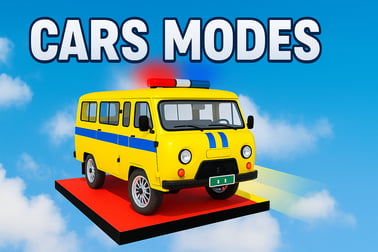
Cars Modes lets you crash, race, and destroy rival cars in intense derby arenas and battle royale modes. Play free in your browser on any device.















Cars Modes
Introduction to Cars Modes
Cars Modes is a fast-paced browser demolition derby game that mixes arena combat, car arena battle royale action, and open free ride driving. You jump straight into online car racing and crashing where every impact matters, panels crumple, and engines smoke under pressure. It’s a free car destruction game built in HTML5, so you can play instantly in your browser on desktop, mobile, or tablet without downloads.
If you enjoy high-speed browser car driving games with real damage physics, Cars Modes checks all the boxes. You can ram opponents in tight arenas, outrun chasers in pursuit modes, or just cruise and practice in free ride. Each round rewards aggressive but smart driving: lining up heavy hits, avoiding full-frontal crashes, and using nitro and handbrake turns to stay alive longer than the rest of the pack.
This guide explains how to play the demolition derby game online, breaks down every mode, and gives tips on upgrades, controls, and performance so you can dominate the arena instead of watching from the scrapyard.
Cars Modes Control Guide
Before you start smashing into rivals, it’s worth learning the basic controls. Cars Modes is designed to feel intuitive whether you’re using a keyboard or on-screen touch controls on mobile.
Keyboard Controls (Desktop & Laptop)
- W / Up Arrow – Accelerate
- S / Down Arrow – Brake / Reverse
- A / Left Arrow – Steer left
- D / Right Arrow – Steer right
- Spacebar – Handbrake (tight turns & drifts)
- Shift / Ctrl (varies by platform) – Nitro or boost when available
- Esc / Pause icon – Pause or open in-game menu
Some browser portals may display on-screen hints for the exact keys used. If something feels off, look for a small help or gear icon to double-check binding labels.
Touch Controls (Mobile & Tablet)
- Left/right arrows on the screen – Steering
- Pedal icons – Throttle and brake/reverse
- Drift / Handbrake button – Quick 180° and sharp cornering
- Nitro icon – Temporary speed burst for ramming or escape
On touch devices, steering sensitivity depends partly on your device and browser. If the turning feels sluggish, try rotating your device (landscape mode usually works best) and make sure your browser’s zoom is set to 100%.
Cars Modes Features
Cars Modes packs several racing and action systems together to create an over-the-top destruction playground. Here are the main features players look for when choosing an online car racing and crashing title:
- Multiple game modes – Classic demolition derby, arena battle royale, high-speed chase, and relaxed free ride.
- Realistic damage physics – Hits deform your car, affect handling, and can eventually disable your vehicle.
- Upgradeable cars – Spend rewards from matches to improve armor, engine power, handling, and sometimes nitro capacity.
- Varied arenas – Tight cages, open stadiums, obstacle-filled tracks, and chase-friendly road layouts.
- Instant browser play – HTML5 technology means no downloads, making it one of the easiest-to-access browser car driving games.
- Accessible difficulty – Easy to pick up for kids and casual players, but still challenging to master for derby veterans.
Combined, these features create a demolition derby game online that feels more tactical than just holding the gas and hoping for the best. Positioning, timing, and upgrades all matter when you’re trying to be the last car moving.
Performance & Troubleshooting
Because Cars Modes runs in a browser, performance depends heavily on your device and browser setup. If the action stutters or your inputs feel delayed, you’re more likely to get wrecked in hectic car arena battle royale matches. Use these quick fixes to keep the game running smoothly:
Improve Performance on Desktop
- Close extra tabs and apps – Video streams, downloads, or other heavy sites can steal memory and CPU.
- Switch to a modern browser – Chrome, Edge, Firefox, or a recent Chromium-based browser usually handle HTML5 games best.
- Disable heavy extensions – Ad blockers and script managers can sometimes interfere with online car racing and crashing titles.
- Lower display size – If the portal allows, shrink the game frame slightly; smaller resolutions are easier to render.
- Update graphics drivers – Outdated drivers can cause strange visual glitches or frame drops.
Improve Performance on Mobile & Tablet
- Use Wi-Fi when possible – It gives more stable online play than spotty cellular data.
- Close background apps – Freeing RAM can noticeably smooth out free car destruction game performance.
- Turn off battery saver modes – These can throttle CPU/GPU, making the game choppy.
- Rotate to landscape – Games are usually optimized for horizontal orientation.
If the game doesn’t load at all, try refreshing the page, clearing your browser cache, or switching to another browser. On school or work networks, some gaming portals may be blocked, so testing on a home network or mobile hotspot can help you rule out network filters.
Is Cars Modes Safe to Play Online?
Cars Modes is generally safe and family-friendly, especially for players who enjoy action-packed car games without graphic content. The focus is on vehicle destruction, not people, making it a good fit for many younger racing fans.
- No graphic violence – The game shows bent metal, smoke, and sparks, but no blood or realistic injuries.
- Browser-based – There’s nothing to install, which reduces the risk of bundled malware compared to random executable downloads.
- Kid-friendly themes – It sits comfortably alongside other arcade-style racing and driving titles.
Safety also depends on the platform you choose. Stick to reputable gaming sites when you want to play this demolition derby game online. Parents may want to enable standard browser safety options or use trusted portals that curate games for younger audiences.
How to Play the Demolition Derby Mode in Cars Modes
Demolition derby is the heart of Cars Modes and the main reason many players search for a demolition derby game online. The rules are simple: outlast every other car in a closed arena using rams, side-swipes, and smart positioning.
Derby Objective
Your goal in derby mode is to be the last functional car. You win by dealing damage to rivals while avoiding hits that cripple your own vehicle. Every collision transfers force based on speed, angle, and where you connect.
Step-by-Step Derby Game Flow
- Choose your car – Early on, you’ll use basic models. As you earn rewards, you can upgrade or unlock sturdier machines.
- Enter the arena – Cars spawn around the ring. You’ll usually get a few seconds to orient yourself.
- Pick your first target – Aim for distracted or already-damaged cars to secure quick eliminations.
- Use your speed – Build momentum in open space, then line up a hit on the enemy’s side or rear.
- Keep your engine safe – Avoid head-on crashes; front-end hits can destroy your engine faster.
- Finish survivors – As the field thins out, play more aggressively and stay near the center to avoid getting trapped.
Winning derby matches is one of the fastest ways to earn resources in this free car destruction game, letting you buy stronger cars and better upgrades for even more satisfying wrecks.
Tips to Survive Arena Battles and Chase Modes
Cars Modes doesn’t stop at simple derby matches. Arena battles and chase segments add extra pressure, pushing you to refine your driving and collision tactics. These tips work across most car arena battle royale and chase-style rounds.
Positioning & Awareness
- Stay off the walls – Hugging the arena edge makes you an easy target and can trap you during multi-car pileups.
- Use the center tactically – The middle gives escape routes in every direction, but it’s also the busiest. Dip in for attacks, then rotate outward.
- Watch incoming arrows/markers – Many versions highlight nearby threats. Use these to predict rams and dodge just before impact.
Attack Smart, Not Just Hard
- Target weak points – Hitting the rear or sides can immobilize opponents quickly without sacrificing your own front end.
- Chain light hits – Several well-aimed medium-speed hits are safer than one reckless max-speed crash that destroys both cars.
- Use handbrake turns – Tap the handbrake to whip your tail around and deliver surprise side-swipes.
Chase Mode Survival
- Plan your escape route – Look ahead for open lanes, ramps, or obstacles you can use to your advantage.
- Force pursuers into hazards – Brake early at corners so chasers overshoot or slam into walls.
- Save nitro for emergencies – A well-timed boost can break a surround or give you the speed to exit a trap.
The longer you survive, the more you’ll earn, so treat every second alive as valuable in these high-pressure online car racing and crashing modes.
Best Upgrades for Maximum Car Destruction
Cars Modes includes a simple but satisfying upgrade loop. Winning battles and derbies earns currency you can pour into making your vehicles tougher and more dangerous. Choosing the right stats to boost can transform you from a fragile rookie into a true arena bully.
Priority 1: Durability & Armor
If your goal is maximum chaos in a free car destruction game, start with survival:
- Armor upgrades – Reduce damage taken from all collisions, letting you stay in the fight longer.
- Chassis strength – Better overall health for your car, slowing down how quickly panels crumple and parts fail.
More durability means you can attempt risky rams that would destroy un-upgraded cars.
Priority 2: Engine Power & Acceleration
- Acceleration – Helps you reach impact speeds faster, great in cluttered arenas with short attack windows.
- Top speed – More useful in larger maps, chase modes, and open-configuration car arena battle royale rounds.
Powerful engines also make it easier to escape when things go wrong, which is key in late-game showdowns.
Priority 3: Handling & Nitro
- Handling / Steering – Better steering lets you thread through traffic, dodge hits, and line up more precise strikes.
- Nitro capacity / recharge – Extra boosts can decide who delivers the knockout hit in close duels.
Fine-tuning these last makes your already tough, powerful car feel responsive and lethal in every mode.
Game Modes Breakdown: Derby, Battle Royale and Free Ride
Cars Modes earns its name by offering several distinct ways to enjoy online car racing and crashing. Each mode uses the same basic controls but emphasizes different skills.
Demolition Derby
This classic mode focuses on arena combat where all drivers spawn inside a closed ring and fight until only one car is still running. It’s the purest expression of the demolition derby game online experience and usually the best starter mode for new players.
Car Arena Battle Royale
In battle royale-style rounds, the play area may shrink or hazards may increase as the match continues. Your aim is still to be the last survivor, but positioning, timing, and awareness matter even more. Expect cross-map rushes, last-second escapes, and multi-car collisions as the safe space tightens.
Chase / Pursuit Modes
Chase modes flip the usual formula. Instead of staying in one arena, you’re often moving along routes or circuits while either chasing a target or fleeing from a group of pursuers. Speed and route knowledge matter more here than raw armor, though damage physics still apply.
Free Ride
Free ride is the relaxed side of Cars Modes. You can explore environments, practice drifts, and test drive new upgrades without the pressure of elimination. It’s perfect for younger players or anyone who just wants a chill browser car driving game session before jumping back into heavy destruction.
Cars Modes Controls and Damage Physics Explained
One thing that sets Cars Modes apart from simpler racing games is its attention to collision and damage behavior. Understanding how its physics work will improve both your attacks and your survivability.
How Damage Is Calculated
- Impact speed – Faster collisions deal more damage to both cars involved.
- Impact angle – Hitting head-on usually hurts both cars badly; hitting from the side is more efficient for the attacker.
- Contact area – Crashing with your front end tends to endanger your engine, while using your sides or rear can spread damage differently.
Over time, your car shows visible wear: crumpled panels, smoke, sparks, or slower acceleration. Ignoring these signs is a quick way to get eliminated.
Driving Techniques That Work with the Physics
- Glancing blows – Aim for partial hits that spin rivals without totally stopping your own car.
- Drift attacks – Use handbrake drifts to swing your rear into opponents, delivering hits without exposing your engine.
- Bump-and-run – Tap an opponent to unbalance them, then circle around to deliver a heavier side slam.
Mastering these physics-driven moves turns you from a random crasher into a strategic arena fighter, making every match in this online car racing and crashing title more satisfying.
Whether you prefer tactical derbies, high-risk car arena battle royale matches, or relaxed free ride cruising, Cars Modes delivers a complete browser-based destruction package. Learn the controls, upgrade wisely, and push the damage physics to their limits—you’ll be ruling the arena in no time.
Frequently Asked Questions
What is Cars Modes about?
Cars Modes is a browser racing and demolition game where you drive powerful cars in arenas, crash into opponents, and try to be the last vehicle standing across different modes like derby, chase, and free ride.
Can I play Cars Modes for free?
Yes, Cars Modes is free to play in your browser. You do not need to pay or download anything to start playing, as long as you have an internet connection and a supported device.
Is Cars Modes safe and suitable for kids?
Cars Modes is generally suitable for older kids and teens because the focus is on cartoon-style car crashes, not on people. There is no graphic violence, but parents should still check if demolition-style gameplay fits their child’s age and preferences.
Do I need to download Cars Modes to play?
No download is required. Cars Modes runs directly in modern web browsers using HTML5, so you can play on desktop, mobile, or tablet without installing extra software.
Are there different game modes in Cars Modes?
Yes, Cars Modes includes several modes such as demolition derby, arena battle, chase, and free ride. Each mode offers a different way to drive, crash, and test your skills while unlocking upgrades for your vehicles.