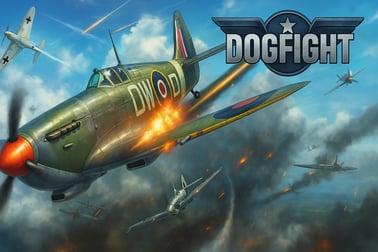
Dogfight is a fast-paced air combat game. Pilot a fighter plane, perform loops and rolls, and outmaneuver enemies in intense WWII-style battles.













Dogfight
Overview of Dogfight
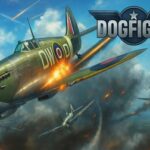
Dogfight is a fast-paced WW2 air combat game you can play directly in your browser. You jump into the cockpit of a nimble fighter plane and battle enemy aircraft in tight, arcade-style dogfights. With looping, rolling, and sharp turning maneuvers, Dogfight captures the thrill of an air war while staying simple enough for anyone to pick up and play.
This browser dogfight game focuses on short, intense air battles where quick reactions matter more than realistic flight simulation. It blends the feel of a classic arcade air war with modern controls and smooth HTML5 performance. If you enjoy an online airplane shooter where you can jump in, fire up your engines, and start taking down enemy planes in seconds, Dogfight is a perfect fit.
The game takes place in a World War II-inspired setting, with battles over oceans, fields, and war-torn skies. Each match pushes you to master basic dogfighting principles: maintain speed, control your angle of attack, and position yourself on the enemy’s tail. The goal is simple: survive, shoot down as many enemy fighters as you can, and become the ace of the sky.
Because Dogfight runs in the browser, there’s no download or long setup. Just load the page, hit play, and you’re in the air. It’s ideal for quick breaks, casual sessions, or practicing your skills until you feel like a true fighter pilot.
Dogfight Controls
Dogfight uses smooth, responsive keyboard controls that make aerial combat feel immediate and satisfying. While your exact key bindings may vary slightly depending on where you play, the standard layout in this browser dogfight game follows a simple pattern:
- W – Speed up / throttle up
- S – Slow down / throttle down
- A – Turn left
- D – Turn right
- Q – Sharp left turn (tight bank)
- E – Sharp right turn
- J – Fire primary weapon (machine guns)
- K – Fire sub-weapon (such as missiles or special shots, when available)
- Space – Pull up / pitch up
- Shift – Roll your fighter plane
- R – Reload weapons
These controls are tailored for quick access so you can easily perform complex aerial maneuvers while still focusing on aiming and firing. The combination of pitch, roll, and sharp turns lets you recreate iconic WW2 air combat moves, even if you’re new to flight games.
If you’re more comfortable with arrow keys, many browser versions also support them as an alternative for basic movement. Experiment with both setups to find what feels best for you. On some platforms, you can remap keys in the options or settings menu, which can be useful if you’re left-handed or using a compact keyboard.
Dogfight Game Modes
Dogfight is designed around energetic, replayable aerial battles that fit into short play sessions. Instead of a long story campaign, it offers focused modes that highlight its strengths as an online airplane shooter:
- Standard Dogfight Battles
- The core mode places you in a fighter plane against enemy aircraft in classic WW2-style dogfights.
- Your objective is to survive waves of enemies and rack up as many kills as possible before being shot down.
- Mission-Based Challenges
- Some versions of Dogfight include mission objectives like defending allies, surviving a set time limit, or taking down a certain number of planes.
- These missions increase in difficulty by adding tougher enemies or tighter time windows.
- Progressive Difficulty
- As you improve, enemies become more aggressive, turn faster, and fire more accurately.
- Earlier battles help you learn the basics; later battles demand sharper maneuvers, smarter positioning, and better resource management.
Across these modes, the main objective is almost always the same: stay alive longer than your opponents and dominate the skies. Score is typically based on how many enemy planes you destroy, how efficiently you use your weapons, and how long you can survive in sustained combat.
Because Dogfight is an arcade air war experience, winning doesn’t require memorizing long checklists or complex cockpit systems. Instead, you win by mastering the simple rules, reading enemy movement, and keeping your fighter plane in the best possible position to attack.
Performance & Troubleshooting
Dogfight is built as an HTML5 browser game, so it usually runs smoothly on most modern systems. If you run into performance issues while playing this WW2 air combat game, use the following tips to improve stability and frame rate:
- Close extra tabs and apps
- Other tabs and heavy background apps can steal CPU and memory.
- Before starting an intense fighter plane battle, close streaming services, downloads, or other games.
- Update your browser
- Use the latest version of Chromium-based browsers (Chrome, Edge, Brave) or Firefox for the best HTML5 performance.
- Older versions may cause stuttering in fast-paced browser dogfight games.
- Disable unnecessary extensions
- Ad blockers, script managers, and overlays can occasionally conflict with online airplane shooters.
- Try disabling them temporarily if you experience input lag or freezes.
- Check your connection
- While many aspects of Dogfight run locally, your connection still affects loading and any online services.
- Use a stable Wi-Fi or wired connection whenever possible.
- Lower display resolution (if available)
- Some platforms let you reduce visual quality or resolution inside the options menu.
- Lowering them can help older laptops or budget machines keep the action smooth.
If your controls feel unresponsive, make sure your browser tab is active and not running in the background. Also confirm that no other application is capturing keyboard input. Restarting the browser or switching to a different browser can instantly fix many minor issues.
Offline Play Availability for Dogfight
Dogfight is primarily designed as an online browser game, which means it’s meant to be played while your device is connected to the internet. In most cases, you’ll need an active internet connection to:
- Load the game files into your browser
- Access the latest version and bug fixes
- Sync any online data or settings stored by the platform
Once the game is open, a small amount of play might still be possible if your connection briefly drops, but Dogfight shouldn’t be treated as a fully offline title. It’s best to think of it as a quick, accessible online airplane shooter that you can start in just a few seconds whenever you have web access.
Because the game runs in the browser and not as a local install, there’s no official offline mode like you’d find in native PC or console games. If you plan to play while traveling, make sure you have reliable Wi-Fi or mobile data so you can enjoy uninterrupted WW2 air combat battles.
How to Play: Mastering Aerial Maneuvers and Controls
Learning how to play Dogfight is all about combining simple controls with smart aerial choices. The game’s design leans into arcade-style air war rather than strict simulation, so you can start flying quickly and improve as you go.
- Get off the ground (figuratively)
- When the battle starts, use W to increase your speed. Speed gives you control and keeps you from becoming an easy target.
- Use A and D to begin gentle turns and get a feel for how the fighter plane responds.
- Practice your pitch and rolls
- Use Space to pull up and gain altitude, which often gives you a better attack angle.
- Tap Shift to roll your plane. Rolling followed by a sharp turn lets you reposition quickly and dodge enemy fire.
- Use sharp turns to shake enemies
- When an enemy is on your tail, use Q or E for sharp turns.
- This sudden bank can throw off their aim and open a chance to counterattack.
- Attack with precision
- Fire your primary guns with J, but don’t hold it forever—controlled bursts are more accurate.
- Use K for your sub-weapon when you have a clear opportunity, such as when an enemy is flying straight.
- Manage ammo and reloads
- Keep an eye on your ammo; if you’re low, find a safer moment to press R and reload.
- Never reload when you’re being chased unless you’ve already broken line of fire.
The learning curve is gentle, so even if you’re new to WW2 air combat games, you’ll quickly understand the basics. Focus first on staying alive by moving constantly, then gradually refine your aim and timing to win more fighter plane battles.
Tips to Win More Air Battles and Become an Ace Pilot
To consistently win in this browser dogfight game, you’ll want to go beyond basic flying and adopt some simple strategy. These tips help turn a casual player into a genuine ace pilot:
- Maintain altitude advantage
- In most air combat battles, being above your opponent gives you control.
- Dive down on enemies from higher altitude for more speed and better attack angles.
- Don’t fly straight for too long
- Flying in a straight line makes you an easy target in any online airplane shooter.
- Even when chasing someone, mix in small rolls and minor turns to stay unpredictable.
- Circle around, don’t chase forever
- If an enemy keeps pulling sharp turns, don’t follow their exact path.
- Instead, cut across their turning circle to predict where they’ll end up and meet them with a burst of fire.
- Use speed as a weapon
- Speeding up (W) lets you quickly overtake and strike, while slowing down (S) can make an enemy overshoot and move into your sights.
- Alternate your throttle to control distance during dogfights.
- Fire in short bursts
- Holding down the trigger wastes ammo and reduces accuracy.
- Take brief, controlled shots when the enemy is centered in your sights.
- Break away when needed
- If you’re damaged or heavily outnumbered, perform a fast dive plus a roll, then use sharp turns to escape.
- Resetting the fight can be smarter than staying in a losing position.
The more you play, the better you’ll understand enemy movement patterns and how to counter them. Over time, you’ll start anticipating where planes will be a second from now instead of where they are right now—which is the real secret behind ace-level performance in Dogfight.
Game Modes, Missions, and Difficulty Levels Explained
Dogfight keeps its structure simple but rewarding, making it a great choice if you want quick WW2 sky battles without a huge learning curve. While exact labels may vary across platforms, most versions of this online airplane shooter offer some mix of the following:
- Arcade Dogfight Mode
- Core mode with non-stop fighter plane battles.
- Face off against waves of enemies and try to survive as long as possible.
- Ideal for practicing maneuvers and sharpening your aim.
- Mission or Objective-Based Play
- Short scenarios with specific goals, like downing a certain number of planes or lasting through timed assaults.
- Often introduce new enemy types, stronger opposition, or denser formations.
- Scaling Difficulty
- Starts relatively forgiving so new players can learn.
- As you improve and survive longer, enemies fire more accurately, react faster, and use smarter flight paths.
Because Dogfight is an arcade air war title, you won’t be buried in menus. Instead, you can restart instantly and experiment with new tactics every round. This loop—quick entry, intense combat, fast restart—is what keeps the game engaging over long sessions.
Best Browser Settings and Devices for Smooth Air Combat
Even though Dogfight is lightweight compared to full-scale simulators, your setup still matters if you want consistently smooth air combat battles. Use these simple guidelines to get the best performance and responsiveness:
Recommended browsers
- Chrome, Edge, Brave (Chromium-based)
- Firefox (recent versions)
These browsers tend to handle HTML5 canvas games like Dogfight well. Make sure hardware acceleration is enabled in your browser settings to reduce CPU load and help your GPU handle rendering.
Desktop and laptop tips
- Use a full keyboard when possible
- Dogfight works best with access to all standard keys (WASD, Q, E, J, K, Shift, Space, R).
- Plug in your device
- On laptops, enable high-performance or gaming power modes to prevent throttling.
- Play in a focused window
- Use full-screen mode if available; it can reduce visual distractions and input hiccups.
Mobile and tablet considerations
Some platforms offer mobile-friendly versions of Dogfight, but the experience can differ from desktop play:
- Touch controls
- On phones and tablets, controls may be simplified or virtual buttons may replace the keyboard layout.
- Performance
- Newer devices handle this arcade air war well, but older phones might show reduced frame rates.
- Wi-Fi over data
- For more stable gameplay, connect to a strong Wi-Fi network instead of relying on weak mobile data.
In general, a desktop or laptop with a keyboard gives you the most accurate control over your fighter plane, which is crucial in a fast-paced browser dogfight game like this.
Frequently Asked Questions About This WWII Air Battle Game
Is Dogfight a realistic flight simulator?
No. Dogfight is an arcade-style WW2 air combat game. It focuses on fun, easy-to-learn controls and fast battles instead of detailed cockpit procedures or strict physics. You still get authentic-feeling maneuvers like loops, rolls, and sharp turns, but they’re tuned for accessibility.
Do I need to download anything to play?
In most cases, no. Dogfight runs as an online browser game, so you simply open the game page and start playing. There’s no large installer, and updates are handled automatically by the platform hosting the game.
Can I use a gamepad or controller?
Some browsers and platforms support controllers, but Dogfight is primarily built around keyboard controls. If controller support is available, it will usually be listed in the game’s description or settings. Keyboard control is recommended for the best experience in this particular fighter plane battle game.
Is Dogfight free to play?
On most browser gaming sites that host Dogfight, it’s available as a free-to-play arcade air war experience supported by ads or platform features. Always use trusted, family-friendly sites when looking for the game, and avoid unofficial downloads.
Is Dogfight appropriate for kids?
Dogfight depicts air combat between WW2-style planes, but the action is typically stylized rather than graphic. There’s no gore, and the focus is on arcade shooting, looping, and dodging in the sky. As always, parents should review the game themselves and decide if it fits their family’s preferences.
Whether you’re a long-time fan of WW2 air combat games or just want a quick, fun online airplane shooter to fill a break, Dogfight delivers compact, high-energy battles that keep you coming back for “one more flight.” Take off, engage the enemy, and see how long you can rule the skies.
Frequently Asked Questions
What is Dogfight about?
Dogfight is an air combat game where you pilot a fighter plane in intense aerial battles, performing maneuvers like loops, rolls, and sharp turns to defeat enemy aircraft.
Can I play Dogfight for free in my browser?
Yes, Dogfight can be played for free in a web browser on supported platforms, with no download required for the browser version.
Is Dogfight suitable for kids?
Dogfight features cartoon-style airplane battles with mild combat effects and no graphic violence, making it generally suitable for older kids and teens. Parents should still review the game first.
Do I need a controller to play Dogfight?
No, you can play Dogfight using your keyboard. Common keys control speed, turning, sharp turns, rolling, firing, sub-weapons, and reloading.
Does Dogfight have missions or just endless battles?
Dogfight typically includes mission-style levels as well as repeatable air battles, letting you practice maneuvers, complete objectives, and try for higher scores.