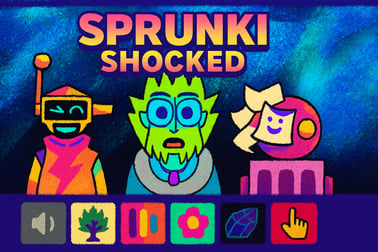
Sprunki Shocked lets you mix electric beats with animated shocked characters. Play the music mod online in your browser for free.















Sprunki Shocked
Introduction to Sprunki Shocked
Sprunki Shocked is an online music remix game that lets you turn simple sounds into shocking, electrified tracks right in your browser. Inspired by Incredibox-style beat mixing, this rhythm mixing browser game focuses on easy drag-and-drop controls, expressive “shocked” characters, and high-energy sound loops that kids and casual players can enjoy in minutes.
You don’t need music theory or production skills to have fun here. Sprunki Shocked is built as a free musical creativity game where you experiment with different characters, layer beats, trigger special animations, and gradually discover powerful combos. It’s casual enough for younger players, but still satisfying for older music fans who enjoy tinkering with loops and rhythms.
Because the game runs in the browser, there’s no download, no long setup, and no extra launcher. Just load the page, hit play, and start building your own electrifying soundscape using an interactive music mod that reacts visually to every choice you make.
How to Play Sprunki Shocked
Sprunki Shocked is designed so that anyone can jump in and start mixing within seconds. Here’s a simple walkthrough of the basic rules and mechanics so you can build your first track without feeling overwhelmed.
Step 1: Load the Stage
When the game launches, you’ll see a lineup of characters at the bottom of the screen and a set of empty slots or positions on the stage. Each character represents a sound type: drums, bass, melody, effects, and more. The empty slots are where you’ll place them to create your mix.
Think of it like a human drum machine: each character is a different loop, and the stage is your music sequencer.
Step 2: Drag and Drop Characters
To start your remix:
- Click or tap on a character icon.
- Drag that character onto one of the empty stage slots.
- Release to drop them in place and hear their loop start playing.
Each time you place a new character, the overall track changes. Some handle rhythm, some add bass, others give you melody or strange electric sound effects. Part of the fun is experimenting to hear how each piece fits.
Step 3: Mix, Replace, and Remove
You can customize your sound at any time:
- Replace a character by dragging a new one onto the same slot.
- Remove a character by clicking or tapping them again (or using a remove button, depending on the version).
- Mute or stop parts of the mix by clearing certain slots and seeing how the sound changes.
Because Sprunki Shocked is a rhythm mixing browser game, there’s no “wrong” way to play. The goal is to find a groove you like and keep tweaking until it feels just right.
Step 4: Trigger the Shocked Specials
Some character combinations unlock powerful “shocked” animations and special sequences. When you place the right mix on the stage, you might see:
- Characters’ eyes widen with electric surprise
- Background flashes and strobe-like visual bursts
- Unique musical breaks or bonus loops
These shocking combos are the heart of the interactive music mod experience. They reward experimentation and make the game feel alive and reactive to your creativity.
Step 5: Replay and Refine Your Remix
Once you find a setup you like, let it play for a while and listen. Then start adjusting:
- Swap one rhythm character for another to change the groove.
- Replace a melody character with a more intense or calmer line.
- Try adding extra effects to make the track more electric and tense.
The loop-based design means your remix never has to be finished. You can keep improving it, restart from scratch, or try completely different combinations whenever you like.
Sprunki Shocked Features
What makes Sprunki Shocked stand out from other online music remix games is how it blends sound, visuals, and simple controls into one cohesive, kid-friendly experience. Here are some of the key features you’ll notice once you start playing.
Expressive “Shocked” Characters
The characters are the stars of the show. Each one has:
- Big, surprised facial expressions that react to the beat.
- Snappy, energetic animations that move in time with the music.
- Unique sound loops that match their visual style, from buzzing synths to punchy drums.
This makes every remix feel like a mini performance, not just a playlist of loops.
Electric Visual Atmosphere
Sprunki Shocked leans into a high-voltage theme with:
- Neon colors and glowing details
- Flashes, pulses, and subtle shakes when combos trigger
- A stage that feels alive and in sync with your beats
These visuals enhance immersion without being too overwhelming for younger players.
Simple, Kid-Friendly Controls
The game relies on very basic actions:
- Click / tap to select.
- Drag / drop to place characters.
- Click again to remove or swap.
Because there are no complex menus, meters, or tiny buttons to manage, Sprunki Shocked works well as a beat making for kids experience that still feels fun for teens and adults.
Instant Browser Play
There’s nothing to install. Sprunki Shocked runs as a web-based rhythm mixing browser game, which means:
- No downloads or patches
- No account required on most game portals
- Quick load times on modern connections
This makes it perfect for quick creative breaks at home, in class (when allowed), or on shared family devices.
Replayable Musical Sandbox
Instead of fixed levels or missions, Sprunki Shocked gives you an open-ended sandbox for musical experimentation. Every session can lead to a totally different track, simply based on which characters you choose and in what order you place them. That keeps the game fresh even after many play sessions.
How to Play Sprunki Shocked and Build Your First Remix
If you want a more guided path to your first successful remix, follow this simple blueprint. It’s especially useful if you’re playing with kids or if this is your first interactive music mod.
1. Start with a Solid Drum Foundation
Begin by filling one or two slots with rhythm characters. These usually provide:
- Kicks and snares
- Claps or hi-hats
- Basic percussive loops
Listen for a moment until the beat feels stable and not too crowded. A clean foundation makes everything else sound better.
2. Add a Bass Character
Next, drag in a bass-focused character. Look for deeper, lower-pitched sounds. A good bass loop will:
- Lock in with your drums
- Give the mix weight and groove
- Make the track feel more complete
If it sounds muddy or off-beat, try swapping for another bass or removing one of the drum characters.
3. Layer Melodies and Chords
Now bring the tune to life with melodic characters:
- Synth leads
- Vocal fragments
- Chords or pads
Don’t overload the stage. Start with only one main melody and maybe one background chord character, then adjust until you like the balance.
4. Sprinkle in Electric FX
Once the core beat is strong, you can add characters that provide:
- Glitchy sounds
- Whooshes, zaps, or risers
- Weird vocal effects
These elements make your remix feel “shocked” and dynamic, but they work best in moderation. Too many at once can make the track feel messy.
5. Hunt for Shocking Combos
With the base track set, start experimenting:
- Swap out one rhythm and listen.
- Try different melody + effects pairings.
- Pay attention when big visual reactions happen – those often signal hidden combos.
Over time, you’ll learn which characters work well together, making it easier to create impressive electric beats quickly.
Features That Make This Electric Music Mod Stand Out
Among free musical creativity games, Sprunki Shocked has a few qualities that make it especially appealing to both kids and casual players.
Accessible Entry, Surprising Depth
The game is incredibly easy to start: drag, drop, listen. Yet behind those simple controls lies a surprising depth of possible combinations and moods. You can build:
- Chill, slow grooves
- Fast, intense electric tracks
- Weird, experimental sound collages
This makes it a great gateway into music-making without the complexity of full digital audio workstations.
Strong Visual Feedback
Kids respond especially well to visual feedback, and Sprunki Shocked delivers that with:
- Instant facial reactions when characters start playing
- Stage pulses synced to your rhythm
- Unique animations when you trigger certain setups
Visual cues help players understand that their choices matter, reinforcing creative experimentation.
No Punishing Fail States
There’s no “game over” screen, no score to fail, and no need to be perfect. That’s ideal for younger players who might be discouraged by difficult rhythm challenges. Instead, Sprunki Shocked rewards curiosity and playfulness.
Great for Short or Long Sessions
You can hop in for five minutes to build a quick loop or spend half an hour chasing the perfect combo. The loop-based format works well whether you have lots of time or just a short break.
Tips for Mixing Beats and Unlocking Shocking Combos
Want your tracks to sound more polished and electric? These practical tips will help you get the most out of this rhythm mixing browser game.
1. Limit How Many Characters You Use
It’s tempting to fill every slot immediately, but that can make your remix sound crowded. A good rule of thumb:
- 1–2 drum characters
- 1 bass character
- 1–2 melody or chord characters
- 1–2 effect characters
Start small, then add more only if you feel something’s missing.
2. Listen in Layers
Build your track layer by layer, and after each character you add:
- Pause and listen for a few loops.
- Ask yourself what that new sound adds.
- If it doesn’t improve the mix, remove or replace it.
This mindset mirrors basic mixing techniques used in real music production, simplified for a kid-friendly format.
3. Experiment with Swaps, Not Just Additions
Instead of only piling on more characters, try swapping one at a time:
- Replace one drum with another to drastically change the groove.
- Try different melody characters over the same rhythm.
- Cycle through effect characters until one “clicks” with your beat.
Swapping is often how you stumble into shocking combos and hidden sequences.
4. Use Silence Strategically
Don’t be afraid to leave one slot empty. A little breathing room can:
- Make the beat feel cleaner and more powerful.
- Help important melodies stand out.
- Make shocking effects feel more impactful when they hit.
Even in a high-energy electric remix, contrast is your friend.
5. Watch for Visual Cues
When you’re close to a cool combo, you’ll often see:
- Extra bright flashes or screen pulses
- Characters reacting in sync more dramatically
- The stage background shifting more intensely
If that happens, note which characters are on stage. Try small tweaks around that lineup to lock in the best version of the combo.
Is Sprunki Shocked Safe and Kid-Friendly to Play Online?
Many parents and teachers want to know whether an online music remix game like Sprunki Shocked is appropriate for younger players. While exact content can vary slightly depending on the hosting site, the core experience is designed to be broadly family-friendly.
Content and Tone
Sprunki Shocked focuses on:
- Music creation and rhythm
- Cartoon-style, “shocked” character expressions
- Abstract electric visuals and sound effects
There’s no graphic violence, no realistic harmful content, and no storylines aimed at adults. Some mods in the broader Sprunki or Incredibox community lean into spooky or intense themes, but Sprunki Shocked’s main appeal is its energetic, playful style.
In-Game Purchases and Ads
On most browser gaming platforms, Sprunki Shocked is offered as a free musical creativity game supported by ads. Safety tips for families include:
- Playing on trusted, well-moderated browser game sites.
- Enabling any available kid or family mode on the platform or device.
- Supervising younger kids, especially if they’re likely to click on external ads.
The game itself typically doesn’t require purchases to enjoy the core play loop, which makes it a budget-friendly activity for kids who love music.
Online Interactions
The core Sprunki Shocked experience is single-player. You’re not chatting with strangers or playing head-to-head. If a site offers features like comments, leaderboards, or community remixes, those usually belong to the hosting platform, not the game itself. Parents can disable or monitor those features if needed.
Browser & Device Requirements for Smooth Sprunki Shocked Gameplay
To get the best experience from this rhythm mixing browser game, it helps to meet a few basic tech requirements. Fortunately, the game is lightweight compared to full 3D titles.
Recommended Browsers
Sprunki Shocked generally runs well in any modern, up-to-date browser, including:
- Chrome
- Edge
- Firefox
- Safari
For the smoothest performance, make sure your browser is updated to the latest version and that hardware acceleration is enabled if available.
Desktop and Laptop Performance
On PC or Mac, even older machines can usually handle Sprunki Shocked because:
- Graphics are 2D and not hardware-intensive.
- Audio processing is relatively light.
- The game runs inside the browser instead of as a heavy install.
If you run into stutters, closing extra tabs or background apps often helps.
Mobile and Tablet Play
Many players enjoy Sprunki Shocked as a tap-based beat making for kids experience on touchscreens. For best results:
- Use a recent iOS or Android device.
- Play in landscape mode to see the full stage comfortably.
- Connect to a stable Wi-Fi network to reduce loading times.
Older or very low-end phones might struggle with sound latency, but most mainstream devices handle the game fine.
Performance & Troubleshooting
If Sprunki Shocked isn’t running smoothly, these quick fixes can usually solve the most common issues.
Fixing Lag or Audio Stutters
- Close unused tabs: Too many active tabs can slow the browser.
- Disable background streams: Stop any other music or video playing in another app.
- Lower system load: Close heavy programs like video editors or big downloads.
If the problem continues, try a different browser to rule out browser-specific issues.
Game Won’t Load or Stays on a Black Screen
- Refresh the page after a few seconds.
- Check your internet connection.
- Disable aggressive ad blockers for that page, if safe to do so.
- Clear browser cache and reload.
Some blockers can interfere with game scripts, so temporarily pausing them on the game page can help, provided you trust the site.
No Sound or Very Quiet Audio
- Verify that the device volume is up and not muted.
- Check in-browser volume controls, if present.
- Plug or unplug headphones to reset the audio output.
- Restart the browser if sound is missing only in that tab.
Because Sprunki Shocked is all about audio, fixing sound issues will dramatically improve your experience.
Offline Play Availability for Sprunki Shocked
Sprunki Shocked is primarily built as an online music remix game that runs in your browser, which means it generally requires an active internet connection to load and play.
Why It’s Mostly Online-Only
The game depends on:
- Assets loaded from the hosting website
- Scripts that run through the browser environment
- Occasional platform-side updates or changes
Without a connection, most browsers can’t access all those files, so the game either won’t start or will only partially load.
Workarounds and Caching
Some browsers cache assets temporarily, which can let a page reload with limited or no connection. However, this isn’t a reliable way to play Sprunki Shocked offline because:
- Cached data can be cleared at any time.
- Not all required files may be stored locally.
- Hosting sites are designed for online use.
If you know you’ll have spotty internet, it’s better to plan play sessions for when you’re connected, or use downloaded music apps specifically designed for offline use.
In short: enjoy Sprunki Shocked as a fun, always-ready browser experience when you’re online, and treat it as a creative playground for electric beat making whenever you have a connection.
Frequently Asked Questions
What is Sprunki Shocked?
Sprunki Shocked is a browser-based music remix game where you drag and drop animated characters with shocked expressions to create your own beat combinations and soundtracks.
Do I need to download anything to play Sprunki Shocked?
No, Sprunki Shocked runs directly in your web browser. You do not need to download or install any additional files to start playing.
Is Sprunki Shocked suitable for kids?
Yes, Sprunki Shocked is designed as a family-friendly rhythm game with colorful visuals and non-violent content, making it suitable for most kids and teens.
Can I play Sprunki Shocked on mobile devices?
In most cases you can play on modern mobile browsers. For the best experience, use an up-to-date browser and a stable internet connection on your phone or tablet.
How do I create better music mixes in Sprunki Shocked?
Experiment by combining different characters for drums, melodies, and effects, layering sounds gradually and muting or swapping characters until the rhythm feels balanced and energetic.