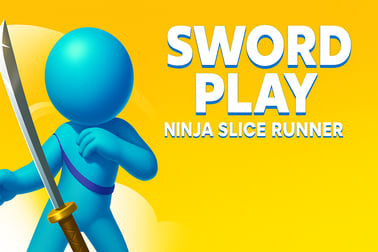
Sword Play Ninja Slice Runner lets you dash, slash, and slice enemies and bullets with a flying katana. Play the fast-paced ninja runner online for free.














Sword Play Ninja Slice Runner
Overview of Sword Play Ninja Slice Runner
Sword Play Ninja Slice Runner is a fast-paced ninja slice runner where you guide a flying katana through waves of stickman enemies, bullets, and traps. Think of it as a mix between a classic runner game and a stylish katana action game. You glide automatically through each level, carving enemies in half, slicing bullets mid-air, and dodging anything that could shatter your blade.
As you progress, you unlock new swords, throwing knives, and other ninja gear that change how your attacks look and feel. It’s simple enough for new players to pick up in seconds, but it rewards precision, timing, and clever movement like a true stickman fighting game. Because it runs in the browser, you can jump in instantly—no big downloads or installs needed—making it a perfect quick-hit online ninja arcade experience.
If you enjoy smooth swipes, dramatic slow-motion slices, and that satisfying feeling of cutting bullets in half just before they hit you, Sword Play Ninja Slice Runner is built for you.
Game Name Controls
Sword Play Ninja Slice Runner keeps the control scheme intentionally simple so you can focus on your reflexes and awareness rather than memorizing complex inputs. Here’s how it usually works in the browser version:
Mouse & Keyboard Controls (Desktop & Laptop)
- Move your sword: Click and hold the left mouse button, then drag to move the sword around the screen.
- Slash enemies & bullets: Just drag your sword through enemies or projectiles. The slicing happens automatically when you make contact.
- Pause or menu: Use the on-screen pause/menu button (often in a corner of the game window).
Touch Controls (Mobile & Tablet Browser)
- Move your sword: Tap and hold your finger on the screen, then swipe to guide the blade.
- Slice: Just drag the blade through targets—no extra buttons required.
There are no jump, attack, or special ability keys to juggle. Your only job is to guide the blade, which makes the game accessible while leaving plenty of room for mastery as the levels get tougher and denser with enemies.
Key Features
Even though Sword Play Ninja Slice Runner is easy to pick up, it packs a surprising amount of variety for a browser-based katana action game. Here are the standout features you can expect:
- Flying katana gameplay: Control a sword directly instead of a full character, turning every movement into a slash or parry.
- Bullet slicing runner action: Enemies fire bullets and other projectiles that you can slice in half to stay alive, creating intense “last-second save” moments.
- Stickman enemies: Face waves of stickman fighters using guns, blades, and other weapons—perfect for a clean, readable stickman fighting game aesthetic.
- Weapon unlocks: Collect in-game currency or points to unlock new swords, knives, and other ninja weapons that change your visual style and sometimes your hit effects.
- Simple, responsive controls: Swipe or drag to move the sword; the game automatically advances, so you can focus on timing and positioning.
- Arcade-style progression: Levels get progressively harder, with tighter bullet patterns, more enemies, and faster reactions required.
- Instant browser play: No installation, no account required on most portals; just press play and start slicing.
- Family-friendly visuals: Despite all the action, the minimalistic stickman style keeps the game light, stylized, and appropriate for most ages.
These features combine to create a fast, arcade-like experience that feels right at home in your browser, whether you’re on a short break or chasing high scores for longer sessions.
Performance & Troubleshooting
Sword Play Ninja Slice Runner is built to run smoothly on most modern browsers and devices. If you’re experiencing lag, stutters, or unresponsive controls in this bullet slicing runner, use the checklist below to clean things up.
Improve Performance in Your Browser
- Close extra tabs: Streaming, large downloads, or many open tabs can steal CPU and RAM, making the game feel sluggish.
- Update your browser: The latest versions of Chrome, Edge, Firefox, and Safari handle WebGL and HTML5 games more efficiently.
- Disable heavy extensions: Ad blockers, script blockers, or VPN extensions can sometimes conflict with online ninja arcade titles. Try disabling them temporarily for the game’s tab.
- Refresh the page: A full reload can fix one-off loading issues or asset glitches.
Input & Control Issues
- Mouse not responding: Check that the game canvas is active by clicking inside it once before trying to drag.
- Touch delay on mobile: Turn off any system gestures that might conflict with swiping (like edge-swipe navigation) or use full-screen mode if the site offers it.
- Cursor jumps or stutters: Clean your mouse sensor area and use a smooth surface, or try another USB port if you’re on desktop.
Graphics & Loading Problems
- Black or blank screen: Ensure JavaScript is enabled and that you haven’t blocked site scripts.
- Slow initial loading: Wait a few seconds for assets to cache. On slower connections, the first load of a 3D or animated runner game can take a bit.
- Audio glitches: If sound cuts in and out, lower the volume or mute, then unmute the in-game slider. Closing other audio-heavy tabs or apps can also help.
If issues persist, try a different browser or device. Because Sword Play Ninja Slice Runner is widely available across multiple portals, you can also test it on another site to see if the problem is platform-specific.
Is Sword Play Ninja Slice Runner Safe to Play?
Sword Play Ninja Slice Runner is generally safe to play online when accessed through reputable browser gaming sites. The game is designed as a light, stylized ninja slice runner with stickman visuals and no graphic gore, making it more cartoonish than realistic.
Content & Age Considerations
- Violence style: The action involves cutting enemies and bullets, but the visuals are simplified stick figures without realistic blood or injury detail.
- Language & themes: No explicit language or mature themes are typically present.
- Audience: Suited for older kids, teens, and adults who enjoy arcade-style katana action games.
Online Safety Tips
- Play on trusted platforms: Stick to well-known browser gaming portals rather than random download sites.
- No personal info: You should never need to enter sensitive personal data just to play this online ninja arcade in your browser.
- Ad awareness: Many free sites use ads. Avoid clicking suspicious pop-ups, and close any windows that look unrelated to the game.
Parents can also enable content filters or use child-safe gaming portals if young players are interested in Sword Play Ninja Slice Runner and similar action titles.
How to Master the Katana in This Ninja Runner
To dominate Sword Play Ninja Slice Runner, you’ll need more than random swipes. Mastery comes from treating your blade like a precision instrument rather than a chaos broom. Here’s how to level up your katana skills:
Think in Arcs, Not Dots
Instead of tapping enemies one by one, move your sword in smooth arcs that pass through multiple targets. This lets you:
- Hit several enemies with a single motion.
- Slice bullets and foes in the same sweep.
- Stay in control without jerky, imprecise moves.
Lead Your Targets
Enemies and bullets are always moving toward you. Aim slightly ahead of where they are right now. Visualize where they’ll be a fraction of a second later and drag your katana through that future position.
Watch the Edges of the Screen
Many threats spawn from the edges. Train your eyes to:
- Glance constantly between the center and edges.
- React quickly to new enemies or projectiles before they crowd the middle.
- Pre-position your sword near where bullets usually appear.
Stay Calm Under Pressure
In any high-speed bullet slicing runner, panic leads to overcorrection. Move with intention, keep your swipes controlled, and remember: it’s better to cleanly block one bullet than to miss three because you rushed a messy swing.
Tips to Slice Bullets and Avoid Enemy Attacks
Bullet slicing is what makes Sword Play Ninja Slice Runner stand out from other runner games. These focused tips will help you live longer and score higher in this intense stickman fighting game experience.
Prioritize Bullets Over Enemies
If you have to choose between hitting an enemy and cutting an incoming shot, always slice the bullet first. A surviving enemy might get another chance to fire, but a missed bullet usually ends your run.
Cut Across the Bullet’s Path
For reliable parries, swipe your katana perpendicular to the bullet’s direction rather than following behind it. This increases your chance to connect and gives you more control of the timing.
Use Short, Fast Swipes
Big, sweeping motions feel flashy but leave you out of position. Try to:
- Make compact defensive swipes in tight areas.
- Reserve larger arcs for when the screen is less crowded.
- Reset your blade towards the center after each defensive move.
Memorize Common Attack Patterns
Many levels reuse certain enemy formations or firing patterns. After a few runs, you’ll start to recognize when and where bullets usually appear. Use that knowledge to preemptively move into a safe lane and slice them before they become overwhelming.
Unlock New Swords and Ninja Weapons as You Run
One of the most satisfying parts of Sword Play Ninja Slice Runner is building your arsenal. Unlocking new blades keeps the game fresh and lets you personalize your ninja slice runner style.
How Unlocking Typically Works
Across most browser platforms, you’ll unlock weapons by:
- Collecting points or coins: Earned during each run when you defeat enemies or complete levels.
- Hitting milestones: Reach certain score thresholds, streaks, or stage completions to open new items.
- Daily return bonuses: Some versions reward you for coming back regularly, occasionally granting weapon unlocks.
Why Try Different Weapons?
New swords and ninja weapons often bring:
- Visual flair: Unique colors, trails, and effects for your slashes.
- Shape and reach variety: Wider blades may feel more forgiving when slicing bullets around the edges.
- Motivation to improve: Setting a goal to unlock the next katana skin naturally pushes you to master the game’s systems.
Smart Progression Strategy
- Focus on survival first: Longer runs mean more points and faster unlocks.
- Play in focused sessions: A few solid attempts are more rewarding than many rushed, short runs.
- Experiment: Once you unlock a new sword, give it a few rounds to see how it feels before switching again.
Over time, you’ll find a favorite blade that matches your rhythm and style, turning this katana action game into a highly personalized experience.
Controls and Gameplay Basics for New Players
If you’re just starting Sword Play Ninja Slice Runner, this quick guide will get you comfortable with the fundamentals so you can start slicing with confidence.
Your Sword Moves, Not the World
The game scrolls forward automatically like a classic runner game. You don’t control movement speed; you control only the sword’s position on the screen. Enemies and bullets come to you—your job is to decide where to meet them.
Basic Gameplay Loop
- Start the run: Hit play on your browser gaming site.
- Guide your sword: Use your mouse or finger to drag the katana around the screen.
- Slice enemies: Move directly through stickman opponents to defeat them.
- Cut projectiles: Intercept bullets and other shots with quick swipes.
- Avoid taking hits: Any bullet or hazard you don’t slice or dodge can end your run.
- Collect points: Survive longer and defeat more enemies to rack up high scores and unlock weapons.
Beginner-Friendly Tips
- Stay near the center of the screen whenever possible for maximum reaction time.
- Don’t chase every enemy; play defensively until you’re comfortable with bullet patterns.
- Take short breaks between runs to avoid fatigue—precision is everything in a bullet slicing runner.
Best Browser and Device Settings for Smooth Ninja Runs
For a silky-smooth online ninja arcade experience, small tweaks to your setup can make a big difference. Sword Play Ninja Slice Runner doesn’t demand a top-tier PC or phone, but optimizing your environment helps avoid frustrating lag or input delays.
Recommended Browser Setup
- Use a modern browser: Chrome, Firefox, Edge, or Safari updated to the latest version.
- Enable hardware acceleration: In your browser settings, make sure hardware acceleration is turned on to improve graphics performance.
- Full-screen mode: If available on your chosen platform, full-screen play reduces distractions and accidental clicks outside the game.
Desktop & Laptop Tips
- Use a stable mouse: A wired mouse often feels more responsive than a low-battery wireless one.
- Close heavy apps: Shut down video editing tools, big downloads, or other CPU-heavy apps while you’re playing.
- Check your power plan: On laptops, set the power mode to “Performance” instead of “Battery saver” for smoother gameplay.
Mobile & Tablet Tips
- Lock orientation: Since Sword Play Ninja Slice Runner plays best in a consistent orientation, lock your screen rotation so it doesn’t flip mid-run.
- Clear background apps: Close unused apps to free memory and prevent stutters.
- Stable connection: Use a reliable Wi-Fi network for faster loading and fewer interruptions.
With these settings in place, your katana will feel more responsive, making every swipe and slice in Sword Play Ninja Slice Runner as sharp as it should be.
Frequently Asked Questions
What is Sword Play Ninja Slice Runner?
Sword Play Ninja Slice Runner is a fast-paced action runner where you control a flying sword, slicing enemy stickmen and bullets while racing to the finish line.
How do I play Sword Play Ninja Slice Runner?
Your sword moves forward automatically. Swipe on mobile or click and drag on PC to steer left and right, slice enemies in half, and cut bullets and other projectiles to avoid damage.
Is Sword Play Ninja Slice Runner free to play?
Yes, Sword Play Ninja Slice Runner is free to play in your browser, with no download required. Just load the game and start slicing.
Can kids play Sword Play Ninja Slice Runner?
The game features cartoon stickman combat and weapon use, so it is generally better suited for older kids and teens. Parents may wish to review the game first.
Do I need to create an account to save my progress?
On some gaming platforms you can create a free account to save your progress and access it from multiple devices, but you can also play instantly as a guest.