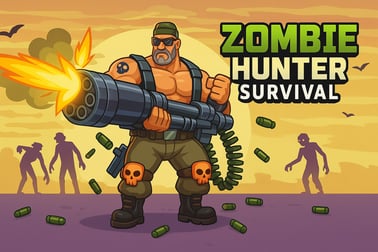
Zombie Hunter Survival lets you battle endless zombie waves, upgrade weapons, and survive as long as you can in this intense online survival shooter.
Zombie Hunter Survival
Introduction to Zombie Hunter Survival
Zombie Hunter Survival is a fast-paced zombie survival shooter where you fight through an endless zombie horde from a top-down perspective. Each round throws more undead at you, forcing you to keep moving, shooting, and upgrading your gear if you want to survive one more wave. It’s a quick, arcade-style browser survival game that you can jump into in seconds, with no downloads or installs required.
Played in a simple top down shooting game view, you control a lone survivor trying to hold back zombies closing in from every direction. Your job is to stay alive, grab upgrades, and turn your basic gun into a powerful zombie-clearing machine. As you last longer, enemies become tougher, faster, and more numerous, creating a satisfying challenge for shooter fans.
If you enjoy straightforward action, quick sessions, and the thrill of squeezing through impossible odds, Zombie Hunter Survival delivers that classic horde-mode feeling right in your browser.
Zombie Hunter Survival Control Guide
The controls in Zombie Hunter Survival are intentionally simple so you can focus on dodging and shooting the undead instead of wrestling with complex inputs. Even if you’re new to browser shooters, you’ll pick it up in a few seconds.
Keyboard & mouse controls (PC / laptop)
- Movement: Use the W, A, S, D keys or the arrow keys to move your hunter around the arena.
- Aim: Move your mouse to aim in any direction in this top down shooting game.
- Shoot / Attack: Left-click to fire your weapon. Some browsers also support auto-fire in certain builds, but plan on clicking or holding the button.
- Special actions: If the version you’re playing includes grenades or special skills, they’re usually bound to Spacebar or number keys like 1 / 2.
- Pause: Press Esc or click the on-screen pause icon, if available.
Touchscreen controls (mobile / tablet in browser)
- Virtual joystick: A thumb-stick appears on the left side of the screen for movement.
- Fire button: A shoot button or virtual joystick on the right side lets you aim and shoot.
- Menus & upgrades: Tap on on-screen buttons to select perks, upgrade weapons online, or continue to the next wave.
Because the game is built around quick reactions, it’s important to get comfortable with strafing (moving sideways) while shooting. Practice circling around zombie clusters instead of backing up in a straight line—this reduces the chance of getting pinned against the edge of the map.
Zombie Hunter Survival Features
Zombie Hunter Survival stands out as a browser survival game by focusing on sharp, replayable action with simple rules but surprisingly tense moments. Here are the key features you can expect when you jump in.
- Endless zombie waves: There’s no scripted ending—the goal is to survive as long as you can as the endless zombie horde grows in strength and numbers.
- Top-down shooting game perspective: Classic arcade-style camera lets you see threats from every direction and plan your movement paths.
- Weapon upgrades between waves: Use collected currency or points to upgrade weapons online, boosting damage, fire rate, bullet spread, and more.
- Progressive difficulty: Zombies start slow and weak but become faster, tougher, and more aggressive the longer you stay alive.
- Pick-up-and-play design: No account required on most platforms, no downloads, and very short load times.
- Accessible controls: Simple WASD + mouse setup or touch controls make it easy for new players while still feeling responsive for shooter veterans.
- Lightweight performance: Designed to run smoothly inside your browser, even on average hardware and mobile devices.
Together, these features create a tight, easy-to-understand loop: survive a wave, upgrade your kit, face a nastier horde, and repeat until the zombies finally overwhelm you.
Performance & Troubleshooting
Because Zombie Hunter Survival runs directly in your browser, performance mostly depends on your device and browser setup. If you’re experiencing lag, stutters, or input delay while facing the endless zombie horde, run through these quick checks.
Improving performance
- Close extra tabs: Streaming, downloads, and many open tabs can steal CPU and memory from your zombie survival shooter.
- Disable heavy extensions: Ad-blockers, script injectors, or VPN plugins can sometimes slow browser games.
- Lower browser zoom: Play at 100% zoom for best performance and avoid scaling the page too large.
- Switch browser: If you have issues in one browser, try another modern one like Chrome, Edge, or Firefox.
- Check battery mode: On laptops and mobile, make sure you’re not in extreme battery-saver mode, which can cap performance.
Fixing loading or black-screen issues
- Refresh the page: A simple reload often resolves stalled loads.
- Enable JavaScript: The game relies on JavaScript; if it’s disabled, the title may not run at all.
- Clear cache: Old cached data can conflict with updated game files—clearing browser cache may help.
- Update browser: Use the latest version to ensure compatibility, especially with WebGL graphics.
Input and control problems
- Unfocus / refocus the game: Click inside the game window to make sure it has keyboard focus.
- Disable conflicting software: Overlays (recorders, FPS counters) or screen-capture tools can occasionally interfere with input.
- Try fullscreen: Use the in-game fullscreen option if available to reduce accidental clicks outside the game area.
If you’re playing on mobile and find controls too sensitive, try rotating the device (if portrait/landscape options exist) and make sure you’re not in “desktop site” mode, which can change the size of virtual buttons.
Can I Play Zombie Hunter Survival Offline?
Zombie Hunter Survival is primarily designed as an online browser survival game, so in most cases you’ll need an active internet connection to load and play it. The core game files, graphics, and logic are delivered through your browser each time you open the page, which makes it easy to access but also means it’s not a traditional offline app.
Some platforms may cache parts of the game temporarily, but you shouldn’t rely on that for consistent offline play. If you lose connection mid-session, your current run may freeze or the page may need to be refreshed when you’re back online.
Because it’s not an installable client, Zombie Hunter Survival doesn’t typically support offline progression or local saves the way standalone apps do. For the best experience, play with a stable internet connection and let your browser handle any cloud or local storage that the host site provides.
How to Survive Endless Zombie Waves in Zombie Hunter Survival
Lasting more than a few minutes against an endless zombie horde isn’t about perfect aim alone—it’s about movement, spacing, and smart use of upgrades. Here’s how to stretch each run as far as possible.
Keep moving at all times
- Never stand still: Standing still, even to line up headshots, invites zombies to surround you.
- Strafe in circles: Move in wide circles or figure-eight patterns to drag zombies into predictable paths.
- Avoid corners: Corners and map edges can trap you with no escape when extra waves spawn.
Control the flow of the horde
- Funnel enemies: Try to gather zombies into a tight group before unloading shots through the cluster for maximum value.
- Leave an escape lane: Always keep one direction relatively clear, so you can dash through if things get overwhelming.
- Thin fast enemies first: Speedy zombies can break your formation and force mistakes—remove them before focusing on tanky targets.
Balance aggression and safety
- Don’t over-chase pickups: Power-ups and coins are great, but not worth running straight into a pack.
- Retreat aggressively: Fire while backing up or sidestepping instead of turning your back completely.
- Use calm moments: Between surges, reposition to the center of the map and prepare for the next wave.
Once you’re comfortable with these basics, each run becomes a rhythm: pull the horde, kite them cleanly, unload your upgraded weapons, then reposition before they respawn around you.
Best Weapons and Upgrades to Clear the Zombie Horde
A huge part of succeeding in this zombie survival shooter is learning how and when to upgrade weapons online. Even a basic gun can feel powerful with the right enhancements, while poor upgrade choices can leave you outgunned by mid-game.
Prioritize damage and fire rate first
- Damage per shot: Upgrading raw damage early makes every bullet more valuable and lets you one-shot weaker zombies for longer.
- Fire rate: A faster fire rate helps when the map is packed and you need to carve a quick escape route.
- Combine both: Aim for a balance—too much damage with a slow gun, or a fast gun with low damage, can both feel weak against later waves.
Area damage and crowd control
- Spread / projectile count: If your gun can shoot multiple projectiles, increasing spread or bullet count is fantastic for horde control.
- Explosive or piercing shots: If available, perks that let bullets pierce enemies or explode on impact are some of the strongest upgrades in any top down shooting game.
- Slow or stun effects: Crowd control buys you precious seconds when the endless zombie horde closes in.
Survivability upgrades
- Max health: A bit of extra HP can let you survive a mistake that would otherwise end your run.
- Movement speed: Faster movement helps you reposition and kite effectively, especially in late waves.
- Regeneration or shields: If the version you’re playing offers regen, shields, or armor, consider investing after your main weapon feels strong.
A good rule of thumb: in the first few waves, focus on raw firepower so you can clear waves quickly. As the game ramps up, start adding speed and defense so you’re not instantly punished for small positioning errors.
Tips and Tricks for Beating Tougher Zombie Enemies
As your timer or wave count climbs, new types of enemies may appear—faster, tankier, or more dangerous variants that can end your run in seconds if you’re not prepared.
Learn enemy behavior patterns
- Slow walkers: Use these as “walls” to keep faster zombies from reaching you directly.
- Runners: Take them out immediately so they can’t slip through gaps and hit you from unexpected angles.
- Tanks or armored zombies: Kite them for longer and focus bursts of damage when the path ahead is clear.
Positioning and map awareness
- Stay near the center early: The center gives you room to move in every direction, critical in a hectic zombie survival shooter.
- Rotate around the edges later: Once the horde is thick, rotating along the edges while keeping a clear lane can be safer than getting boxed in the middle.
- Watch spawn cues: Pay attention to where new groups are appearing so you don’t dash straight into fresh spawns.
Smart upgrade choices for late waves
- Shift to defense: Once your weapon is solid, start picking health, shields, or mobility perks.
- Stack synergy: If you’ve invested in area damage, keep choosing upgrades that boost that same playstyle—don’t scatter into unrelated perks.
- Plan for the hardest waves: Think one or two waves ahead; if tougher zombies are about to show up, pick upgrades that directly solve that problem.
With these tips, even tough later waves in Zombie Hunter Survival become manageable, turning chaotic fights into controlled, strategic kiting sessions where you dictate the flow of combat.
Controls and Gameplay Guide for New Zombie Hunters
If you’re brand new to this type of top down shooting game, a quick gameplay roadmap can make your first sessions much smoother.
Step-by-step first run
- Start moving immediately: As soon as the round begins, use movement controls to find open space.
- Practice aiming while moving: Don’t stand still to shoot—learn to keep your crosshair on zombies while strafing.
- Focus on close threats: Always shoot the nearest zombie that’s about to reach you instead of tunneling on distant targets.
- Use pauses between waves: If the game gives a short break, breathe, check upgrades, and reposition to the center.
- Experiment with builds: Try different upgrade paths—rapid-fire glass cannon vs. slower but tanky survivor—and see what fits your style.
Common beginner mistakes to avoid
- Over-upgrading niche stats: Don’t spend early upgrades on tiny bonuses like minor reload speed if your weapon still feels weak overall.
- Backing into corners: Always glance behind you before backing up. Train yourself to move diagonally or sideways instead.
- Ignoring movement speed: At least one or two speed upgrades can dramatically increase your survival time.
Within a few runs, you’ll start to read the flow of each wave and feel the difference between a weak starting build and a fully upgraded weapon tearing through the horde.
Safe Browser Play: Platforms and Devices Supported
Zombie Hunter Survival is available on multiple reputable gaming portals and is designed to run on a wide range of devices, making it easy to jump in for a quick round whenever you like.
Supported platforms
- Desktop & laptop: Most modern browsers on Windows, macOS, and compatible Linux setups can run this browser survival game.
- Mobile & tablet: Many hosts offer a mobile-optimized version that works inside Android or iOS browsers.
- Portrait or landscape: Depending on the site, the game may support portrait play on phones and more traditional landscape play on larger screens.
Safe and family-friendly play
- No downloads needed: Because it runs in-browser, you don’t install extra executables or launchers.
- Moderate cartoon violence: As a zombie survival shooter, it includes fantasy combat, but typically in a stylized, arcade format rather than realistic gore.
- Check host ratings: Different sites may label the game with age suggestions; always follow platform guidance for younger players.
For the best and safest experience, play on well-known gaming portals, keep your browser updated, and use standard web safety practices. Then you can focus entirely on what matters most: surviving just one more wave in Zombie Hunter Survival.
Frequently Asked Questions
What is Zombie Hunter Survival?
Zombie Hunter Survival is a top‑down action shooting game where you fight endless waves of zombies, collect loot, and upgrade your weapons to survive as long as possible.
Can I play Zombie Hunter Survival online for free?
Yes. Zombie Hunter Survival can be played online for free in your browser with no download required on most supported gaming sites.
Is Zombie Hunter Survival suitable for kids?
The game features cartoon-style zombie shooting with no realistic gore, but it still includes combat, so it is generally better for older kids and teens with parental guidance.
Do I need an account to save my progress in Zombie Hunter Survival?
Some platforms let you log in to save your progress and upgrades across devices, while others store progress locally in your browser.
Which devices can run Zombie Hunter Survival?
Zombie Hunter Survival is designed for desktop and mobile browsers and is typically supported on PC, Android, and iOS devices with a modern web browser.