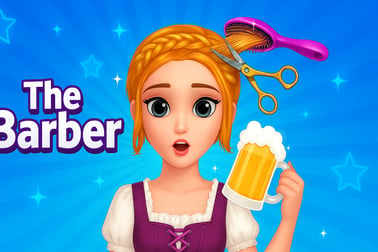
The Barber lets you cut, style, and shave in a virtual barbershop. Use realistic tools, try new hairstyles, and practice your creativity online.













The Barber
Overview of The Barber
The Barber is a light, family-friendly barber shop simulator you can play instantly in your browser. Step into a colorful virtual salon, grab your clippers, and start giving clients fresh new looks in this relaxed hair salon online game. Whether you want to practice clean fades, goofy mustaches, or wild colors, The Barber keeps things simple, fun, and creative.
Instead of managing money or complex appointments, this virtual haircut game focuses on the most satisfying part of the experience: cutting, shaving, and styling. It’s ideal for kids, casual players, and anyone who likes makeover games but wants something you can drop into for a few minutes at a time.
You don’t need to download anything or create an account. Open the page, hit play, and you’re standing in front of your first client. The straightforward tools make it perfect for younger players, while the freedom to experiment keeps it interesting for older kids and adults who just want a relaxing haircut styling game.
The Barber Control Guide
The Barber is built to be easy to pick up in seconds. Everything happens with simple mouse or touch controls, so even first-time players can start cutting hair right away.
Mouse & Keyboard Controls (Desktop/Laptop)
- Move cursor: Move your mouse to position tools over the client’s head or beard.
- Select tools: Click on the clippers, scissors, razor, or styling items in the on-screen toolbar.
- Cut or shave: Click and hold the left mouse button, then drag over the hair you want to cut.
- Zoom or rotate (when available): Use on-screen arrows or icons to slightly change the view for more precise trims.
- Undo / reset style (if provided): Click the undo or reset button to fix mistakes or start a new look.
- Next client: Use the continue/next button after completing a style.
Touch Controls (Phones & Tablets)
- Move tools: Slide your finger across the screen to move the clippers or scissors.
- Select tools: Tap on each icon in the toolbar to switch between cutting, shaving, or styling.
- Cut hair: Tap and drag over the hair or beard area to remove or shape it.
- Buttons: Tap on-screen buttons to accept a style, try again, or jump to a new customer.
Controls are intentionally minimal so kids can focus on creativity instead of complicated inputs. If a younger player is new to mouse control, it helps to let them practice slowly moving the tool around before they start cutting.
The Barber Features
The Barber may be a simple browser game, but it still captures the core fun of a barber makeover game. Here’s what you can expect when you load up the chair.
Key Gameplay Features
- Interactive Barber Tools: Use clippers, scissors, and razors to cut, shape, and shave hair in real time. Each tool behaves a bit differently, letting you switch up your approach.
- Multiple Clients: Work on different characters with varied hair lengths, shapes, and starting styles. This keeps every session feeling fresh.
- Creative Freedom: There’s no single “correct” answer. You can try realistic barbershop cuts or go completely over the top with wild patterns.
- Visual Feedback: Hair disappears or changes as you move your tools, so it’s easy to see exactly what you’re doing.
- Replayable Sessions: Finish a style, then immediately reset and experiment with a totally new look on the same client.
Why It Works as a Kids & Casual Game
- No fail state: You don’t “lose” the game for trying a weird style, which encourages experimentation.
- Short play loops: One haircut can take a couple of minutes or less, perfect for quick breaks.
- Clean, accessible visuals: Big buttons and clear tool icons make navigation simple for younger players.
Together, these features make The Barber a great introductory hair salon online game for kids, while still being a satisfying creative sandbox for older players.
Performance & Troubleshooting
Because The Barber runs right in your browser, you usually don’t have to tweak a lot of settings to enjoy smooth play. If you do run into issues, try the steps below.
Improving Game Performance
- Close extra tabs: Too many open browser tabs can slow down a virtual haircut game. Close unused tabs and reload.
- Switch browsers: Modern browsers like Chrome, Edge, Firefox, and Safari tend to handle browser games best. If one runs slow, try another.
- Check your connection: A weak connection can delay assets from loading. Sit closer to your Wi‑Fi router or switch to a stronger network.
- Disable heavy extensions: Ad blockers and script blockers sometimes interfere with browser gaming platforms. Temporarily disable them for the game domain if you see blank screens or missing buttons.
Common Issues & Quick Fixes
- Game not loading at all: Refresh the page, clear your browser cache, and make sure JavaScript is enabled.
- No sound from tools (if sound is available): Check your device volume, unmute browser tabs, and ensure system sound isn’t muted.
- Controls not responding: Click once inside the game frame to focus it, then try again. On mobile, reload the page and wait until all assets finish loading.
- Game lagging while cutting: Lower any system-wide performance modes (like battery saver), close background apps, and keep only one game window open.
If kids are playing, it can help an adult walk them through refreshing the page or switching browsers the first time there’s an issue. After that, most problems can be solved in just a few taps.
Is The Barber Safe to Play Online?
The Barber is designed as a family-friendly barber shop simulator that focuses on haircuts and creative styling only. There’s no graphic content, no violence, and no scary surprises, which makes it a solid choice for younger players.
Content & Age Appropriateness
- Non-violent theme: All gameplay revolves around trimming, shaving, and styling hair and beards.
- Kid-friendly visuals: Characters are presented in a light, cartoonish way with no disturbing imagery.
- No chat or messaging: The typical browser version doesn’t include real-time chat, reducing exposure to strangers.
Parental Tips
- Play in a shared space: Let kids enjoy this hair salon online game in a family area so you can easily glance at the screen.
- Set time limits: Because haircuts are quick and fun, it’s easy to keep saying “just one more client.” Setting clear screen-time rules keeps play balanced.
- Discuss creativity: Encourage kids to explain the styles they make. It turns a casual barber makeover game into a small creative storytelling exercise.
As always, you should still follow your own family rules for online play, but The Barber itself keeps its focus on harmless, imaginative styling.
Master Virtual Haircuts in This Realistic Barber Simulator
The Barber may be simple to control, but its tools behave in a surprisingly believable way. As you move clippers and razors across the client’s head, you’ll see hair gradually disappear, just like at a real barbershop. That makes it a great starter experience for anyone curious about how fades and trims actually work.
Because this haircut styling game is low pressure, you can make all the mistakes you want. Try buzzing one side shorter, then balancing the other. Carve a strong hairline and then soften it with a different tool. Over time, you’ll develop an eye for symmetry and clean lines—skills real barbers practice, too.
If you’re already into barber culture, The Barber works as a chill way to sketch ideas. If you’re brand new, it’s a relaxed digital playground where you can learn basic haircut logic without picking up actual clippers.
How to Cut, Style, and Shave Like a Pro in Your Browser
You don’t need professional training to have fun with this virtual haircut game, but a few simple habits can make your cuts look a lot sharper.
1. Start With a Plan
- Before you begin, decide: short fade, medium trim, or a dramatic transformation?
- Look at the client’s starting hair length and imagine the final silhouette.
2. Work From Long to Short
- Begin with scissors or higher “guard-style” cuts (if available) to remove bulk.
- Once you’re close to the length you want, switch to tighter clippers for details.
3. Use Smooth, Controlled Strokes
- Drag the tool in steady lines instead of random scribbles.
- Follow the shape of the head—up at the sides, back and down at the neck.
4. Outline, Then Clean Up
- Use finer tools or razors to define the hairline, sideburns, and beard edges.
- After outlining, go back over any uneven spots until the cut looks balanced.
5. Finish With Personal Style
- Add a sharper fade, carve a design, or leave a more natural look depending on your taste.
- Challenge yourself to recreate styles you’ve seen in photos or around you.
Practicing like this turns The Barber from a simple casual game into a mini training ground, where every client is an opportunity to refine your virtual barber skills.
Barber Shop Game Features: Tools, Clients, and Creative Styles
The heart of any barber shop simulator is its tools and how you use them. The Barber focuses on a handful of intuitive instruments that let you approach each cut in different ways.
Essential Barber Tools
- Clippers: Your main workhorse for removing larger chunks of hair and shaping fades.
- Scissors: Great for trims, touch-ups, and gently adjusting length without going too short.
- Razor or straight edge: Used for crisp outlines, shaving beards, and cleaning the neck and hairline.
Client Variety
Even with a simple character set, The Barber keeps you busy by changing hair length, volume, and starting styles. One client might arrive with long, shaggy hair begging for a buzz cut, while another needs a careful tidy-up of an existing fade. This variety turns each round into a small creative puzzle: how can you bring out the best in this style?
Endless Style Experiments
- Create classic looks: low fades, medium crops, simple business cuts.
- Invent playful, exaggerated designs for kids just enjoying a makeover.
- Try matching hair and beard shapes so the whole look feels intentional.
The combination of flexible tools and varied clients means no two sessions of this hair salon online game have to look the same, especially if you challenge yourself not to repeat a style.
Tips for Creating Trendy Fades, Designs, and Beard Styles
If you want your The Barber creations to look closer to real-world barbershop cuts, a few technique tweaks can help. These tips work across most styles in this haircut styling game.
Sharper Fades
- Set a top line: Decide where the longest hair ends—usually around the temples or slightly above.
- Blend downward: Gradually shorten hair as you move toward the ears and neckline, avoiding sudden jumps in length.
- Clean the base: Use the razor to clear the very bottom of the neck for a crisp finish.
Cool Hair Designs
- Start simple: Try a single curved line or a lightning bolt rather than complicated patterns.
- Use thin passes: Take small, controlled strokes with your finest tool or razor.
- Keep symmetry in mind: If you do designs on both sides, compare often to keep them even.
Clean Beard & Mustache Work
- Define cheek and neck lines: Carefully trace around the beard to separate it from the skin.
- Match hair and beard length: Coordinating lengths makes the overall look neater.
- Experiment with shapes: Go from full beards to goatees, mustaches, or stubble and see which suits each client best.
Over time, these small habits will help every client in your virtual barbershop walk out looking like they just visited a real stylist—even if you’re only playing in your browser.
Family-Friendly Barber Game You Can Play Online for Free
One of the biggest advantages of The Barber is how accessible it is for families. There’s no cost to start, no complicated setup, and no intense time commitment—just a straightforward, kid-friendly barber makeover game you can enjoy together.
Why Parents & Kids Like It
- Free to play: Load the game in your browser and start giving haircuts without paying or downloading large files.
- Quick sessions: A full style can take just a few minutes, perfect for short play windows.
- Creative expression: Kids get to make choices, experiment, and see instant visual results.
- Low reading requirement: Simple icons and visual feedback mean even early readers can enjoy it.
Ideas for Playing Together
- Take turns: One person handles hair, another manages the beard or final touches.
- Set mini-challenges: “Today, everyone has to make a curly top fade” or “Only beard makeovers allowed this round.”
- Talk about real-life grooming: Use the game as a fun way to discuss basic self-care and haircuts.
With its positive, non-violent theme and simple controls, The Barber fits nicely into a lineup of safe, casual browser games for kids and families looking for something creative to do together.
Frequently Asked Questions
What is The Barber game about?
The Barber is a virtual barber shop simulator where you cut, style, and shave clients using realistic tools and creative hairstyles.
Is The Barber free to play?
Yes, The Barber is free to play in your browser, with no download required. Just load the game and start styling.
Can kids play The Barber?
Yes. The Barber is family-friendly and suitable for kids, as it has no violence and focuses on creativity and haircut styling.
Do I need to download anything to play The Barber?
No download is needed. You can play The Barber directly in your web browser as an online game.
What kind of tools can I use in The Barber?
You can use clippers, scissors, razors, and other barber tools to create fades, trims, and fun custom hairstyles.