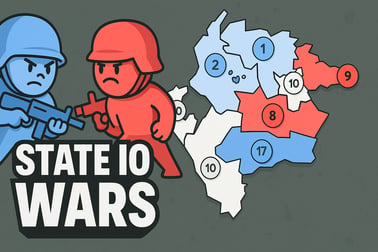
State Io Wars is a fast strategy game where you send troops, capture territories, and conquer the whole map directly in your browser.


























State Io Wars
Overview of State Io Wars
State Io Wars is a fast-paced territory conquest game where you command streams of tiny soldiers in real time and try to color the entire map with your flag. Every state on the map constantly generates units, and it’s your job to send those units out to capture neutral territories and enemy-controlled areas while defending your own borders. If you enjoy a simple but addictive real time strategy browser game that you can jump into in seconds, State Io Wars fits perfectly.
Each round is a quick online war strategy match played on a stylized map split into connected states. You start with a few regions, your opponent starts with theirs, and unclaimed territories sit in between you. As your army count rises in each state, you drag from your area to another to send troops and attempt a takeover. The action never fully stops, so you’re constantly deciding whether to attack, reinforce, or defend.
The rules are easy to grasp in a minute, but mastering timing, pathing, and prioritizing targets takes longer. That mix of accessibility and depth is what makes State Io Wars so replayable. It feels like a puzzle, a strategy game, and an army expansion game all at once.
State Io Wars Controls
One of the reasons State Io Wars works so well as a browser strategy game is its ultra-simple control scheme. You don’t need complex shortcuts or menus, just a mouse or a touchscreen.
Mouse & Keyboard Controls (Desktop)
- Click and drag: Hold the left mouse button on one of your states, then drag to another state (neutral or enemy) to send troops.
- Release to confirm: Let go of the mouse button on your target to launch the attack or reinforcement.
- Multi-direction sending: On some versions, you can drag from one of your states to multiple targets in quick succession to split your troops.
- Keyboard: Gameplay is mostly mouse-driven; keyboard is usually only needed for browser functions, not for core game controls.
Touch Controls (Mobile & Tablet)
- Tap and hold: Press and hold your finger on a state you control.
- Drag to target: Slide your finger over to the state you want to attack or reinforce.
- Lift to send units: Release when your finger is on the target state to deploy soldiers.
Because State Io Wars uses the same drag-to-send system across platforms, you can easily switch between desktop and mobile without learning new controls. That makes it a great pick-up-and-play choice for quick strategy sessions.
Key Features
State Io Wars looks simple at first, but there are several features that make it stand out among IO and browser war strategy games.
- Real-time territory conquest: Every decision happens live; both you and your opponents are constantly sending units, reacting, and counterattacking.
- Abstract but readable map design: States are clearly separated, usually by borders and colors, so you can quickly see who controls what and where to strike next.
- Neutral, friendly, and enemy states: Gray or pale states are neutral, your states are usually one distinct color, and opponents use contrasting colors. This three-way color code makes it easy to read the battlefield.
- Unit numbers per state: Each territory shows a number indicating how many units are stationed there. You need to send at least that many to capture it, so the entire game revolves around managing those numbers effectively.
- Progression and upgrades: Many versions reward wins with coins or points that you can invest into faster attack speed, higher starting troops, or other bonuses for future levels.
- Short, intense matches: A single match of State Io Wars usually lasts just a few minutes, which is perfect for quick breaks or short play sessions.
- Browser-based with mobile-friendly design: No downloads, no hefty requirements—just open the game in your browser and start conquering states.
Together, these features create a light but satisfying strategy loop: grow your forces, attack at the right time, react to enemy pushes, and slowly transform the entire map into your color.
Where to Play State Io Wars
You can play State Io Wars as a real time strategy browser game directly in your web browser on both desktop and mobile devices. Just load the game page, wait a brief moment for it to initialize, and you’ll be dropped into a map where you can start pushing your borders outward.
Playing in Your Browser
On desktop PCs and laptops, modern browsers like Chrome, Firefox, Edge, and Safari are usually enough to run the game smoothly. You generally don’t need extra plugins. For the best experience:
- Make sure your browser is up to date.
- Close unnecessary tabs if you notice lag.
- Use fullscreen mode in the game (if available) to see the whole map more clearly.
Mobile & Tablet Browser Play
Most versions of State Io Wars also run in mobile browsers. You tap and drag instead of clicking, but the gameplay is identical. It’s a perfect army expansion game to play one-handed when you have a few minutes to spare.
- Open the game in Chrome, Safari, or another modern mobile browser.
- Rotate your device to landscape for a wider view of the map.
- If the game feels sluggish, check your internet connection and try closing other apps.
Because the game is browser-based, you can move between devices easily—start a few practice runs on your laptop, then continue conquering maps on your phone whenever you’ve got a spare moment.
Is State Io Wars Safe to Play Online?
State Io Wars is generally considered family-friendly and safe to play in a typical browser environment. The game’s focus is on abstract online war strategy and colorful territories, not on graphic violence or realistic warfare.
Content & Age Appropriateness
- Violence level: Very mild and abstract. You see units as dots or tiny figures moving along lines between states—no blood, gore, or realistic combat.
- Theme: Strategy and territory control rather than direct combat simulation.
- Language: Typically minimal and clean, centered around menu text and simple UI labels.
Online Safety Considerations
- No chat required: Most browser versions don’t include text or voice chat, so players aren’t communicating directly with strangers.
- Ads and external links: Some portals may show ads around or before the game. For younger players, it’s a good idea to supervise and remind them not to click unknown pop-ups or download anything.
- Accounts: Many browser implementations run without mandatory account creation, which avoids sharing personal data.
As with any online game, basic precautions are recommended, especially for kids: play on trusted gaming sites, avoid entering personal information, and keep browser security features enabled. Within those guidelines, State Io Wars is a safe, casual strategy experience.
How to Conquer the Map in State Io Wars
Winning in State Io Wars is all about smart territory conquest. Your main goal is to capture the states until you control every region on the map—and your color is the only one left.
Step 1: Secure Easy Neutral Territories
At the start of a match, neutral states are your best opportunity. They don’t fight back on their own, so they’re cheaper and safer to grab than enemy-held regions.
- Look for nearby neutral states with low unit numbers.
- Send just enough troops to capture them, keeping reserves at home.
- Chain captures quickly so your production snowballs early.
Step 2: Grow a Solid Core Before Pushing Deep
Many new players rush straight at the enemy and end up overextended. Instead, try to build a strong “core” of states behind your front line.
- Fill in easy states around your starting region.
- Aim to control a tight cluster of connected territories.
- Use this core as your main production engine before you risk attacks deeper into enemy territory.
Step 3: Target Weak Links in the Enemy’s Border
Once you’ve built up enough power, look for weakly defended enemy states near your borders. These are often the best opening to start breaking their territory apart.
- Check enemy states for low numbers and isolation.
- Attack from multiple adjacent states at once if you can.
- Quickly reinforce newly captured regions so you don’t lose them to a counterattack.
Think of the map like a network. If you grab a key node that connects several enemy states, you can cut off their production routes and lock them into a smaller area, making the rest of the conquest easier.
Tips to Grow Your Army and Capture More Territories
Because every state acts like a mini factory for your troops, the speed at which your army grows determines how fast you can capture the map. Here’s how to maximize your growth in this territory conquest game.
Always Keep States Producing
Treat each state’s unit count like a resource you don’t want to waste. Sending too many troops leaves it vulnerable; sending too few slows your expansion.
- Avoid emptying states completely unless you’re making a decisive, game-ending push.
- Rotate attacks: Use several states to contribute smaller groups of units instead of draining a single one dry.
- Watch production speed: Some versions let you upgrade production; prioritize that early.
Balance Offense and Reinforcement
The easiest way to lose in State Io Wars is to attack constantly without reinforcing your borders. Every time you take land, you also create more front-line territory to defend.
- After capturing new states, immediately feed them units from safer, backline territories.
- Rotate troops from your safest inner states out toward the front.
- If an enemy starts pushing into a weak point, pause your attack for a moment and stabilize your defenses.
Use Momentum to Your Advantage
Once you’ve won a big fight and cleared a section of the map, don’t give your opponents time to recover.
- Chain your attacks across several connected states while the enemy numbers are low.
- Push your advantage before they can rebuild their army.
- Just don’t lose sight of your own borders—momentum is useless if you’re hit with a surprise counterattack elsewhere.
As your skill improves, you’ll be able to read the flow of units and feel when it’s safe to push harder or wiser to slow down and consolidate.
State Io Wars Controls and Gameplay Basics
Underneath the quick matches and colorful maps, State Io Wars follows a simple set of rules. Understanding these basics turns random clicking into thoughtful strategy.
Unit Counts and Capturing States
- Each state displays a number that represents how many units it currently holds.
- To capture another state, you must send more units than the target’s current number.
- When your attack arrives, your units and the defender’s units basically subtract each other. If attackers win, you take ownership of that state.
Automatic Troop Generation
- Every state you control generates units over time.
- The more states you own, the faster your total army grows.
- Some states might generate troops faster than others, depending on the version or level design.
Flow of a Typical Match
- Opening: Grab nearby neutral states that are easy and safe.
- Mid-game: Consolidate your region and start poking at enemy front-line states.
- Late-game: Once you’ve broken their line and control more production, sweep through the remaining territories to finish the match.
Everything in State Io Wars revolves around timing your attacks and choosing the right targets. Because production keeps ticking in the background, even a few seconds of delay can change whether your attack succeeds or fails.
Strategy Guide: Defend Your States While Expanding
True mastery of State Io Wars comes from doing two things at once: taking new territory while keeping your existing states safe. Here’s how to balance both sides of that equation.
Build Layers of Defense
Think of your territory as a series of rings:
- Outer ring: Border states that touch enemy or neutral land. These need the most attention and reinforcement.
- Middle ring: States slightly farther from danger that can send support troops to the front line.
- Inner core: Deep, safe states that act as a reserve army.
Use inner and middle rings to feed the outer ring whenever you expect a big battle. If one border state looks especially vulnerable or strategically important, over-defend it and use it as a staging point for your attacks.
Watch Enemy Movement & Anticipate Attacks
- Keep an eye on where enemy lines are forming. If they’re sending a lot of troops to one side, either reinforce that flank or counterattack where they’re now weak.
- Look for enemy states that suddenly drop in numbers; they may have just launched a big attack elsewhere—perfect time to hit back.
- Don’t tunnel-vision on your own arrows; try to watch the entire map periodically.
Know When to Retreat or Hold
Not every contested state is worth sacrificing your whole army for. Sometimes it’s better to let one border state fall and recapture it later from a stronger position.
- If defending a state would drain multiple other regions, pull back and form a shorter, stronger frontline.
- Use your remaining states to build a big counterpunch while your opponent wastes time on one minor capture.
- Once your numbers are clearly higher overall, push out again and reclaim what you lost—plus more.
Defense in this online war strategy game is less about building walls and more about smart positioning and timing. Let your production and smart retreats do the work for you.
Browser & Mobile: Where You Can Play State Io Wars
State Io Wars is designed to be lightweight and accessible, making it easy to play almost anywhere you have a modern browser and an internet connection.
Playing on Desktop Browsers
You can access the game on most gaming portals and play it directly in your browser window. For the smoothest experience:
- Use an up-to-date browser like Chrome, Firefox, Edge, or Safari.
- Allow the game to load fully before starting a level.
- Consider activating fullscreen within the game to better see state connections and unit numbers.
Playing on Mobile and Tablet
On mobile devices, State Io Wars usually works similarly through your default browser. Because it relies on simple taps and drags, it translates very well to touchscreens.
- Open the game page in a mobile browser.
- Use landscape mode if the map feels cramped in portrait.
- If your device gets warm or slow, close background apps and check your signal.
Whether you’re at your desk or on the go, you can load a quick match, send your mini soldiers into battle, and try to conquer the map in just a few minutes. It’s that accessibility—combined with strategic depth—that keeps players coming back to State Io Wars again and again.
Frequently Asked Questions
What is State Io Wars?
State Io Wars is an online real-time strategy game where you send troops between states to capture neutral and enemy territories and control the entire map.
How do you play State Io Wars?
Click or tap on your state, drag to a target state, and release to send troops. Fill the target state’s number with your units to capture and color it as your own.
Can I play State Io Wars for free?
Yes, State Io Wars is free to play in your browser with no downloads required. Just load the game, press play, and start conquering states.
Is State Io Wars suitable for kids?
Yes. The game uses simple dots and colored territories instead of graphic violence, making it a family-friendly strategy experience focused on planning and tactics.
Do my states generate more troops over time?
Yes. Each captured state slowly produces new troops. The more states you control, the faster your army grows, helping you overrun enemy territories.