2048 Solitaire is a free merge card puzzle. Stack matching number cards, create combos, and reach 2048 and beyond in this relaxing browser solitaire.

2048 Solitaire
Introduction to 2048 Solitaire
2048 Solitaire is a clever blend of classic solitaire with the viral 2048 number puzzle. Instead of stacking traditional suits, you’re dropping numbered cards into columns and merging matching values to climb toward the magic tile: 2048 and beyond. It’s a relaxed yet strategic merge card puzzle that works perfectly as a browser puzzle card game for quick sessions or long high-score hunts.
This online solitaire card game keeps the rules simple but gives you a lot of room to outthink the deck. You see the current card and the upcoming one, choose 1 of several piles to place it, and whenever two identical numbers touch, they merge into the next value. The board slowly fills up, so each move matters. Because it runs in the browser, you can jump into a free solitaire merge round anytime without downloads or sign-ups.
Whether you’re a 2048 fan, a solitaire lover, or just want a quick number merging game that’s easy to learn and hard to master, 2048 Solitaire offers a satisfying balance of luck and tactics.
How to Play 2048 Solitaire
While different versions of 2048 Solitaire may tweak the layout, the core basic rules & mechanics stay the same. Here’s how the typical browser version plays.
1. Understand the layout
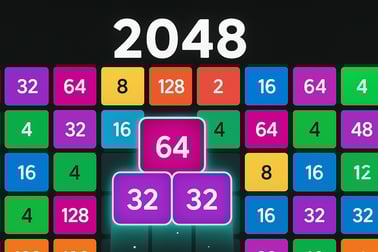
- Piles/columns: You usually have four or more vertical piles where cards stack from bottom to top.
- Current card: The card you must place on a pile this turn (e.g., 2, 4, 8, 16, 32...).
- Next card: The upcoming card shown in advance so you can plan ahead.
- Score: Increases as you merge cards into higher values like 128, 256, 512, 1024, and 2048.
2. Place cards onto piles
On each move you pick one pile to place the current card:
- Click or tap a pile to drop the card there.
- Once placed, that card is locked in position; you can’t drag it to another column.
- New cards always land on top of that pile’s stack.
3. Merge matching numbers
The heart of this number merging game is combining equal cards:
- If the card you place lands on a card with the same value, they merge into a single card with double the number. For example, 16 + 16 → 32.
- Some versions allow chain reactions, where the new card immediately merges again if the next card down matches.
- Every merge increases your score, and bigger numbers give bigger point boosts.
4. Keep piles from overflowing
The main way to lose in this browser puzzle card game is by running out of space:
- Piles have a height limit. When a stack reaches the top, that column is at risk.
- If all piles are full and you have no legal place to put the next card, the game ends.
Your long-term goal is to hit 2048 and climb higher, but your immediate job is to manage space so you always have a safe spot to drop the next card.
5. Use special cards and power-ups (if available)
Some versions of 2048 Solitaire include extra tools that make it more than just a passive merge card puzzle:
- Wild cards: Can merge with any number on top of a pile.
- Missiles / clear cards: Remove a full column or specific card, freeing space.
- Flip / swap: Change the current and next card to adjust your strategy.
- Discard slots: Temporarily skip a bad card you don’t want to play.
Not every online solitaire card game variant includes these, but when they do, they add a deeper layer of strategy to every decision.
Key Features of 2048 Solitaire
As a hybrid between solitaire and 2048, this free solitaire merge title offers a different feel from both traditional card stacks and sliding tiles. Here are the typical key features you can expect in browser versions of 2048 Solitaire.
Simple to learn, tricky to master
- Only a few rules: place cards, match numbers, and merge upward.
- The challenge comes from planning future turns, not learning complex systems.
- Perfect for short breaks but deep enough to chase better scores session after session.
Strategic solitaire-style planning
- Limited piles mean each decision affects your future options.
- You’re constantly balancing immediate merges against long-term stack health.
- Because you see the next card, you can set up combos and multi-step plans.
Endless run-style gameplay
- No fixed levels; you just keep going until you run out of space.
- Hitting 2048 is a milestone, not the end—many runs continue to 4096, 8192, or higher.
- Ideal if you like chasing personal bests and long-term high-score strategies.
Accessible browser play
- Runs directly in modern browsers as a smooth browser puzzle card game.
- No downloads, logins, or installs required for most web versions.
- Plays well with mouse or touch, making it easy on desktops, laptops, tablets, and phones.
Low-pressure but engaging
- No timers in most versions, so you can think as long as you like.
- Great for relaxing, unwinding, or keeping your hands busy while you listen to music or podcasts.
- Yet decisions still feel meaningful, especially as the board tightens and every move counts.
Performance & Troubleshooting
Because 2048 Solitaire is a lightweight online solitaire card game, it generally runs smoothly in most browsers. If you run into issues, here are some quick checks and fixes.
Game not loading
- Refresh the page: A simple reload often fixes temporary hiccups.
- Check your connection: Make sure your internet is active and stable.
- Disable strict content blockers: Some ad blockers or script blockers may interfere with browser games. Try disabling them for the site or whitelisting the domain.
- Try another browser: If it won’t start in one browser, switch to another modern one (Chrome, Edge, Firefox, Safari).
Lag or unresponsive controls
- Close extra tabs or apps that might be consuming memory or CPU.
- On older devices, lowering screen brightness and closing background apps can improve performance.
- Ensure your browser is updated to the latest version.
Touch issues on mobile
- Zoom to 100% so the touch targets (piles, buttons) are easy to tap.
- Rotate your device to landscape if the layout feels cramped.
- If taps don’t register, reload the page to reset the touch handler.
Progress not saving
- Most browser-based 2048 Solitaire games are session-based, meaning runs reset when you refresh or close the tab.
- If a version supports high-score saving, it typically uses local storage or optional accounts—make sure cookies and local storage are allowed for that site.
Can I Play 2048 Solitaire Offline?
Whether you can enjoy 2048 Solitaire offline depends on the specific version you’re playing.
Browser versions
- Most in-browser versions are designed as an online solitaire card game, so they need an active connection to load the game files and ads.
- Once loaded, some may continue to work if your connection briefly drops, but a full reload typically requires the internet.
Mobile app versions
- Dedicated apps from official stores can often be played offline after installation, though ads or some services may require a connection.
- If you want guaranteed offline play, look for 2048 Solitaire apps that explicitly mention offline mode in their descriptions.
Practical tip
If you mainly want a quick free solitaire merge session in your browser, assume it’s online-only. For road trips, flights, or offline commutes, consider installing a trusted 2048 Solitaire app in addition to your favorite browser version.
How to Play 2048 Solitaire in Your Browser
Getting started with 2048 Solitaire in a browser is fast. Here’s a simple step-by-step so you can jump right into your first merge card puzzle.
Step 1: Open the game page
- Use a modern browser (Chrome, Edge, Firefox, Safari) on desktop, laptop, tablet, or phone.
- Navigate to your preferred gaming portal that hosts 2048 Solitaire.
Step 2: Wait for assets to load
- Give the page a moment to load the game canvas, scripts, and any pre-roll ads.
- Once you see the main menu or board, you’re ready to play.
Step 3: Learn the controls
- Mouse: Move your cursor over a pile and click to place the current card.
- Touch: Tap the pile where you want to drop the card.
- Some versions may support keyboard shortcuts, but pointing and clicking/tapping is the default.
Step 4: Start merging
- Look at the current and next cards displayed.
- Choose a pile that sets you up for a merge either now or on a future turn.
- Keep an eye on pile height to avoid hitting the top too early.
Step 5: Chase 2048 and new highs
- As you merge up through 128, 256, 512, and 1024, you’ll inch closer to 2048.
- After hitting 2048, try to keep your run alive for even bigger tiles and scores.
Tips and Tricks to Reach 2048 and Beyond
To turn this relaxing number merging game into a satisfying high-score machine, you’ll need more than random drops. These tips will help you survive longer and merge higher.
1. Reserve a “big number” column
- Dedicate one pile to your highest numbers (512, 1024, 2048).
- Avoid dropping small cards there; keep the column as “pure” as possible.
- This makes it easier to stack matching high values without clutter.
2. Keep at least one emergency pile low
- Maintain one column that’s intentionally short.
- Use it when you draw awkward cards that don’t fit your main plan.
- This “safety valve” pile often saves a run when the deck turns against you.
3. Plan using the next card preview
- Before placing the current card, always check what’s coming next.
- Sometimes it’s better to delay a merge so you can merge twice in a row.
- Think two moves ahead: “If I drop 16 here, next turn my 16 can land on top for a 32.”
4. Avoid scattering identical numbers everywhere
- Grouping similar values into the same 1–2 piles makes merges easier.
- If you spread 16s across all columns, you’ll struggle to pair them later.
5. Use discards and power-ups wisely
- If your version offers discards, save them for truly run-killing cards.
- Clear or missile power-ups are best used when a column is almost full and blocking your high-number merges.
- Don’t hoard power-ups forever; use them to protect a strong, long run.
6. Think in chains, not single moves
- Whenever possible, set up boards where one merge triggers another.
- For example, building 8 – 16 – 16 so that your next 16 creates several merges in sequence.
- These chains boost your score and rapidly clear space.
Power-Ups, Combos, and High Score Strategies
To turn 2048 Solitaire from a casual time-killer into a high-score chase, you’ll want to lean into combos, smart pile management, and power-up timing.
Leverage combos for big rewards
- Some versions give combo bonuses when you trigger multiple merges in consecutive moves.
- Try to chain merges by planning small groups of identical numbers in the same column.
- Even without explicit combo scoring, rapid merges open space and keep your board healthy.
Use clear/vertical/horizontal power-ups sparingly
- Column clears: Best when one pile is dangerously tall but loaded with low-value clutter.
- Row or area clears: Great for resetting messy mid-tier numbers so you can rebuild clean stacks.
- Aim to use clears right before you’d otherwise lose, or when they unlock a path to merge large tiles.
Focus on board health before score spikes
- It’s tempting to chase a single massive merge, but if your piles are all almost full you might not get there.
- Prioritize keeping at least one or two columns at medium height, not maximum.
- Healthy stacks mean more flexibility and better chances to build big combos over time.
Adopt a simple three-role column strategy
- High-value column: Holds your biggest numbers and their support tiles.
- Mid-value column: A staging area where medium cards merge up before moving “into position.”
- Low-value column(s): Handle 2s, 4s, 8s and awkward leftovers.
This loose structure keeps your merge card puzzle organized so you’re not constantly fighting chaos.
Is 2048 Solitaire Good for Your Brain?
While it’s primarily entertainment, 2048 Solitaire is more than just a time sink. As a thoughtful number merging game, it can lightly train several mental skills.
Improves planning and foresight
- You constantly evaluate the current card, the next card, and the layout of all piles.
- This encourages short-term planning and “if I do this, then that” thinking.
Supports pattern recognition
- Over time, you start to recognize common board patterns that lead to success or failure.
- You’ll get faster at spotting where merges are possible and where they’ll be blocked.
Light numerical and spatial practice
- Even though numbers are small (2, 4, 8, 16, etc.), you naturally internalize doubling and exponential growth.
- Placing cards into columns also gives a basic spatial organization challenge.
Stress relief and focus
- Because 2048 Solitaire is low-pressure and untimed, it can be a calming, meditative break.
- The simple loop—drop, merge, repeat—helps some players relax and refocus between tasks.
It’s not a replacement for formal brain training, but as a casual browser puzzle card game, it can be a pleasant way to stay mentally engaged.
Free Online 2048 Card Solitaire on Any Device
One of the biggest advantages of 2048 Solitaire is how easy it is to access as a free solitaire merge experience across devices.
Play on desktop and laptop
- Open your favorite gaming site in your web browser.
- Use your mouse to click piles and manage cards precisely.
- Enjoy a larger screen for better visibility of numbers and stack heights.
Play on tablets
- Launch the game in your tablet’s browser—no install required.
- Tap to place cards; the touch controls are naturally suited to this style of game.
- Rotate to landscape mode if you want wider columns and easier reading.
Play on phones
- Open the same site in your mobile browser and start a quick round anywhere.
- Because each move is just a tap, it’s great for one-handed play during short breaks.
- If the interface feels small, zoom slightly or tilt your phone sideways for more space.
No-cost, low-barrier fun
- Most web versions of 2048 Solitaire are supported by ads, so you can play for free.
- No login or registration is usually needed—just load and start merging.
- This makes it an ideal pick when you want an instant, drop-in merge card puzzle with zero setup.
Whichever device you prefer, 2048 Solitaire delivers a compact, satisfying mix of solitaire and 2048 logic that you can enjoy straight from your browser.
Frequently Asked Questions
What is 2048 Solitaire?
2048 Solitaire is a free online card puzzle that mixes classic solitaire stacking with 2048-style number merging. You place numbered cards in columns and merge matching values to reach 2048 and higher.
How do you play 2048 Solitaire?
You draw a card and choose a column to place it in. When two cards with the same number touch, they merge into a higher value card. Plan your columns so you can keep merging without filling the board.
Can I play 2048 Solitaire for free?
Yes. 2048 Solitaire can be played for free in your web browser with no download required. Just load the game page, press play, and start merging cards.
Is 2048 Solitaire suitable for kids?
Yes. The game is family-friendly and based on simple numbers and basic math. It’s appropriate for kids and adults as long as they are comfortable with number matching.
Do I need to download anything to play 2048 Solitaire?
No download is needed. 2048 Solitaire runs directly in modern desktop and mobile browsers, so you can play instantly without installing apps or plugins.