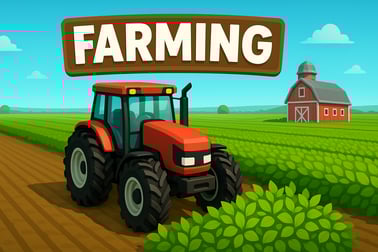
Tractor lets you drive a powerful farm machine, haul cargo and master physics-based hills. Play this tractor driving simulator online for free.














Tractor
Overview of Tractor
Tractor is a fun, family-friendly farm tractor driving game that challenges you to haul cargo across bumpy fields, hills, and countryside tracks. Instead of racing supercars, you slip into the seat of a hardworking farming vehicle and try to keep your trailer steady while you climb, descend, and balance over uneven terrain.
This browser-based tractor simulator online focuses on simple keyboard controls, ragdoll-style physics, and short, level-based challenges that are perfect for quick play sessions. Each level gives you a tractor, a loaded trailer, and a twisty off-road route. Your goal is to reach the finish line without flipping the vehicle or losing too much cargo along the way.
Because Tractor is easy to learn and doesn’t require a download, it’s ideal for kids, casual gamers, and anyone who enjoys lighthearted farming vehicle games. Under the cute graphics, though, there’s a surprisingly engaging tractor physics game where timing your acceleration, braking, and balance really matters.
Tractor Control Guide
Tractor keeps its controls as simple as possible so anyone can jump in and start driving within seconds. Here’s how play typically works on desktop and mobile:
Keyboard controls (desktop & laptop)
- Right Arrow – Accelerate and move the tractor forward.
- Left Arrow – Reverse or gently slow down on downward slopes.
- Up/Down Arrows (in some versions) – Adjust weight balance or tilt when airborne for finer control.
The most important skill is feathering the keys. Instead of holding the right arrow the whole time, tap it in short bursts to avoid bouncing your trailer or throwing cargo into the air.
Touch controls (phones & tablets)
- Right on-screen arrow – Drive forward.
- Left on-screen arrow – Reverse or slow.
On touchscreens, hold each arrow just long enough to climb a hill, then release to let gravity and momentum do the work. Tractor’s physics are forgiving, but if you constantly hold the gas, you’ll roll your tractor or lose your load quickly.
Unlike complex driving sims, Tractor doesn’t make you worry about gear shifting or steering with a mouse. You drive in a side view, focusing entirely on speed, timing, and balance—classic hallmarks of the best tractor cargo delivery games.
Key Features
Tractor borrows ideas from classic physics-based driving titles and wraps them in a cozy, countryside farming theme. Here are the main features that make it stand out among modern farming vehicle games:
- Level-based tractor cargo delivery
Progress through a series of routes, each with its own layout of hills, pits, and obstacles. You’ll need to deliver a set amount of cargo to unlock new stages. - Realistic yet playful tractor physics
The tractor, trailer, and cargo all react to bumps and speed changes. Too much gas on a steep hill and your trailer might jackknife or your cargo could spill out. - Pick-up-and-play driving
Games typically load quickly in your browser, and each run only lasts a minute or two. That makes Tractor perfect for short breaks and classroom-safe entertainment. - Simple controls for all ages
Only a couple of buttons are needed to drive, so kids can enjoy Tractor without a long tutorial. Adults, meanwhile, can chase perfect runs and three-star completions. - Kid-friendly farm atmosphere
Expect bright colors, gentle sound effects, and a relaxed rural setting. There’s no violence, no combat, and nothing inappropriate—just pure tractor driving fun. - Browser-based tractor simulator online
You play directly in your web browser; no big downloads or installation packages. This makes it easy to try on school or home computers, as well as modern mobile browsers.
Together, these features create a casual yet satisfying farm tractor driving game that rewards patience, timing, and a good feel for momentum.
Performance & Troubleshooting
Because Tractor usually runs as a web game, performance depends on your device, browser, and internet connection. If your tractor simulator online is laggy or doesn’t load correctly, try the following tips:
Boosting performance
- Close unused tabs and apps – Open tabs use memory and CPU. Closing them frees resources for smoother tractor physics.
- Check your connection – A slow or unstable network can cause long loading times. Switching to a stronger Wi-Fi network often helps.
- Update your browser – Modern farming vehicle games rely on up-to-date browser features for graphics and input handling. Make sure Chrome, Edge, or Firefox is current.
- Disable heavy extensions – Ad blockers or script-heavy add-ons can sometimes clash with web-based games. Temporarily disable anything non-essential.
Common issues & fixes
- Game doesn’t start
Try refreshing the page. If that fails, open the game in an incognito/private window to rule out cookie or extension issues. - Controls not responding
Click once inside the game frame to focus it, then press the arrow keys again. On mobile, make sure you’re not zoomed in too far, which can misalign on-screen buttons. - Slow or choppy motion
Lower your screen resolution or close background apps. Older devices may struggle with higher detail settings if the game includes them.
If your platform offers a quality toggle (for example, low/medium/high graphics), choose low for older machines or entry-level tablets. Tractor’s core gameplay is all about physics and timing, so you won’t lose much by trimming extra visual effects.
Offline Play Availability for Tractor
Tractor is primarily designed as an online tractor physics game that runs in the browser, so in most cases you’ll need an internet connection to load and play it.
- Browser version – Normally requires an active connection to load game files and assets. Once you close the tab, the game must be reloaded from the web again.
- App or downloadable versions (if offered by your platform)
These may allow offline play after the initial download. Once installed, you might be able to enjoy tractor cargo delivery missions without staying online, though leaderboards or cloud saves could still require internet access.
Always check the specific platform’s description for clear offline/online information. If you know you’ll be traveling or playing without Wi-Fi, launch Tractor while you’re online first and see if your device keeps it cached for short offline sessions—but expect that some features may not work without a connection.
Master Tractor Driving: From Farm Fields to Steep Hills
At a glance, Tractor looks like a simple farm run, but mastering it means understanding how weight, terrain, and momentum interact. The game is less about speed and more about controlled driving over tricky landscapes.
Learning the feel of the tractor
- Start slow on early levels – Treat the first few stages as a training ground. Focus on how the tractor tilts when you accelerate or brake on slopes.
- Use momentum, not raw power – Approach hills with a bit of speed, then ease off the gas as you climb. Flooring it at the base of a steep hill in a farm tractor driving game is a quick way to lift your front wheels and flip backward.
- Respect the trailer – The heavier your cargo, the more the trailer will push or pull you when going up or down. Drive like you’re towing something fragile… because you are.
Handling flat fields vs. steep hills
- Farm fields – On gentle terrain, small speed bursts followed by coasting work best. You can safely collect stars, coins, or bonuses without risking every bump.
- Steep climbs – Build speed on the approach, then hold the accelerator just long enough to crest the hill. If you see the tractor tipping back, tap reverse quickly to lower the front end.
- Sharp drops – Always tap the brake before big downward slopes. If you go over the edge too fast, your trailer may surge forward and jackknife the entire rig.
As you improve, you’ll naturally start thinking a few seconds ahead: “There’s a big hill coming, so I need momentum but can’t bounce too much or my cargo will fly.” That mindset is exactly what makes Tractor such a satisfying tractor simulator online experience.
How to Transport Cargo Safely in Tractor Physics Games
Cargo is the heart of Tractor. It’s not enough to simply reach the finish; you’re usually rewarded based on how much of your load survives the journey. To consistently succeed in tractor cargo delivery, treat your trailer like it’s full of eggs.
Core cargo safety techniques
- Avoid sudden inputs – Harsh acceleration, quick braking, and jerky reverses are the main reasons cargo bounces out. Use light, repeated taps on the arrow keys instead of long presses.
- Slow before, not during, bumps – If you see a big bump or ramp ahead, reduce speed before you hit it. Braking hard on top of a bump can whip your trailer around.
- Keep your rig level – On some versions, you can tilt slightly mid-air. Try to land with all wheels roughly at the same time to keep cargo from slamming into the sides of the trailer.
Reading the terrain like a pro
- Rolling hills – Use the downhill to gather speed, then ease up halfway up the next hill. This keeps your tractor from nose-diving or popping a wheelie.
- Short platforms and gaps – Approach slowly, then give a short burst of speed to clear the gap. Over-jumping can bounce your trailer and cost you valuable cargo.
- Stacked cargo – If your trailer’s load is piled high, it’s top-heavy. Drive more cautiously, especially on side-leaning hills, to prevent tipping.
By blending patience with careful timing, you’ll consistently deliver more cargo and earn better scores, stars, or unlocks—key to progressing in any tractor physics game centered around delivery challenges.
Tips for Beating Challenging Levels in Farm Tractor Simulators
Later stages in Tractor can be surprisingly tricky, especially compared to the relaxed early routes. Here are strategies that help you beat those notorious “just one more try” levels that define the best farm tractor driving game experiences.
Strategic driving tips
- Memorize the route – On your first couple of attempts, don’t worry about perfect scores. Learn where the steepest slopes, biggest bumps, and tightest landings are.
- Segment the track – Mentally break each level into sections: start, mid, and finish. Adjust your speed and risk level based on which segment you’re in.
- Set your own pace – You usually don’t need to race against a timer. It’s better to arrive with lots of cargo slowly than rush and lose half your load.
Improving consistency
- Use reference points – Remember “push forward for two seconds after this tree” or “let go of the gas just before that rock.” These simple cues help you repeat successful runs.
- Recover from mistakes – If you bounce too hard, quickly counter by easing off the gas or tapping reverse. You can often save a near-flip if you react early.
- Know when to restart – If half your cargo falls out in the first few seconds, it may be smarter to restart the level than to drag a poor run to the end.
Over time, you’ll develop a natural rhythm and intuition for these farming vehicle games, making even the toughest routes feel manageable and fun instead of frustrating.
Family-Friendly Tractor Driving Fun for Kids and Adults
Tractor is designed as a family-friendly tractor simulator online that kids, teens, and adults can enjoy together. Its simple controls and peaceful farm theme make it a safe choice for classrooms, family computers, and shared tablets.
Why kids love Tractor
- Instant gratification – Press a key, the tractor moves. No complicated menus or long story intros.
- Colorful farm visuals – Bright fields, cute cargo, and cartoon-style tractors keep the atmosphere light and approachable.
- Short levels – Each run is quick, so kids can play a few levels during a break without feeling overwhelmed.
Why adults enjoy it too
- Physics-based challenge – Behind the cute exterior, there’s a real skill ceiling in this tractor physics game. Perfect deliveries are genuinely satisfying.
- Low-stress gameplay – No aggressive opponents, no harsh punishments—just you, your tractor, and the terrain.
- Great for casual sessions – Whether you’re unwinding after work or sharing turns with kids, Tractor makes it easy to drop in and out.
Parents and teachers often appreciate that Tractor helps younger players practice cause and effect (what happens if I go too fast over a bump?), basic problem solving, and patience without any inappropriate content or complex monetization systems.
Controls & Settings: Getting Comfortable Behind the Tractor Wheel
Even though Tractor keeps things streamlined, spending a minute or two adjusting to the controls and any available settings can dramatically improve your experience.
Fine-tuning your control style
- Keyboard players – Rest your index and middle fingers lightly on the arrow keys so you can tap quickly. If your keyboard supports it, turn on “gaming mode” to prevent accidental Windows key presses.
- Touchscreen players – Hold your device in landscape mode with both hands, using your thumbs for the left and right arrows. This grip makes it easier to make tiny adjustments.
Helpful settings (when available)
- Sound & music – Lower or mute volume if you’re playing in a quiet environment. Many farming vehicle games let you separately adjust sound effects and music.
- Quality options – If Tractor offers low/medium/high graphics, choose medium on mid-range devices and low on older hardware to keep the frame rate smooth.
- Language selection – Some platforms may offer localized text or buttons, which is especially helpful for younger children.
Once you’re comfortable with the controls and any optional tweaks, the tractor itself becomes an extension of your reflexes, making every cargo run smoother and more enjoyable.
Frequently Asked Questions
What is Tractor about?
Tractor is a browser driving game where you control a farm tractor, haul cargo across bumpy terrain, and try to reach the finish line without losing your load.
How do I control the tractor?
On desktop you typically use the arrow keys to accelerate, brake, and balance the tractor. On mobile, you tap on-screen arrows or buttons to move forward and backward.
Is Tractor suitable for kids?
Yes, Tractor is family-friendly. It has simple controls, non-violent gameplay, and focuses on careful driving, balance, and problem-solving.
Do I need to download anything to play Tractor?
No download is required. You can play Tractor directly in your browser as long as you have a stable internet connection and a modern web browser.
Can I play Tractor on mobile devices?
Yes, most modern smartphones and tablets can run Tractor in the browser. Use the touch controls shown on-screen to drive your tractor and deliver cargo.