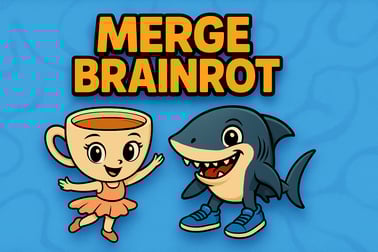
Merge Brainrot is a free meme merge puzzle. Drop and combine viral brainrot tiles, unlock goofy characters, and keep the board from filling up.








Merge Brainrot
Overview of Merge Brainrot
Merge Brainrot is a chaotic, meme-packed merge puzzle where Italian brainrot memes, goofy critters, and viral characters collide in a satisfying chain of upgrades. If you enjoy a watermelon style merge game like Suika but want more absurd humor, this brainrot merge game delivers exactly that. You drop tiles or meme icons into a board, merge matching ones, and watch them morph into bigger, sillier versions as your score climbs.
The game plays directly in your browser as a free browser merge game, with no downloads or sign-ups required on most platforms. It combines the simple drag-and-drop logic of a classic meme merge puzzle with the viral chaos of Italian brainrot memes like ballerinas, capybaras, and other exaggerated internet icons. Quick rounds, bright visuals, and satisfying sound effects make it perfect for short sessions or casual play while multitasking.
Because it runs with HTML5 / WebGL on popular gaming portals, Merge Brainrot works on most modern desktop and mobile browsers. It fits into categories like Puzzle, Casual, and Merge, and it’s designed so anyone can pick it up within seconds—even if you’ve never tried a merge game before.
How to Play Merge Brainrot
The basic loop of Merge Brainrot is simple but surprisingly addictive. Here’s how a typical run works from the moment you load the game in your browser:
- Start a new round
- Click or tap the play button on the main menu.
- You’ll see an empty or partially filled board/cup where tiles will drop.
- A preview shows which meme character or item will drop next.
- Position your meme tile
- Move your cursor or finger left and right at the top of the board.
- The active meme icon follows horizontally.
- Line it up above another tile you want to merge with.
- Drop to merge
- Release the mouse or lift your finger to drop the tile.
- When two identical tiles touch, they merge into a higher-tier brainrot character.
- That new character is worth more points and often takes a bit more space.
- Chase combos and chains
- If the newly merged character lands next to another of the same type, it can trigger chain merges.
- Chaining merges creates a burst of score and opens more room on the board.
- Avoid filling the board
- The round ends when the tiles stack too high or the board/cup overflows.
- Your final score, highest-tier meme unlocked, and sometimes best combo are shown on a results screen.
Every drop matters, so you’re constantly balancing risk and reward: do you drop now for a safe merge, or gamble on a trickier angle for a bigger combo? That simple decision-making is what keeps Merge Brainrot so engaging.
Key Features
Merge Brainrot has a focused feature set that keeps gameplay fast, responsive, and replayable. While details can vary slightly by platform, you can generally expect these core elements:
- Watermelon-style merging
- Clearly inspired by the classic watermelon merge formula.
- Drop, collide, and evolve icons step by step into larger forms.
- Each new stage is visually distinct, making progress easy to see.
- Meme-packed character ladder
- Progress through a ladder of Italian brainrot memes and internet icons.
- Characters like ballerina cappuccino-style figures, chaotic critters, and meme animals appear as you merge.
- Higher-tier characters are rarer, more valuable, and often funnier.
- Score-chasing gameplay
- Every merge adds to your total points.
- Bigger merges and combo chains give higher rewards.
- Perfect for friendly competition with friends to beat each other’s records.
- Instant browser access
- No installation—just open in Chrome, Edge, Firefox, or Safari.
- Optimized as a free browser merge game on most gaming portals.
- Runs on desktop, laptop, tablets, and many phones.
- Family-friendly content
- Cartoonish art style and exaggerated humor.
- No realistic violence or disturbing imagery.
- Great for meme enjoyers, teens, and adults looking for light entertainment.
Together, these features make Merge Brainrot one of the easiest meme merge titles to recommend—especially if you’re already into brainrot humor or just want a lighter alternative to more serious puzzle games.
Merge Brainrot Controls
One of the biggest strengths of Merge Brainrot is its simplicity. Whether you’re on PC or mobile, the controls stay intuitive and minimal.
Desktop & Laptop Controls
- Mouse move – Move your cursor left or right at the top of the screen to position the incoming meme tile.
- Mouse drag (on some versions) – Click and drag the tile left or right before you release.
- Release / click – Drop the tile into the board or cup.
Some browser versions might add small UI buttons for pause or restart, which you can click directly.
Mobile & Tablet Controls
- Tap & hold – Touch the top of the screen where the tile appears.
- Slide left/right – Drag your finger to align the tile horizontally.
- Lift your finger – Release to drop the tile and attempt a merge.
That’s all you need. There are no complex gestures, no hidden mechanics, and no extra buttons to memorize. This makes Merge Brainrot especially accessible for casual players who want to jump straight into the brainrot merge chaos.
How to Play Merge Brainrot Online in Your Browser
Getting started with Merge Brainrot is as easy as opening a tab. Follow this quick step-by-step guide to play the brainrot merge game online without hassle:
- Use a modern browser
- Open Chrome, Edge, Firefox, or Safari.
- Make sure your browser is updated for best performance and WebGL support.
- Go to a trusted gaming portal
- Search for “Merge Brainrot play online” or “Italian brainrot meme merge puzzle”.
- Choose a reputable platform known for safe, family-friendly games.
- Wait for the game to load
- The first load may take a few seconds while assets and memes initialize.
- Don’t close the tab if the screen is briefly blank—this is often normal for WebGL content.
- Adjust sound or music
- Most versions let you toggle sound effects or music on/off.
- Look for a small speaker or gear icon in the corner if you’re playing in a shared space.
- Start merging
- Hit the play button and drop your first meme tile.
- Experiment for a few rounds to understand gravity, bounce, and collision.
Because it’s a free browser merge game, you can usually reload instantly if something goes wrong, or just start a new round whenever your board fills up.
Tips to Unlock All Hilarious Brainrot Characters
If you’re aiming to collect every character in this meme merge puzzle, you’ll need more than random drops. These strategy tips will help you climb the entire brainrot evolution ladder:
1. Build from one side, not the middle
Start stacking tiles primarily on one side of the board (left or right). This gives you an “open” side where you can safely drop new tiles and set up merges without clogging the center too quickly.
2. Create dedicated merge “lanes”
Try to keep rows or columns focused on specific tiers of memes:
- Bottom rows: lower-tier memes you’re merging frequently.
- Middle area: mid-tier memes waiting for matches.
- Top area: high-tier memes you’re protecting from accidental clogging.
This loose structure helps prevent random stacks that kill your run early.
3. Think two merges ahead
Don’t just match what’s in front of you. Ask:
- “If I merge these now, where will the new character land?”
- “Can that new tile merge again soon, or will it get stranded?”
Planning for chains is how you reach the rarest Italian brainrot memes more consistently.
4. Avoid risky edge bounces
In watermelon style merge games, tiles can bounce unpredictably off the walls. If you’re dropping a piece near the edges, angle it carefully so it doesn’t ricochet into your “safe” zone and block big merges.
5. Use early rounds as warm-ups
Because Merge Brainrot rounds are short, treat your first 1–2 runs like practice:
- Learn how different tiles roll and stack.
- Experiment with new patterns for arranging tiers.
- Identify which characters appear at each stage of the ladder.
Once you’re comfortable, you’ll be able to push much further up the character chain and unlock the most ridiculous memes in the game.
Why Merge Brainrot Is the Ultimate Meme Merge Game
There are plenty of merge titles out there, but Merge Brainrot stands out as a top-tier meme merge game for several reasons.
1. Pure meme energy
Instead of generic fruits or shapes, Merge Brainrot leans fully into brainrot humor and Italian brainrot memes. Every new evolution feels like unlocking an inside joke from the internet, which keeps you curious about the next stage.
2. Watermelon-style with a twist
Fans of the watermelon style merge game formula will feel right at home, but the brainrot theme adds:
- More personality in each tile.
- Goofier animations and sound effects.
- A less “serious” puzzle mood, perfect for unwinding.
3. Fast, snackable rounds
Most sessions last just a few minutes, making it ideal for quick breaks. You can squeeze in a round between tasks, on a commute, or while waiting for something to load—no long-term commitment required.
4. Low barrier to entry
No account, no paywall, no tutorial walls. You just open the page and start merging. That simplicity is why this free browser merge game has become a go-to pick for casual players.
5. Great for sharing and competing
Because it’s web-based, it’s easy to tell friends: “Search Merge Brainrot and beat this score.” Whether you’re comparing high scores, rare character unlocks, or wild board screenshots, it’s naturally social without needing built-in multiplayer.
Merge Brainrot Controls and Gameplay Basics
To really master the game, you’ll want to understand both the inputs and the underlying gameplay rules.
Core Gameplay Rules
- Identical tiles merge – Only two of the same character or item can merge into a higher tier.
- Gravity affects everything – Tiles fall straight down and can roll or shift if they land on slopes or rounded surfaces.
- Board fills from bottom up – Tall, uneven stacks make it harder to place new tiles accurately.
- Game over on overflow – If a tile crosses a certain height or spills beyond the play area, the run ends.
Beginner-Friendly Tactics
- Drop early tiles close together to force quick merges.
- Avoid making tall “towers” in the center that trap smaller tiles.
- Use open space strategically—leave yourself a landing area for future merges.
Combining these basics with the simple drag-and-drop controls makes Merge Brainrot accessible but still engaging for players who enjoy squeezing more strategy out of each run.
Free Meme Puzzle Games Like Merge Brainrot
If you fall in love with this brainrot merge game and want more, you’re in luck. There’s a growing family of meme merge puzzle titles and related brainrot games online. While availability can change depending on your platform, you’ll often find:
- Other brainrot merge variants
- Games where you drop different meme themes—dogs, cats, capybaras, or giga characters—using similar watermelon-style physics.
- Clicker-style brainrot games
- Idle clickers where you tap to earn currency and unlock new Italian brainrot memes instead of merging them.
- Brainrot-themed puzzles
- Logic or drawing puzzles featuring the same characters, but with different gameplay (guessing, drawing, or sorting mechanics).
- Classic merge games
- Non-meme titles that use the same satisfying merge and physics logic but with fruits, bubbles, or blocks.
When searching, try phrases like “meme merge puzzle”, “brainrot games online”, or “watermelon style merge game” to discover more free browser titles with a similar feel.
Play Merge Brainrot on Phones & Tablets
Because Merge Brainrot is built as a browser-friendly game, it’s surprisingly smooth on mobile and tablets when your device and browser are up to date.
Mobile Play Tips
- Use full-screen mode – Tap the full-screen icon if available so you have more precise control over left-right positioning.
- Play in portrait if supported – Many watermelon-style merge games feel more natural vertically, especially on phones.
- Disable rotation lock issues – Make sure your screen orientation isn’t flipping mid-game, which can cause misdrops.
Tablet Advantages
On a tablet, Merge Brainrot feels particularly comfortable:
- Larger play area makes it easier to judge angles and bounces.
- More precise finger control when sliding tiles into place.
- Better for longer sessions due to bigger visuals and less eye strain.
Whether you’re on iOS or Android, opening Merge Brainrot in your default browser is usually enough—no separate app store download is required for browser-based versions.
Is Merge Brainrot Safe to Play Online?
For most players, Merge Brainrot is a safe, family-friendly option as long as you use reputable gaming portals.
Content & Age Friendliness
- Visual style – Cartoonish and humorous, with exaggerated meme expressions rather than realistic imagery.
- Violence & tone – No serious violence; the focus is on merging cute, silly characters.
- Language – Any text is usually mild or meme-based rather than explicit.
Online Safety Considerations
- Choose trusted sites – Stick to well-known, established browser game platforms to avoid shady ads or redirects.
- Avoid unauthorized downloads – Merge Brainrot is a browser game, so you generally don’t need to install anything.
- Supervise younger players – As with any web-based game, an adult should help younger kids navigate ads or external links.
Within those reasonable guidelines, Merge Brainrot is a safe and entertaining free browser merge game for anyone who wants a quick hit of meme-flavored puzzle fun.
Frequently Asked Questions
What is Merge Brainrot?
Merge Brainrot is a free browser merge puzzle where you drop and combine matching brainrot meme tiles to unlock new, fun characters and score higher.
How do I play Merge Brainrot?
Use your mouse or finger to drag and drop tiles onto the board. When two of the same tiles touch, they merge into a new character. Keep merging before the board fills up.
Can I play Merge Brainrot on mobile?
Yes. Merge Brainrot runs in the browser, so you can play on mobile phones, tablets, and desktop without downloading any apps.
Is Merge Brainrot free to play?
Yes, Merge Brainrot is completely free to play in your browser. No purchase or registration is required to start merging tiles.
Is Merge Brainrot suitable for kids?
Merge Brainrot features silly meme-style characters and simple merge gameplay. It is generally family-friendly, but parents may want to review the humor style for younger children.