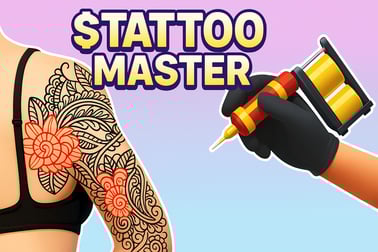
Tattoo Master lets you run a virtual tattoo studio, follow client requests, trace stencils, and color designs. Play free in your browser now.














Tattoo Master
Introduction to Tattoo Master
Tattoo Master is a relaxing yet precise online tattoo game where you step into the role of a professional tattoo artist. Working in your own virtual studio, you trace outlines, fill in colors, and complete detailed designs for a steady flow of clients. It blends the calm focus of a coloring app with the satisfying structure of a tattoo art simulator.
Played directly in your browser, Tattoo Master focuses on accuracy, patience, and color choices. Every client brings a new sketch or stencil, and it’s your job to turn that blank outline into a clean, vibrant tattoo. If you enjoy art games, drawing, or casual simulation titles, this tattoo drawing game is designed to give you that creative hit in short, satisfying sessions.
Unlike complex strategy or action games, Tattoo Master keeps things accessible. Simple controls, clear feedback, and bright visuals make it easy for beginners, kids, and casual players to jump right in. At the same time, the game still rewards advanced players who manage to keep their lines smooth and their color choices on point.
Basic Rules & Mechanics
Tattoo Master plays like a streamlined tattoo shop simulator with coloring mechanics. You don’t need any real tattoo experience, just a bit of focus and a steady virtual hand. Here’s how the core systems work:
- Clients arrive with a design: Each level starts when a new customer walks into your studio, showing you the artwork they want. Some ask for specific colors, others give you freedom.
- Stencil and outline first: The game shows the placement area and the stencil or outline. Your first task is usually to trace or follow the contour lines as neatly as possible.
- Fill with color: Once the outline is in place, you move to the coloring phase. Tap or drag to fill in blank areas with the appropriate shades.
- Accuracy is scored: The closer your lines and colors match the requested design, the higher your score. Missed spots, wobbly lines, or wrong colors can reduce your rating.
- Earn rewards and unlocks: Finishing tattoos earns in-game currency or stars, which unlocks new clients, designs, and sometimes extra tools or color palettes.
The main rule is simple: follow what the customer wants. The better you respect the stencil and colors, the more reputation you’ll earn. Even though it’s a casual tattoo art simulator, the scoring system gives you a reason to replay levels and chase cleaner results.
Key Features
As an online tattoo game, Tattoo Master mixes artistic freedom with easy-to-understand goals. These are the standout features that define the experience:
- Accessible browser play: No download required. Just open the game and start tattooing within seconds.
- Touch- and mouse-friendly controls: Whether you’re on a laptop, desktop, or mobile device, you can draw, tap, and color comfortably.
- Progressive difficulty: Early tattoos are simple and forgiving; later designs add more intricate shapes, shading, and color combinations.
- Varied tattoo themes: Expect everything from hearts, flowers, and animals to bolder, more stylized designs as you advance.
- Satisfying coloring gameplay: Fans of coloring books will find a familiar rhythm in this tattoo coloring game—fill every section, see the design come to life, and complete your collection.
- Client feedback: After each tattoo, you get a performance summary so you know where you did well and where you slipped.
Tattoo Master doesn’t overload you with menus or complicated stats. Instead, it builds depth through more detailed art, tighter timing windows, and more demanding customers, while keeping the core loop of “outline, color, finish” intact.
Where to Play Tattoo Master
Tattoo Master is built as a lightweight HTML5 browser game, so it’s designed to be played on most modern devices without hassle. You typically find it hosted on casual gaming portals and browser game platforms under categories like Art, Simulation, or Casual.
To play the game online in your browser, you usually just need:
- A modern web browser: Chrome, Firefox, Edge, or Safari are usually supported.
- Stable internet connection: While the game is small, it needs to load assets like art, sounds, and interface elements from the host site.
- Enabled JavaScript: Most browser games require it for controls and animations.
Many platforms also let you run Tattoo Master in full-screen mode for a more immersive studio feel. This is especially helpful on smaller devices, where you want as much space as possible for precise lines and tapping.
Is Tattoo Master Safe to Play?
Tattoo Master is generally considered safe and family-friendly. It doesn’t include graphic medical details, blood, or realistic needle animations. Instead, it presents tattoos closer to a digital coloring book, focusing on outlines and colors rather than procedural realism.
From a content and safety standpoint:
- Non-violent content: The game is all about drawing and painting. There’s no fighting, horror, or mature storylines.
- Art-focused gameplay: Designs tend to be decorative—hearts, shapes, icons, stylized art—fitting for a wide range of ages.
- No personal data required to play on most portals: On many browser gaming sites, you can play as a guest without logging in.
Parents should still be aware that tattoos are a body art theme, but in Tattoo Master it’s presented in a light, cartoon-like way. As always, safety can also depend on the specific website hosting the game—stick to reputable browser game platforms, avoid suspicious pop-ups, and supervise younger children if they click external ads or links.
How to Play Tattoo Master Online in Your Browser
Getting started with Tattoo Master as an online tattoo game is quick and straightforward. Here’s a simple step-by-step guide:
- Open the game page: Visit your chosen browser gaming site and load Tattoo Master. Wait a moment for assets and interface to appear.
- Select a level or client: Most versions start you on an early tutorial client. Later, you’ll see a level map or list of customers with different designs.
- Review the requested design: A preview shows the stencil or finished tattoo your client wants. Pay attention to colors and shapes.
- Trace the outline: Follow the guide lines on the client’s skin. Move slowly to keep your line inside the highlighted path.
- Fill in with color: Switch to coloring mode. Tap or drag to fill each area with the correct shade. Some levels give you freedom; others demand exact hues.
- Check for missed spots: Before finishing, scan the tattoo for uncolored sections or obvious gaps in the outline.
- Complete and collect rewards: Confirm you’re done. The game scores your work, then awards coins, stars, or progress to the next level.
This loop repeats with slightly more complex tattoos each time, giving you a smooth learning curve from simple to intricate designs.
Tips to Create Perfect Tattoo Designs Without Mistakes
Because Tattoo Master behaves like a precision-focused tattoo drawing game, a few simple habits can dramatically improve your scores and client satisfaction:
- Slow down your strokes: Quick movements lead to jagged lines. Move your cursor or finger steadily along the guideline for cleaner results.
- Use zoom if available: Many browser tattoo games let you zoom in on tricky corners or tight spaces. Zooming helps prevent spilling over edges.
- Outline before heavy coloring: If the game allows some freedom, start with solid, neat outlines. Once the borders are clean, coloring inside them is much easier.
- Match reference colors closely: When the client shows a specific color scheme, double-check your palette before filling large areas.
- Fix small errors immediately: If the game includes an undo or eraser tool, use it right away instead of trying to cover mistakes with extra color.
- Play with sound on: Some versions give audio feedback when you stray off the stencil or complete a section properly, which helps you react faster.
- Practice symmetry: Designs with wings, eyes, or mirrored patterns reward consistent shapes on both sides. Use visual landmarks to keep things even.
The more you practice, the more Tattoo Master feels like a true tattoo art simulator, where every movement of your hand matters.
Tattoo Tools, Colors, and Stencils You Can Use
Even though Tattoo Master is simplified for casual play, it still captures the feel of working with different tools and artistic options. These elements are at the heart of its tattoo coloring game experience:
- Basic needle tool: Used for outlining and fine details. Usually represented by a thin line that follows your cursor or finger.
- Fill or brush tool: Ideal for large color blocks. Tap inside a closed shape to fill it instantly, or drag to paint smoothly.
- Stencils and guides: Many tattoos start with pre-defined stencils that you trace. They function as “training wheels,” guiding your path to prevent uneven shapes.
- Color palettes: You’ll get a mix of standard colors—black, red, blue, green—as well as lighter and darker tones for shading or highlights.
- Undo/eraser (when available): Helpful for quick corrections. Using them wisely can be the difference between a good and a perfect rating.
As you advance, the game introduces more elaborate stencils, layered colors, and sometimes special effects like glow accents or gradients. These additions make Tattoo Master feel deeper than a simple paint bucket app, while keeping the tools easy to handle.
Client Requests, Orders, and Progression System Explained
One of the most satisfying aspects of this tattoo shop simulator is its sense of progression. You’re not just randomly drawing; you’re building a reputation and working through a growing list of clients.
How client requests work
- Unique requests: Each customer asks for a specific tattoo design, often showing a preview or sketch.
- Color and style notes: Some might want bold black lines, others colorful or soft-toned art. You either follow their color list or choose shades that fit their personality.
- Scoring criteria: Accuracy, completeness, and speed (in some versions) determine how satisfied the client is with the result.
Progression and rewards
- Stars or ratings: Your performance is measured at the end of each session. Higher ratings unlock new designs faster.
- New clients and designs: As your reputation grows, new customers appear with more interesting and complex tattoos.
- Gallery or collection: Many builds of Tattoo Master keep a record of your completed tattoos, so you can view your virtual portfolio anytime.
This structure turns the game into more than a basic tattoo drawing game: it feels like managing a simple studio, taking real “orders,” and getting better with each client.
Is Tattoo Master a Good Game for Kids and Beginners?
Tattoo Master is generally well-suited for kids, beginners, and anyone curious about a gentle tattoo art simulator that doesn’t involve real needles or realistic injuries.
For kids and younger players:
- Simple controls: Tapping and dragging is intuitive, especially if they’ve played coloring apps before.
- Low-pressure gameplay: There’s no intense time pressure in most levels, so children can take their time to color carefully.
- Artistic practice: It subtly teaches color matching, fine motor control, and attention to detail.
For beginners and adults who aren’t “gamers”:
- No complex systems: You don’t need to learn deep rules or long tutorials. Most players pick it up in a few minutes.
- Short sessions: Each tattoo can be finished in a quick break, making it great for casual play.
- Stress-free creativity: It’s more about relaxing and enjoying the creative process than chasing high-stakes competition.
Parents or guardians can treat it as a safe, digital art activity that introduces body art as a visual style rather than a lifestyle choice, keeping conversations open and age-appropriate.
Frequently Asked Questions
What is Tattoo Master?
Tattoo Master is a casual art and simulation game where you play as a tattoo artist, follow client requests, and create colorful tattoo designs.
Can I play Tattoo Master for free?
Yes, Tattoo Master is free to play. You can start the game in your browser without paying or downloading anything.
Is Tattoo Master suitable for kids?
Tattoo Master uses cartoon-style graphics and avoids realistic blood, so it is generally family-friendly. Parents should still review the game content first.
Do I need to download Tattoo Master?
No download is needed. Tattoo Master runs in most modern web browsers, so you can click play and start tattooing online instantly.
Can I choose different tattoo designs and colors?
Yes, you can pick from multiple tattoo designs, stencils, and color options. Matching client wishes and using accurate colors helps you earn higher scores.