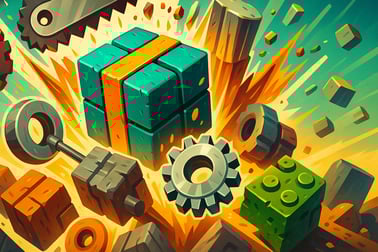
Crusher Block is a free idle clicker where you crush blocks, earn coins, and upgrade your machine into a powerful automated block shredder.















Crusher Block
Introduction to Crusher Block
Crusher Block is a satisfying idle clicker game where you build a gigantic block crushing machine and watch cubes explode into coins. Inspired by a Minecraft style block game, this browser-based incremental idle game lets you start small with basic crushers and slowly evolve into a full-blown industrial mining empire. Whether you love watching numbers climb, tweaking upgrade paths, or just relaxing with a free idle mining game, Crusher Block hits that perfect “one more upgrade” loop.
You don’t need downloads, installs, or a powerful PC. Just open the game in your browser, start crushing blocks, and let the automated machines keep working while you sit back. It’s part clicker, part block crushing simulator, and entirely about turning dirt and stone into endless digital profit.
In this guide you’ll learn how to play Crusher Block online, how the idle progression works, what each block and crusher type does, and why this incremental idle browser game is such a good AFK background tab while you’re doing other things.
How to Play Crusher Block
Even if you’ve never touched an idle clicker game before, you’ll pick up Crusher Block in seconds. The game is designed so that your first blocks are crushed almost instantly, giving you coins to spend and showing you how the whole system fits together.
Basic Rules & Mechanics
The core loop of Crusher Block is straightforward:
- Spawn blocks at the top of the conveyor or chute.
- Move downward through saws, crushers, and other destroyers.
- Break the blocks into pieces to earn coins and resources.
- Use coins to buy more spawners, stronger crushers, and automation upgrades.
Every upgrade you buy improves your income per second, so progress feels faster and faster. That constant acceleration is what makes an incremental idle browser game so addictive.
Controls & Input
Crusher Block is built for simple mouse or touch controls:
- Left-click / Tap on buttons in the UI to buy or upgrade items.
- Hover over certain objects (like manual tools or pickaxes, depending on the version) to trigger additional actions or bonuses.
- Click repeatedly on highlighted areas if the game offers “active” boosts to speed up crushing for a short time.
On desktop, a single mouse button is all you need. On mobile or tablet, just tap where you’d normally click. You don’t need keyboard input, which is ideal for a casual idle clicker game that’s meant to sit in a tab while you multitask.
Objectives & Win Conditions
Like most idle games, Crusher Block doesn’t have a hard “ending” in the traditional sense. Instead, it’s about pushing your production chain further and further, chasing milestones and efficiency goals rather than a final boss.
Key Features
- Endless progression: Keep upgrading crushers, spawners, and automation to see your coin income skyrocket.
- Relaxing visuals: Watch dirt, stone, and other blocks get shredded in a Minecraft style block game environment.
- Idle & active play: Let your machine run on its own or jump in with clicks and manual boosts to speed things up.
- Incremental upgrades: Every purchase improves something—spawn rates, crushing power, coin multipliers, or special bonuses.
- Play in-browser: No account or installation required on most portals; just load and play.
Your personal “win condition” might be reaching a certain income per second, unlocking late-game block types, or fully maxing out every crusher in your factory. Because it’s a block crushing simulator, the satisfaction is in seeing a messy pile of cubes enter the system and pure profit come out the other side.
Performance & Troubleshooting
Crusher Block is built using HTML5 / WebGL technology, so it runs directly in modern browsers. Still, any incremental idle browser game that spawns lots of objects can start to feel heavy on older devices over long sessions. Here are some quick performance tips if things slow down.
Common Issues & Fixes
- Game running slowly or choppy:
- Close extra tabs or background apps that use lots of memory.
- Try a different browser (Chrome, Firefox, Edge, or a modern Chromium-based browser).
- Lower any visual effects settings if the game provides options.
- Game not loading:
- Disable aggressive ad-blockers on the page and refresh.
- Check that JavaScript is enabled in your browser.
- Clear your cache and reload the game if the loading bar gets stuck.
- Progress missing or not saving:
- Some portals save progress in browser storage, so don’t use incognito mode if you want it to persist.
- If an account or “Save” option is offered, log in and save manually from time to time.
Since Crusher Block is fairly lightweight, most players on desktop and modern phones should be able to run this free idle mining game smoothly without special tweaks.
Where to Play Crusher Block
Crusher Block is designed as a browser-based idle clicker game, so it’s made to run instantly without any installations. You simply visit a supported gaming site, click the play button, wait for the short loading period, and you’re ready to crush your first block.
The game typically supports:
- Desktop and laptop browsers: Best performance and easiest for long idle sessions.
- Mobile browsers: Great for quick sessions and AFK progression on the go.
- Tablet browsers: A comfortable middle ground with more screen space for managing upgrades.
Because it’s a casual incremental idle browser game, you can jump in for two minutes or leave it running for hours. Just keep the tab open if you want the crushers to keep working while you do something else.
Offline Play Availability for Crusher Block
Most versions of Crusher Block are primarily online browser games. That means:
- You usually need an internet connection to load the game initially.
- Once loaded, your progress is often stored locally in your browser or linked to an online account on the hosting site.
In many cases, after the game assets are fully loaded, the core gameplay can continue if your connection briefly drops, but you shouldn’t rely on Crusher Block as a true offline game. Treat it as an online idle clicker game that may keep running in the background tab even if your connection is unstable, as long as the page doesn’t need to refresh.
If offline support matters to you, look for:
- A “download app” or “install” version from official app stores on mobile.
- Explicit mentions of offline play on the portal where you’re launching the game.
For standard browser play, assume Crusher Block is mostly an online, in-tab experience rather than a fully offline title.
How to Play Crusher Block Online in Your Browser
Getting started with Crusher Block takes less time than crushing your first block. Here’s a quick walkthrough to go from zero to fully operational crusher line.
Step-by-Step Start Guide
- Open the game page on your favorite browser and wait for it to load.
- Start the first wave of blocks: Most versions automatically spawn basic dirt blocks, or you click a button to begin.
- Watch your first crushers work: Early on, a basic saw blade or crusher will chop those blocks into pieces, rewarding you with coins.
- Upgrade your income: Use those coins to buy improvements—faster spawns, stronger crushers, or extra lanes.
- Keep the tab open: As an idle clicker game, income continues even if you’re less active, as long as the page remains open.
Early Priorities
For a smooth start:
- Focus on upgrading block spawners to increase the number of blocks entering your crusher.
- Then improve crusher strength or speed so they can keep up with the extra blocks.
- Grab any cheap automation upgrades so your machine keeps earning even when you’re away from the screen.
Within a few minutes, you’ll feel the pace pick up as your little crusher setup becomes a serious block destroying factory.
Tips to Build the Ultimate Block Crushing Machine
Once you’re past the early game, Crusher Block becomes a puzzle of optimization. Your goal is to turn your basic conveyor into the ultimate block crushing machine where every cube is destroyed instantly and every second spits out massive coins.
Balance Spawners and Crushers
A common mistake in any block crushing simulator is over-investing in one side of the chain:
- If spawners are too strong and crushers are weak, blocks will clog and move slowly.
- If crushers are overpowered but spawners are weak, your machine sits idle waiting for new blocks.
Try to keep your system balanced by watching where the bottleneck appears. Upgrade wherever blocks are getting stuck or where you see long empty gaps in the line.
Prioritize Multipliers and Automation
In an incremental idle browser game, flat upgrades are good, but multipliers and auto-features are usually better long-term:
- Grab upgrades that increase all income by a percentage when possible.
- Buy automation tools that reduce the need for manual clicking.
- Look for global speed boosts that affect the entire crusher chain.
These upgrades compound over time, letting your machine grow even while you’re not paying attention.
Use Active Clicking Strategically
Some portals’ versions of Crusher Block let you actively participate—for example, clicking on a pickaxe, a hyper crusher button, or a special power-up. Use these bursts of activity when:
- You’ve just bought several upgrades and want to push quickly to the next tier.
- You’re close to affording a major new crusher or block tier and don’t want to wait.
- Special temporary boosts are active, multiplying the value of each crushed block.
Think of active clicking as a temporary turbo mode for your factory.
Idle Clicker Progression: Upgrades, Coins, and Automation
The heart of Crusher Block is its incremental idle progression. What starts as a few dirt blocks becomes a sprawling production system driven by upgrades and smart reinvestment of your coins.
Coins and Currency
Every block you crush pays you coins (or a similar soft currency). The tougher the block, the more it’s worth. Your job is to:
- Use early coins to unlock basic crushers and spawners.
- Reinvest profits into stronger machines and multipliers.
- Climb into late-game tiers where each block is worth a ridiculous amount of coins.
As in any free idle mining game, the numbers will eventually get huge, and that’s part of the fun.
Upgrade Types
While the exact upgrade names may vary by version, they usually fall into these categories:
- Spawner Upgrades: More blocks per second or more lanes feeding into your crushers.
- Crusher Power: Extra damage, faster cutting, or improved efficiency with tougher blocks.
- Speed Boosts: Faster conveyor movement or crushing cycles.
- Income Multipliers: Flat or percentage boosts to coin rewards from all blocks.
- Automation & Quality-of-Life: Auto-clickers, auto-upgrades, or unlocked features that reduce micromanagement.
AFK and Long-Term Progress
Because Crusher Block is designed as a true idle clicker game, it rewards long, relaxed sessions:
- Leave the game in a background tab while you study, work, or browse.
- Check back occasionally to spend coins on big upgrades.
- Watch your production curve rise each time you reinvest profits.
This slow-build style is what makes incremental idle browser games so appealing—you don’t have to grind actively every second to feel progression.
Block Types, Crushers, and Power-Ups Explained
A big part of the fun in Crusher Block is discovering new block types and figuring out the best crushers and power-ups to use on them.
Common Block Types
While visual styles can differ, you’ll generally encounter:
- Basic dirt blocks: Low value, easy to crush, great for early game.
- Stone or rock blocks: Tougher and more valuable, appear as you upgrade.
- Special resource blocks: Blocks that may give bonus coins, multipliers, or temporary boosts when destroyed.
Harder blocks usually require stronger crusher upgrades to maintain fast clearing speeds.
Crushers and Saws
Your crushing machine might include:
- Basic saw blades: The starting point for slicing through dirt.
- Heavy crushers or presses: Deal massive damage to tougher stone blocks.
- Multi-stage crusher lines: Several crushers chained together for faster total destruction.
As you level up each crusher, you’ll see blocks vanish faster, turning your machine into a blur of spinning blades and shattering cubes.
Power-Ups and Temporary Bonuses
Some versions of Crusher Block include:
- Timed income multipliers that boost all coins earned for a short period.
- Speed boosts that make conveyors and crushers move faster.
- Special event blocks that trigger bonuses when destroyed.
Use these when you’re actively watching the screen so you can capitalize on the short windows of boosted income.
Why Crusher Block Is a Perfect AFK Idle Game
If you’re looking for a game that can run in the background while you do something else, Crusher Block is ideal. As a block crushing simulator and idle clicker wrapped into one, it’s built to be an AFK-friendly experience.
Low Effort, High Satisfaction
You don’t need fast reflexes or constant attention. Just:
- Open the game in a browser.
- Set up your first few upgrades.
- Let the machines do the hard work while you focus on other tasks.
Each time you check back, you’re rewarded with a pile of coins and a batch of new upgrades to buy. That cycle of leaving, returning, and upgrading is exactly what makes Crusher Block a standout free idle mining game.
Great for Short or Long Sessions
Crusher Block adapts to your schedule:
- Short sessions: Hop in, crush some blocks, grab a few upgrades, and leave.
- Long AFK sessions: Keep the tab open for hours, then come back to a mountain of resources.
Because it lives in your browser, it’s easy to add to your daily routine—open it alongside your work or school tabs and let that virtual factory grind away in the background.
If you enjoy watching systems grow, experimenting with upgrade paths, and turning simple cubes into endless profit, Crusher Block is one of the most satisfying incremental idle browser games you can play right now.
Frequently Asked Questions
What is Crusher Block?
Crusher Block is a free browser-based idle clicker game where you crush endless blocks, earn coins, and upgrade your crushers and block spawners to build a powerful automated machine.
How do you play Crusher Block?
You start by clicking to crush blocks and earn coins. Use those coins to upgrade your crushers, increase block spawn rates, and unlock automation so the machine keeps working while you sit back and watch.
Can I play Crusher Block for free?
Yes, Crusher Block is completely free to play in your browser. There is no download required, and you can start playing instantly on desktop or mobile devices that support HTML5.
Is Crusher Block an idle or active clicker game?
Crusher Block is both. You can actively click to speed up crushing for faster coins, or let the upgraded crushers and spawners work on their own as an idle game in the background.
Do I need an account to save my progress in Crusher Block?
Some platforms may let you save progress by logging into an account, but you can usually play Crusher Block as a guest. Check the platform’s save options if you want to keep your upgrades across sessions.