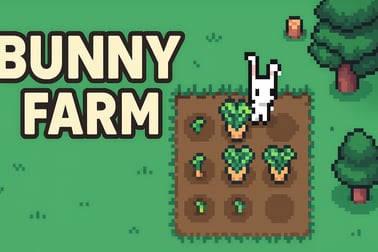
Bunny Farm lets you plant, harvest, and manage a cozy forest farm as a hard-working rabbit. Fulfill animal orders, upgrade gear, and relax while you grow.

















Bunny Farm
Overview of Bunny Farm
Bunny Farm is a cozy pixel farm where you play as a hardworking white rabbit growing crops, feeding forest animals, and slowly turning a tiny clearing into a thriving woodland settlement. It blends an adorable cute farming simulator vibe with light management and idle mechanics, making it perfect for quick browser sessions or long, relaxing play marathons.
At its heart, Bunny Farm is an idle farm game online: you plant, water, harvest, and deliver food to your animal neighbors, then unlock tools, workers, and new plots of land to automate more and more of the work. Orders roll in constantly from hungry forest critters, giving you a simple but satisfying gameplay loop of grow–process–deliver–upgrade.
Because it runs in the browser, there’s no download or installation needed. The cozy pixel farm visuals, simple controls, and forgiving pacing make it a great animal farming game for kids, adults, and anyone who wants a gentle break between more intense games.
In this guide, you’ll learn how Bunny Farm works, how to control your bunny, how to manage your crops and orders efficiently, plus tips to expand your browser farm management empire as smoothly as possible.
How to Play Bunny Farm
Bunny Farm is designed to be simple to pick up, even if it’s your first farming sim. Once the game loads in your browser, you’ll see your bunny standing in a small patch of land surrounded by plots, fields, machines, and delivery spots that gradually unlock as you progress.
Core Rules & Systems
Everything in this cute farming simulator revolves around a few core actions: planting, harvesting, processing, and fulfilling orders. Here’s how those systems connect:
- Seeds & Crops: You start with basic crops like carrots and wheat. Later you’ll unlock others such as corn or tomatoes. Plant them on empty fields, then come back to harvest after they grow.
- Watering & Growth: Some versions of the game ask you to water your plants; others trigger auto-watering when you stand on a marked tile. In all cases, crops need a little time to grow before you can harvest.
- Orders Board: Animal customers place orders for specific items (for example, “10 carrots” or “3 loaves of bread”). Completing these orders is the main way you earn coins and progress.
- Processing Stations: As your farm grows, you unlock machines that turn raw crops into value-added goods (like flour from wheat, or cooked meals from vegetables). These are essential for higher-level orders.
- Upgrades & Automation: Coins from orders can upgrade tools, increase storage, buy more land, or hire workers to perform tasks automatically.
The goal isn’t to rush or min-max like a hardcore strategy game. Instead, it’s to build a cozy rhythm where your cozy pixel farm quietly grows more efficient over time while you enjoy the satisfying loop.
Bunny Farm Controls
Controls are straightforward and tailored to a browser farm management experience:
- Movement: Use the WASD keys or the arrow keys to move your bunny around the map.
- Interact / Auto-actions: Move onto specific marked tiles (often white or highlighted squares). Simply standing there will auto-perform the task: planting, watering, harvesting, loading machines, or delivering goods.
- Clicking (if supported by your portal): In some browser versions, you can use the mouse to confirm certain actions, pick upgrades, or navigate menus, but the core gameplay is keyboard-based.
Because movement-driven interactions are so simple, even younger players or casual gamers can comfortably manage their animal farming game without complex button combos.
Bunny Farm Features
Bunny Farm packs a lot of charm into a small footprint. These are the key features that define the experience and make it stand out among other idle farm game online titles:
- Adorable Forest Theme: You aren’t just on generic farmland; you’re deep in a magical woodland, surrounded by animal neighbors, wooden fences, and cozy cabins.
- Simple But Satisfying Progression: Start with a single plot and a few crops. As you complete more orders, you’ll unlock new fields, processing machines, storage areas, and decorative touches.
- Idle-Friendly Systems: Auto-actions and optional workers reduce how often you need to micromanage, which is ideal if you enjoy an easygoing cute farming simulator with light idle elements.
- Resource Management: You’ll juggle crop types, machine capacity, storage space, and order deadlines to keep your cozy pixel farm running smoothly.
- Browser-Based Convenience: The game runs directly in your browser as an HTML5 experience—no heavy downloads, no complex setup.
- Family-Friendly Atmosphere: Non-violent gameplay, friendly animals, and soft visuals make it suitable for kids and families to play together.
Combined, these features create a relaxing but engaging browser farm management game that feels fresh every time you unlock a new part of your woodland homestead.
Performance & Troubleshooting
Because Bunny Farm is a browser-based game, most performance issues come from the browser or device rather than the game itself. If your cozy pixel farm starts to stutter or lag, try these fixes:
- Close Extra Tabs: Too many open tabs or streaming services can slow down your idle farm game online. Close anything you don’t need while playing.
- Update Your Browser: Make sure you’re using the latest version of Chrome, Edge, Firefox, or another modern browser. HTML5 games run best on up-to-date engines.
- Disable Heavy Extensions: Ad blockers, script blockers, or other heavy extensions can sometimes interfere. Temporarily turn them off on the site hosting Bunny Farm if you notice issues.
- Lower Display Scaling: If your browser zoom is cranked above 100%, try setting it back to 100% so the game doesn’t have to render at an unusual scale.
- Check Your Connection: While gameplay itself doesn’t typically use much bandwidth, an unstable connection can cause loading issues or freezes during ad breaks on some portals.
If the game fails to load at all, refreshing the page or trying a different browser usually resolves the problem. On school or work networks, some gaming domains may be blocked; in that case, you might have to play from a home network instead.
Is Bunny Farm Safe to Play Online?
Bunny Farm is generally considered safe for most players and is built as a family-friendly animal farming game with no graphic content or violence. You’re growing crops, feeding animals, and optimizing your woodland business—not fighting enemies.
Still, there are a few safety and content notes worth keeping in mind:
- Suitable for Kids: The gameplay loop, visuals, and theme are appropriate for children, and the mechanics are simple enough for them to understand quickly.
- No Chat or PvP: Typical browser versions of Bunny Farm don’t include real-time chat, PvP combat, or user-generated text, reducing exposure to inappropriate content from other players.
- Third-Party Ads: Some hosting sites may display ads before or after the game, or in page margins. Parents may want to supervise younger children to ensure they don’t click on unrelated promotions.
- Data & Accounts: Most portals let you play Bunny Farm without creating a detailed account. If account creation or permissions are requested, read the site’s privacy policy before sharing personal information.
As long as you’re playing on a reputable gaming portal and keeping an eye on standard web safety (not sharing passwords, ignoring suspicious pop-ups), Bunny Farm is a safe, relaxing title you can happily enjoy as your go-to cozy pixel farm break.
Grow Your Cozy Forest Farm With an Adorable Bunny
From the very first steps, Bunny Farm pulls you into its world with a soft color palette, pixel art fields, and a determined little bunny ready to work. This isn’t a high-stress business sim; it’s a gentle, forest-themed cute farming simulator where small improvements add up over time.
You’ll begin with just enough land to plant a few rows of crops. There’s no huge tutorial wall of text—just intuitive prompts that show you where to move, what to plant, and how to collect your first harvest. As orders pop up from woodland customers, you’ll get a natural introduction to the game’s systems:
- Plant simple crops like carrots and wheat to fulfill basic requests.
- Use your bunny’s energy efficiently by planning your walking route around the farm.
- Learn the layout—fields, storage, machines, and delivery spots—so you can quickly fall into a rhythm.
This early game is intentionally relaxed. You’ll get used to your browser farm management tasks one by one, with no complex strategy required. Over time, though, the layers of production deepen and the sense of running a living, breathing forest farm grows richer.
How to Plant, Harvest, and Fulfill Animal Orders
Most of your time in this idle farm game online will be spent cycling between three big actions: planting, harvesting, and delivering. Mastering this loop is the key to both fun and efficiency.
Planting & Growing Crops
To plant crops on your cozy pixel farm:
- Move your bunny onto an empty field tile.
- Stand on the planting spot or follow on-screen prompts to choose which crop to plant.
- Repeat across all available plots, prioritizing crops you need for upcoming orders.
Many players like to dedicate whole rows to a single crop—carrots in one area, wheat in another—to quickly see what’s ready at a glance.
Harvesting Efficiently
After some time passes, crops will be ready to harvest:
- Walk across fully grown tiles to auto-harvest them into your inventory or the nearest storage.
- Try to harvest in loops rather than zig-zagging randomly; it saves time and keeps your cute farming simulator gameplay flowing smoothly.
- Replant immediately where possible so that fields are never sitting idle.
Completing Animal Orders
Orders from animal neighbors are displayed on an order board or interface:
- Check order details to see which items and how many units you need.
- Gather required items from your inventory or produce them via machines.
- Deliver the order by moving to the marked delivery spot.
- Collect rewards—usually coins and sometimes experience or bonus items.
Always keep upcoming orders in mind while you plant. If you see multiple future requests for wheat-based goods, for instance, prioritizing wheat fields and related processing will keep your animal farming game running far smoother.
Tools, Upgrades, and Workers to Boost Your Farm
As you complete more orders, you’ll earn coins that can be reinvested into your Bunny Farm. This is where the browser farm management aspect really shines, letting you shape how automated and efficient your operation becomes.
Farm Tools & Machines
You’ll gradually unlock:
- Processing machines that turn raw crops into higher-value items.
- Storage buildings that hold more harvests so you don’t overflow.
- Speed or capacity upgrades that help machines handle larger batches more quickly.
Focus on upgrading machines that feed into your most common or most profitable orders first. That way your idle farm game online keeps generating strong income even when you’re not micromanaging every step.
Hiring Workers & Automation
One of the most satisfying milestones in a cozy pixel farm is unlocking workers:
- Field workers can handle planting or harvesting in specific areas.
- Transport helpers may move goods between storage and machines.
- Processing assistants keep machines fed and running without constant input from you.
This automation turns Bunny Farm into a truly chill idle farm game online, where much of the routine work happens for you and you get to focus on high-level decisions—what to expand next, which orders to prioritize, and how to shape your woodland empire.
Tips to Expand Your Land and Build a Woodland Empire
Expanding your land is one of the most exciting parts of any animal farming game, and Bunny Farm is no exception. Each new area you unlock adds fresh possibilities, more plots, and often new machinery.
Plan Your Expansion Path
Instead of unlocking random tiles as soon as you can afford them, think about your overall layout:
- Group related activities together—put crop fields near each other and processing buildings in a central hub.
- Minimize walking time by keeping high-traffic spots (like storage and order delivery points) close to your main routes.
- Leave space for future machines near existing ones so your production lines stay compact.
Balance Growth and Upgrades
It’s tempting to spend all your coins unlocking more land, but your browser farm management will suffer if your existing tools are underpowered. A good rule of thumb:
- Upgrade storage and your most-used machines regularly.
- Expand land when you frequently hit capacity or feel bottlenecked on field space.
- Reinvest windfall income (from big orders) into long-term infrastructure like workers or extra plots.
Over time, this balanced approach turns your modest clearing into a full-blown woodland empire—a high-functioning cozy pixel farm where every corner hums with activity.
Relaxing Idle Farming Gameplay for All Ages
What makes Bunny Farm so appealing isn’t just the mechanics; it’s the mood. The gentle pace, low-pressure objectives, and charming visuals combine into a cute farming simulator that feels like a warm cup of tea between stressful tasks.
For kids, it’s a safe, colorful introduction to resource management and planning. For adults, it’s a welcome breather—a way to unwind while still engaging your brain just enough through browser farm management decisions. And for fans of idle farm game online experiences, it offers that satisfying sense of watching your systems grow more complex and self-sustaining over time.
Whether you play in short sessions during breaks or sink hours into perfecting your production lines, Bunny Farm delivers a wholesome, forest-themed animal farming game that’s easy to love and even easier to return to. Hop in, plant a few rows, fulfill some animal orders, and watch your tiny forest patch blossom into the coziest pixel farm around.
Frequently Asked Questions
What is Bunny Farm about?
Bunny Farm is a cozy farming simulation game where you play as a rabbit, plant and harvest crops, fulfill animal orders, and grow a thriving forest farm.
Is Bunny Farm free to play?
Yes, Bunny Farm is free to play in your browser. You can start farming, upgrading tools, and expanding your land without any download.
How do you play Bunny Farm?
Move your bunny around the farm, plant seeds, water crops, and harvest them to complete orders. Use your earnings to unlock new areas, tools, and upgrades.
Is Bunny Farm suitable for kids?
Yes, Bunny Farm is family-friendly. It features simple controls, cute animal characters, and non-violent farming gameplay suitable for children and adults.
Can I play Bunny Farm on mobile?
Bunny Farm is a browser game that can be played on most modern mobile devices and desktops, as long as you have an up-to-date web browser and internet connection.