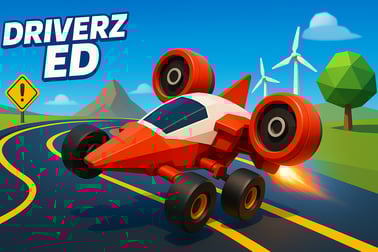
Driverz Ed lets you practice driving tests, parking and road rules in a realistic browser simulator. Train for driver’s ed with fun, safe challenges.
















Driverz Ed
Overview of Driverz Ed
Driverz Ed is an online driving school game that lets you practice real-world driving tests, parking skills, and road rules right in your browser. Designed as a fun drivers ed simulator, it recreates common situations new drivers face: obeying traffic lights, staying in your lane, watching blind spots, and squeezing into tight parking spaces without a scratch.
Unlike many racing games, Driverz Ed isn't about speed or crashing into obstacles. It's a car parking practice game and driving test practice game focused on control, awareness, and safe decision-making. You'll manage steering, acceleration, and braking while following virtual instructors' directions and learning to learn road signs online in a low-pressure environment.
Because it runs in the browser, Driverz Ed is easy to launch on school computers, home laptops, or personal devices. That makes it a handy supplement for teens starting driver's ed, adults refreshing their skills, or anyone curious about basic road rules. You can jump into short, focused levels that mimic real exam tasks: three-point turns, reversing into spaces, parallel parking on a street, or approaching intersections correctly.
Whether you're nervous about your future road test or just want to sharpen your parking skills before borrowing the family car, Driverz Ed gives you a friendly, game-like way to build confidence before you ever turn a real key.
Driverz Ed Control Guide
Driverz Ed uses simple, intuitive controls so players can focus on safe driving habits rather than complex inputs. Depending on your setup, you can play with a keyboard or, on supported devices, with on-screen buttons.
Keyboard Controls (Desktop & Laptop)
- Arrow Keys / WASD
- Up / W – Accelerate forward
- Down / S – Brake and reverse
- Left / A – Steer left
- Right / D – Steer right
- Spacebar – Handbrake or emergency stop in some modes
- P – Pause or open the in-game menu (if available)
- R – Restart the current level or test
The steering is intentionally a bit sensitive to simulate how small wheel movements affect the car's trajectory. It encourages you to "feather" the keys rather than holding them down, just as you'd make small, smooth corrections with a real steering wheel.
On-Screen Controls (Mobile Browser, If Supported)
- Virtual steering buttons on the left side of the screen to turn the vehicle
- Accelerate and brake pedals on the right side for forward and reverse control
- Optional camera or reset icons to adjust your view or restart a parking attempt
On touch devices, it's best to use both hands: left thumb for steering and right thumb for pedals. This mimics real driving, where you coordinate hands and feet together.
Camera & View Options
Some builds of Driverz Ed may include basic view toggles:
- Chase camera – Standard third-person view behind the car
- High or side camera – Helpful for tight parking or precision maneuvers
Using a higher view can make it easier to line up for parallel parking or to judge the distance between your car and nearby obstacles.
Key Features
Driverz Ed is built as both an entertaining browser game and a light educational tool. It borrows ideas from classroom driver's ed and turns them into interactive challenges you can retry as often as you like.
- Realistic driving test scenarios – Practice starting, stopping, signaling, lane changes, and gentle turns in simulated exam-style routes.
- Dedicated parking levels – Focused scenarios turn the game into a full car parking practice game with parallel, angle, reverse, and tight-space parking.
- Road sign recognition – Levels and tutorials help you learn road signs online, from speed limits and yield signs to school zones and no-parking zones.
- Scoring and evaluation – Mistakes such as hitting cones, bumping into cars, or ignoring signals lower your score, just like point deductions on a real road test.
- Beginner-friendly difficulty – Short, structured tasks keep new drivers from feeling overwhelmed while still building core skills.
- Instant restart and replay – Missed a turn or overshot a parking space? Restart in seconds and try again until you perfect the maneuver.
- Browser-based access – No large downloads or installs; just open your browser and start playing an online driving school game in moments.
The overall design favors learning by repetition. You attempt a skill, get quick feedback, and try again with a better plan. For teens, parents, and teachers, this makes Driverz Ed a simple but effective supplement to more formal training.
Performance & Troubleshooting
Because Driverz Ed is a browser-based drivers ed simulator, performance depends on your device, browser, and connection. If you experience lag, audio glitches, or slow response times, try the following tips.
Recommended Setup
- Modern browser – Use the latest version of Chrome, Edge, Firefox, or Safari.
- Stable internet connection – A steady connection helps the game load assets smoothly.
- Disable extra tabs – Close heavy video streams or other browser games to free memory.
Common Issues & Quick Fixes
- Game feels slow or choppy
- Lower your browser's zoom level (100% or below).
- Close background apps or downloads.
- On laptops, plug into power so the system isn't in battery-saver mode.
- Controls don't respond
- Click once inside the game frame to ensure it has keyboard focus.
- Check that no pop-up or dialog is blocking input.
- If playing on a school or work PC, some keys may be restricted—try another device if possible.
- Game doesn't load
- Refresh the page after a few seconds.
- Clear browser cache and reload.
- Temporarily disable aggressive ad-blockers that might block game scripts.
If performance continues to be an issue on an older machine, try reducing other activity and focus on shorter sessions. Since each level in Driverz Ed is relatively compact, you can still get meaningful driving test practice even on modest hardware.
Where to Play Driverz Ed
Driverz Ed is built to be an accessible online driving school game that launches directly in your web browser. You don't need to install a large client, create complex accounts, or purchase anything to start practicing.
You'll typically find Driverz Ed on family-friendly browser gaming sites under categories like Driving, Simulation, or Educational. Look for descriptions that highlight driving test practice, road rules, and parking challenges. Once you open the game's page, wait for it to load fully, review the control guide, and then choose your first lesson or level.
Because it runs in-browser, Driverz Ed is also convenient for classroom use. Teachers can pull it up on lab computers as a light activity to reinforce lessons on road signs, traffic lights, and right-of-way rules. Just be sure to follow any school guidelines for using online games during class time.
Is Driverz Ed Safe to Play Online?
Driverz Ed is designed as a family-friendly drivers ed simulator that focuses on safety and learning, not reckless driving. There is no graphic content, no real-world driving required, and no promotion of dangerous behavior. Instead, the game rewards players for cautious driving, correct signaling, observing speed limits, and avoiding collisions.
Parents and educators can feel comfortable with Driverz Ed for several reasons:
- Educational focus – The gameplay supports learning road signs, signals, and basic right-of-way concepts.
- No explicit violence – Mistakes are usually shown as gentle bumps or on-screen warnings, not graphic crashes.
- Short, structured levels – Sessions can be easily supervised and limited.
As with any browser game, it's wise to play on trusted gaming platforms, avoid sharing personal information, and keep your browser and security settings up to date. But in terms of content, Driverz Ed is intended to be appropriate for teens and most younger learners who are starting to think about road safety and future driving tests.
Master Realistic Driving Tests in Your Browser
Driverz Ed turns your computer into a basic driving test practice environment. It can't replace a licensed instructor or real behind-the-wheel time, but it can help you get used to the types of tasks you'll face during an exam.
Simulated Road Test Tasks
- Starting and stopping smoothly – Practice gentle acceleration, steady braking, and stopping at the correct distance behind crosswalks and stop lines.
- Lane discipline – Follow lane markings, avoid drifting, and use subtle steering corrections to stay centered.
- Signaling and checking "blind spots" – The game encourages using signals before turns or lane changes and "looking" around via camera and positioning.
- Speed control – Learn not to floor the accelerator; keeping a steady, reasonable speed is usually rewarded with better scores.
Each attempt offers a chance to reflect on what went wrong—turning too fast, braking too late, or missing a sign. Repeating levels can help you build the muscle memory and awareness that pay off later during real-world driver's ed.
Why Practice in a Driverz Ed Simulator?
Using a browser-based driving test practice game lets you make mistakes in a completely risk-free environment. You can hit a cone, pause to think through a turn, or even restart an entire route without worrying about damaging a real car. That freedom to experiment helps nervous learners relax and absorb good habits before climbing into an actual vehicle.
Parking Challenges: Parallel, Reverse and Tight Spaces
Many new drivers say parking is the hardest part of learning to drive. Driverz Ed leans into this by framing the game as a car parking practice game with clearly defined challenges and easy restarts.
Parallel Parking Practice
Parallel parking is often one of the most intimidating tasks on a driving test. In Driverz Ed, you'll line up beside parked cars, reverse into the space, and adjust your angle without hitting obstacles. Cones or visual guides help you understand:
- When to start turning the wheel
- How far to reverse before straightening out
- How to correct if you're too close or too far from the curb
By repeating the level, you'll start to recognize consistent reference points, making the real maneuver feel less mysterious.
Reverse and Angle Parking
Driverz Ed also explores everyday parking lot skills, such as:
- Reverse-in spaces – Backing into a spot between two vehicles.
- Angle parking – Approaching at the right angle and stopping inside the lines.
- Pull-through parking – Lining up with front-and-back spaces efficiently (if the mode is offered).
Learning to judge your car's length and width virtually can make parking lots and driveways feel much easier once you're in a real vehicle.
Tight Space & Obstacle Courses
Some levels effectively act as tight obstacle courses, asking you to maneuver between cones, poles, or other cars without contact. This builds:
- Low-speed control
- Patience and careful steering
- Comfort with frequent small corrections instead of big, jerky turns
Every time you complete a tough parking scenario, you gain a bit more confidence—and that's a big win for anyone who dreads parking in crowded lots.
Learn Road Signs, Signals and Right-of-Way Rules
One key benefit of Driverz Ed is the chance to learn road signs online in a setting that rewards correct responses. Instead of memorizing a chart, you see how signs fit into actual driving situations.
Road Signs in Context
As you drive through virtual streets, you'll encounter:
- Regulatory signs – Stop, yield, speed limit, one-way, and no-entry.
- Warning signs – Sharp turns, pedestrian crossings, school zones.
- Parking and no-parking signs – Important in dedicated parking levels.
Ignoring these signs might cost you points, make you fail a level, or trigger a gentle reminder, encouraging you to watch the environment carefully.
Signals & Intersections
Driverz Ed makes you pay attention to:
- Traffic lights – Stopping on red, not jumping early on green, and obeying yellow lights safely.
- Turn arrows – Understanding when protected turns are allowed or when you should yield.
- Four-way stops – Practicing the correct order of movement based on arrival and right-of-way rules.
These scenarios mirror common test questions and classroom lessons, but the interactive format helps the rules stick.
Right-of-Way Basics
Right-of-way can feel abstract when you only read about it. In this driving test practice game, you get a feel for when you should wait and when it's safe to proceed. Typical examples include:
- Letting pedestrians fully cross at marked crosswalks.
- Yielding to oncoming traffic when turning left.
- Being extra cautious near school zones or parked school buses (if included).
Practicing these behaviors in a no-risk simulator helps build the habit of thinking ahead and sharing the road responsibly.
Safe Driving Tips for New Teen Drivers
Driverz Ed is more than a casual game; it subtly models safe habits new drivers can carry into real life. While practicing in this online driving school game, keep these safety principles in mind and discuss them with parents or instructors.
1. Speed Isn't the Goal
In Driverz Ed, you rarely "win" by going fast. You score better by driving smoothly, stopping correctly, and avoiding mistakes. The same applies on real roads: steady, predictable driving is safer than rushing.
2. Look Ahead, Not Just at the Car in Front
Use the wide camera and environment cues to scan further down the road. In real driving, looking ahead helps you catch hazards early—like sudden stops, changing lights, or pedestrians stepping off the curb.
3. Take Parking Slowly
Parallel parking and tight maneuvers in the game reward patience. Tiny movements and frequent checks are better than large, rushed turns. When you eventually park a real car, remember that there's no prize for doing it fast—only for doing it safely.
4. Practice Good Habits Early
Signal before turns in the game, even if the level doesn't strictly require it. Come to complete stops at stop signs. Stay within "posted" speeds. Building these habits now makes them second nature when you take the wheel for real.
5. Combine Simulator Time with Real Instruction
A browser-based drivers ed simulator is a supplement, not a substitute, for licensed instruction and supervised driving. Use Driverz Ed to get comfortable with concepts, then confirm and refine what you've learned with a parent, guardian, or professional teacher.
Practice for Driver’s Ed Without Leaving Home
One of the biggest advantages of Driverz Ed is convenience. You can get a taste of driver's ed-style practice from your bedroom, school library, or any place with a decent internet connection.
Great for Pre-Learners and Nervous Beginners
If you're months or even years away from getting your permit, this kind of driving test practice game lets you explore what driving involves without pressure. You'll understand that it's about observation and control, not just pressing the gas pedal.
Reinforcement for Current Students
Already enrolled in a driver's ed course? Use Driverz Ed as a nightly warm-up:
- Run a couple of road test levels before studying your handbook.
- Use the parking levels to visualize angles discussed in class.
- Replay road sign scenarios after doing written quizzes.
This blended approach—class material plus an online driving school game—can deepen your understanding and make test day feel more familiar.
No-Car Households or Limited Access
Not everyone has constant access to a car for early practice. In those situations, an accessible, browser-based drivers ed simulator is especially helpful. While it can't replace real driving, it can help you arrive at your first behind-the-wheel lesson with useful background knowledge and less anxiety.
By giving you a safe place to experiment, make mistakes, and improve, Driverz Ed makes learning to drive a little less scary and a lot more approachable—without leaving home.
Frequently Asked Questions
What is Driverz Ed?
Driverz Ed is a browser-based driving simulator where you practice basic driving, parking and road rules in a safe, game-style environment.
Is Driverz Ed free to play?
Yes, Driverz Ed is free to play in your browser. You just need an internet connection and a compatible device to start driving.
Can Driverz Ed help me prepare for a real driving test?
Driverz Ed is a practice tool that can help you get familiar with road signs, signals, parking and basic traffic rules, but it does not replace an official driver’s education course.
Do I need to download anything to play Driverz Ed?
No download is required. Driverz Ed runs directly in your web browser, so you can start playing instantly.
Is Driverz Ed suitable for kids and teens?
Yes, Driverz Ed is family-friendly and designed with teens and beginner drivers in mind. It focuses on safe driving habits and basic traffic rules.