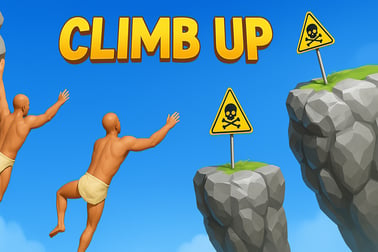
Climb Up is a challenging 3D climbing adventure. Test your skill and nerve, dodge obstacles, and see how high you can reach in your browser.
















Climb Up
Overview of Climb Up
Climb Up is a tense, physics based platformer where every tiny movement can send you tumbling back to the start. You guide a determined climber up a massive 3D mountain filled with narrow ledges, awkward jumps, and risky shortcuts. It looks simple at first, but as you rise higher, the real mountain climbing challenge kicks in and every new ledge feels like a victory.
Designed as a 3D skill game, Climb Up focuses on precision, timing, and patience. Instead of fast action and power-ups, this difficult adventure game tests your nerves. One careless move can undo minutes of progress, so you'll learn to respect momentum, weight, and gravity as you edge your way upward.
Because it's an online climbing game you can jump in instantly from your browser and start climbing without downloads. Players come back again and again, trying new routes, shaving seconds off their best times, and seeing how high they can go before gravity wins. If you enjoy games where skill truly matters, Climb Up belongs on your must-play list.
Climb Up Control Guide
The controls in Climb Up are simple to learn but surprisingly deep once you start pushing for higher climbs. As a physics based platformer, it uses standard movement keys or on-screen touch controls, but the way you combine them makes all the difference.
Keyboard and mouse controls (desktop browser)
- Arrow keys / WASD – Move your climber left, right, and jump.
- Spacebar – Main jump or climb action, depending on the ledge or object.
- Shift or Ctrl – Slow, precise movement or "careful step" on narrow platforms (if available in your version).
- Mouse – In some versions, you can aim your jump or drag to set direction and power.
The exact mapping may differ slightly between platforms, but the core idea stays the same: combine directional input with a jump or climb action, then let the physics system handle your arc, slide, or landing.
Touch controls (mobile and tablet)
- Virtual joystick or arrows – Slide your thumb to move your climber.
- Tap / tap-and-hold – Jump, climb, or grab onto a ledge.
- Swipe – Some builds use swipe gestures for powerful leaps or quick direction changes.
On touch screens, the game keeps the interface minimal so you can focus on timing and balance. You'll quickly feel how even a slightly longer press can send you flying past the next platform – or straight off the cliff.
Climb Up Features
Climb Up may look straightforward, but it packs plenty of features that make each climb unique and memorable.
- Physics-driven climbing – Every jump, slide, and stumble is ruled by physics. That means there are no "fake" animations to save you – if you overjump, you fall.
- Vertical 3D level design – The mountain feels like one towering obstacle, with narrow ledges, rotating blocks, and precarious footholds stacked high above the void.
- Constant mountain climbing challenge – There are no easy shortcuts. The higher you climb, the thinner the platforms, the longer the gaps, and the more punishing every mistake becomes.
- Skill-based progress – There are no pay-to-win boosts here. Progress comes from learning how the physics behaves and mastering your own timing and angles.
- Quick restarts – Fall from a great height? You can immediately try again, pushing a little further each attempt.
- Browser and mobile support – As a flexible online climbing game, Climb Up can be played on modern browsers and many mobile devices.
Together, these features create a gameplay loop that feels fair but challenging. When you fail, you know it was your misjudged jump or greedy shortcut—never random luck.
Where to Play Climb Up
Climb Up is designed to be easy to access, especially if you love trying a new physics based platformer directly in your browser.
Play in your browser
You can enjoy Climb Up as an online climbing game on gaming portals that support Adventure, Skill, and Platform categories. Just open your browser, visit your preferred site that hosts Climb Up, and click Play. There's usually no registration required to start climbing.
Because it's a browser-based 3D skill game, you don't need to install heavy clients. This makes it perfect for quick sessions at home, during a break, or on any desktop that supports modern HTML5 gaming.
Play on mobile and tablets
Many platforms also offer Climb Up in a mobile-friendly version, so you can tackle the mountain wherever you go. Some sites let you play straight from your mobile browser, while others may link to app versions created by the developer.
In all cases, check that your device is up to date and that you're on a stable connection for smoother input and fewer interruptions while you're focusing on that crucial jump.
Is Climb Up Safe to Play Online?
Climb Up is generally considered safe for a wide audience. It's focused purely on skill, reflexes, and physics-based platforming. There's no graphic violence, no mature themes, and no inappropriate content. The tension comes from the risk of falling, not from anything scary or extreme.
When you play Climb Up on a reputable browser gaming site, you also benefit from standard content filtering and moderation. Parents can feel comfortable letting kids try this challenging but clean difficult adventure game, especially if they enjoy platformers that reward practice.
As with any online climbing game, it's still wise to:
- Play only on trusted gaming platforms.
- Avoid sharing personal information in usernames or chat (if social features exist on the hosting site).
- Use up-to-date browsers and security software.
The game itself is about as family-friendly as a pure skill-based vertical climb can get.
How to Master the Mountain in Climb Up
Climb Up isn't about button mashing. It's about learning how your climber moves and how the mountain pushes back. To master the mountain, you'll need to treat each ledge and platform like its own tiny puzzle.
Study the terrain before you jump
Don't rush. When you reach a new section, pause for a second and look closely. Ask yourself:
- Where is the safest landing spot?
- Is there a smaller, more secure platform before the big gap?
- Are any surfaces angled in a way that could cause you to slide?
Climb Up rewards players who think two or three jumps ahead. Treat every move as part of a chain, not just a single action.
Learn your character's momentum
Because this is a physics based platformer, momentum is everything. A tiny step before jumping can change your arc just enough to reach a tricky ledge. Likewise, jumping while you're already moving can send you much farther than expected.
Spend a few runs experimenting on early platforms. Practice short hops, long leaps, and quick direction changes to see how far you travel with different inputs. That knowledge will save you from nasty surprises when the stakes are higher.
Accept that falling is part of the climb
No matter how careful you are, you'll fall—sometimes from painfully high spots. Instead of getting frustrated, treat every fall as feedback. Ask yourself:
- Did I jump too early or too late?
- Was there a safer route I ignored?
- Did I underestimate the slope or angle of the platform?
This mindset is key to mastering Climb Up. Progress isn't just measured in height; it's measured in how much better you understand the mountain each time you play.
Tips and Tricks to Climb Higher Without Falling
If you want to turn your shaky first attempts into confident climbs, keep these practical tips in mind. They apply whether you're on desktop or mobile, and they're especially useful in the late-game sections of this 3D skill game.
1. Respect small platforms
Those tiny ledges might look tempting to skip, but they're often placed there for a reason. Use them to reset your momentum, adjust your angle, and line up the next jump. Risky shortcuts can save time, but they also send you back down more often than you'd like.
2. Use controlled jumps instead of full sends
Holding the jump button as long as possible isn't always the answer. Practice tap jumps for short, precise hops and longer presses only when the gap clearly demands it. In a precise mountain climbing challenge, overjumping is just as dangerous as coming up short.
3. Stay calm after a mistake
The most dangerous moment is right after you slip or misjudge a landing. Many players panic and mash buttons in an attempt to correct mid-air or mid-slide, which only makes things worse.
Instead, try to stay composed. Sometimes the safest choice is to accept a lower platform or safe fallback point rather than spamming another desperate jump.
4. Memorize critical sections
Some stretches of the climb are clearly harder than others. When you find a section that consistently sends you tumbling, turn it into a training ground. Ask yourself:
- What exact sequence of movements works here?
- Where should I stand before jumping?
- How long should I hold the jump button?
Once you have a reliable pattern, stick to it on future runs instead of improvising every time.
5. Take breaks when the game gets to you
Climb Up is a difficult adventure game by design. When you're tilted or impatient, your reaction time and judgment suffer. Short breaks help reset your focus, so you can come back and make cleaner, more deliberate moves.
Game Controls and Mechanics Explained
Under the hood, Climb Up is all about momentum, friction, and gravity working together to challenge your timing. Understanding how these mechanics interact will give you a real edge on the mountain.
Movement and friction
Surfaces in the game can behave differently depending on their angle and material. Flat platforms allow tighter control and quicker stops, while sloped or smooth surfaces cause you to slide if you land too fast or at the wrong angle.
This is where gentle taps on the movement keys or joystick matter. Small corrections can be the difference between stabilizing on a narrow ledge and sliding right off.
Jump arcs and landing zones
Every jump has a predictable arc, based on your speed and the direction you're pressing. As you climb, start to think in terms of "landing zones"—small spots where you know you can safely land and reset. You're not just trying to "reach the next platform"; you're aiming for specific points that give you the safest foothold.
Risk vs reward routes
The mountain often gives you two options:
- Safe route – More platforms, smaller jumps, slower progress but a lower chance of falling.
- Risky route – Bigger jumps, fewer ledges, faster progress but harsher punishment if you miss.
As you improve, you can experiment with the riskier paths. At first, though, stick with safer routes so you can see more of the mountain and learn what awaits higher up.
Why Climb Up Is a True Test of Skill and Nerve
Climb Up stands out because it doesn't hand out easy wins. It's a pure test of your coordination, patience, and willingness to learn from failure. There are no enemies to blame, no random traps, and no scripted cutscenes that bail you out. Just you, the physics, and the mountain.
This makes every milestone feel earned. Clearing a section that used to seem impossible is incredibly satisfying. When you finally see the view from a new height, you know you got there through practice and persistence, not luck.
The game also tests your mental game. Can you stay calm when you're one jump away from your record? Can you recover emotionally after a big fall and climb again? That combination of mechanical skill and emotional control is what makes Climb Up such a gripping mountain climbing challenge.
Mobile and Browser Platforms You Can Play On
One of the best parts of Climb Up is how accessible it is across devices. You don't need a high-end gaming rig to enjoy this 3D skill game.
Playing on desktop browsers
On PC or laptop, Climb Up typically runs in modern browsers like Chrome, Edge, Firefox, or Safari. For the smoothest experience:
- Close extra tabs and background apps to free up memory.
- Make sure hardware acceleration is enabled in your browser, if supported.
- Use fullscreen mode to reduce distractions and improve input focus.
Keyboard controls often feel the most precise, especially for tiny adjustments on narrow ledges.
Playing on mobile and tablet
On smartphones and tablets, you can usually launch Climb Up straight from a browser-based gaming site, or via a linked app if one exists for your platform. To get the best performance:
- Use a stable internet connection, preferably Wi-Fi.
- Turn on “Do Not Disturb” to avoid notifications during tough climbs.
- Consider reducing your screen brightness slightly to keep your device cool during longer sessions.
Touch controls can take a little practice, but once you get used to the feel of taps and swipes, climbing on mobile becomes surprisingly intuitive.
Whether you're playing on desktop or handheld, Climb Up delivers the same tight, physics-based challenges that make every ascent feel intense and rewarding.
Frequently Asked Questions
What is Climb Up?
Climb Up is a 3D climbing skill game where you scale a dangerous mountain, avoid obstacles, and try to reach the highest point without falling.
Is Climb Up free to play?
Yes, Climb Up is free to play in your browser with no download required. You may see ads that help keep the game free.
How do you play Climb Up?
Use the on-screen buttons or keyboard controls shown in the tutorial to move, jump, and grab ledges. Time your actions carefully to avoid slipping and falling.
Can kids play Climb Up?
Yes, Climb Up is family-friendly and suitable for kids, though the gameplay can be challenging and may require patience and practice.
Can I play Climb Up on mobile devices?
Yes, Climb Up is available on both desktop and mobile browsers, so you can play on phones, tablets, and PCs that support modern web browsers.