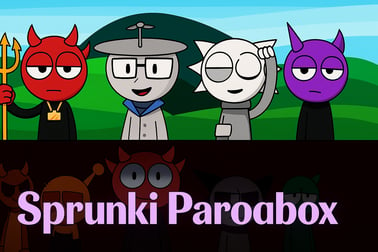
Sprunki Parodybox lets you mix creepy and funny beats with remixed Sprunki characters. Play free in your browser and create your own horror music tracks.















Sprunki Parodybox
Overview of Sprunki Parodybox
Sprunki Parodybox is a fan-made, browser-based music creation game that mashes up the chaotic energy of Sprunki mods with the layering system of Incredibox. Instead of just dragging in cute beatboxers, you're mixing remixed Sprunki characters, horror variants, and meme-y sound effects into one big interactive online remix game. Every character you drop on stage adds a new vocal, beat, melody, or creepy ambience, turning your screen into a living, looping track.
Built to run directly in your browser, Sprunki Parodybox feels instantly familiar if you've tried Sprunki Incredibox mods before. You start with a cast of stylized Sprunkis on the bottom and an empty stage at the center. From there, it's all about experimenting with combinations: soft pads under harsh glitch drums, distorted whispers over bouncy basslines, or full-on horror music mixer chaos with jumpscare stingers and eerie choirs. The result is a playful browser rhythm game you can pick up in seconds but keep tweaking for hours.
Because everything is visual and drag-and-drop, Sprunki Parodybox is accessible to anyone—no music theory, no DAW, and no downloads required. Just load it in your browser, plug in headphones, and start layering sounds until your track feels right… or deliciously wrong.
How to Play Sprunki Parodybox
Sprunki Parodybox uses extremely simple controls so you can focus on creativity instead of menus. Here's a quick rundown of the Sprunki Parodybox controls and typical browser inputs:
- Mouse / Touch
- Click or tap a character icon to select it.
- Drag and drop a character onto an empty slot on the stage to add their sound.
- Click or tap a character already on stage to mute/unmute or trigger a special animation (varies by mod version).
- Drag a character off the stage (or click a small "x" icon, if shown) to remove their part from the mix.
- Keyboard (optional, depends on hosting site)
- Spacebar: pause or resume the full loop.
- Number keys: quickly select specific slots or character groups (in some builds).
- Audio controls
- Use your device volume buttons or system mixer to adjust loudness.
- Many pages add a mute icon to instantly silence the game while keeping your mix loaded.
Once you understand the basics, the flow becomes very natural: pick a sound, drop it in, listen to how the loop changes, and keep tweaking until you've built a full composition.
Sprunki Parodybox Features
Sprunki Parodybox stands out from other music creation games because it leans heavily into parody and horror aesthetics while still staying approachable and fun. Here are some of the key features you can expect when you launch this online remix game in your browser:
- Layer-based music system
- Each character represents a distinct audio loop: drums, bass, leads, effects, vocals, or ambient textures.
- Loops are perfectly synced, so your track always stays on beat.
- Adding or removing characters feels like live DJing without needing a full DAW.
- Remixed Sprunki character roster
- Parody versions of popular Sprunki faces with exaggerated designs.
- Both normal and horror variants that change the tone of your mix.
- Unique animations that respond to the rhythm while they sing or play.
- Horror & comedy sound palette
- Creepy choirs, reversed pads, low drones, and glitchy SFX for spooky vibes.
- Goofy vocal chops, meme-like ad-libs, and cartoony percussion for funny tracks.
- Blend horror and humor for twisted but catchy remixes.
- Browser rhythm game experience
- No installation required—just open the page and the engine runs in HTML5.
- Responsive playback that keeps every element on the same tempo grid.
- Runs on most modern browsers: Chrome, Edge, Firefox, Safari, and others.
- Replayable sessions
- Experiment with different character combinations to discover hidden "perfect" mixes.
- Some versions hide secret sequences that trigger special scenes or bonus sounds when you place the right characters in the right order.
Together, these features turn Sprunki Parodybox into a light but surprisingly deep playground for remixing and sound design, especially if you're already a fan of Sprunki Incredibox-style mods.
Where to Play Sprunki Parodybox
Sprunki Parodybox is designed primarily as a browser rhythm game, so you don't need to download large files or install a client. It typically appears on fan-friendly, ad-supported gaming portals that host Sprunki Incredibox mods and other casual music titles.
To play safely and smoothly, keep these points in mind:
- Use reputable browser game hubs
- Look for established platforms that clearly label games as free, browser-based, and require no EXE downloads.
- Avoid random links promising "cracked" or "hacked" versions; Sprunki Parodybox works fine in the browser without installers.
- Play on desktop or laptop for best performance
- Most HTML5 builds are optimized for larger screens and full keyboard/mouse input.
- Fullscreen mode is usually available via a small icon near the game frame.
- Check your connection
- A stable internet connection ensures smooth loading of the game engine and audio assets.
- Once everything's cached, the loop playback itself isn't very bandwidth-heavy.
If you're browsing a site that offers multiple Sprunki mods, Sprunki Parodybox is often listed under categories like Music, Rhythm, or Casual. Launch it, wait a few seconds for the assets to load, and you'll be ready to build your first remix.
Is Sprunki Parodybox Safe to Play?
Sprunki Parodybox is meant to be a family-friendly music creation game, but it does include stylized horror themes depending on the build you're playing. Here's what to know about safety and content:
- Content & visuals
- Some characters appear in creepy or corrupted forms, especially in horror modes.
- Visuals are typically cartoonish rather than graphic, more eerie than explicit.
- Online safety
- The core game itself doesn't require logins, chats, or in-game messaging.
- Any comment sections or communities are usually part of the hosting site, not the game.
- Technical safety
- Legit versions run in HTML5 within your browser—no need to download .exe or .apk files.
- Always keep your browser and antivirus updated, and avoid unofficial download mirrors.
For younger players, parents may want to quickly preview the game. If they're comfortable with mild horror aesthetics (dark eyes, glitch effects, spooky music), Sprunki Parodybox can be a safe and creative way to explore music remixing online.
What Is Sprunki Parodybox and How Does It Work?
At its core, Sprunki Parodybox is a loop-based music mixer wrapped in a spooky-funny Sprunki skin. The idea is simple but powerful: every character is a building block in your song, and you decide which blocks stay in the loop.
Here's how the basic structure works behind the scenes:
- Pre-composed loops
- Each character has a pre-made audio pattern that repeats in sync with the main tempo.
- Patterns are composed so nearly any combination still sounds intentional and musical.
- Layering system
- You can fill several slots on the stage, usually grouped by role (drums, FX, leads, vocals, etc.).
- Turning a character on/off instantly adds or removes that layer from your remix.
- Trigger-based events
- Certain character combos may unlock special chorus sections, mini cutscenes, or visual transformations.
- Some horror variants only reveal full animations when specific slots are active together.
This design means you don't need to worry about timing notes or hitting keys like in traditional rhythm games. Instead, Sprunki Parodybox is more like a toy version of a music studio: you're a playful producer, dropping in weird singers and cursed drum machines to see what happens.
Key Features: Remixed Sprunki Characters, Modes and Music
One of the main reasons Sprunki Parodybox has become so popular among Sprunki Incredibox mods is its wild variation in characters, moods, and musical styles. Each new version of the mod might tweak the art or tweak the sounds, but most share these standout elements:
- Remixed and swapped Sprunki cast
- Familiar faces reimagined with parody outfits, glitched designs, or swapped roles.
- Characters that look cute and playful in their base form but reveal darker sides in horror mode.
- Normal vs. horror sound sets
- Normal mode leans into bouncy beats, catchy hooks, and fun vocal chops.
- Horror mode adds detuned synths, reversed hits, breathy whispers, and ominous drones.
- Mixing both can create tracks that feel half party, half nightmare.
- Rich musical variety
- From trap-style hi-hats to cinematic pads and glitchcore FX.
- Simple enough for casual players, but layered enough that music fans can sculpt real moods.
- Visual feedback on every beat
- Characters bob, blink, and animate in sync with their loops.
- Horror transformations often sync with drops or key changes, selling the mood shift.
These features blend into a distinctive identity: part browser rhythm game, part spooky cartoon, part meme-fueled soundboard. If you enjoy remixing or just like poking at interactive toys until chaos happens, Sprunki Parodybox hits a sweet spot.
How to Play Sprunki Parodybox in Your Browser
You don't need any special setup to enjoy Sprunki Parodybox as an online remix game. Follow this general step-by-step flow once you've opened a trusted site hosting the game:
- Wait for the loading bar to finish
- The game will download its audio and graphic assets first; this might take a few seconds.
- Check your sound
- Turn on your speakers or plug in headphones.
- Set your device volume to a moderate level—horror stingers can be loud.
- Explore the character bar
- Hover over or tap each icon to see its design.
- Try to guess their role: drums, bass, melody, vocal, or FX.
- Drag a few basic sounds first
- Start with a drum character to set the groove.
- Add a bass character for low-end energy.
- Layer in melodic and spooky parts
- Drop in leads, pads, and vocal chops to build the core of your song.
- Then experiment with horror characters to see how they twist the vibe.
- Fine-tune by muting and swapping
- Click characters on the stage to temporarily silence them and hear the difference.
- Replace ones that clash or feel too noisy with subtler options.
- Hunt for hidden events
- Certain lineups may trigger unique animations or scene changes.
- If something unusual happens, note which characters were active so you can repeat it later.
Once you've found a mix you like, you can simply leave it running as background music while you study, chat, or browse. Some players even record their screen and audio to share their favorite Sprunki Parodybox remixes on video platforms.
Tips to Create Horror Tracks and Funny Mixes
Because Sprunki Parodybox is equal parts horror music mixer and goofy parody, you can aim for very different moods depending on how you combine characters. Use these simple tips to push your tracks in the direction you want.
Building creepy horror tracks
- Start dark and slow
- Pick drum loops with sparse hits instead of busy snares and hi-hats.
- Favor slower-feeling grooves or half-time beats.
- Layer low drones and pads
- Look for characters whose sounds are long, sustained notes rather than short blips.
- Stack 1–2 ambient layers to fill the background with tension.
- Sneak in glitch and reverse FX
- Use characters that add reversed swells, static bursts, or pitch-bending FX.
- Don't overdo it—1 or 2 creepy FX loops often feel scarier than 6 at once.
- Use horror vocals sparingly
- Whispers, breaths, or distant cries can be unsettling when used as accents.
- Try muting them every few bars to create "quiet before the jump" moments.
Making silly, funny Sprunki mixes
- Go for bright drums
- Choose snappy kicks, claps, and energetic hi-hats.
- Busier patterns feel more playful and less scary.
- Stack vocal chops
- Use characters that say short phrases, laughs, or cartoon-like syllables.
- Layer multiple voices to create a chaotic, party-like feel.
- Include "wrong" sounds on purpose
- Odd squeaks, barks, or glitch beeps can act as punchlines in the rhythm.
- Place them on unexpected beats to surprise listeners.
- Mix horror lightly for contrast
- Add one creepy pad under a happy beat to make the track weird in a fun way.
- Mute and unmute the horror element to create "serious vs. silly" moments.
Think of Sprunki Parodybox as your sandbox: serious producers can sculpt tense horror scores, while casual players can throw in anything that makes them laugh. Either way, every new session teaches you a bit more about rhythm, layering, and how powerful a simple online remix game can be.
Safe, Free, and Online: Where to Play Sprunki Parodybox
Because Sprunki Parodybox is a free browser rhythm game, it's easy to try it out without committing to downloads or accounts. Stick to these guidelines when you're looking for a place to play:
- Choose established browser gaming platforms
- Look for sites that focus on music, rhythm, and casual games and have clear navigation.
- Legit platforms usually show a description, rating, and tags like "Music" or "Sprunki mods" next to the game frame.
- Check that it runs in HTML5
- Sprunki Parodybox should launch directly in the page as an embedded window.
- If a site forces you to download an installer for basic play, back out and find a different host.
- Watch for ads, not scams
- Free portals often rely on ads. Banners around the game are normal; pop-ups asking for suspicious permissions are not.
- Never provide personal data just to load the game—Sprunki Parodybox doesn't need it.
With those basics in mind, you can enjoy Sprunki Parodybox as it was intended: a safe, free, and endlessly replayable music creation game you can launch from almost any modern browser and use to unleash your weirdest horror tracks and funniest Sprunki remixes.
Frequently Asked Questions
What is Sprunki Parodybox?
Sprunki Parodybox is a fan-made browser music game where you drag and drop characters to build custom songs using remixed Sprunki-style sounds and visuals.
Do I need to download Sprunki Parodybox?
No. Sprunki Parodybox is played directly in your browser, so you can start mixing music instantly without any downloads or installs.
Is Sprunki Parodybox free to play?
Yes, Sprunki Parodybox is free to play online. You can experiment with characters, sounds and modes without paying or creating an account.
Can kids play Sprunki Parodybox safely?
Sprunki Parodybox is a fan project with some spooky and horror-themed designs, so it is better suited to older kids and teens who are comfortable with mild scary visuals.
Can I save or share my songs in Sprunki Parodybox?
Depending on the site you use, you can usually record or capture your mix and share it as a video or audio clip with friends or on social platforms.