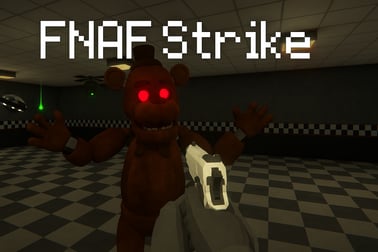
Fnaf Strike puts you in dark corridors full of deadly animatronics. Shoot, survive, and find the exit in this free browser horror FPS.















Fnaf Strike
Overview of Fnaf Strike
Fnaf Strike is a fast-paced horror shooting game online that drops you into a maze of dark corridors packed with killer animatronics. Instead of watching security cameras, you're holding the gun yourself in a full 3D first person browser shooter. Your job is simple but brutal: survive long enough to find the exit while metallic monsters stalk you from every angle.
This WebGL FPS game blends classic corridor escape shooter gameplay with tense survival horror. You'll explore dimly lit hallways, manage ammo, throw grenades, and unlock better weapons as the pressure ramps up. Each step forward means another corner to clear, another jump scare to brace for, and another chance to be overrun.
If you enjoy animatronic survival games inspired by Five Nights at Freddy's but want more action and direct control, Fnaf Strike is a perfect fit. It runs directly in your browser, so you can jump in within seconds and start blasting your way toward the exit.
Fnaf Strike Control Guide
To stay alive in this horror shooting game online, you need to be completely comfortable with the controls. Fnaf Strike uses classic PC FPS inputs, so shooter fans will feel right at home.
Keyboard Controls
- W / A / S / D – Move forward, left, backward, right
- Space – Jump (great for dodging or getting around small obstacles)
- C – Crouch (helps with cover, tight spots, or steadying your aim)
- Shift (sometimes) – On some versions, used to sprint for quick bursts of speed
- R – Reload your current weapon
- G – Throw grenade
- F – Use / interact (open doors, pick up weapons, use objects)
Mouse Controls
- Move Mouse – Look around and aim
- Left Mouse Button (LMB) – Fire your weapon
- Right Mouse Button (RMB) – Aim down sights or toggle flashlight, depending on version
- Mouse Wheel / Number Keys – Switch between unlocked weapons
Spend your first minute in-game just walking, aiming, and reloading in a safe corridor. Smooth control over your crosshair is key to landing headshots and reacting before an animatronic gets close enough to kill you.
Key Features
Fnaf Strike takes familiar horror elements and builds them into a lean, action-first corridor escape shooter. Here are the main features that define the experience:
- Intense animatronic survival gameplay – You're constantly hunted by robotic enemies that punish slow reactions and sloppy aim.
- First person browser shooter – No installs or launchers needed; just load the WebGL FPS game in your browser and play.
- Endless corridor exploration – Navigate a maze of dark, twisting hallways and rooms while searching for the exit.
- Unlockable weapons and upgrades – Discover and unlock stronger guns as you progress, giving you more firepower against tougher waves.
- Grenades and explosive elements – Use grenades and environmental explosives (like explosive balloons in some versions) to wipe out groups.
- Fast, responsive controls – Designed like a classic PC shooter with WASD + mouse input for tight, accurate aiming.
- Atmospheric horror setting – Low lighting, narrow corridors, and sudden enemy appearances keep tension high at all times.
- Skill-based survival – Good movement, map awareness, and ammo management are just as important as raw aiming skill.
Together, these features make Fnaf Strike stand out among animatronic survival games, especially if you prefer shooting back instead of just hiding.
Performance & Troubleshooting
Because Fnaf Strike is a WebGL FPS game, it runs directly in your browser but still uses 3D graphics and real-time lighting. That means performance can vary depending on your device and settings. If you experience lag, stutters, or visual glitches, try the steps below.
Improve Performance
- Close other tabs and apps – Streaming video, extra game tabs, or heavy downloads can slow your browser-based FPS.
- Use a modern browser – Chrome, Edge, Firefox, or other updated browsers tend to handle WebGL better than outdated versions.
- Lower system load – On laptops, plug into power mode and switch to a "performance" power profile for smoother frame rates.
- Wait for full load – Let all assets load fully before rushing into combat; this can reduce stuttering during intense scenes.
Fixing Common Issues
- Game not starting or stuck on loading
- Refresh the page after 15–30 seconds.
- Clear browser cache or try an incognito/private window.
- Switch to another modern browser if the issue persists.
- Mouse not locking / losing aim focus
- Click directly inside the game window once it has loaded.
- If the browser asks to "Allow pointer lock", choose "Allow" so your mouse doesn't escape the screen while turning.
- No sound or very low audio
- Check in-game sound sliders if available.
- Verify system audio and browser tab volume.
- Headphones are highly recommended for hearing animatronics sneaking up behind you.
- Lag spikes in busy fights
- Close background software, especially other games or video players.
- Lower your browser's resolution zoom level slightly (e.g., 90%) to lighten the render load.
Because this is a browser horror shooting game online, connection drops or brief freezes can happen on unstable networks. A stable connection helps keep the experience smooth.
Is Fnaf Strike Safe to Play Online?
Fnaf Strike is designed as a spooky, action-focused animatronic survival game, but it remains within typical browser FPS content. Here's what to expect from a safety and content perspective:
- No real-world money required – It's usually free to play in-browser with no mandatory purchases.
- No downloads or executables – Legitimate platforms run Fnaf Strike directly in your browser as a WebGL FPS game, so you don't need to install extra files.
- Single-player focus – Standard versions do not include open chat or direct multiplayer interactions with strangers.
However, the game is still horror-themed and may not be suitable for very young players:
- Scary animatronics and jump scares
- Frequent shooting and combat
- Dark, intense atmosphere
For families, a general guideline is that Fnaf Strike is more appropriate for teens and older due to its horror tone and weapon use. Always launch it from trusted gaming sites, keep your browser and antivirus up to date, and avoid any page that asks you to download extra "players" or suspicious files.
How to Survive Animatronic Attacks in Fnaf Strike
Survival is the heart of this corridor escape shooter. Enemies are lethal up close, so you need a plan for every encounter, not just raw aim.
Maintain Distance
Animatronics are deadly in melee range. Keep them at mid-distance whenever possible:
- Backpedal with S while firing to create space.
- Use strafe + aim (A/D with mouse movement) to circle around enemies instead of stepping straight back into another threat.
- Fire early when you hear an enemy around a corner; it's better to overreact than be surprised at point-blank range.
Use Corners and Doorways
Because Fnaf Strike plays like a tight WebGL FPS game, positioning gives you a huge advantage:
- Hold a corner and let enemies come into your sights one at a time.
- Use door frames as cover: peek, fire a burst, then step back.
- Avoid standing in the center of intersections where you can be flanked from multiple hallways.
Control the Flashlight
In many versions, your flashlight is mapped to RMB. It helps you see down long corridors, but it also tempts you to tunnel-vision on one direction.
- Flash rooms quickly, then turn to check your sides.
- Don't stare down one hallway for too long; animatronics can close in from behind.
- Learn key silhouettes so you recognize threats even in partial light.
Listen Carefully
Audio cues often give you a split-second warning before an attack:
- Metallic footsteps or scraping sounds usually mean an enemy is near.
- Sudden silence after noise can indicate an enemy is close and waiting around a corner.
- Use headphones so you can roughly locate threats by direction.
Combine these habits and you'll last much longer in this horror shooting game online, especially in narrow, high-pressure hallways.
Controls and Tips for Mastering the Corridors
The map design in Fnaf Strike leans heavily on long corridors, tight turns, and simple rooms. That makes movement just as important as raw DPS.
Movement Techniques
- Strafe while shooting – Never stand still. Move sideways as you fire so animatronics struggle to line up hits.
- Jump sparingly – Use Space to hop over small obstacles or dodge at the last second, but don't spam it; jumping can throw off your aim.
- Crouch for control – In some situations, C can help reduce recoil and make your aim more stable, especially with precision weapons.
Corridor Awareness
- Always check behind you – Animatronics can slip in from previously cleared passages. Turn around regularly when you feel "too safe."
- Clear side rooms first – If a corridor branches, sweep short side paths before pushing deeper; it reduces surprise attacks from behind.
- Use landmarks – Pay attention to unique props, signs, or lighting colors that help you remember where you've been.
Quick Reaction Tips
- Keep your crosshair at chest or head height as you move; this cuts milliseconds off your reaction time.
- Reload during quiet moments, not after every single kill; you don't want to be stuck reloading when a new wave appears.
- When surprised at close range, backpedal + spray rather than turning to run with your back exposed.
Once you master these basics, the claustrophobic corridors become a playground instead of a death trap, letting you treat Fnaf Strike like a high-skill first person browser shooter instead of a panic simulator.
Weapons, Grenades, and Upgrades in Fnaf Strike
Weapon progression is a big part of what makes Fnaf Strike feel rewarding. Starting with basic firearms, you'll gradually unlock stronger tools for your animatronic survival game run.
Weapon Types
Exact gun names can vary between versions, but you'll generally encounter things like:
- Starter pistol – Reliable, accurate, but with limited stopping power. Great for headshots on single targets.
- Assault rifles – Offer a strong balance of damage, fire rate, and magazine size. Ideal for mid-range corridor fights.
- Shotguns – Devastating in close quarters; perfect for tight corners but weaker at distance.
- SMGs or rapid-fire weapons – High rate of fire, good for panicked swarms but ammo-hungry.
Grenades and Explosives
Grenades, mapped to G, are your best answer to clumped enemies:
- Toss grenades down long hallways when you hear multiple footsteps.
- Use explosives on choke points (doorways, narrow hallways) to maximize damage.
- In versions with explosive balloons or barrels, shoot them when enemies walk nearby for an easy multi-kill.
Upgrade Strategy
- Prioritize reliability – A steady rifle that you can control is often better than a wild, high-recoil powerhouse.
- Balance ammo use – Don't rely solely on your strongest weapon; rotate between guns to avoid running dry at the worst moment.
- Adapt to the map – In extremely tight sections, lean on shotguns and explosives. In longer corridors, rifles and accurate semi-auto weapons shine.
Understanding your arsenal turns Fnaf Strike from a simple horror shooting game online into a tactical shooter where smart weapon choices dramatically increase your odds of escape.
Browser Requirements and Devices You Can Play On
Fnaf Strike is built as a Unity or WebGL FPS game for browsers, so there's no big download, but your device still needs to handle real-time 3D graphics.
Recommended Browsers
- Google Chrome (latest version)
- Microsoft Edge
- Mozilla Firefox
- Other Chromium-based browsers with WebGL enabled
Make sure JavaScript is turned on and hardware acceleration is allowed for best results.
Desktop & Laptop Requirements
- OS: Windows, macOS, or Linux with a modern browser
- RAM: 4 GB or more recommended
- GPU: Any reasonably recent integrated or dedicated graphics that supports WebGL
Because it's a first person browser shooter, mouse and keyboard support are essential, so desktop or laptop is the ideal platform.
Mobile & Tablet Support
Some platforms may offer Fnaf Strike on mobile browsers, but performance and controls can be inconsistent:
- Touch controls are less precise than mouse aim, which is a major factor in a fast horror shooting game online.
- Older or low-end phones may struggle with 3D rendering and WebGL performance.
For the full experience, including precise headshots and responsive movement, a PC or laptop is strongly recommended.
Beginner Strategy Guide: Finding the Exit Faster
Surviving is only half the goal in this corridor escape shooter. To actually win, you have to find the exit before you're overwhelmed. New players often wander in circles; use these strategies to cut down your time dramatically.
Build a Simple Mental Map
- Pick a default direction – For example, always turn right when in doubt. This creates a predictable pattern and reduces confusion.
- Use environmental clues – Notice repeating textures, lights, or props. If you've seen the same poster or door style three times, you might be looping.
- Mark routes mentally – Think "From spawn: left, straight, right" to retrace paths later.
Clear and Move
- Don't camp too long – While holding a safe corner can help briefly, staying in one area invites more attacks.
- Clear, then advance – Eliminate visible enemies in front of you, scan quickly behind, then move forward toward unexplored paths.
- Avoid full backtracking unless you're sure you missed a major branch or door.
Recognize Exit Clues
Different builds of Fnaf Strike may highlight exits with certain visual cues:
- Brighter lighting or a lit doorway at the end of a darker hall
- Unique doors, panels, or signage that don't appear elsewhere
- Changes in environment style (new wall textures, wider spaces) that signal you're nearing an end zone
Stay alert for anything that "breaks the pattern" of regular corridors; those differences can lead to the exit.
Where to Play Fnaf Strike
You can enjoy Fnaf Strike as a fast-loading horror shooting game online on various reputable browser gaming platforms. While specific site lists can change over time, here are general guidelines:
- Use established gaming portals – Stick to well-known action, shooting, or horror game hubs that clearly mark Fnaf Strike as a WebGL FPS game.
- Avoid unofficial downloads – Legit versions run straight in the browser and don't require separate launcher downloads.
- Check for HTTPS – Make sure the site uses a secure connection (https://) before you play.
Once you've loaded the game, it usually takes just a brief loading period before you're dropped into the animatronic survival game world. From there, it's you, your weapons, and the endless corridors standing between you and the exit.
Frequently Asked Questions
What is Fnaf Strike?
Fnaf Strike is a free browser-based first person shooting game where you explore dark corridors, fight deadly animatronics, and try to reach the exit before being overwhelmed.
How do you play Fnaf Strike?
Use WASD to move, the mouse to aim and shoot, R to reload, Space to jump, Shift to sprint on some versions, G for grenades, F to interact, C to crouch, and the right mouse button to aim or use the flashlight.
Can I play Fnaf Strike for free online?
Yes, Fnaf Strike is free to play in your web browser with no download required. Just load the game page, wait for it to start, and click play.
Is Fnaf Strike suitable for kids?
Fnaf Strike includes horror themes, dark environments, and shooting scary animatronics, so it is better suited for teens and older players rather than young children.
Do I need to install anything to play Fnaf Strike?
No installation is needed. Fnaf Strike runs with WebGL or HTML5 directly in modern browsers like Chrome, Edge, or Firefox. Just make sure your browser is updated and hardware acceleration is enabled.