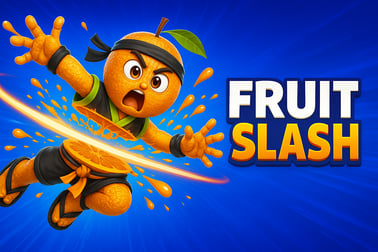
Fruit Slash is a free online fruit-slicing game. Slice, combo, and clear tricky levels in your browser with no download or signup required.















Fruit Slash
Overview of Fruit Slash
Fruit Slash is a fast-paced online fruit slicing game that blends classic arcade action with smart physics puzzles. Instead of just swiping at random fruit, you’ll plan each slice carefully, bounce blades off walls, and use gravity to clear every piece on the screen. It’s quick to learn, challenging to master, and plays instantly in your browser with no downloads or sign-ups.
Each level drops you into a small puzzle arena filled with spinning fruit, tricky angles, and obstacles. You’re given a limited number of cuts or throws to complete the stage. That’s where the strategy comes in: every slice matters. The better your aim and the smarter your angle, the more fruit you cut with a single move—and the bigger your score.
Because Fruit Slash is built for the web, it fits perfectly into short breaks or longer gaming sessions. It loads fast, works on both desktop and mobile, and keeps gameplay family-friendly and approachable for all ages. If you enjoy free browser arcade games that reward both reflexes and planning, Fruit Slash will feel right at home in your favorites list.
How to Play Fruit Slash
Fruit Slash keeps its core rules simple so you can jump in and start slicing within seconds. Here’s how the basic loop works in most versions of the game you’ll find online:
- Step 1 – Start a level: Click or tap the play button and you’ll be taken to a level with fruit arranged in different patterns—sometimes spinning, sometimes stacked, often protected by obstacles.
- Step 2 – Aim your slice: Use your mouse or finger to set your cutting path. On many levels, you’ll see a guideline or preview angle before you release.
- Step 3 – Slice the fruit: Release to send your blade or slash across the screen. Anything that crosses your cut line gets sliced—if you’ve aimed well.
- Step 4 – Use limited moves: Most physics puzzle slicing levels give you only a few cuts. Clear all the required fruit before you run out of turns.
- Step 5 – Earn coins and stars: The smarter and cleaner your cuts, the better your score. Many browser versions award coins or stars based on how efficiently you finish.
Instead of endless waves, Fruit Slash usually focuses on level-by-level progression. Each stage introduces new twists: moving platforms, rotating clusters of fruit, cannons that fire projectiles, or barriers that block direct shots. The core thrill stays the same though—calculate the perfect path, slice multiple fruits at once, and watch the chain reaction unfold.
Because the rules are easy to follow, Fruit Slash works well as a casual time-killer, but the turn limits and advanced layouts give it enough depth for players who like a tougher fruit cutting challenge.
Fruit Slash Features
Different browser sites may tweak the details, but most online versions of Fruit Slash share the same key features that make it stand out from other free browser arcade games:
- Arcade-plus-puzzle gameplay: Fruit Slash feels like a classic arcade slicer at its core, but every level is a mini puzzle. You’re rewarded for thinking ahead instead of just swiping wildly.
- Physics-based interactions: Gravity, rotation, and bounce angles all matter. Blades can ricochet off surfaces, fruit can fall or roll, and well-placed cuts can set off satisfying chain reactions.
- Level variety: You’ll slice through simple clusters at the start, then progress to complex layouts with rotating fruit, tight corridors, and obstacles that punish careless cuts.
- Limited cuts per level: Many stages give you a set number of moves. Turn limits transform a simple online fruit slicing game into a tactical puzzle where every move counts.
- Score and coin systems: Efficient slashes that clear multiple fruits often reward you with more points or coins, which may unlock new fruit skins or cosmetic upgrades in some versions.
- Instant browser play: No accounts or installs are required. Just load the page and start slicing in seconds.
- Family-friendly visuals: Bright colors, cartoon-style fruit, and no graphic content make Fruit Slash suitable for kids and adults alike.
Thanks to this mix of arcade energy and clever level design, Fruit Slash fits nicely into the Arcade, Puzzle, and Action categories all at once.
Performance & Troubleshooting
Fruit Slash is designed to run smoothly in modern browsers, even on modest hardware. If you run into lag, input delay, or loading issues while playing your favorite touch screen slicing game, try the following steps:
1. Check your browser
- Use a modern browser: Chrome, Edge, Firefox, or Safari tend to give the best performance for HTML5 games.
- Update to the latest version: Old browser versions can cause stutters or graphical glitches in physics-heavy levels.
- Close extra tabs: Too many open tabs or background apps can eat up memory and slow down fruit animations.
2. Adjust performance settings
- Disable heavy extensions: Ad blockers or script-heavy extensions sometimes interfere with game scripts. Temporarily disable them and refresh.
- Lower system load: Close other CPU-intensive apps (video editors, big downloads, or multiple game windows) while you play.
- Try another browser: If one browser stutters, another may handle the physics engine more effectively.
3. Fix control or input issues
- On desktop: Make sure your mouse or trackpad is clean and responsive. If the cursor feels “sticky,” turn off any third-party pointer software while playing.
- On mobile: Clean your screen and avoid playing with a multi-touch gesture (like pinch-to-zoom) at the same time you slice. Some devices can misread overlapping swipes.
- Full-screen mode: Entering full-screen often helps with accidental scrolling or tapping the browser UI instead of the game.
4. Network and loading problems
- Check your connection: While gameplay is mostly client-side, a very weak connection can slow down initial loading.
- Refresh the page: If a level doesn’t load or freezes on the splash screen, a hard refresh usually fixes it.
- Clear cache: Occasionally, clearing your browser cache for the site can resolve persistent loading errors.
If you continue to have trouble, look for a “Help” or “FAQ” section on the host site; many platforms that feature Fruit Slash offer additional troubleshooting tailored to their player base.
Can I Play Fruit Slash Offline?
Most versions of Fruit Slash you’ll find as free browser arcade games are built as online HTML5 titles. That means they’re intended to run in your browser and typically require an internet connection, especially for the first load.
Here’s what you can generally expect regarding offline play:
- Standard browser play: You’ll need to be online to open the page and load the game files. If you lose your connection mid-session, many levels will continue to run until you refresh or close the tab.
- No official offline mode in the browser: The web version isn’t usually packaged for fully offline desktop play, and most sites don’t support installing Fruit Slash like a native app.
- Mobile app versions vary: Some app-store variants inspired by Fruit Slash, Fruit Ninja, or other fruit cutting challenge games can be played offline after you download them. That depends on the specific app, not the browser version.
If you want an always-available experience, you can:
- Bookmark your favorite Fruit Slash site in your browser.
- Use “Add to Home Screen” or “Install app” if your browser offers Progressive Web App (PWA) support for that site.
- Look for a dedicated mobile app in your device’s store if you prefer fully offline sessions.
For quick casual play, though, keeping a tab open and connected is usually all you need to enjoy Fruit Slash online.
How to Play Fruit Slash Online in Your Browser
Playing Fruit Slash online is straightforward and takes just a few steps from any modern device.
Step-by-step browser setup
- Open your browser: Launch Chrome, Edge, Firefox, Safari, or another up-to-date browser.
- Visit a trusted game portal: Go to a reputable site that hosts Fruit Slash and other free browser arcade games.
- Locate Fruit Slash: Use the site’s search bar or browse the Arcade, Puzzle, or Action categories.
- Click or tap “Play”: The game will load in an embedded window or dedicated canvas area.
- Start slicing: Once the main menu appears, select a level or hit “Start” to jump straight into your first fruit cutting challenge.
In-game flow
- Watch the level layout and note where fruit, walls, and hazards are placed.
- Plan a slicing path that hits as many pieces of fruit as possible in one move.
- Use the available cuts wisely—remember that many levels have move limits.
- Replay levels to improve your score and try new cutting angles.
Because there are no long tutorials or complex menus, a full game session can be as short as a minute or as long as you’d like. It’s ideal for coffee breaks, short waits, or winding down with simple but satisfying physics puzzles.
Tips to Master Slicing and Score Higher in Fruit Slash
Once you understand the basics, the real fun begins: squeezing maximum value out of each slice. These tips will help you climb leaderboards and handle tougher physics puzzle slicing stages more confidently.
1. Think like a pool player
Angles are everything. Imagine each slice like a cue shot in pool—where will the blade travel after it hits a wall, and what fruit can it reach on the rebound?
- Aim for lines that intersect multiple fruits instead of focusing on just one.
- Use walls or obstacles to bounce your cut into otherwise unreachable pieces.
- Visualize the full path before you release your swipe.
2. Prioritize moving targets
Spinning or drifting fruit can mess up a carefully planned path if you ignore their movement.
- Time your slice so that rotating fruit enter your cutting line at the perfect moment.
- Start by eliminating the most unpredictable targets, then clean up the rest.
3. Use gravity to your advantage
In many levels, fruit will fall, roll, or shift after you cut supporting objects.
- Try knocking fruit off ledges so they gather in a tight cluster for your next slice.
- Cut supports strategically to create new, easier targets.
4. Conserve cuts
Because move counts are limited, using extra slices just to “clean up” a single piece is usually a bad trade.
- Restart a level early if your first cut was clearly inefficient.
- Look for solutions that clear the board in 1–2 moves whenever possible.
5. Practice on easier levels
Replaying early stages is a low-pressure way to experiment with unusual angles and new strategies. Once you can clear beginner layouts with minimal cuts, advanced fruit cutting challenge levels will feel much more manageable.
Fruit Slash Controls and Devices: Desktop & Mobile
Fruit Slash is built to be accessible whether you’re at a PC, laptop, tablet, or phone. Controls are simple and map naturally to both mouse and touch input.
Desktop & laptop controls
- Mouse swipe: Click and hold the left mouse button, drag to set your slash direction, then release to execute the cut.
- Trackpad swipe: Press and drag with one finger to mimic the same motion.
- UI navigation: Click buttons in menus to start levels, restart, or move to the next stage.
Mobile & tablet controls
- Touch swipe: Tap and drag across the screen to draw your slice path. Lift your finger to perform the cut.
- Tap buttons: Use single taps to start stages, pause, or restart.
- Full-screen: Rotate your device and, if available, enter full-screen mode for a cleaner, more immersive view.
This flexibility is what makes Fruit Slash such a satisfying touch screen slicing game. The core mechanic—drawing a line to cut fruit—feels natural on both input types, so you can move from desktop to phone without relearning anything.
Arcade-Style Fruit Slicing Meets Physics Puzzles
Fruit Slash stands out by mixing the instant gratification of arcade slicing with the brain-teasing structure of physics puzzles. It’s not just about speed; it’s about precision.
In a purely arcade slicer, more swipes usually mean more points. In Fruit Slash, that mindset gets you stuck quickly. The game pushes you to:
- Plan ahead: Study the layout before committing to a cut.
- Experiment: Try different angles, bounces, and timing to discover shortcuts and one-cut solutions.
- Embrace trial and error: Failing a level isn’t a dead end; it’s feedback that guides your next strategy.
This hybrid design appeals to both action fans and puzzle lovers. If you enjoy games where a perfect solution feels almost “elegant,” Fruit Slash delivers that feeling repeatedly the deeper you go into the level set.
Free Browser Games Similar to Fruit Slash
If you like the blend of slicing, physics, and strategy that Fruit Slash offers, there are plenty of similar titles worth exploring among free browser arcade games. While exact names will vary by platform, here are the types of games to look for:
- Classic fruit slicers: Games inspired by Fruit Ninja and other online fruit slicing game classics, where you aim for combos and rapid swipes rather than strict move limits.
- Physics-based cutting games: Titles where you slice ropes, shapes, or platforms to drop objects into targets or collect stars. These often resemble Fruit Slash’s puzzle side.
- Ricochet and angle puzzles: Games that revolve around bouncing projectiles off walls to hit all targets, very similar to planning slices in tight spaces.
- Casual action puzzlers: Light, one-click or one-swipe games where you solve small board setups under loose time pressure.
Browsing the Arcade, Puzzle, and Action categories on your favorite gaming site will quickly surface more options. If a game description mentions slicing, angles, physics, or limited moves, there’s a good chance it will scratch the same itch as Fruit Slash.
Frequently Asked Questions
Is Fruit Slash free to play?
Yes. Fruit Slash is completely free to play in your browser with no payments, subscriptions, or hidden fees.
Do I need to download Fruit Slash?
No download is needed. Fruit Slash runs directly in modern web browsers, so you can start playing instantly.
Can I play Fruit Slash on my phone or tablet?
Yes. Fruit Slash works on mobile phones and tablets with touch controls, as well as on desktop using a mouse.
Is Fruit Slash suitable for kids?
Fruit Slash is family-friendly, featuring colorful fruits and arcade-style slicing action without any graphic violence.
Do I need an account to play Fruit Slash?
No account is required. Simply open the game page, press play, and start slicing fruits right away.