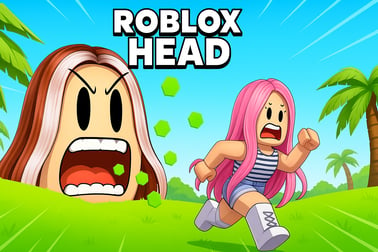
Roblox Head lets you run, jump, and escape scary heads through maze and obby levels. Survive every challenge, unlock rewards, and beat all stages.












Roblox Head
Introduction to Roblox Head
Roblox Head is a fast-paced, scary maze escape game where you're trapped in a world full of massive floating heads that are always hunting you down. It mixes escape head obby stages, survival chases, and head only parkour into one intense experience. Your goal is simple: keep moving, avoid the giant heads, and reach the exit before they catch you.
If you've ever played games like Escape Running Head or obbies where your avatar is just a head, Roblox Head feels like a polished mix of both. You'll dash through dark corridors, jump over gaps, squeeze through tight platforms, and memorize each maze layout while a creepy head slides or sprints behind you. Every stage increases the pressure, turning each run into its own little horror movie chase.
This game is perfect for players who love tense runs, tricky jumps, and multiplayer chaos. Whether you're here for the running head survival excitement or the challenge of conquering each scary maze escape game level, Roblox Head gives you plenty of reasons to replay and improve.
Roblox Head Control Guide
Roblox Head keeps the controls simple so you can focus on dodging and reacting fast. Exact buttons can vary slightly based on the experience, but these are the most common control schemes you'll use in a typical roblox head challenge or escape head obby map:
PC / Laptop Controls
- Move: W, A, S, D or Arrow Keys
- Jump: Spacebar
- Run / Sprint: Shift (hold)
- Camera: Move mouse to look around
- Zoom: Scroll wheel in/out
- Respawn / Reset: Esc > Reset Character (or R in some head only parkour games)
Mobile & Tablet Controls
- Move: Virtual joystick on the left side of the screen
- Jump: Jump button on the right
- Run / Sprint: Extra button, often bottom-left or bottom-right, depending on UI layout
- Camera: Drag on the screen with one finger to rotate
- Zoom: Pinch in/out with two fingers
Console (Xbox) Controls
- Move: Left stick
- Camera: Right stick
- Jump: A
- Run / Sprint: Usually R2 / RT (or clicking in left stick on some obbies)
- Dash / Special Move (if available): Often R1 / RB
Because many roblox head challenge maps are built by different creators, always read the description on the Roblox game page. Some head only parkour maps add unique controls like dash, slide, or double-jump, so checking the instructions before rushing into a chase can save you from a quick jump-scare death.
Key Features
Roblox Head feels simple at first glance, but there are several features that keep players coming back and grinding every stage:
- Giant Head Enemies: The stars of the game are the huge, creepy heads that keep chasing you. Their speed and behavior change across stages, which keeps every running head survival route fresh.
- Maze & Obby Hybrid: Each level mixes a scary maze escape game layout with tight jumps, moving platforms, and narrow ledges. You have to think about both pathfinding and precision at the same time.
- Head Only Parkour: In some stages, your avatar is literally just a head. No arms, no legs, just pure rolling and bouncing. This "head only parkour" twist changes how you judge distance and timing.
- Multiple Levels & Boss Stages: As you progress, levels get longer and trickier. Many Roblox Head experiences include special boss heads or final chase sequences that act as climactic tests of everything you've learned.
- Power-Ups & Items: Speed boosts, shields, and temporary invincibility are common rewards. Learning when to use these is key for clearing a tough escape head obby segment.
- Multiplayer Co-op & Races: Some servers let you team up, bait heads away from your friends, or race to the exit. The chaos of several players panicking at once is part of the fun.
- Replayable Stages: Once you know the route, the game turns into a speedrun challenge. Many players replay the same roblox head challenge over and over to shave off seconds or collect every coin.
Performance & Troubleshooting
Because Roblox Head relies on fast reactions and tight jumps, performance matters. Lag can easily make you fail a jump or get caught by a head. If you're having issues, use these tips to improve your experience:
Improving Game Performance
- Lower Roblox Graphics: In the Roblox app, go to Settings > Graphics and slide the bar down to reduce details. This helps on low-end PCs, laptops, and older phones.
- Close Background Apps: Shut down browsers, streaming apps, or downloads before starting your running head survival sessions.
- Use a Stable Connection: For a smooth scary maze escape game, try to stay on Wi-Fi instead of mobile data. Avoid playing far from your router.
- Switch Servers: If a server feels laggy or crowded, rejoin the game to find a different server with fewer players.
Common Issues & Quick Fixes
- Game Won't Load: Restart Roblox, clear your browser cache (on web), or reboot your device, then try launching Roblox Head again.
- Controls Feel Delayed: This is usually network lag. Check your internet speed, move closer to your router, or disconnect other devices using bandwidth.
- Camera Too Zoomed In/Out: Use your scroll wheel on PC, pinch on mobile, or adjust camera mode in Roblox Settings > Camera Mode.
- Character Glitching or Clipping: If you get stuck in a wall during head only parkour, reset your character through the Roblox menu and retry the section.
Is Roblox Head Safe to Play Online?
Roblox Head is designed to be family-friendly, but it does lean into light horror. The main "scary" element is being chased by large, sometimes goofy, sometimes creepy heads. There's no gore, but jump scares and tense chases are part of the core scary maze escape game experience.
Here are some safety and content points to consider:
- Age Suitability: Most kids and teens who already play Roblox horror or survival games will be fine. Very young or easily frightened players might find the constant chase and sudden jump-scares stressful.
- Chat & Multiplayer: Since Roblox Head experiences usually allow public servers, players can see in-game text chat. Roblox has filters and reporting tools, but parents should still supervise younger players.
- In-Game Purchases: Some Roblox Head style games include game passes, boosts, or cosmetic heads. Disable or password-protect purchases if you don't want accidental spending.
- Roblox Safety Tools: Use Roblox account controls to limit who can chat, join games, or send messages. This helps keep the roblox head challenge environment safe and positive.
Overall, Roblox Head is as safe as typical obby and survival titles on the platform, especially when parents or guardians take advantage of Roblox's built-in privacy and safety options.
How to Escape the Giant Heads and Beat Every Level
Surviving a Roblox Head level is all about staying calm while you're being chased. Each stage is built like an escape head obby – there's one or more correct routes, several traps, and a big floating head forcing you to move faster than you'd like.
Learn the Layout in Layers
- First Run: Focus on finding the exit, not collecting everything. Treat it like you're "mapping" the maze in your head.
- Second Run: Memorize key landmarks: a red platform, a narrow bridge, or a big staircase. These help you orient yourself quickly.
- Third Run and Onward: Start optimizing your route: cut corners, skip safe but slow areas, and improve your jump timing.
Use Corners and Obstacles
In many running head survival chases, the head follows you in a straight line. If you break line of sight with tight corners and walls, you'll often get a bit of breathing room:
- Turn sharply around pillars or maze corners to slow how fast the head can aim at you.
- Use vertical sections (ramps, stairs, ladders) to change levels quickly.
- When possible, choose routes with more obstacles between you and the head.
Practice Risky Jumps Safely
Most levels include at least one scary jump over a void or hazard. Before you attempt risky shortcuts in your main run:
- Practice those jumps in private servers or when the head is far away.
- Count to three before jumping to sync with moving platforms.
- Use a consistent camera angle so you can repeat the jump reliably.
Once you've memorized the route and risky sections, beating each Roblox Head stage becomes a test of execution rather than pure luck.
Tips and Tricks for Surviving Maze and Obby Challenges
Whether you're playing solo or co-op, surviving the maze is half strategy, half reflex. These tips apply across most escape head obby and scary maze escape game maps on Roblox.
Control Your Camera
- Use a slightly zoomed-out third-person view to see both the path ahead and the head behind.
- On mobile, adjust your camera with slow swipes instead of sudden flicks to avoid disorientation.
- On PC, keep your mouse sensitivity moderate so tiny moves don't swing your view wildly.
Stay in Motion
- Never stop in an open hallway when the head is active; always be moving towards the next checkpoint.
- If you must slow down for parkour, do it in tight areas where the head can't easily rush straight at you.
- In some roblox head challenge maps, standing still too long triggers faster heads or extra hazards.
Use Sound Cues
Many Roblox Head experiences use sound to tell you how close danger is:
- Footstep or sliding sounds often get louder as the head approaches.
- Music may change tempo when a chase starts or when you're near the end.
- Play with headphones if possible – hearing the direction of a head can save you precious seconds.
Learn Checkpoint Behavior
Some maps give you full checkpoints that save progress, while others reset you the moment you die. To survive better:
- Figure out where each checkpoint is so you know how far you'll fall back on a mistake.
- Take higher risks when you're near a checkpoint and play safer when you just passed one.
- Use secured checkpoints as practice zones to refine jumps or routes.
Best Power-Ups and Items to Use as a Head Only
In many Roblox Head and head only parkour maps, coins or points can be exchanged for items that make your runs easier or more stylish. While the exact items change from game to game, these are the most common and how to get the most from them.
Speed Boosts
- What they do: Temporarily increase your running speed, letting you outrun heads or cross long sections fast.
- Best use: Activate right before long straight corridors or big chase sequences, not in tiny platform sections where control matters more than speed.
Jump Boosts
- What they do: Increase your jump height, perfect for clearing wide gaps in an escape head obby.
- Best use: Save them for known "problem" jumps you often fail, or for secret routes that require extra height.
Shields or Temporary Invincibility
- What they do: Let you survive one or more hits from a head or hazard without dying.
- Best use: Use them right before crowded or tight passages where the head's hitbox makes movement unpredictable.
Cosmetic Heads and Trails
- What they do: Change how your head looks or add visual effects. They usually don't change gameplay but make your head only parkour runs more fun.
- Best use: Show off in multiplayer lobbies, races, or speedruns – style points never hurt.
Always read item descriptions on the game's shop or info board; some roblox head challenge items stack, others don't, and a few may only work on specific stages or game modes.
Multiplayer Strategies: Team Up to Outrun the Heads
Playing Roblox Head with friends can turn a tense horror chase into hilarious chaos. But if you want to actually survive together, a little teamwork goes a long way.
Use Bait and Distraction
- One player can intentionally grab the head's attention and lead it around a wide area.
- Meanwhile, other players grab coins, search for exits, or practice new routes.
- Rotate "bait duty" so no one player is always the one being chased.
Share Routes and Callouts
- Use short callouts like "left tunnel", "red bridge", or "stairs near spawn" to guide each other.
- If someone finds a shortcut, show the group between rounds instead of just racing ahead.
- In bigger mazes, split up to explore, then regroup once someone finds the best path.
Coordinate Power-Ups
- In games where power-ups are limited, decide who gets what based on skill level and role.
- Give speed boosts to the player luring the head away, and shields to newer players still learning the obby.
- Time boosts together, especially in long running head survival chases, to help the whole group push forward.
With the right teamwork, a tough scary maze escape game level becomes much easier, and you'll all clear the Roblox Head challenges faster than playing solo.
Beginner to Pro: Mastering Parkour When You're Just a Head
Head only parkour feels strange at first. Your avatar is smaller, lower to the ground, and sometimes rolls or slides differently than a full character. But once you master it, these maps become some of the most satisfying roblox head challenge experiences on the platform.
Adjust Depth Perception
- Because you're controlling a smaller shape, platform edges may be harder to judge.
- Use a slightly top-down camera angle to better see where your head will land.
- Practice lining up with the center of platforms instead of barely clipping the edge.
Learn Rolling Momentum
- Some head only maps let your head keep sliding a bit after you stop pressing movement keys.
- Tap movement keys instead of holding them down to make tiny adjustments.
- On mobile, use short joystick movements to avoid overshooting narrow platforms.
Speedrunning Mindset
Once you can consistently beat a level, transform your runs from survival to speedrun:
- Time your best runs and try to beat your own record.
- Memorize exactly how many steps or seconds you need before each jump.
- Watch other players and creators to discover new skips and shortcuts.
With practice, you'll go from barely surviving your first escape head obby run to confidently speedrunning every stage Roblox Head throws at you.
Frequently Asked Questions
What is Roblox Head?
Roblox Head is a browser game where you play as or run from giant heads through maze and obby stages, trying to escape and survive each level.
Is Roblox Head suitable for kids?
Yes. Roblox Head is family-friendly, with light spooky elements but no gore. It focuses on parkour, mazes, and fun escape challenges.
Do I need to download anything to play Roblox Head?
No download is required on our platform. Just open the game page in your browser, press play, and start escaping the heads.
Can I play Roblox Head with friends?
Yes. Roblox Head supports multiplayer, so you can join the same server as your friends and race to escape the heads together.
Are there different levels in Roblox Head?
Yes. Roblox Head includes multiple stages with mazes, parkour jumps, and boss-style head chases that get harder as you progress.