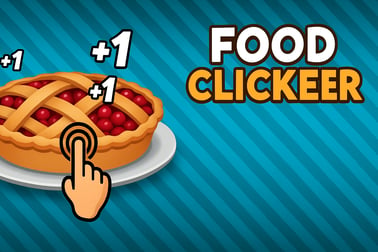
Food Clicker lets you tap to cook, earn coins, and upgrade your dream kitchen with automated helpers, recipes, and endless idle progress.
















Food Clicker
Introduction to Food Clicker
Food Clicker is a relaxing yet addictive idle cooking game where every tap, upgrade, and automation step helps you build your dream kitchen. It mixes the satisfying number climb of an online incremental game with cozy cooking vibes, colorful food art, and a laid-back soundtrack that makes it easy to play for a minute or an hour.
You start in a tiny kitchen with a single cooking station. By clicking on the main food item, you earn your first coins. From there, you unlock better tools, faster prep, and automated helpers that keep the meals coming in even when you’re away. The more you invest into your kitchen, the faster your income grows and the more wild your dishes and upgrades become.
If you enjoy the loop of clicking, upgrading, and watching numbers skyrocket, Food Clicker is one of the most satisfying casual browser cooking game experiences you can play instantly in your web browser. No long tutorial, no downloads, just jump in and start cooking.
How to Play Food Clicker
Food Clicker is designed to be simple on the surface but surprisingly deep once you start experimenting with upgrades and automation. Here’s how the basic flow works when you first start this kitchen upgrade clicker.
Step 1: Start Clicking to Cook
The heart of any clicker game is the main button. In Food Clicker, that’s usually a big, tasty food item in the center of your screen, such as a burger, cookie, or plate of hot food.
- Click or tap the main food repeatedly to cook dishes.
- Each click gives you a certain amount of coins or food points.
- Early on, most of your progress comes from your own clicks.
This early phase teaches you the basics and gives you your first taste of the classic incremental curve: every few clicks, something new becomes affordable.
Step 2: Buy Your First Upgrades
Once you’ve earned a bit of currency, open the Upgrades or Shop panel. This is where Food Clicker turns from a simple tapper into a full online incremental game.
- Click power upgrades: increase coins per click so every tap is more valuable.
- Production upgrades: improve how much each dish earns or how fast you cook.
- Starter automation: basic helpers that add a slow trickle of idle income even when you’re not clicking.
Don’t be afraid to spend everything. Progress comes from reinvesting constantly in this afk clicker with automation.
Step 3: Unlock Automation
After you buy a few basic upgrades, you’ll gain access to automated kitchen helpers — the real backbone of any idle cooking game.
- Sous-chefs auto-cook at a fixed rate.
- Ovens, grills, or fryers generate income every second.
- Passive multipliers boost all automated income at once.
Over time, your manual clicks become a bonus, while your automated kitchen carries most of the load, letting Food Clicker function like a true afk clicker with automation.
Step 4: Reinvest and Snowball
The main loop of Food Clicker is refreshingly straightforward:
- Click to cook and earn coins.
- Spend coins on upgrades and helpers.
- Let automation work while you plan your next purchase.
- Unlock new recipes, tools, and eventually prestige.
Each cycle makes your kitchen stronger, turning a tiny stand into a multi-station cooking empire.
Food Clicker Game Modes
Food Clicker may start simple, but it usually includes several modes or long-term systems that keep the game engaging beyond the first few minutes. The exact names might vary by version, but you’ll often see variations similar to these.
Standard Kitchen Mode
This is the core experience and the one most players stick with for long stretches:
- Start with one basic recipe.
- Progressively unlock more tools, appliances, and food lines.
- Experiment with different upgrade paths to find your favorite build style.
In Standard Mode, there’s no timer or pressure — it’s the most relaxed way to enjoy this casual browser cooking game.
Time-Limited or Challenge Modes
Some versions of Food Clicker introduce time-based or goal-based challenges to shake up your routine.
- Time Attack: earn as much as possible within a short window.
- Goal Rush: hit a specific income or production target with limited resources.
- Restricted Upgrades: play with only certain helpers or tools available.
These modes are great if you already know the basics and want to test your strategy in a more focused way.
Prestige and Reset Systems
Once you’ve built a powerful kitchen, Food Clicker typically offers a prestige or reset mechanic. It’s a staple of any modern online incremental game:
- Reset your kitchen back to the beginning.
- In exchange, gain a permanent bonus currency or multiplier.
- Each new run becomes faster, stronger, and more efficient.
This long-term progression system gives Food Clicker surprising depth. You’re not just chasing the next upgrade; you’re planning when to reset for maximum benefit.
Performance & Troubleshooting
Because Food Clicker runs in the browser, performance is usually smooth, even on modest devices. Still, any kitchen upgrade clicker with lots of animated numbers and effects can slow down over time. If you run into issues, these tips can help.
Improve Performance in Your Browser
- Close extra tabs: running multiple heavy sites can eat up memory.
- Lower animation load: if there’s an in-game option to reduce effects or toggle visual extras, use it.
- Disable unnecessary extensions: ad blockers or script-heavy extensions can interfere with some online incremental game elements.
Fix Input or Click Problems
- If clicks don’t register, try clicking slightly away from overlapping UI elements.
- On mobile, use a single finger and avoid gestures like pinch-to-zoom while playing.
- Refresh the page if the game seems frozen or unresponsive.
Saving and Progress Issues
Most browser versions of Food Clicker save automatically using local storage or cookies.
- Don’t regularly clear cookies if you want to keep your progress.
- If you play in private/incognito mode, your saves may not persist.
- Some versions support manual export/import of saves; use that before switching devices.
Is Food Clicker Safe to Play Online?
Food Clicker is built as a family-friendly idle cooking game that’s safe for most ages. The themes are focused on food, cooking, and numbers going up — no violence, no graphic content, and no inappropriate language in the core gameplay.
Safety and Content
- Content rating: Cooking visuals and cartoon-style graphics make it suitable for kids and teens.
- No downloads required: most browser versions run directly in your web browser, reducing the risk of installing harmful files.
- Ads and links: depending on where you play, you may see ads or external links. Younger players should stick to trusted gaming portals or play with an adult nearby.
As with any online game, it’s smart to avoid sharing personal information, using suspicious links, or installing unofficial mods or tools.
How to Play Food Clicker Online: Beginner Guide
If this is your first time trying Food Clicker, this quick-start guide will get you from zero coins to a humming kitchen in just a few minutes.
1. Focus on Click Power Early
In the opening minutes, your manual clicking is your biggest weapon. Before you dive into heavy automation, invest in a few core upgrades:
- Increase coins per click so each tap matters more.
- Reduce click cooldowns if such upgrades exist.
- Grab cheap multipliers that boost all click income.
This sets up a strong foundation that will fast-track your first wave of helpers in this kitchen upgrade clicker.
2. Transition into Idle Income
Once you’ve got a solid click value, start buying your first idle helpers:
- Basic cooks or sous-chefs.
- Simple ovens or grills that tick every second.
- Any upgrade that mentions “per second” or “automatic production.”
The goal is to reach a point where your kitchen earns a steady stream of coins even if you pause clicking for a moment.
3. Follow the Upgrade Synergies
Food Clicker rewards players who read upgrade descriptions and combine them smartly.
- Some upgrades multiply specific helpers.
- Others boost all automated income or all food types at once.
- Occasional limited-time boosts might massively increase production for a short span.
Whenever you unlock a new tier of upgrades, pause and look for combos: a helper plus a global multiplier for that helper type is usually a big win in any online incremental game.
Best Upgrades to Boost Your Kitchen in Food Clicker
Over time, you’ll see dozens of upgrades, but a few types tend to be universally strong in a casual browser cooking game like Food Clicker.
Prioritize Global Multipliers
Upgrades that affect your entire kitchen are often more valuable than ones that only buff a single helper.
- “All production +X%” gives a big, immediate power spike.
- “All click and idle income x2” style upgrades are incredibly efficient.
- Whenever you see a major global multiplier, consider delaying smaller buys to grab it first.
Upgrade Your Cheapest Helper First
In most clickers, the first or second helper you unlock has a low cost curve, meaning it can be leveled up many times.
- Focus early spending on your cheapest automated unit.
- Hit key level thresholds that might give special bonuses.
- Use it as your “workhorse” while you slowly unlock higher-tier helpers.
Don’t Ignore Click-Based Boosts
Even in an afk clicker with automation, clicking remains important:
- Click multipliers stack on top of idle gains during active play.
- Some modes reward getting a huge burst of income quickly, not slowly.
- If you like to actively play while watching a show or listening to music, click boosts pay off.
Tips to Automate Cooking and Earn Idle Income
Automation is what turns Food Clicker from a simple tapper into a full-blown online incremental game. Use these tips to squeeze the most value out of your automated systems.
Build a Balanced Kitchen
Rather than spending all coins on a single helper, try to keep a balance:
- Upgrade low-cost helpers for consistent growth.
- Invest periodically in higher-tier units for big jumps.
- Buy global multipliers whenever they become affordable.
This balanced approach keeps your income curve smooth, which is ideal for an idle game you’ll leave running in the background.
Use Boosts Before Going AFK
Many versions of Food Clicker include temporary boosts or power-ups:
- Double production for a limited time.
- Faster cooking speed for all stations.
- Special recipe frenzy that pays huge rewards.
Activate these boosts right before you step away from the game. That way, your kitchen earns at maximum capacity while you’re idle, making the most of this afk clicker with automation style.
Plan Around Prestige
Prestige resets temporarily “undo” your direct progress but unlock powerful long-term bonuses.
- Wait until progress feels slow before prestiging.
- Check how much permanent bonus you’ll gain for the reset.
- Right after prestiging, rebuild your automation core first.
Done well, each new run of your idle cooking game will be shorter but far more explosive.
Game Modes, Prestige, and Long-Term Progression
What keeps Food Clicker engaging after hours of play is its layered progression. It’s not just about bigger numbers; it’s about how you reach them.
Experiment with Different Game Modes
Try every mode at least once:
- Use Standard Mode to learn systems and experiment freely.
- Use Challenges to test your optimization skills.
- Use Timed Modes when you only have a few minutes but still want meaningful progress.
Each mode will subtly change your upgrade priorities, keeping the kitchen upgrade clicker loop fresh.
Set Personal Milestones
Because there’s no hard “win” in most incremental games, it helps to define your own goals:
- Reach your first million, billion, or beyond in coins.
- Unlock every recipe and helper type.
- Hit specific prestige levels or bonus thresholds.
These self-set challenges give structure to your long-term Food Clicker sessions.
Why Food Clicker Is the Perfect Casual Cooking Clicker
Food Clicker stands out because it respects your time and attention. It’s equally welcoming to both short and long play sessions, making it one of the most flexible casual browser cooking game choices around.
Easy to Learn, Hard to Put Down
The core loop — click, earn, upgrade, automate — is instantly understandable. Within seconds, you’re already making progress, and within minutes you’re planning which path to take through the upgrade tree.
Great for Both Active and Idle Playstyles
- If you like to be active, you can spam clicks, chase timed boosts, and fine-tune your upgrade order.
- If you prefer to let the game run, your automated kitchen will quietly stack coins while you multitask.
That flexibility is exactly what players look for in an afk clicker with automation.
Comforting Cooking Theme
Finally, there’s something inherently comforting about building a dream kitchen in an idle cooking game. Colorful dishes, cute helpers, and simple upgrades make Food Clicker a low-stress escape you can jump into anytime. Whether you’re sneaking in a quick break at work or winding down at night, it delivers that satisfying “just one more upgrade” feeling without demanding your full attention.
Frequently Asked Questions
What is Food Clicker?
Food Clicker is a casual idle clicker game where you tap to cook food, earn coins, and upgrade your kitchen with faster tools and automated helpers.
Is Food Clicker free to play?
Yes, Food Clicker is free to play in your browser, with no download needed. Just load the game and start cooking with a few clicks.
Can I play Food Clicker at school or work?
In most cases you can, as long as gaming sites are not blocked on your network. Food Clicker runs in the browser and doesn’t require extra software.
How do I progress faster in Food Clicker?
Focus on buying upgrades that increase coins per click, unlock automated helpers, and use boosts when available. Reinvesting earnings steadily speeds up your progress.
Does Food Clicker keep earning while I’m away?
If you’ve unlocked automated helpers and idle income upgrades, your kitchen can continue earning coins for a while even when you’re not actively clicking.