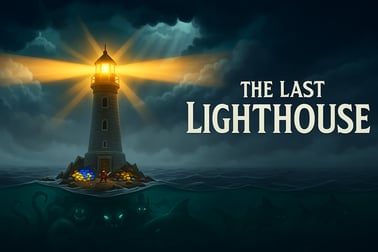
The Last Lighthouse puts you on a tiny island to defend the final beacon of hope. Fight sea monsters, upgrade your gear, and survive the endless night.


















The Last Lighthouse
Overview of The Last Lighthouse
The Last Lighthouse is a fast-paced survival lighthouse game where you stand alone on a storm-battered island and hold back relentless waves of sea monsters. Your only hope is the glowing beam of your lighthouse. Every night you juggle sea monster defense, time management survival, and tight resource management action as you try to last one more wave.
Designed as a single player browser game, The Last Lighthouse runs right in your desktop or mobile browser with no big downloads. The action happens on a small circular island, but the threats come from every direction. You’ll move constantly, repair damage, keep the beacon burning, and fire off upgraded weapons to keep the nightmares away from the light.
Each run is short, intense, and replayable. You earn coins and gems while you survive, then spend them between rounds on better weapons, stronger lighthouse defenses, and stylish skins. As the night wears on, the sea becomes more aggressive, throwing new enemy types, faster attacks, and brutal boss waves at you. It’s a tight blend of action, survival, and strategy that feels easy to learn but hard to master.
Whether you love score-chasing arcade games, wave-based survival challenges, or strategic defense experiences, The Last Lighthouse delivers a tense, atmospheric battle to keep the last beacon of hope shining.
How to Play The Last Lighthouse
The core loop in The Last Lighthouse is simple: move, survive, and upgrade. But within that loop is a lot of depth built around timing, resources, and positioning. Here’s how a typical night plays out in this survival lighthouse game.
- Step 1: Prepare before the wave
- Choose your weapon, character skin, and lighthouse skin in the loadout menu.
- Spend any saved coins on weapon and tower upgrades.
- Check which lifelines (temporary boosts or test weapons) you have available.
- Step 2: Survive the incoming wave
- Monsters spawn from the sea and move toward the lighthouse or you.
- You constantly move around the island, dodging projectiles and melee attacks.
- Your weapon auto-fires or shoots where you aim, pushing enemies back before they reach the beacon.
- Step 3: Protect the lighthouse itself
- Enemies can damage the lighthouse directly if they get close.
- Some waves feature tanky monsters that ignore you and go straight for the beacon.
- If the lighthouse health hits zero or the light goes out, you lose the run.
- Step 4: Collect rewards and upgrade
- At the end of each wave, you earn coins and sometimes diamonds.
- Use coins for incremental upgrades like damage, range, or cooldown.
- Use diamonds to unlock new weapons, lighthouse skins, or permanent bonuses.
The key to winning isn’t just raw shooting skill; it’s time management survival. You must decide when to focus on kiting enemies, when to guard the lighthouse closely, and when to grab dropped pickups without getting cornered.
The Last Lighthouse Features
As a browser-based resource management action title, The Last Lighthouse packs a surprising number of systems into quick play sessions. Here are the standout features you’ll notice as you play:
- Wave-based survival gameplay
- Endless waves of sea monsters with increasing difficulty.
- Regular “milestone” waves that act like mini-boss fights.
- Score, best wave, and personal records tracked locally.
- Upgradable weapons and lighthouse
- Multiple weapon types, each with unique patterns (spread shots, piercing beams, explosive rounds, and more).
- Upgradeable stats, including damage, fire rate, range, reload speed, and sometimes special traits like knockback.
- Lighthouse upgrades that strengthen the beacon, add passive defenses, or boost resource gain.
- Skins and customization
- Character skins that tweak your speed, defense, or special active skills.
- Lighthouse skins that visually change your beacon and may offer small gameplay twists.
- Weapon skins and visual effects for a more personalized experience.
- Game modes and difficulty
- Standard mode tuned for arcade-style survival.
- A harder mode you can unlock after learning the basics (details below).
- Extra challenges tied to score, wave count, and damage taken.
- Accessible browser play
- Runs in modern desktop and mobile browsers using HTML5.
- No registration required on most gaming portals.
- Optimized for both mouse-keyboard and touch controls.
All of these features support a tight survival lighthouse game fantasy: you’re the last keeper of the light, improvising your way through longer and longer nights.
Where to Play The Last Lighthouse
You can play The Last Lighthouse directly in your browser on major online gaming platforms that host HTML5 games. It’s designed as a single player browser game, so there’s nothing to install and no launcher to manage.
To start playing:
- Open your preferred desktop or mobile browser (Chrome, Edge, Firefox, Safari, or other modern options).
- Go to a trusted browser gaming portal and search for “The Last Lighthouse”.
- Click the game’s thumbnail or title.
- Wait a few seconds for the HTML5 game to load, then press Play.
Most portals allow instant access with no login. If you want your progress or high scores synced across devices, some platforms may offer optional sign-in or cloud save features, but the core game works fine without them.
Because The Last Lighthouse is browser-based, you can easily jump between desktop, laptop, tablet, and mobile phones, as long as you use a supported browser and have a stable internet connection.
Is The Last Lighthouse Safe to Play Online?
The Last Lighthouse is built as a family-friendly single player browser game with no direct player-to-player chat, voice, or competitive messaging, which significantly reduces the risk of toxic online interactions. The action focuses on fantasy sea monster defense, and while there’s combat, it’s stylized and non-gory.
For most players, the main safety and content points are:
- Content rating
- Fantasy violence against cartoonish sea creatures.
- No realistic gore, adult themes, or explicit language.
- Suitable for teens and older kids who are comfortable with action games.
- Online safety
- No multiplayer chat or voice systems.
- No user-generated content that might display inappropriate material.
- Local leaderboards only on most portals, not social-network connected.
- Privacy
- Progress is usually stored in local browser storage or cookies.
- Some portals may show ads or analytics; always check the platform’s privacy policy.
Parents and guardians should still supervise younger players, especially regarding the ads or external links shown by the hosting site. But the game itself focuses on reflexes, planning, and time management survival, not on social or mature content.
How to Keep the Lighthouse Beacon Burning Through the Night
Keeping the light alive is the heart of this survival lighthouse game. If the beam goes out, the monsters swarm and your run ends. Here’s how to keep that beacon burning as long as possible.
Balance personal safety and beacon defense
Every second you spend dodging attacks far from the lighthouse is a second enemies may be chipping away at its health. On the other hand, if you hug the tower, you’ll get surrounded. Aim for a loose orbit:
- Circle around the lighthouse at medium distance, adjusting based on wave intensity.
- Pull enemies outward so they bunch up, then sweep your shots across the group.
- Dash or move back toward the lighthouse when you see enemies threatening the base.
Prioritize enemies that target the lighthouse
Not all monsters behave the same. Some chase you; others charge straight at the beacon. In a proper resource management action mindset, kill the biggest threat to your long-term survival first.
- Beacon-rushers should be your top priority, even if a chasing enemy is closer.
- Ranged attackers can damage the lighthouse from a distance, so keep an eye out for projectiles flying past you.
- Use piercing or splash weapons to hit multiple enemies threatening the lighthouse at once.
Invest early in lighthouse health and regen
It’s tempting to dump all your coins into weapon damage, but a frail lighthouse won’t survive higher waves.
- Grab at least one or two lighthouse durability or regeneration upgrades early in a run.
- Consider any passive that auto-repairs the tower at the end of waves; they pay off over time.
- Combine regen with defensive play to stretch your survival much longer.
Think of the beacon as your most valuable “resource.” A slightly weaker gun is manageable; a nearly dead lighthouse is not.
Tips to Survive Endless Waves of Sea Monsters
Survival in The Last Lighthouse is about smart positioning, efficient kills, and disciplined upgrades. Use these tips to push deeper into the night:
Master movement and kiting
Surviving a sea monster defense scenario means never standing still.
- Move in smooth arcs around enemy clusters instead of backing up in straight lines.
- Learn enemy tells: some wind up visibly before lunging or shooting.
- Use short, controlled movements instead of frantic zigzags to maintain aim accuracy.
Control the flow of enemies
Try to gather monsters into one side of the island, then rotate around them so they stay grouped.
- Group enemies to maximize multi-hit shots and explosions.
- Don’t let yourself get pinned between the lighthouse and a wave; always leave an escape lane.
- Occasionally reposition to “reset” the battlefield before you’re fully surrounded.
Use pickups and lifelines wisely
The game’s time management survival feel comes from choosing when to risk going for bonuses:
- Grab health or shield pickups when you’re relatively clear, not while you’re being swarmed.
- Trigger lifelines (temporary buffs, test weapons, or extra diamonds) early in a tough wave so you benefit longer.
- If a pickup lands near the island’s edge, wait until enemies have moved slightly away to reduce ambush risk.
Adapt your weapon to the wave type
Different weapons shine in different situations:
- Fast-firing, accurate guns are great for single, speedy threats.
- Wide cones or shotguns destroy tight clusters near the lighthouse.
- Piercing beams or line shots excel when you’ve herded enemies into lanes.
If a particular wave type keeps ending your runs, swap to a weapon that counters that behavior—even if it means relearning your rhythm.
Best Upgrades to Boost Your Lighthouse Defense
Upgrades are the backbone of your resource management action decisions. Coins and diamonds are limited, so spend them where they’ll make the biggest difference.
Prioritize reliable damage first
In the early waves, raw DPS keeps you from getting overwhelmed.
- Damage per shot and fire rate are usually the most impactful starting upgrades.
- If your weapon already has good base damage, upgrade projectile count or spread to hit more enemies per shot.
- A small boost in damage can mean killing monsters one hit sooner, which scales across the whole wave.
Then upgrade survivability and control
Once your weapon feels “comfortable,” turn to defense:
- Boost lighthouse health and any available shield options.
- Consider movement speed for easier dodging and better positioning.
- Invest in knockback or slow effects if your weapon or character offers them.
Don’t ignore economy upgrades
Some of the best long-term power spikes come from the humble economy boosts:
- Upgrades that increase coin drops or diamond rewards help you snowball over multiple runs.
- If there’s an option that grants extra resources every few waves, pick it early in the run.
- Use diamonds on permanent unlocks that benefit all future sessions, such as stronger starting weapons or better baseline lighthouse stats.
Think of upgrades in three tiers: damage now, survival mid-game, and economy for the future. Balancing these keeps The Last Lighthouse feeling fair but challenging as you learn.
Controls and Gameplay Guide for Desktop and Mobile
The Last Lighthouse is optimized for quick, responsive control, whether you’re on a keyboard and mouse or playing on a touch screen. Here’s how the single player browser game handles on different devices.
Desktop controls
- Movement
- Use WASD or the Arrow Keys to move your character around the island.
- Aiming and shooting
- Move the mouse to aim.
- Your weapon will either auto-fire toward the cursor or shoot with a click, depending on the weapon and settings.
- Menus and upgrades
- Use the mouse to click buttons, confirm upgrades, and select weapons or skins.
- Press Esc or P to pause if your browser or platform supports it.
Mobile and tablet controls
- Movement
- Drag your thumb on the left side of the screen to use a virtual joystick.
- Aiming and attacking
- On the right side, your weapon typically auto-aims at the nearest threats.
- Some weapons or abilities may require tapping or holding on the right side to activate specials.
- Interface
- Tap on-screen buttons to start waves, accept upgrades, or switch menus.
- Most UI elements are large enough for comfortable touch input in landscape mode.
Because the whole experience runs in your browser, performance will depend on your device. For a smoother time management survival feel, close other heavy apps or background tabs while playing, especially on older phones.
Unlocking Weapons, Skins, and Hard Mode Challenges
One of the most satisfying parts of The Last Lighthouse is slowly expanding your arsenal and cosmetic options. Progression keeps each night feeling fresh and gives you new tools to tackle tougher waves.
How to unlock new weapons
Weapons usually unlock via a mix of milestones and currency:
- Reach specific wave thresholds to reveal new weapon options.
- Use collected diamonds to permanently unlock them in the armory.
- Test locked weapons for one run using special lifeline options on some platforms.
Try out each weapon to see how it fits your preferred sea monster defense style—some favor precise aim, others reward aggressive close-range play.
Character and lighthouse skins
Skins are more than just visual flair in this survival lighthouse game:
- Character skins may alter your movement speed, starting health, or give you unique active abilities.
- Lighthouse skins change the look of your beacon and can sometimes tweak passive stats such as regen or starting health.
- Unlock skins with diamonds, achievement-style challenges, or in-game events, depending on the platform.
Hard Mode and advanced challenges
Once you’ve gotten comfortable surviving standard waves, you can move on to tougher options:
- Hard Mode usually becomes available after you hit a target wave or complete a specific in-game challenge.
- Expect faster enemies, denser waves, and less margin for error.
- Extra challenges might track stats like “survive to wave X without lighthouse damage” or “win using a specific weapon.”
Hard Mode is where careful resource management action really matters. Every coin, diamond, and upgrade choice affects your odds of pushing the lighthouse through another impossible night.
Frequently Asked Questions
What is The Last Lighthouse about?
The Last Lighthouse is a survival action game where you protect a lone lighthouse on a small island from waves of sea monsters rising from the dark ocean.
How do you play The Last Lighthouse?
You move around the island, aim and shoot at incoming creatures, and earn coins and diamonds to unlock weapons, character skins, and lighthouse upgrades to survive longer.
Can I play The Last Lighthouse on mobile?
Yes. The Last Lighthouse runs in the browser and supports mobile devices in landscape mode with touch controls for movement and aiming.
Is The Last Lighthouse free to play?
Yes. You can play The Last Lighthouse for free in your browser, with optional in‑game unlocks earned through gameplay.
Does The Last Lighthouse have different game modes?
Yes. It includes a Normal Mode with endless waves and a Hard Mode with faster, tougher enemies that unlocks after your first victory.