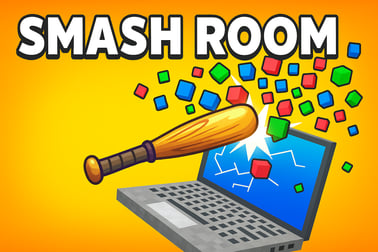
Smash Room lets you obliterate voxel objects with rockets, bats, bombs and more. Play this free destruction sandbox online and relieve stress instantly.




















Smash Room
Overview of Smash Room
Smash Room is a fast, satisfying destruction simulator online where the entire point is to blow things up, break them apart, and watch the pieces fly. Instead of managing a city or grinding levels, this voxel destruction game strips things down to one core idea: pick an object, arm yourself with an over-the-top weapon, and unleash chaos until every last block is scattered across the screen.
This browser sandbox game is built around simple controls and instantly readable physics. Each object is made of tiny voxels, so every hit sends chunks flying in a different pattern. Whether you're firing rockets at a laptop or dropping bombs on a birthday cake, the destruction feels crunchy, reactive, and oddly relaxing.
Because it runs in your browser, Smash Room is perfect for quick sessions during a break or as a light stress relief smashing game after a long day. There's no story, no timers you have to obey, and no complicated systems to learn. Instead, you get a tight loop of choose, smash, repeat that keeps you experimenting with new weapon and object combinations. If you enjoy free online destruction games or physics sandboxes where you can just mess around, Smash Room fits right into that niche.
Under the hood, the game mixes elements of Simulation, Action, and Casual genres. The simulation side comes from the voxel physics and varied reactions. The action comes from explosive weapons and rapid destruction. The casual side comes from how easy it is to jump in and start playing with zero setup. It's designed to be pick-up-and-play fun that scales from a 3-minute smash to a 30-minute experiment session.
How to Play Smash Room
Smash Room keeps the rules simple so you can focus on destruction instead of memorizing systems. You don't need a tutorial to get started, but understanding the basic flow helps you get the most satisfying results from this browser sandbox game.
Basic Rules & Mechanics
At its core, Smash Room follows a three-step loop: choose an object, select a weapon, and then demolish it. There's no losing, no fail state, and no way to get stuck. When you finish with one setup, you simply reset or switch to another object and go again.
- Select an object: You start by choosing one of several voxel-based items. Each one has its own shape, size, and internal structure, so they react differently when hit.
- Pick your weapon or tool: Next, you choose how you want to attack the item. Weapons determine both the pattern and intensity of destruction.
- Smash and experiment: Use your mouse or touch controls to fire, swing, or drop your weapon onto the object. Pieces break off, fly away, and sometimes trigger chain reactions.
- Reset and repeat: When the object is in ruins, reset it with a click or tap and try a different mix of item and weapon.
There aren't any complex objectives or hidden rules. The appeal is in experimenting with the physics: hitting from different angles, stacking hits, or mixing tools to see how the voxel destruction game engine responds.
Smash Room Control Guide
Controls are deliberately minimal so the game works smoothly as a destruction simulator online on both desktop and mobile browsers.
- Mouse (desktop / laptop):
- Left-click: Select items, weapons, or fire / trigger an attack.
- Click and hold (where applicable): Charge or aim certain weapons for a more dramatic hit.
- UI buttons: Use on-screen buttons to swap objects, change tools, or reset the scene.
- Touch (phones & tablets):
- Tap: Select objects and weapons and activate your chosen tool.
- Tap and hold: For weapons that benefit from timing or charging, hold for a moment before releasing.
Because Smash Room is made to be accessible, you won't find complicated keybinds or hidden shortcuts. Everything you need is on-screen, making it approachable for casual players, younger users, and anyone who just wants a quick stress relief smashing game without learning curves.
Smash Room Game Modes
Smash Room focuses on a single, highly polished sandbox loop rather than a long list of separate game modes. That said, there are distinct ways to play inside this browser sandbox game, depending on your mood and how much attention you want to invest.
Free Smash Sandbox
The main way to experience Smash Room is as an open-ended sandbox. You choose any available item and weapon and simply go wild. There's no timer, no score, and no restrictions on how many times you can reset.
- Endless replayability: With a line-up of different objects and weapons, you're encouraged to experiment.
- Relaxed pacing: Take your time and enjoy the way objects crumble block by block.
- Perfect for breaks: Great when you've got a few spare minutes and want something instantly satisfying.
Self-Set Challenges
Even though the game doesn't enforce strict mission objectives, the physics and tools make it easy to create your own goals:
- Try to split an object perfectly in half with a precise hit.
- See how much you can destroy in a single shot using high-damage weapons.
- Limit yourself to a particular tool (like just the bat) and see how long it takes to reduce everything to rubble.
This freeform approach keeps Smash Room flexible. You can treat it as a calm, free online destruction game or as a playground to test your own skills and creative ideas.
Smash Room Game Overview: A Pure Destruction Sandbox
What sets Smash Room apart from other casual games is how unapologetically focused it is on destruction. There's no pressure to win, no puzzle to solve, and no long-term progression to worry about. You're here to break things, and the game does everything it can to make that experience feel crunchy, colorful, and satisfying.
Each object you choose is built from small cubes, which gives Smash Room that recognizable voxel aesthetic. When you attack, these cubes fly off according to where and how you hit. Lob a rocket at the center of a burger and watch it explode outward in chunky layers. Smash a laptop with a bat and see the screen, chassis, and keys break apart into showers of tiny blocks.
That tactile feedback is what makes Smash Room a standout voxel destruction game. Rather than simply fading out or showing a single pre-made animation, every hit creates a slightly different outcome. Over time, you start looking for new angles, impact points, and weapon chains to trigger the most spectacular reactions.
Because it all runs inside a browser, Smash Room fills a useful niche in the world of free online destruction games. There's no download required, and you don't need high-end hardware. You just open the game, pick your tools, and start smashing.
How to Play Smash Room Online in Your Browser
Smash Room is designed to be painless to access. Playing this destruction simulator online usually only takes a few seconds from the moment you load the page.
Step-by-Step: Getting Started
- Open the game page: Launch Smash Room in a modern browser like Chrome, Edge, Firefox, or Safari.
- Wait for assets to load: The voxel models, weapons, and effects will load in the background. This normally takes only a short moment.
- Pick an object: On the main screen, use the UI to browse through the available items. Choose something you feel like destroying—maybe a laptop if you want a tech-themed smash, or a cake if you're in a celebratory mood.
- Choose a weapon: Next, select your preferred tool of chaos. You can start with a simple bat or jump straight to rockets and explosives.
- Tap or click to attack: Use your mouse or finger to trigger the weapon. Watch carefully as pieces fly off—half the fun is observing the physics.
- Reset and try again: Once the object is collapsed into debris, use the reset option to restore it instantly. Switch weapons or items to keep things fresh.
Because everything happens in one screen with clear prompts, Smash Room is very beginner-friendly. It's an ideal pick if you want to show a browser sandbox game to friends or younger players who don't usually game.
Play Smash Room on Phones & Tablets
Smash Room is also suited for mobile and tablet browsers, making it easy to take your stress relief smashing game on the go.
- Touch-first interface: All controls are based on taps, so you can play with one hand.
- No install needed: Just open the game URL in your mobile browser and start smashing.
- Short-session friendly: Ideal for commutes, waiting rooms, or quick breaks between tasks.
For the smoothest experience, make sure your device isn't overloaded with background apps. Closing extra tabs and ensuring a stable internet connection will help the voxel destruction engine run more fluidly.
Weapons and Tools: Rockets, Bats, Bombs and More
A big part of the appeal in Smash Room is the arsenal. Each weapon adds a different flavor to the destruction and encourages you to keep mixing and matching in this destruction simulator online.
Melee Tools
- Baseball Bat: Delivers focused, satisfying hits. Great for chipping away at corners, knocking off chunks, or "carving" shapes into objects one swing at a time.
- Heavy Hitting Tools: Sledgehammer-style attacks (if available) create bigger craters and are perfect when you want to quickly hollow out the center of an object.
Melee weapons are ideal if you enjoy precision and want to watch objects crumble gradually, layer by layer.
Ranged and Explosive Weapons
- Rockets: Fire a rocket into the middle of a laptop or burger and you'll see a wide circular blast, sending voxels flying in every direction.
- Cluster Bombs: These can create secondary explosions, so one trigger may cause multiple blasts across the object, perfect for total annihilation.
- Bombs & Grenades: Drop or launch them and watch as they detonate with a delayed, high-impact burst.
Explosives usually offer the most dramatic payoffs and are ideal if you're chasing big visual effects in your voxel destruction game sessions.
Specialty Tools
- Saw Blades: Spinning blades can slice through layers of voxels in a clean line, allowing for creative shapes and patterns.
- Other Experimental Tools: Certain tools might push or pull pieces in unusual ways, letting you experiment with how objects collapse or scatter.
The variety of tools keeps this browser sandbox game from ever feeling repetitive. Even with a single object, you can get a surprisingly wide range of outcomes just by changing the weapon and where you aim.
Objects You Can Destroy: From Laptops to Birthday Cakes
Smash Room's selection of breakable objects is a big part of its charm. The everyday nature of the items makes the chaos oddly relatable and funny.
Technology and Gadgets
- Laptops: A popular pick for obvious reasons. Rockets and bombs rip through the screen and casing, spraying fragments everywhere.
- Boomboxes: Their boxy shapes produce satisfying blocky explosions when hit with explosives.
These tech items are great for testing high-powered weapons in your stress relief smashing game sessions.
Food and Party Items
- Birthday Cakes: Watching a beautifully stacked cake vaporize under a rocket blast is surprisingly cathartic.
- Burgers: Layers of bun, patty, and toppings all break apart differently, creating a unique pattern of crumbs and chunks.
Party-themed items let you turn celebrations into colorful destruction, which fits the playful tone of this free online destruction game.
Other Everyday Objects
Beyond tech and food, Smash Room usually offers a range of small household or decorative items. Each object brings different shapes, densities, and responses to impact, so you're encouraged to test them all:
- Stack lighter objects to see if you can knock them into each other.
- Focus on corners to cause topples and partial collapses.
- Use different tools on the same item to compare how the destruction changes.
Because everything is voxel-based, you can reliably expect that any hit will have a visible effect. That consistency makes Smash Room a very satisfying voxel destruction game to experiment with.
Tips for Stress Relief and Satisfying Voxel Destruction
While Smash Room is easy to pick up, a few habits can make it even more effective as a relaxation tool and even more fun to watch.
Slow Down and Watch the Details
Instead of spamming attacks, try pausing between hits to really watch how pieces fly and fall. Notice how different strike angles cause different debris patterns. Treat it like a visual toy box rather than a race, and you'll get more out of the sandbox feel.
Experiment with Combinations
One of the best parts of this destruction simulator online is mixing weapons and objects:
- Start with a bat to weaken an area, then finish with a rocket.
- Slice an object in half with a saw blade and then detonate a bomb inside the gap.
- Use lighter tools on delicate objects and heavier ones on dense items to see how reactions differ.
This playful experimentation is what turns a simple smash into a deeper, more rewarding session.
Use Short Sessions as Breaks
If you're using Smash Room as a stress relief smashing game, keep your sessions short and focused. Five or ten minutes of pure, no-goal destruction can act like a mental reset between work or study tasks. Because it's a browser sandbox game, it's easy to start and stop without commitments.
Performance & Troubleshooting
Smash Room is optimized for modern browsers, but because it's a physics-heavy voxel destruction game, you may occasionally see slowdowns on older devices. A few quick tweaks can help keep things smooth.
Improving Performance
- Close extra tabs: Fewer active tabs mean more resources for the game.
- Disable heavy background apps: Close streaming, large downloads, or other CPU-intensive tools while you play.
- Update your browser: The latest version of Chrome, Edge, Firefox, or Safari often runs free online destruction games more efficiently.
Common Issues & Fixes
- Game not loading: Refresh the page, check your internet connection, and verify that JavaScript is enabled.
- Controls not responding: Click or tap directly inside the game area. On mobile, ensure you're not tapping on the browser UI.
- Lag during big explosions: Give the game a moment during large blasts, or try playing on a device with more memory if possible.
Most problems can be solved with a quick refresh or by closing other apps. Since Smash Room is a light browser sandbox game, it usually runs smoothly on typical modern hardware.
Is Smash Room Safe to Play Online?
Smash Room is built as a lighthearted sandbox focused on breaking virtual objects, not on violence toward characters or realistic gore. That helps keep it in a more family-friendly territory than many action titles.
- Content focus: All destruction is applied to inanimate, voxel-style items like laptops, cakes, and other everyday objects.
- Stylized visuals: The blocky art style keeps everything playful rather than graphic.
- No graphic imagery: You're dealing with flying blocks and colorful debris, not realistic damage.
As with any online game, it's wise for parents and guardians to supervise younger children, especially when they are new to browser games. But overall, Smash Room fits comfortably within the Simulation, Action, and Casual categories as a safe, cartoonish destruction simulator online experience.
If you're looking for a quick, satisfying way to unwind, experiment with physics, and enjoy a pure voxel destruction game right in your browser, Smash Room is an easy recommendation. Open it up, pick your favorite object, arm a ridiculous weapon, and let the debris fly.
Frequently Asked Questions
What is Smash Room?
Smash Room is a browser-based destruction sandbox where you smash voxel objects like laptops and cakes using rockets, bats, bombs and other tools.
Is Smash Room free to play?
Yes, Smash Room can be played for free in your web browser with no download or installation required.
Can I play Smash Room on mobile devices?
Yes, Smash Room works on most modern phones and tablets as well as desktop browsers. Just open the game page and tap to play.
Is Smash Room suitable for kids?
Smash Room features cartoon-style, non-graphic destruction of objects, making it generally family-friendly. Parents should still check the game first for younger children.
Do I need an account to play Smash Room?
No account is required to start playing Smash Room. Simply load the game in your browser, pick an object and weapon, and begin smashing.