Sprunki Squid Game drops you into chaotic Squid-style trials with rhythmic beats and browser play. Mix sounds, survive challenges, no download needed.




















Sprunki Squid Game
Introduction to Sprunki Squid Game
Sprunki Squid Game is a fan-made rhythm survival game that mashes up the tense challenges of Squid Game with the chaotic, music-driven energy of Sprunki-style browser music games. Instead of just dodging bullets or running from guards, you're building bizarre soundtracks while trying to survive squid-inspired rooms and mini-challenges.
Played directly in your browser, this rhythm survival game leans into creative music mixing, animated Squid characters, and interactive sound loops. Each character you drop into the scene adds a new beat, vocal, or sound effect, transforming the deadly Squid arena into a wild concert stage. The result is a browser music game that's equal parts puzzle, rhythm, and survival parody.
Because Sprunki Squid Game is a fan made Squid Game experience, it keeps the tone lighter and more cartoony than the original show. You're not watching a serious drama—you're experimenting with rhythms, unlocking horror-style modes, and trying to keep your composition and your character alive through quirky squid game survival scenes.
This page will walk you through how to play, basic mechanics, features, survival tips, safety details, and some similar rhythm survival games you can try next—all tailored for players who love fast, creative browser games that run with no downloads.
How to Play Sprunki Squid Game
Sprunki Squid Game is designed so anyone can jump in within seconds. If you've ever played an Incredibox-style mixer or any Sprunki mod, you'll feel at home immediately. If not, here's how the core system works step by step.
Basic Rules & Flow of a Session
At its heart, Sprunki Squid Game is about building a musical composition while surviving squid-style challenges:
- Characters = Sounds: Each Sprunki or Squid character you drag into the scene adds a specific sound—beat, bass, vocal, effect, or melody.
- Combinations unlock events: Certain character combinations trigger special animations, creepy sequences, or "Squid challenge" survival moments.
- Keep the rhythm: The better your rhythm and layering, the more satisfying and stable your scene feels—even when chaos erupts.
- Experiment freely: There’s no strict fail state like in a hardcore survival game; instead, you’re rewarded for creativity, discovery, and timing.
Core Controls & Input
Controls can vary a little between platforms hosting Sprunki Squid Game, but the core setup is very similar everywhere:
- Mouse / Touch: Click or tap on characters to select them.
- Drag & Drop: Drag a character onto an open slot or line in the chamber to add their sound to your mix.
- Tap to Mute / Remove: Tap or click a character already in the chorus to remove or replace them.
- Special Icons: Some versions include special icons or a "dark" character that toggles horror or corrupted modes.
Because it's a browser music game, there are no complicated button combos. The entire point is to explore sounds, surprise events, and squid-themed animations with fast, simple input.
Step-by-Step: Your First Squid Challenge Online
- Start the game: Click the play or start button on the Sprunki Squid Game page. Wait a moment for assets and audio to load.
- Tap to begin: Many fan-made Sprunki games ask you to tap or click anywhere to "wake up" the chamber.
- Add characters: Drag Squid or Sprunki characters into open slots. Listen to how each new sound stacks onto the beat.
- Mix and match: Swap characters around to balance rhythm, vocals, and effects. Try to avoid cluttered noise.
- Trigger events: Experiment until you unlock squid game survival scenes—such as red-light-green-light inspired cutaways, creepy doll cameos, or corrupted glitch sequences.
- Reset or refine: If the sound gets too messy, remove a few characters and rebuild a cleaner rhythm survival loop.
Sprunki Squid Game Features
Sprunki Squid Game stands out by turning intense Squid-style games into a playful audio sandbox. Instead of quick reflex shooting or platforming, the focus is on music, timing, and exploration.
Key Features
- Rhythm Survival Gameplay: Every survival room or squid challenge online is driven by your active soundtrack. The better your mix, the more satisfying each event feels.
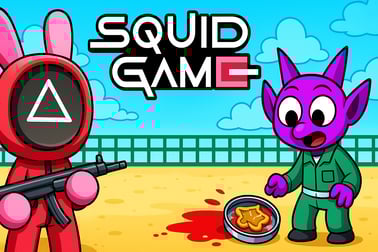
- Squid-Inspired Characters: Expect familiar silhouettes from the Squid universe—masked guards, contestants, and ominous figures—reimagined in a stylized, fan-friendly aesthetic.
- Dynamic Sound Layers: Beats, percussive loops, synth lines, and eerie vocal chops stack as you drop characters, creating unique tracks each time.
- Horror & Corruption Modes: Many fan-made Sprunki mods include "horror" or "corrupted" toggles that distort visuals and sound for a darker vibe.
- No-Download Browser Play: As a browser music game, Sprunki Squid Game typically runs directly in your web browser with no installation or signup.
- Replay-Friendly Design: Because there's no single "right" mix, you can replay endlessly to discover new sequences, combos, and animations.
Why Fans Love This Fan-Made Squid Game Mix
Players drawn to squid game survival themes often want tension and stakes, while Sprunki fans love wild, meme-ready audio. Sprunki Squid Game combines both:
- It captures Squid challenge online vibes without being overly graphic or serious.
- It keeps the focus on music-first experimentation instead of high-pressure failure.
- It rewards curiosity—trying weird character combinations reveals hidden sequences and creepy musical variations.
Performance & Troubleshooting
Because Sprunki Squid Game is a web-based experience, performance depends a lot on your device, browser, and network. If your rhythm survival game feels laggy or desynced, try these simple tweaks.
Browser & Device Tips
- Use a modern browser: Chrome, Edge, Firefox, or Safari (latest version) generally handle WebGL and audio timing better.
- Close extra tabs: Too many tabs or other apps can cause audio stutter in a music-heavy browser game.
- Check your connection: While gameplay is mostly local once loaded, a slow connection can delay initial loading of sounds and animations.
- Restart the tab: If characters stop responding or a squid challenge won't trigger, refresh the page and relaunch the game.
Audio Desync or No Sound
- Make sure your system volume and browser tab volume are not muted.
- On some devices, you must click once before audio playback is allowed for privacy reasons.
- If your mix drifts off-beat, pause for a few seconds or remove a few characters, then rebuild with fewer layers.
Input & Lag Issues
- Turn off heavy extensions: Ad blockers or script-heavy extensions can slow fan made Squid Game experiences.
- Lower background activity: Streaming video, voice calls, or downloads in the background can cause input lag.
- Try another device: Older phones or low-end laptops may struggle with complex animations and layered audio.
Can I Play Sprunki Squid Game Offline?
In most cases, Sprunki Squid Game can't be played fully offline. It's built as an online browser game, meaning assets, scripts, and audio loops are loaded from the hosting site at runtime. Once the tab is closed, you lose access unless you reconnect.
Some important points about offline availability:
- There is no official offline app or downloadable client for Sprunki Squid Game.
- Any "download" claiming to offer offline versions may be unsafe or unofficial.
- Playing directly in the browser is the intended and safest way to enjoy the rhythm survival experience.
If you want a similar feel while offline, consider mobile rhythm apps or music sandbox games from trusted app stores, but be aware they won't be the same fan-made Squid Game crossover.
How to Play Sprunki Squid Game Online in Your Browser
Playing Sprunki Squid Game online is straightforward, and you can usually start a session in under a minute.
Step 1: Open a Trusted Browser Gaming Site
Search for "Sprunki Squid Game browser music game" or "Sprunki Squid Game rhythm survival" and choose a reputable casual-gaming or Sprunki-focused site. Avoid random file downloads—legit versions run on the page itself.
Step 2: Load the Game
- Click the Play or Start Game button.
- Wait for the loading bar or spinner to finish; audio files and animations are often the largest part.
- Some sites show short ads first—after they finish, the squid challenge online chamber will appear.
Step 3: Interact With the Chamber
- Tap or click inside the play area to begin.
- Drag characters from the bottom or sides into the main stage.
- Listen, tweak, and experiment until you're happy with your track and visual chaos.
Step 4: Share or Replay
While most Sprunki-style games don't offer exportable audio, you can:
- Replay and rebuild new tracks with different squid game survival setups.
- Share the URL with friends so they can create their own twisted mixes.
Game Features: Music, Chaos and Squid-Inspired Challenges
What makes Sprunki Squid Game so addictive is how it fuses survival tension with a playful music toy. It doesn't behave like a traditional deathmatch or runner; instead, every choice you make is an audio and visual punchline.
Music-Driven Chaos
- Layered rhythm tracks that let you build anything from bouncy trap beats to eerie, horror-leaning loops.
- Dynamic crescendos when you add certain Squid characters, making the chamber feel like a loud, living organism.
- Glitch and distortion effects in horror or corruption modes that warp standard rhythms into unsettling soundscapes.
Squid-Inspired Rooms & Moments
While not all fan versions feature the same content, common squid game survival nods include:
- Red-light-green-light style freezes synced to your beat.
- Masked guards bobbing or reacting in time with the music.
- Contestant-style characters whose animations change based on which sounds they represent.
Puzzle-Like Discovery
Sprunki Squid Game also scratches a light puzzle itch. You're not solving logic grids, but you are:
- Testing character combinations to trigger rare scenes.
- Balancing sound types for a coherent rhythm instead of pure noise.
- Learning which setups feel "safe" and which tip the scene into funny chaos.
Tips to Survive the Squid Rooms in Sprunki Style
Even though Sprunki Squid Game is more playful than brutal, you can still treat each run like a mini squid game survival challenge. Here are some practical tips.
1. Start With a Solid Beat Foundation
Before dropping in vocals or weird effects, place 2–3 rhythmic characters:
- One kick or main beat character.
- One hi-hat or percussive loop.
- Optionally, a bassline to glue it together.
A strong base makes later chaos feel intentional, not random.
2. Add Squid Characters Gradually
Don't flood the board immediately. Add squid-inspired characters one at a time and listen:
- If a new sound overwhelms the mix, swap it for something subtler.
- Watch how the chamber visuals change; some characters are linked to survival-style events.
3. Use Horror / Corruption Mode Sparingly
If your version includes a dark or horror toggle:
- Activate it after you build a stable track; the distortion will then feel like a deliberate "phase two" of your squid challenge online.
- Turn it off if younger players are watching or if the visuals become too intense.
4. Treat It Like a Puzzle
Approach each session as a puzzle where you're trying to unlock the coolest animation or survival scene:
- Remember which characters triggered events.
- Rebuild that combo later and tweak one or two pieces to see if it evolves.
5. Don't Chase "Winning" Too Hard
There isn't a strict win screen in most versions of Sprunki Squid Game. "Winning" is more about:
- Creating a satisfying, on-beat mix.
- Seeing rare squid game survival animations.
- Enjoying the experiment rather than racing to a finish.
Similar Rhythm and Survival Games to Try Next
If you enjoy Sprunki Squid Game, you'll likely love other rhythm survival game experiments and fan-made crossovers.
Sprunki-Style Music Mods
- Sprunki But Squid Game: A closely related fan-made mode where classic Squid characters join a chorus and horror mode twists the visuals.
- Corruptbox / Horror Sprunki Mods: Darker, glitch-heavy takes that lean fully into horror rhythms.
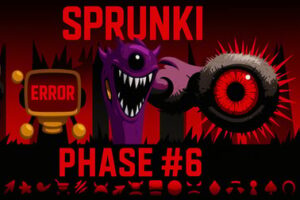
- Sprunki Phase Series: Progressive phases that introduce new sound sets, art styles, and lore.
Other Rhythm & Survival Hybrids
- Friday Night Funkin'-style browser games: More traditional rhythm timing with survival-flavored battles.
- Music-driven puzzle games: Titles where you solve small puzzles or survive waves using music cues and beat timing.
When browsing for new experiences, search for combinations like "browser music game," "fan made squid game," or "rhythm survival game" to stay in the same genre space.
Is Sprunki Squid Game Safe and Free for Kids?
Because Sprunki Squid Game is a fan made Squid Game remix, safety depends on two factors: the specific version you play and the hosting website.
Visual & Content Safety
- Most versions use cartoon-style art and avoid realistic violence.
- There may be mild horror elements—creepy faces, glitch effects, darker color palettes—especially in corruption modes.
- Language is usually clean, as dialogue is minimal and most of the focus is on music and sound effects.
For younger kids, parents may want to:
- Preview the game first for any unsettling visuals.
- Keep horror modes off, if that option exists.
- Play on a family-friendly gaming portal with moderation and clear age ratings.
Online & Technical Safety
- No downloads needed: Legitimate Sprunki Squid Game experiences run in the browser, reducing the risk of malware.
- Avoid unofficial installers: Do not download "EXE" or "APK" files from random sites claiming to be Sprunki Squid Game.
- Ads & pop-ups: Some hosting sites display ads; using a reputable portal helps limit inappropriate advertising.
Is Sprunki Squid Game Free?
Yes—Sprunki Squid Game is generally free to play as an online browser music game. Some platforms may show ads before or around the game, but you shouldn't be asked to pay for core access. If a site demands payment or requests suspicious permissions, close it and look for a safer alternative.
In summary, Sprunki Squid Game is usually safe for teens and many older kids, especially when played on trustworthy browser gaming sites and with horror elements moderated by adults. It delivers a unique blend of squid game survival flavor, rhythm experimentation, and fan-made creativity that's perfect for music-loving players looking for something a little weird, a little spooky, and endlessly replayable.
Frequently Asked Questions
What is Sprunki Squid Game?
Sprunki Squid Game is a fan-made browser game that mixes Sprunki-style music mixing with Squid Game–inspired survival challenges and characters.
How do I play Sprunki Squid Game online?
Click Play on the game page, wait for it to load, then tap or click characters to add them to the chorus, trigger Squid-style events and create your own rhythm.
Do I need to download or install anything?
No, Sprunki Squid Game runs directly in your browser. Just make sure you have a stable internet connection and an up‑to‑date browser.
Is Sprunki Squid Game free to play?
Yes, the game is free to play online. Some platforms may show advertisements around the game to support hosting and development.
Is Sprunki Squid Game suitable for kids?
The game uses cartoon Squid Game themes with light horror elements. It is generally family-friendly, but younger children should play with parental guidance.