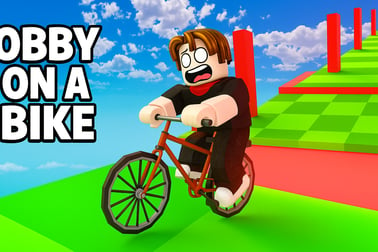
Obby On A Bike lets you ride through crazy floating obstacle courses. Balance, jump and race friends in fun single or 2 player bike parkour modes.










Obby On A Bike
Introduction to Obby On A Bike
Obby On A Bike is a fast-paced mix of bike racing and precision parkour, all wrapped into a vibrant 3D browser game. Instead of just blasting down a straight track, you’re riding across floating platforms, razor-thin beams, ramps, jumps, and moving traps that feel like a bike obby parkour course straight out of your favorite sandbox world. One wrong move and you’re falling into the void — but with quick restarts and generous checkpoints, it’s the kind of challenge you’ll want to retry "just one more time" again and again.
The game blends arcade, racing, and skill gameplay. You’re racing the clock, but you also have to be super precise with balance, turning, and timing. You can play solo to master each route or jump into a 2 player bike racing game mode and share a keyboard with a friend to see who can clear the stage first. Along the way you’ll earn coins, unlock new bikes, and customize your rider with different skins and cosmetic items.
Whether you love mastering a challenging bike obstacle course or you just want a free browser bike game you can start instantly, Obby On A Bike delivers tight controls, tricky layouts, and lots of replay value. It’s all about learning the physics of the bike, reading the course, and making tiny adjustments so you don’t overshoot that next platform.
Obby On A Bike Control Guide
Good control is everything in a precision bike parkour online experience. Obby On A Bike keeps the input simple, but there’s a lot of nuance in how you use it. Mastering these basics is the fastest way to start flying through levels instead of constantly falling off the track.
Keyboard Controls for PC
Typical default controls:
- Up Arrow / W – Accelerate and move the bike forward
- Left Arrow / A – Steer left
- Right Arrow / D – Steer right
- Down Arrow / S – Slow down or gently brake (if available)
- R – Quick reset to the last checkpoint (varies by host)
Some versions also support alternative keys for Player 2, so you can enjoy the 2 player bike racing game mode on a single keyboard. Before you start a race with a friend, double-check the key layout on the mode select screen so you don’t end up fighting over the same buttons.
Touch Controls on Browsers That Support It
If you’re playing in a mobile browser that supports keyboard emulation or on a device with configurable touch overlay, you’ll usually see on-screen arrows:
- Right-facing arrow – Move forward or accelerate
- Left/right arrows – Steer the bike
While Obby On A Bike is designed first for keyboard play, some platforms add virtual buttons so you can still enjoy this precision bike parkour online on smaller screens.
Control Sensitivity & Tips
- Feather the keys – Tap left or right instead of holding them down. Tiny corrections are more stable on narrow beams.
- Ease off the gas – Full speed is great on straight sections but dangerous on small platforms and curves.
- Plan jumps early – On ramps, keep a steady speed; sudden braking or turning at the edge can throw off your trajectory.
Obby On A Bike Game Modes
Obby On A Bike offers several ways to tackle its challenging bike obstacle course, whether you’re practicing solo runs or racing against a friend on the same screen.
Normal Mode
This is the best place to start if you’re new to bike obby parkour games.
- No strict time limit – You can ride at your own pace and focus on learning each segment of the track.
- Perfect for exploration – Try risky jumps, practice tight turns, and memorize checkpoint placements.
- Ideal for warming up – Use Normal Mode to prepare before going into time-based challenges or multiplayer races.
Challenge / Time Trial Mode
Once you’re comfortable with a level, switch to the harder mode:
- Time pressure – Beat the countdown or set a personal record for each stage.
- Replay-friendly – Run the same course several times, shaving off seconds as you discover faster lines.
- Competitive feel – Great for players who like to speedrun this type of precision bike parkour online.
Single Player vs 2 Player Bike Racing Game
- Single Player – Focus entirely on your own run and mastering the bike obby parkour layouts.
- 2 Player Mode – Two riders share one keyboard using different control schemes. You race the same obstacle course simultaneously, trying to reach the finish line or final checkpoint first.
Both modes use the same core physics and track layouts, so any skill you build solo instantly transfers into head-to-head races.
Performance & Troubleshooting
Obby On A Bike is a free browser bike game, so it should run on most modern desktops and laptops without heavy hardware. Still, performance issues can pop up on older devices or overloaded browsers. Here’s how to keep the game smooth.
Improving Performance
- Close extra tabs – Streaming, downloads, or multiple open sites can eat RAM and cause stutters on large 3D stages.
- Disable unused extensions – Ad blockers, script injectors, and toolbars sometimes conflict with HTML5 games.
- Update your browser – The latest versions of Chrome, Edge, Firefox, and similar browsers handle WebGL 3D much better.
- Plug in on laptops – Some systems throttle graphics performance on battery power.
Common Issues & Fixes
- Game doesn’t load
Try refreshing the page, clearing your browser cache, or switching to another browser. If the site uses an age gate or cookie prompt, complete that first. - Controls feel delayed
Close background apps and make sure your internet connection is stable. Even though gameplay runs locally, some platforms still sync data online. - Graphics glitches
Update your graphics driver if possible, and disable any custom browser flags that affect hardware acceleration.
If nothing works, check the host site’s FAQ or support page; some platforms provide specific tips for 3D arcade and racing titles like Obby On A Bike.
Is Obby On A Bike Safe to Play Online?
Obby On A Bike is generally family-friendly and safe to play on reputable browser gaming platforms. The theme focuses on bikes, obstacle courses, and light-hearted competition rather than violence or mature content.
- No graphic violence – When you fail a jump, your rider simply falls off the track or resets to a checkpoint.
- No real-money purchases in typical web versions – Most implementations of this free browser bike game rely on ads or basic rewards instead of in-game purchases.
- Minimal text chat – Local 2 player bike racing game modes are played on the same device, so there’s no open chat with strangers in those versions.
For younger players, parents should still:
- Choose trusted sites with clear privacy and content policies.
- Watch for external ads or pop-ups hosted by the platform.
- Use browser-based content filters or parental controls where available.
Played on mainstream gaming portals, Obby On A Bike is a safe, skill-based experience focused on timing, balance, and problem solving.
How to Play Obby On A Bike Online
Getting started with Obby On A Bike is quick: open your browser, load the game, and you’re ready to ride. Here’s a simple walkthrough of how a typical session works.
1. Choose Your Mode
- Select Single Player if you’re learning the course or chasing personal bests.
- Select 2 Player to turn it into a split-keyboard race with a friend.
- Then pick Normal or Challenge depending on whether you want relaxed practice or time-based goals.
2. Pick a Level or Stage
Most versions include multiple stages or a progression of levels. Early tracks are simpler with wider platforms and gentler curves, while later ones emphasize narrow paths, moving elements, and harsher punishment for mistakes.
3. Ride from Start to Finish
- Accelerate smoothly to start rolling.
- Steer carefully along beams, ramps, and floating paths.
- Hit checkpoints so you don’t lose all progress when you fall.
- Cross the final line or flag to officially clear the level.
As you ride, you’ll collect coins or rewards that you can later spend on new bikes or character skins, giving your rider a unique style while you conquer each challenging bike obstacle course.
Tips to Beat Tricky Bike Obstacle Courses
Because Obby On A Bike is a mix of bike obby parkour and racing, pure speed isn’t enough. You need consistent technique if you want to stay on the track.
Master Your Speed
- Slow is fast on narrow paths – On thin beams and sharp corners, ease off the gas. Controlled speed makes it easier to correct your angle.
- Use speed on ramps – For long jumps and rising slopes, maintain enough momentum so you don’t come up short.
Study the Course Layout
- Do a scouting run in Normal Mode to see where gaps, moving platforms, and tricky turns are.
- Memorize checkpoint locations so you know when to take extra risks and when to play safe.
Control Your Line
- Look ahead instead of staring just under your front wheel; you’ll react earlier to corners.
- Center your bike on each platform before turning or accelerating again.
- Feather steering with light taps, especially on tight edges.
Use Checkpoints Smartly
- Once a checkpoint is activated, use it to practice tough segments repeatedly.
- If your line feels messy after a series of mistakes, consider resetting quickly to attempt a cleaner approach.
With these habits, even the most brutal precision bike parkour online sections start to feel manageable, and soon you’ll be cruising through obstacles that once felt impossible.
Game Modes, Levels and Checkpoints Explained
Obby On A Bike is built around short, focused levels and a powerful checkpoint system that keeps frustration low while maintaining a real sense of challenge.
Level Structure
- Early levels – Wide tracks, gentle curves, minor gaps. Great for learning the physics of your bike.
- Mid-game levels – More jumps, staggered platforms, and narrower routes that demand better line control.
- Advanced stages – Complex sequences of ramps, tight corners, and high-risk sections that test every skill you’ve learned.
Checkpoints
- Usually marked by arrows or visible markers on the floor.
- Turn active once you ride over them, often changing color.
- When you fall, you respawn at the last activated checkpoint, not at the very beginning.
This design encourages experimentation. You can keep trying risky jumps or tricky turns without replaying the entire level each time. It also means that in a 2 player bike racing game, a single mistake isn’t always the end — the race can still turn around if one player handles the next section better.
Unlocking Bikes, Skins and Character Customization
Progress in Obby On A Bike isn’t just about clearing courses; it’s also about earning style. Coins collected across levels can be spent on fun cosmetic upgrades, making your rider stand out as you tackle each challenging bike obstacle course.
Collecting Coins
- Checkpoint rewards – Many checkpoints have coins placed near them.
- Off-path coins – Some are positioned on riskier lines, encouraging advanced players to take alternate routes.
Unlockable Bikes
- Visual variety – Different colors, frames, and designs keep things fresh.
- Potential handling tweaks in some versions, offering slightly different feel for acceleration or turning.
Character Skins & Cosmetics
- Skins and outfits for your rider.
- Hair, hats, glasses, and accessories to personalize your character.
None of this is required to enjoy the core bike obby parkour gameplay, but unlocking and showing off new looks adds long-term goals beyond just beating the next level.
Multiplayer Bike Races: Challenge Your Friends
One of the most entertaining parts of Obby On A Bike is turning it into a couch competition. The local 2 player bike racing game mode makes every narrow beam and huge jump feel twice as intense.
How Local Multiplayer Works
- Shared screen – Both players see the same course from similar camera angles.
- Separate controls – Each rider gets their own set of keys on the same keyboard.
- Same checkpoints – Both players race through identical checkpoint placements, so it’s a pure skill showdown.
Fun Ways to Play With Friends
- First to finish – Standard race: whoever crosses the final line first wins.
- Least falls wins – Keep track of who wipes out the fewest times over multiple runs.
- Speedrun relay – Take turns on the same level, trying to set the fastest time; loser picks the next course.
Because the game is easy to start in any modern browser, it’s ideal for quick competitions during breaks or after school. If you’re both experienced at precision bike parkour online, advanced levels become intense battles of nerves and consistency.
Obby On A Bike combines tight controls, clever track design, and approachable visuals into a standout free browser bike game. Whether you’re chasing perfect lines alone or trading wins in multiplayer, every cleared level feels like mastering a new mini parkour puzzle on two wheels.
Frequently Asked Questions
What is Obby On A Bike?
Obby On A Bike is a 3D skill and racing game where you ride a bike along floating parkour-style tracks, dodging obstacles, making jumps, and trying not to fall off while reaching the finish line.
How do you play Obby On A Bike?
Use the keyboard or on-screen controls to move forward, steer left and right, and keep your balance. Follow the track, hit checkpoints, avoid falling into the void, and cross the finish line to clear each stage.
Can I play Obby On A Bike with a friend?
Yes. Obby On A Bike includes a 2 player mode where two players share the same device and race on the same track to see who can reach the goal first.
Are there different bikes and skins in Obby On A Bike?
Many versions of the game let you collect coins or complete stages to unlock new bikes and customize your rider with different outfits, colors, and accessories.
Is Obby On A Bike free to play online?
Yes, Obby On A Bike is free to play in your browser. You don’t need to download anything—just load the game, choose a mode, and start riding.