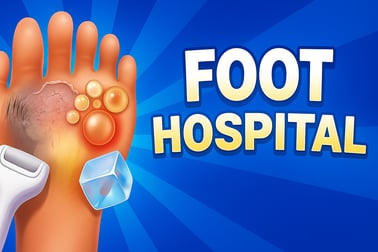
Foot Hospital lets you become a foot doctor. Clean, treat, and pamper feet, unlock tools, and upgrade your clinic in this fun online hospital game.

















Foot Hospital
Overview of Foot Hospital
Foot Hospital is a light-hearted foot doctor game where you run a tiny clinic and treat all kinds of funny and gross foot problems. It blends medical tools, spa-style pampering, and simple simulator mechanics to create a kid-friendly hospital simulator for kids that’s easy to play right in your browser.
Each patient arrives with different foot issues: overgrown nails, calluses, blisters, cuts, or even pimples and fungus. Your job is to use the right tools in the correct order to clean, heal, and refresh their tired feet. The better you treat them, the more coins or gems you earn to decorate and upgrade your cozy little clinic.
Because it’s an online doctor game, there’s no need to download anything. Just click to start, follow the on-screen prompts, and enjoy a relaxing pedicure spa game experience that’s perfect for kids, tweens, and anyone who enjoys makeover and simulation titles. It’s simple, colorful, and designed to make basic foot hygiene feel fun instead of scary.
How to Play Foot Hospital
In Foot Hospital, the gameplay is built around short levels. Each level represents one patient’s visit to your clinic. You’ll see their feet on the screen along with a tray of doctor and spa tools at the bottom or side. The game guides you step-by-step, so younger players won’t get lost.
Here’s how a typical treatment plays out in this medical treatment game:
- 1. Start the level: Tap or click “Play” to bring in a new patient. Their feet appear with visible problems like hair, dirt, cuts, pimples, or calluses.
- 2. Follow the instructions: The game usually highlights the next tool to use. You might see a glowing outline or a short text hint telling you what to tap.
- 3. Pick the right tool: Click or tap on the tool icon (like clippers, a razor, or a sponge). The tool will stick to your cursor or finger so you can use it on the affected area.
- 4. Perform the treatment: Drag, swipe, or tap on the foot as shown. You might shave hairs, cut nails, pop pimples, file dead skin, or gently wash the area. Progress bars or sparkles show when you’re doing it correctly.
- 5. Finish the clean-up: After all the medical steps, you often get to add some spa-style touches, like lotion or polish, to make the feet look extra fresh.
- 6. Get your reward: When the feet are fully treated, the level ends and you earn coins or gems for your performance.
- 7. Upgrade your clinic: Head to the decoration or upgrade menu between levels to spend your earnings on new furniture, décor, or clinic improvements.
There’s no complicated scoring to worry about. As long as you listen to the instructions and complete each step, you’ll clear the level and keep unlocking new patients and problems to solve.
Key Features
This foot doctor game includes a mix of medical and makeover-style features that make it feel like both a hospital simulator for kids and a relaxing spa title. Here are the main highlights:
- Step-by-step medical procedures: Treat cuts, blisters, cracked heels, fungus, pimples, and more using realistic tools, but in a cartoonish, non-scary way.
- Foot spa and pedicure elements: Once the serious problems are handled, you can clean, scrub, file, and sometimes even decorate the feet like a pedicure spa game.
- Multiple levels and patients: Each new level introduces slightly different foot conditions, so you’re not always doing the exact same steps.
- Simple click-and-drag controls: Designed for young players and casual gamers, everything is done with basic taps, clicks, or short drags.
- Clinic customization: Use the coins or gems you earn to unlock décor, waiting-room upgrades, and other cosmetic improvements for your clinic.
- Kid-friendly visuals: Even though some feet are “gross,” the graphics are colorful and cartoony, so they’re more silly than scary.
- Browser-based play: No installation needed. Load it directly in a modern browser as a fast and easy online doctor game.
All of these features come together to create a relaxed, low-pressure medical treatment game that still feels rewarding as you transform messy feet into clean, healthy ones.
Where to Play Foot Hospital
You can play Foot Hospital directly in your web browser on most popular gaming portals that host online doctor games and simulation titles. Look for it in the Girls, Simulation, or Doctor category if you’re browsing a large games library.
General steps to start playing:
- Open your preferred browser (Chrome, Edge, Firefox, Safari, or a modern mobile browser).
- Search for “Foot Hospital foot doctor game” or navigate to your favorite browser gaming site.
- Click the game’s thumbnail or title to open the game page.
- Wait a few seconds for the loading bar to finish, then press the on-screen play button.
The game runs through HTML5, so you don’t need Flash or any extra plugins. As long as your browser is up to date and you have a stable internet connection, you can jump straight into treating patients and upgrading your clinic.
Is Foot Hospital Safe to Play Online?
Foot Hospital is built as a family-friendly hospital simulator for kids and casual players. There’s no graphic violence, jump scares, or inappropriate themes. You’ll only see cartoon-style feet and basic medical tools used in a gentle, educational way.
Safety notes and considerations:
- Content level: The “gross” elements (like pimples or fungus) are stylized and silly, closer to a makeover game than a realistic surgery sim.
- No real-money purchases inside the core game: Typical web versions don’t require you to buy anything to play. Unlocks are done with in-game coins or gems.
- Ads and external links: Most browser gaming platforms support themselves with ads and links to other games. Parents may want to supervise younger kids so they don’t accidentally click away from the game.
- No chat or user-generated content: You’re only interacting with the game’s own characters and levels, which reduces online safety concerns.
As with any online doctor game, the best approach for families is to play in a trusted browser, keep pop-ups blocked, and supervise small children while they dish out virtual medical treatment.
How to Play Foot Hospital and Treat Every Foot Problem
Each condition in Foot Hospital has a matching tool and a simple mini-action. Learning these pairs makes it easy to treat every patient quickly and efficiently.
Common tools and what they fix
- Nail clippers: Use these for overgrown toenails. Click and hold to trim along the white parts of the nail until they’re a neat shape.
- Razor or trimmer: For hairy toes and feet. Gently drag across the hair patches; they’ll disappear as you pass over them.
- Callus scraper: Used on thick, yellowish or rough patches of skin, usually on heels or the ball of the foot.
- Foot file or pumice tool: Smooths out remaining dead skin after scraping, leaving the feet soft and polished.
- Soap and sponge: Scrub dirt and germs away. Typically, you rub in circles until the dirt vanishes and the foot sparkles.
- Ice pack or cooling gel: Applied to blisters, redness, or cracked soles to calm irritation.
- Antiseptic spray or cream: Used on cuts and open wounds to prevent infection.
- Acne or pimple tool: Some levels ask you to gently tap pimples or use a special extractor icon to clear them.
Step-by-step treatment strategy
- Start with cleaning: If the level allows, use soap and water first to remove dust and mud so it’s easier to see each problem.
- Handle the rough stuff: Tackle calluses, dead skin, and any thick areas with the scraper and file.
- Fix nails and hair: Trim nails and shave hair to give the foot a neat appearance.
- Disinfect cuts and spots: Use sprays, creams, or special tools on wounds, blisters, and pimples.
- Finish with spa care: Apply lotion or polish if available. This often completes the level and boosts your rewards.
If you ever get stuck, watch the highlighted tool or on-screen prompts; the game is designed so that even first-time players can perform each treatment correctly.
Game Features: Foot Spa Tools, Levels, and Clinic Upgrades
Even though Foot Hospital is simple to pick up, it still offers a nice sense of progression and variety, especially for fans of pedicure spa games and makeover sims.
Foot spa and doctor tools
- A full tray of medical tools such as clippers, razors, scalpels, syringes, and bandages for handling tougher conditions.
- Spa-style items like foot files, scrubs, lotions, and polish options that let you add a beauty element to your medical treatment.
- Visual feedback like bubbles, sparkles, and progress bars so you know when each treatment step is complete.
Levels and patient variety
- Early levels: Focus on basic cleaning, trimming, and simple calluses so new players can learn the mechanics.
- Later levels: Introduce more complex combinations—like a foot with infections, blisters, and overgrown nails all at once.
- Mix of visual conditions: Ensures that each patient’s feet feel a little different, even if the tools are familiar.
Clinic upgrades and décor
- Waiting room furniture: Sofas, plants, posters, and more to make your hospital look friendly and stylish.
- Wall and floor choices: Change colors or patterns to match your taste.
- Progress feeling: Every upgrade you buy with coins or gems makes your clinic look more professional and rewarding to visit.
This gentle loop of treat–earn–upgrade is what makes Foot Hospital satisfying for players who enjoy long-term goals without high difficulty.
Tips to Earn More Coins and Decorate Your Foot Clinic Faster
If you love the decorating side of this hospital simulator for kids, you’ll want to maximize your coins or gems. Here are some simple tips to speed up your progress.
- Complete every step: Don’t skip tools or rush treatments. Fully cleaning and healing each foot often leads to better rewards.
- Follow the order shown: Using tools in the suggested sequence avoids mistakes and keeps each level short and efficient.
- Replay easy levels: Some early stages can be cleared very quickly. Replaying them is a fast way to grind extra currency for décor.
- Prioritize visible upgrades: Spend your first coins on big visual changes, like new chairs or walls. It makes your clinic feel more “finished” and keeps the game satisfying.
- Turn off distractions: Playing without multitasking helps you finish levels faster and miss fewer tool prompts.
By staying focused and replaying a few of your favorite levels, you’ll be able to unlock most of the decoration items without feeling stuck.
Foot Care Fun: Learn About Hygiene While You Play
Beyond being a fun pedicure spa game, Foot Hospital quietly teaches a few real-world lessons about hygiene and basic care. Even younger kids can pick up good habits just by playing.
- Importance of washing: Many levels begin with soap and water, reinforcing the idea that clean feet are healthier and more comfortable.
- Trimming nails safely: The game shows that nails shouldn’t be left extremely long and that they should be cut carefully, not painfully.
- Treating small problems early: Blisters, calluses, and small cuts are easier to handle if you deal with them instead of ignoring them.
- Respect for medical tools: Even though everything is cartoony, it gives kids a gentle introduction to what common clinic tools look like.
Of course, it’s still just a medical treatment game, not a real medical guide. But it can make kids less nervous about foot checkups and more aware of why regular washing and clean socks matter.
Similar Doctor and Hospital Games You Can Try Next
If you enjoy Foot Hospital, you’ll probably like other online doctor games and simulators with the same mix of light medical play and makeover-style fun. Look for titles in the Girls, Simulation, and Doctor categories such as:
- Nose or throat clinic games: Focus on cleaning noses, throats, and ears with similar drag-and-drop tools.
- Pet vet simulators: Treat injured puppies, kittens, or farm animals with bandages, stethoscopes, and x-rays.
- ASMR cleaning games: Satisfying scrubbing, polishing, and organizing challenges with relaxing sound effects.
- Emergency room simulators: Slightly more advanced medical scenarios where you care for patients with broken bones or minor surgeries.
- Spa and beauty clinic games: Less medical and more makeover focused, with facial treatments, hair styling, and nail art.
Rotating between Foot Hospital and other doctor and spa titles keeps the experience fresh while still giving you that same relaxed, tap-and-drag simulation feel you enjoy.
Frequently Asked Questions
What is Foot Hospital?
Foot Hospital is a casual doctor game where you treat patients’ feet using different medical and spa tools, clean infections, and upgrade your clinic.
Is Foot Hospital free to play?
Yes, Foot Hospital is a free online browser game. You can play it without paying, and no download is needed on most devices.
How do you play Foot Hospital?
Follow the on-screen instructions, pick the correct tool for each problem, and click or drag with your mouse or touchscreen to clean and heal the feet.
Can kids play Foot Hospital safely?
Yes, the game is family-friendly. It shows cartoon-style feet and treatments, making it suitable for kids who like doctor and makeover games.
What can I do with the coins or gems I earn?
You earn coins or gems after treating patients. These can be used to unlock decorations and upgrades for your clinic or home in the game.