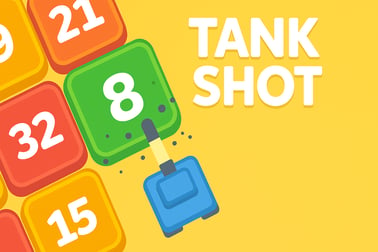
Tank Shot is a free online tank shooting gallery game. Move your tank, hit blue turrets, dodge red ones, and see how many levels you can beat.











Tank Shot
Overview of Tank Shot
Tank Shot is a fast-paced online tank shooter where you control a rolling tank at the bottom of the screen and blast away at moving turrets above you. It mixes classic arcade action with shooting gallery gameplay, making it perfect for quick play sessions in your browser. As a free tank shooting game, there’s nothing to download or install — just load it up and start firing.
In this browser tank game, rows of blue and red turrets slide across the screen. Your job is simple: hit as many blue turrets as you can while avoiding the red ones. Every shot requires focus, timing, and a steady aim. It’s a straightforward concept, but the pace and pattern changes keep it exciting for kids, teens, and casual players alike.
Because Tank Shot runs directly in your web browser, it works as a lightweight turret shooting game that you can play at home, at school (where allowed), or on the go. There are no complicated menus, no paywalls, and no intrusive extra systems — just pure, easy-to-learn tank defense action focused on accuracy and reflexes.
Whether you’re looking for a quick online tank shooter to fill a break or a casual challenge to beat your last high score, Tank Shot delivers simple, replayable fun with clear rules and family-friendly visuals.
Basic Rules & Mechanics
The rules in Tank Shot are intentionally simple so players of all ages can jump right in. Still, understanding the basic mechanics will help you stay alive longer and set higher scores in this browser tank game.
Here’s how the core systems work:
- Blue turrets = your main targets
- Each blue turret you destroy is worth 1 point.
- They move horizontally across different rows at varying speeds.
- Your main objective is to take out as many of these as possible.
- Red turrets = dangerous obstacles
- Red turrets must not be hit.
- Every time you shoot a red turret, you lose one life.
- Missing completely is safe — but wastes an opportunity to score.
- Your tank
- Your tank sits at the bottom of the screen on a track.
- You can slide left or right to line up the perfect shot.
- Your cannon fires straight upward, so positioning is everything.
- Rows of turrets
- The turrets appear in several horizontal lanes.
- At first, only the top row is active, but more rows unlock as you progress.
- Rows alternate direction, so some move left-to-right and others right-to-left.
- Lives system
- You start each session with 10 lives.
- Hit a red turret and you lose 1 life.
- When all lives are gone, it’s game over and your final score is recorded.
- Leveling
- Every 50 points (50 blue turrets destroyed), you advance to the next level.
- Higher levels gradually increase the challenge with more turrets and faster movement.
There’s no complex ammunition system, no power-ups, and no confusing menus. It’s just you, your cannon, and waves of moving turrets that test your reaction time and precision.
Tank Shot Features
While Tank Shot is a straightforward free tank shooting game, it still offers several features that keep it fun, accessible, and replayable.
- Pure shooting gallery action
- Focuses on target selection, timing, and aim.
- Minimizes distractions so you can just enjoy the shooting.
- Simple, intuitive design
- Clean visuals make it easy to see blue and red turrets at a glance.
- Interface shows score, level, and remaining lives at the top of the screen.
- Automatic high score tracking
- Your browser saves your best score locally.
- You can try to beat your own record every time you replay.
- Scalable difficulty
- Starts slow so new players can learn.
- More rows and faster motion add challenge as you level up.
- Instant play in your browser
- No account required.
- No download or installation — just click and play.
- Works as a quick lunch-break or after-school browser tank game.
- Family-friendly experience
- No realistic violence or gore.
- Bright, arcade-style visuals that suit kids, teens, and adults.
Because of this mix of simplicity and challenge, Tank Shot sits comfortably between a casual tapper and a reflex-based arcade shooter. It’s easy to learn in seconds but tough to master as the screen fills with turrets and your reaction time is put to the test.
Performance & Troubleshooting
Tank Shot is built as a lightweight HTML5 browser game, so it’s designed to run smoothly on most modern devices. If you’re having trouble getting this online tank shooter to run correctly, these quick tips usually help.
Improving performance
- Close extra tabs and apps
- Too many open browser tabs or background apps can slow down performance.
- Close anything you don’t need while playing.
- Update your browser
- Use the latest version of Chrome, Firefox, Edge, or another modern browser.
- Old versions may struggle with newer HTML5 games.
- Disable heavy extensions
- Adblockers, script blockers, and VPN extensions can sometimes interfere.
- Temporarily disable them if the game won’t load or feels laggy.
- Check your internet connection
- Tank Shot runs locally once loaded, but you still need a stable connection to start the game.
- Refresh the page if it gets stuck on the loading screen.
Common issues & simple fixes
- Game not starting
- Try refreshing the page.
- Make sure JavaScript is enabled in your browser.
- Try a different modern browser if the issue continues.
- Controls not responding
- On desktop, click directly inside the game window first so it has focus.
- On mobile, tap the game area once and try again.
- If the screen is zoomed, reset zoom to 100% for more accurate touches.
- Lag or choppy gameplay
- Lower your device’s screen brightness and close other high-usage apps.
- Ensure you’re not downloading large files in the background.
- On older devices, restarting your device can free memory for smoother play.
Because Tank Shot is a streamlined browser tank game, most players will experience smooth performance without any adjustments, but these steps can help if you run into trouble.
Is Tank Shot Safe to Play Online?
Tank Shot is designed as a family-friendly online tank shooter that’s safe for kids, teens, and casual players. The game focuses purely on colored turrets and simple tank cannons — there’s no graphic content, no harsh language, and no realistic war imagery.
Here are a few safety points to know:
- Content rating
- Cartoon-style visuals and simple explosions.
- No blood, gore, or disturbing imagery.
- Suitable for most school-age children with basic hand–eye coordination.
- No real-world purchases in-game
- The game plays as a fully free tank shooting game.
- No microtransactions or loot boxes during regular gameplay.
- No player chat or messaging
- Tank Shot is a single-player turret shooting game.
- There are no public chat rooms or messaging features.
- Basic browser safety
- Always access the game through trusted gaming platforms or your preferred game portal.
- Teach younger players not to click suspicious ads or external links around any browser tank game, including this one.
As with any website, parents and guardians should supervise younger children’s general web use, but in terms of gameplay content, Tank Shot keeps things light, simple, and arcade-focused.
How to Play: Master Your Aim in This Tank Shooting Gallery
Learning the moment-to-moment action in Tank Shot only takes a minute, but mastering your aim takes longer. Here’s how typical gameplay works from start to finish.
Starting a new game
- Tap or click the Play button on the welcome screen.
- Check your best score, usually displayed near the title or menu.
- Once the game screen appears, you’ll see your tank at the bottom and your score, level, and lives across the top.
Desktop controls
- Move your tank
- Left-click and hold on your tank, then drag left or right to move.
- Alternatively, some versions allow you to drag anywhere on the bottom area to slide the tank horizontally.
- Fire your cannon
- Left-click anywhere in the play area (other than on the tank if you’re moving it) to shoot.
- Your shot travels straight up from your current position.
Mobile & tablet controls
- Move and shoot with touch
- Tap and drag to move the tank horizontally.
- Lift your finger and tap again to fire when lined up with a turret.
Core gameplay loop
- Scan the rows above your tank for blue turrets.
- Slide your tank so the cannon is directly under a blue target.
- Make sure there’s no red turret directly above you in the same column.
- Tap or click to fire, destroying the blue turret and gaining 1 point.
- Repeat as turrets scroll across each row, choosing safe shots and ignoring risky ones.
The longer you survive and the more accurately you shoot, the higher your score climbs. Every 50 blue turrets you hit, you’ll progress to the next level, which usually means more traffic in each row and a faster, more intense shooting gallery feel.
Tips and Tricks to Avoid Friendly Turrets and Stay Alive Longer
Survival in Tank Shot is all about accuracy and patience. Here are some practical strategies to stay alive longer and rack up a serious score in this online tank shooter.
- Prioritize safety over speed
- It’s better to skip a shot than risk hitting a red turret.
- Don’t chase every blue target — only shoot when you’re sure the line is clear.
- Watch entire columns, not just single turrets
- Before firing, trace an imaginary line from your tank to the top of the screen.
- If a red turret is anywhere along that column, wait until it passes.
- Use the edges wisely
- Sometimes the safest shots are near the far left or right of the screen.
- These edges can have less overlapping turret traffic, especially at early levels.
- Anticipate turret movement
- Rows alternate direction — memorize which ones move left and which move right.
- Move your tank a little ahead of a blue turret’s path, then fire as it crosses your line.
- Stay calm after losing a life
- It’s easy to panic after hitting a red turret and then make more mistakes.
- Take a second to re-center your tank and refocus on clean shots.
- Practice tracking more than one row
- As levels rise, you’ll need to quickly glance across multiple lanes.
- Try to spot patterns: maybe a safe column appears regularly where only blue turrets pass.
With practice, you’ll start to see safe “zones” where blue turrets tend to pass without red interference. That’s when Tank Shot starts feeling less like random tapping and more like a precision-based tank defense game where smart decisions keep you alive.
Scoring, Levels, and Lives Explained for New Tank Commanders
Understanding how scoring and progression work in this turret shooting game will help you set goals and measure your improvement from run to run.
Scoring system
- +1 point for each blue turret destroyed
- There are no bonus multipliers; every blue target counts the same.
- Your total score is shown at the top-left of the screen.
- High score tracking
- Your best score is saved locally in your browser.
- Every new run gives you a chance to beat that personal record.
Levels and difficulty
- Leveling up
- You advance one level for every 50 points scored.
- Example: 0–49 = Level 1, 50–99 = Level 2, 100–149 = Level 3, and so on.
- What changes as you level
- More rows of turrets become active.
- Turrets move faster, leaving you less time to line up shots.
- The mix of blue and red turrets may feel more crowded and chaotic.
Lives and game over
- Starting lives
- You begin each session with 10 lives.
- Your remaining lives are clearly displayed at the top of the screen.
- Losing lives
- Each time you hit a red turret, you lose one life.
- Missing shots has no penalty beyond wasted time.
- Game over
- When you reach 0 lives, your run ends immediately.
- Your final score is compared against your saved high score.
- You can quickly start again to try to beat your previous performance.
This simple, transparent system makes Tank Shot ideal for players who enjoy chasing scores in a classic arcade-style browser tank game. There are no complex stats to memorize — just your index finger, your reaction time, and your steadily improving aim.
Play Free Tank Shooting Games Online on Any Device
One of the biggest advantages of Tank Shot is that you can jump into the action on almost any modern device with a web browser. There’s no need for a console or a high-end gaming PC to enjoy this free tank shooting game.
Playing on desktop or laptop
- Browser support
- Works in popular browsers like Chrome, Firefox, Edge, and others.
- For best performance, keep your browser updated to the latest version.
- Input
- Use your mouse or trackpad for simple point-and-click controls.
- Larger screens make it easy to track multiple turret rows at once.
Playing on mobile & tablet
- Touch-friendly controls
- Tap and drag to move your tank.
- Tap again to fire — ideal for quick sessions.
- No app store needed
- Open your mobile browser, visit your favorite gaming portal, and launch Tank Shot instantly.
- Because it’s a browser tank game, you don’t need to install a separate app.
Quick access from anywhere
- School or library play (where allowed)
- Since it runs in the browser, Tank Shot can often be played on shared or public computers, depending on local rules.
- Short-session friendly
- Each run is relatively quick, so it’s perfect for filling small breaks.
- You can stop at any time without losing complex progress or story.
If you enjoy instant-play experiences, Tank Shot fits right alongside other quick-launch online tank shooters — but with a focus on simple, intuitive turret blasting that’s great for all ages.
Best Browser Tank Games for Kids, Teens, and Casual Players
If you like Tank Shot, there’s a whole world of similar browser tank games that mix action, aiming, and defense gameplay in different ways. While Tank Shot focuses on shooting gallery mechanics, here’s how it fits into the broader landscape of family-friendly tank titles.
Why Tank Shot appeals to all ages
- Kids
- Easy-to-understand rules: shoot blue, avoid red.
- Simple controls that are forgiving for small hands.
- Bright visuals and no complicated menus.
- Teens
- Fast-paced reflex challenge — great for score chasing.
- Higher levels become genuinely tricky, rewarding skill and focus.
- Casual adult players
- Ideal for quick “coffee-break” sessions.
- No long-term commitment or grinding — just instant action.
How Tank Shot compares to other tank defense games
- Focused shooting gallery gameplay
- Unlike some tank defense games that involve base building or complex upgrades, Tank Shot keeps things pure and simple.
- This makes it a great starting point for newcomers to the genre.
- Low hardware demands
- Many modern online tank shooters use heavy 3D graphics.
- Tank Shot’s light HTML5 design works better on school laptops, office machines, and older phones.
If you or your family enjoys Tank Shot, you can explore other browser tank game experiences that offer puzzle-style aiming, physics-based shots, or more strategic turret defense. Tank Shot is a great “first stop” because it teaches careful aiming, timing, and pattern recognition in a fun, approachable way.
Whether you’re a new player taking your first shot or a seasoned fan of online tank shooters chasing a new high score, Tank Shot offers accessible, replayable fun for everyone who enjoys lining up the perfect shot and watching their score climb.
Frequently Asked Questions
What is Tank Shot?
Tank Shot is a free browser-based shooting gallery game where you move a tank, shoot moving blue turrets for points, and avoid hitting red turrets that cost you lives.
Do I need to download or install anything to play?
No, Tank Shot runs directly in your web browser. There are no downloads or installations required, so you can start playing instantly on desktop or mobile.
Is Tank Shot suitable for kids?
Yes. Tank Shot is family-friendly with simple controls, no graphic violence, and quick arcade-style rounds that are suitable for kids, teens, and adults.
How do you control the tank and shoot?
On desktop, drag the tank left or right with your mouse or touchpad, then click or tap to fire. On touch devices, drag with your finger to move and tap the screen to shoot.
How do lives, scoring, and levels work in Tank Shot?
You start with a limited number of lives and lose one each time you hit a red turret. Each blue turret you destroy adds to your score, and reaching set score milestones levels you up and increases the challenge.