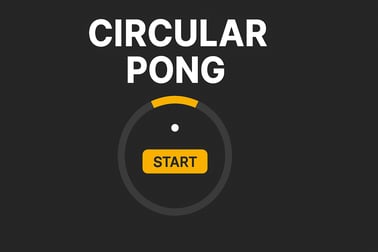
Circular Pong is a fast 360° arcade challenge. Control a rotating paddle, keep the ball inside the circle, and push your reflexes to the limit.













Circular Pong
Overview of Circular Pong
Circular Pong is a fast paced skill game online that puts a 360-degree twist on the classic Pong formula. Instead of two paddles on opposite sides, you control a single paddle that orbits around a glowing circle. Your only job sounds simple: don't let the ball escape the arena. In practice, this circular arcade pong game quickly turns into a hyper casual reflex test where every second gets faster, trickier, and more intense.
Designed as a 360 degree paddle game, Circular Pong feels at home in the browser. There are no downloads, no sign-ups, and no complicated menus—just jump in and react. With its neon visuals, smooth motion, and snappy controls, it plays like a modern neon pong browser game that's perfect for short breaks or long high-score marathons.
Whether you're a fan of minimalist arcade challenges or just want a one-button time-killer that ramps up the pressure, Circular Pong sits right at the intersection of arcade, hyper casual, and skill gameplay. One ball, one paddle, and endless chances to beat your best run.
How to Play Circular Pong
At its core, Circular Pong is easy to learn in under a minute, which makes it a great hyper casual reflex game for all ages. The challenge comes from how long you can survive once the speed starts climbing.
Basic Rules & Mechanics
The rules are straightforward:
- You control a single curved paddle that moves around the outside of a circle.
- A ball bounces around inside that circle, ricocheting off your paddle and the inner wall.
- Your goal is to keep the ball from slipping past your paddle and escaping the circle.
- Each successful hit adds points and often increases the ball's speed.
- As the speed increases, you'll need quicker reactions and more precise positioning.
This simplicity is what makes Circular Pong such a compelling fast paced skill game online. There's no long tutorial, no complicated combos—just pure reaction-based play.
Browser-Based One-Button Control
Most browser versions of Circular Pong use extremely simple input:
- Desktop (Mouse / Touchpad): Click or hold to rotate your paddle clockwise or counterclockwise (depending on the specific implementation). Releasing or clicking again often flips the direction.
- Touchscreen (Mobile / Tablet): Tap or hold the screen to switch the paddle's direction and keep it lined up with the incoming ball.
Because there's only one primary action—change direction—Circular Pong is ideal for quick play sessions and feels instantly familiar, even if it's your first 360 degree paddle game.
How to Play Circular Pong Online in Your Browser
Circular Pong is built for instant access. You don't need to download an app, sign in, or install plugins. Just open the game page in your browser and you're ready to go.
Step-by-Step: Getting Started
- Open your browser. Chrome, Edge, Firefox, Safari, and most modern browsers work well.
- Load the Circular Pong page. The game will typically show a loading screen for a moment while the assets initialize.
- Choose your mode. Many versions offer a classic endless mode and sometimes timed modes or difficulty presets.
- Tap or click to start. The ball launches from the center, and your paddle begins rotating around the outer ring.
- Keep the ball in. Adjust your paddle's direction to intercept the ball before it reaches the edge where you're guarding.
From there, the circular arcade pong game loop is simple: survive as long as possible, score as high as possible, then hit restart and try to beat your record.
On-Screen Prompts & Visual Cues
Most Circular Pong builds include small, subtle hints:
- A highlighted segment of the circle to show your current paddle position.
- A trailing effect on the ball, helping you track its last movement and anticipate its next angle.
- A score counter somewhere near the top or bottom of the screen, along with best scores or leaderboards.
As you become familiar with these visual cues, the game transitions from random-seeming chaos into a more predictable—and skill-based—pattern reading challenge.
Tips and Tricks to Master the 360° Paddle
Surviving more than a few seconds in a fast paced skill game online like Circular Pong takes more than luck. To consistently climb the leaderboard, you'll want to refine your control and positioning.
1. Learn the Ball's Angles
The ball isn't random. It follows basic bounce physics—angle in, angle out. Watch how it reacts when it hits your paddle from different sides. Over time, you'll learn where it's likely to travel next, making it easier to pre-position your paddle.
2. Don't Over-Spin the Circle
Beginners often panic and spin the paddle around the entire circle repeatedly. That looks flashy, but it leaves you out of position when the ball changes direction. Instead:
- Rotate just enough to stay in the ball's path.
- Make small, controlled direction changes rather than wild spins.
- Keep your paddle in the half of the circle where the ball is currently bouncing.
3. Anticipate, Don't Chase
When the game speeds up, you won't have time to chase the ball after it's already moving toward the edge. Try to:
- Predict which quadrant the ball will reach after each bounce.
- Rotate early so you're waiting there instead of scrambling.
- Use the ball's previous path and speed as a guide to where it'll go next.
4. Stay Calm as Speed Increases
In many hyper casual reflex game designs, panic is what ends a good run. Remind yourself:
- The controls haven't changed—only the timing.
- Short, efficient paddle movements are safer than big swings.
- It's better to be slightly early with smaller corrections than late with big ones.
5. Practice in Short Sessions
Circular Pong excels as a "just one more round" neon pong browser game. A few short, focused sessions often improve your reflexes and pattern recognition more than one long, tired run. Play for five to ten minutes, take a break, and come back fresh to push your high score higher.
Objectives & Win Conditions
Unlike traditional games with fixed levels or clear endings, Circular Pong is built as an endless, score-driven experience. That's why it fits neatly into the "addictive" corner of arcade and hyper casual reflex game design.
Your Main Objective
The primary objective in Circular Pong is simple:
- Keep the ball inside the circle for as long as possible.
- Each successful hit adds to your score.
- The longer you survive, the faster the ball travels and the more each moment counts.
High Scores and Progression
Some implementations offer extra goals and progression hooks:
- Personal Best: Beat your previous high score and set new personal milestones.
- Global Leaderboards: Compare your best run against other players in this fast paced skill game online.
- Challenges or Missions: Mini-goals like "Survive 60 seconds" or "Score 50 hits" to keep gameplay varied.
There's usually no "final level" or boss. Instead, the game tests how long you can maintain near-perfect reflexes while the intensity escalates.
Endless Arcade Challenge: How Long Can You Keep the Ball In?
Circular Pong isn't about beating the game; it's about beating yourself. Each attempt is a condensed arcade story: slow start, rising tension, narrow escapes, and eventually that one miss that sends the ball flying out of the circle.
The Difficulty Curve
Most versions use a smooth difficulty ramp:
- Early Game: The ball moves lazily, giving you time to learn angles and get comfortable with the 360° paddle.
- Mid Game: Speed increases noticeably, forcing you to anticipate rather than react.
- Late Game: The ball becomes a blur, and the game becomes a pure test of instinct and reaction time.
This pacing is what keeps players returning to this circular arcade pong game. Even short runs feel meaningful, and longer runs feel like an achievement.
Why It's So Addictive
Several design choices make Circular Pong a classic "just one more" experience:
- Instant restarts: When you lose, you're back in a new round in seconds.
- Clear feedback: Every hit, near-miss, and failure feels obvious and fair.
- Simple controls, high ceiling: One input, but huge room to improve your timing and prediction.
The result is an endlessly replayable fast paced skill game online where a single mistake ends your run, but learning from that mistake makes the next run better.
Power-Ups, Speed Ups, and High Scores in Circular Pong
Depending on the specific build you're playing, Circular Pong may include power-ups and modifiers to make each run feel different. These elements add a layer of strategic choice on top of the base 360 degree paddle game mechanics.
Common Power-Ups
- Paddle Expansion: Temporarily increases the length of your paddle, giving you a wider margin for error and making interceptions easier.
- Paddle Shrink (Penalty): Some versions include negative "power-downs" that reduce your paddle size, turning the game into a high-risk challenge for expert players.
- Shield or Extra Chance: A one-time barrier that catches the ball if you miss, saving a run that would otherwise be over.
- Slow Motion: Briefly reduces the ball's speed, letting you reset your rhythm when things get too hectic.
Managing Speed Ups
Speed is the heart of this hyper casual reflex game. In most variations:
- Every successful hit adds a tiny bit of speed to the ball.
- Hitting the ball at more extreme angles can sometimes cause sharper trajectory shifts, making it feel faster.
- Surviving longer leads to "speed tiers" where the pace suddenly feels dramatically harder.
To handle speed ups:
- Stay closer to where the ball is traveling instead of rotating all the way around the circle.
- Use wider arcs early in the run and smaller corrections later when the ball is too fast to chase.
- If a slow-motion or shield power-up appears, grab it when you know you'll need a breather or backup.
Chasing High Scores
Scoring in Circular Pong is usually straightforward:
- 1 point (or more) per successful paddle hit.
- Sometimes bonus points for long streaks without missing or for collecting certain power-ups.
- Occasional combo multipliers if you survive through multiple speed tiers in a row.
By learning when to take safe hits versus riskier angle shots, you'll be able to balance survival with score-maximizing plays—turning a simple neon pong browser game into a deep high-score hunt.
Best Device and Control Settings for Smooth Circular Pong Gameplay
Because Circular Pong is browser-based, your device and control setup can make a big difference in how responsive the game feels.
Best Devices for Circular Pong
- Desktop & Laptop: Typically the most precise way to play. A mouse or trackpad gives reliable control with minimal input lag.
- Tablets: Great for touch-based, one-handed play. The larger screen makes it easier to track the ball and paddle.
- Smartphones: Perfect for quick sessions. Just be sure to lock your orientation if the game is optimized for portrait or landscape mode.
Recommended Control Settings
While specific options depend on the version you're playing, here are general guidelines:
- Sensitivity: If there's a slider for paddle sensitivity, start in the middle. Increase slightly if the game feels sluggish; decrease if you keep overshooting the ball.
- Sound: Keep sound effects on if possible—audio hits and alerts can help you react faster in this fast paced skill game online.
- Graphics: On slower devices, look for a "low" or "performance" graphics option to reduce visual effects and keep the frame rate smooth.
Screen and Orientation Tips
- Play in fullscreen where available to reduce distractions and accidental clicks outside the game area.
- On mobile, use the game's recommended orientation (portrait or landscape) to avoid input issues.
- Increase screen brightness slightly so the neon ball and paddle stand out from the background.
Where to Play Circular Pong
Circular Pong is designed as a browser-friendly neon pong browser game, which means the best place to play is directly online in a modern web browser.
Browser Requirements
For the smoothest experience, use:
- A recent version of Chrome, Edge, Firefox, or Safari.
- JavaScript and cookies enabled, since most web games rely on them.
- Hardware acceleration turned on for better graphics performance.
Playing on Different Platforms
- PC / Mac: Open the game in your preferred browser. Use mouse, trackpad, or keyboard-based controls depending on how the game is set up.
- Android: Launch the game in Chrome or another modern mobile browser. Tap controls usually work out of the box.
- iOS (iPhone / iPad): Use Safari or a compatible browser. Make sure you allow sound and touch controls when prompted.
Because it's a hyper casual reflex game that runs online, you can jump between devices easily—as long as your progress and high scores are saved either locally or to an account, you'll be able to continue chasing your personal best from anywhere.
Is Circular Pong Safe to Play Online?
Circular Pong is generally a family-friendly experience. The design focuses on reflexes, timing, and simple arcade action rather than violence or mature themes.
Content & Age Suitability
- Visuals: Abstract shapes, neon colors, and simple geometric effects.
- Gameplay: No graphic content, language, or story elements—just pure arcade mechanics.
- Audience: Suitable for kids, teens, and adults who enjoy quick reaction games.
Online Safety Tips
Although the circular arcade pong game itself is safe, keep these general online safety practices in mind:
- Play on trusted gaming portals or official publisher sites.
- Avoid downloading "hacked" or unofficial versions of any fast paced skill game online.
- If an account is required, use a strong, unique password and avoid sharing personal information in public chats or leaderboards.
When played from reputable browser gaming platforms, Circular Pong is a safe, lightweight, and engaging way to test your reflexes in a neon-lit 360° arena.
Frequently Asked Questions
How do you play Circular Pong?
In Circular Pong you control a paddle that moves around a circular arena. Use your keyboard or mouse to rotate the paddle and hit the ball back toward the center. Your goal is to keep the ball from escaping the circle for as long as possible.
Can I play Circular Pong for free online?
Yes, Circular Pong can be played for free in your browser. There is no download required, and you can start a new run instantly as many times as you like.
What devices can run Circular Pong?
Circular Pong runs on most modern web browsers on desktop, laptop, tablet, and many mobile phones. For the smoothest experience, use an up‑to‑date Chrome, Firefox, Edge, or Safari browser.
Is Circular Pong a single-player or multiplayer game?
Most browser versions of Circular Pong are single-player survival games focused on beating your own best score, though some variants support a local two-player mode on one keyboard.
Is Circular Pong suitable for kids?
Yes, Circular Pong is family-friendly. There is no violence or inappropriate content—just fast, skill-based arcade action that can help improve reaction time and coordination.