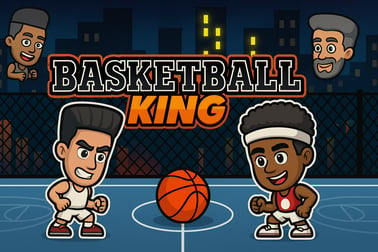
Basketball King lets you test your hoop skills in fast arcade levels. Aim, shoot, and beat the timer as you climb the rankings in this free online game.









Basketball King
Overview of Basketball King
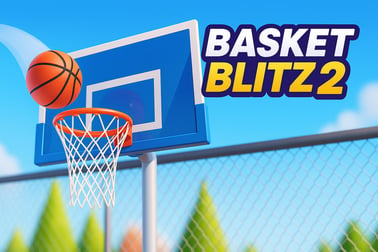
Basketball King is a fast-paced online basketball game that drops you right in front of an arcade-style hoop and challenges you to score as many baskets as possible before the clock runs out. Instead of running up and down a full court, you focus entirely on shooting precision, timing, and consistency. It feels like stepping up to one of those classic arcade hoops machines, but you get to enjoy it directly in your browser, for free.
This free basketball shooting game keeps things simple on purpose. You line up your shot, judge the distance and angle, and toss the ball toward the rim again and again. Each level has a target number of baskets and a strict time limit, so you’re always under pressure to shoot quickly without losing accuracy. Miss too many or take too long, and you’ll be restarting the round.
Because it runs in HTML5, Basketball King loads quickly on modern browsers and works on desktop and mobile. It fits perfectly into the browser sports games category where you can jump in for a short session, chase your high score, and then come back later to beat it. Whether you’re a basketball fan or just love simple arcade hoops challenges, the game is easy to learn and surprisingly hard to master.
How to Play Basketball King
Even if you’ve never tried an arcade basketball game before, Basketball King is designed so anyone can start shooting within seconds. The main idea is straightforward: make as many clean shots as possible before the timer hits zero. Each level sets a different goal, like scoring 10 shots in 20 seconds or hitting a streak without missing.
Here’s the basic flow of a typical round in this basketball skills game:
- Start the round: Once the level loads, you’ll see the hoop, the balls in front of you, and a countdown timer.
- Aim your shot: Move your cursor or finger to set the angle of your throw. You’ll usually see a rough trajectory line or visual feedback that indicates the direction of the shot.
- Adjust power: The distance you drag or the speed of your swipe often determines how strong the shot is. Too weak, and the ball falls short; too strong, and it hits the backboard or sails over.
- Release to shoot: When you’re satisfied with your angle and power, release to send the ball flying toward the hoop.
- Watch the result: Swishes, rim bounces, and misses all give you feedback about your aim and power. Quickly apply that information to your next shot.
- Beat the target: Keep shooting until the timer ends. If you hit the target number of baskets, you pass the level and usually move up in the rankings or onto the next stage.
The fun comes from squeezing every last shot into the timer. You’ll constantly balance speed versus control: firing off quick shots to stay ahead of the clock while still dialing in accuracy to avoid wasting attempts.
Basketball King Game Modes
Basketball King focuses on repeatable, arcade-style shooting sessions rather than complex simulations, making it ideal for quick breaks and casual play. While the exact mode names can vary by hosting platform, they generally revolve around your performance within tight time windows.
Common ways the game modes are structured include:
- Level-based progression: Each level sets a new challenge, such as a higher score requirement, a shorter timer, or a trickier shot arc. Your goal is to meet or beat the requirement to move on.
- High-score chase: Many players treat Basketball King as a pure arcade hoops challenge, replaying levels to beat their personal bests. Some sites add leaderboards so you can compare scores with friends or other players.
- Ranking climb: As you complete levels in this online basketball game, you may see yourself move up through fictional ranks or titles, reflecting your improved performance.
- Endless shooting mode (on some portals): Certain versions of similar basketball games feature an endless or survival style where the timer is extended each time you make a certain number of baskets, letting you keep going as long as you stay accurate.
Regardless of the specific labels, each mode uses the same underlying mechanics: fast shooting, realistic ball arcs, and score goals that push you toward cleaner and faster throws. This tight focus on repetition and improvement is what makes it a satisfying basketball skills game for short play sessions.
Where to Play Basketball King
You can play Basketball King directly in your web browser through HTML5, so there’s no need to download apps or extra software. That makes it a perfect pick if you want a quick free basketball shooting game during a study break, at work, or anytime you’ve got a few spare minutes.
To enjoy Basketball King with the best experience:
- Use a modern browser: Chrome, Firefox, Edge, or Safari work well. Keeping your browser up to date ensures smoother performance and better input responsiveness.
- Check your connection: While the game itself is light, a stable internet connection helps with loading assets and any online leaderboard features.
- Enable sound (optional): Many players like the swishes and bounce sounds to feel more immersed in the arcade hoops atmosphere. If you’re in a quiet setting, you can simply mute the tab.
Because Basketball King is part of the broader browser sports games category, you can open it in a tab, play for a few rounds, and close it without cluttering your device with installs or large files. It’s designed to be instant-on fun: click, shoot, and you’re in the game.
Is Basketball King Safe to Play Online?
Basketball King is generally safe and family-friendly, making it a good choice for younger players who like sports and quick reflex games. The content is focused entirely on shooting hoops: there’s no violence, no mature themes, and no complicated social features built into the gameplay itself.
Still, it’s smart to keep a few safety basics in mind when playing any online basketball game in the browser:
- Play on trusted sites: Stick to reputable gaming portals that clearly show their privacy policy and don’t bombard you with confusing pop-ups.
- Watch out for external ads: Some sites may show third-party ads alongside the game. Avoid clicking on suspicious banners or anything that looks unrelated to the actual basketball skills game.
- No personal info needed: You can enjoy this free basketball shooting game without sharing personal data, payment details, or logging in. If a site asks for sensitive information just to start a simple arcade game, back out.
- Parental guidance for kids: For younger players, parents may want to supervise playtime and make sure children know not to download random files or chat with strangers if the hosting site offers social features.
As long as you follow these basic guidelines and use a modern browser with built-in security, Basketball King is a low-risk, safe way to enjoy fast-paced arcade hoops challenges online.
How to Play Basketball King Online on Your Browser
Getting started with Basketball King in your browser is straightforward. You don’t need a controller or special setup; just a mouse, trackpad, or touchscreen. Here’s a simple step-by-step route into the action:
- Open your browser: Launch your preferred web browser on desktop, laptop, tablet, or phone.
- Load the game page: Navigate to the hosting page for Basketball King. The game will usually load automatically within a few seconds.
- Wait for the loading bar: You’ll often see a loading indicator as graphics and sounds are prepared. Once it reaches 100%, you’re ready to play.
- Start the first level: Click the play button or start button to enter your first round.
- Aim and shoot: On desktop, move your mouse to adjust your aim, then click and drag (if supported) or simply click to shoot. On mobile, you’ll tap and slide your finger to set the shot angle and power.
- Track the timer and goal: Keep an eye on the target score and remaining time. Your main objective is to reach that score before time expires.
- Advance or retry: If you meet the goal, you move on to the next level or challenge. If not, hit replay and try again with better timing and aim.
Because it’s such a focused online basketball game, you don’t have to worry about complex rules or long tutorials. You can learn the basics in one or two attempts and then spend the rest of your time fine-tuning your technique.
Controls Guide for PC and Mobile Players
The controls in Basketball King are deliberately simple so you can focus on precision and rhythm, not button memorization. Below is a quick guide to help you feel comfortable whether you’re playing on PC, laptop, or mobile.
PC & Laptop Controls
- Mouse to aim: Move your mouse to set the horizontal alignment of your shot relative to the hoop.
- Click and drag to adjust power: In many versions, dragging farther away (or upward) sets a stronger throw, while shorter drags produce softer arcs.
- Left click to shoot: Release the button to send the ball toward the basket.
- Replay or next: Use on-screen buttons to retry a level or advance after you complete a challenge.
If you prefer a trackpad, the same controls apply, though a mouse generally offers smoother control for finely tuning your shot angles in this basketball skills game.
Mobile & Tablet Controls
- Tap to focus: Tap within the game area to ensure your device recognizes touch input inside the game frame.
- Swipe or drag to aim: Move your finger to line up the direction of the throw. The game usually shows visual feedback for your aim.
- Adjust power with swipe length: Longer, faster swipes tend to send the ball farther; shorter ones keep it closer.
- Lift to shoot: Just like releasing the mouse button, lifting your finger launches the ball.
These intuitive controls are why Basketball King works well as a quick free basketball shooting game on both large desktop screens and smaller mobile displays. After a few attempts, you’ll develop a feel for exactly how far and fast you need to drag or swipe for different shot distances.
Game Modes and Challenges in This Arcade Basketball Shooter
Basketball King might look simple at first glance, but the design of its levels and score targets gives it an addictive, “just one more round” feel. Each challenge builds on the previous one and pushes your accuracy and timing.
Here are some of the typical ways this arcade hoops challenge tests you:
- Timed score targets: Most levels ask you to reach a specific number of made shots within a set time limit. The time window can be generous at first but gets tighter as you progress.
- Increasing difficulty: The hoop might appear to be at different distances or heights, forcing you to slightly recalibrate your drag length or swipe power.
- Combo-focused play: Some challenges reward hitting several baskets in a row without missing, encouraging you to slow down just enough to protect your streak.
- Ranking and progression: As you clear levels, you may see your ranking improve, which gives a sense of progression even though the game is very streamlined.
Because rounds are short, you can treat Basketball King like a “score attack” game: replaying the same challenges to shave off mistakes, maximize your baskets per second, and climb as high as possible in whatever ranking system the hosting site uses.
Tips and Tricks to Score More Hoops in Basketball King
If you want to move up the rankings and truly feel like the king of the court, a little strategy goes a long way. These practical tips will help you score more consistently in this online basketball game.
- Warm up with a few slow shots: Before trying to play as fast as possible, spend a round focusing on pure accuracy. Learn exactly how far you need to drag or swipe for a normal-distance shot.
- Use a consistent release point: Try to start your drag from roughly the same spot each time. Consistency reduces guesswork, making every shot feel more repeatable.
- Watch the arc, not just the hoop: Pay close attention to how the ball travels when you make a perfect swish. Imitate that same arc in future throws to build muscle memory.
- Don’t rush the first shot: Your opening throw sets the tone. Take an extra second at the start of the timer to dial in that first basket, then accelerate once you’ve nailed the feel.
- Adjust in small increments: If your shot is consistently short or long, tweak the power only slightly. Huge changes make it harder to hone in on the sweet spot.
- Stay calm under the clock: As the timer counts down, it’s easy to panic and spam shots. That usually leads to more misses. Aim for smooth, rhythmic throws instead of frantic ones.
- Use the backboard when needed: Depending on the physics, slightly harder shots off the backboard can still drop in, giving you a bit more margin for error on power.
Apply these tips consistently and you’ll see your scores improve quickly, especially in the mid-level challenges where you need a mix of speed and precision to keep progressing.
Play Basketball King on Phones & Tablets
Basketball King works very well on mobile devices, turning your phone or tablet into a virtual arcade hoop whenever you want a quick game. Touch controls mirror the simplicity of the mouse version and can actually feel more natural for swiping-style shots.
For the best mobile experience with this free basketball shooting game:
- Use a stable device orientation: Hold your phone or tablet in the position the game recommends (usually landscape) so the hoop and shot line feel natural.
- Clear your screen: Ensure your touchscreen is clean; smudges or moisture can reduce the precision of your swipes.
- Disable accidental rotations: Turn off auto-rotate temporarily if screen flipping disrupts your play.
- Play on Wi-Fi when possible: While the game isn’t heavy on data, Wi-Fi tends to provide smoother loading and lower lag when accessing online leaderboards or ads.
- Mind your grip: Rest part of your hand on a stable surface or hold the device firmly so that your flicks and drags are as precise as possible.
If you enjoy lightweight browser sports games that don’t require large downloads, Basketball King on mobile is ideal. It runs directly in your mobile browser, so you can sneak in a few rounds anytime—on the couch, during a commute, or while waiting in line.
Similar Online Basketball Games You Can Try Next
Once you’ve spent some time sinking shots in Basketball King, you might want to explore other online basketball game options that play with the same arcade feel or add new twists. Here are a few types of titles to look for when you’re ready to expand your lineup:
- Street-style shooters: Games that put you on an outdoor court with slightly different physics, trick shots, or wind effects to consider.
- Multiplayer arcade hoops: Titles where you race another player to a score threshold in real time, adding a competitive edge to the arcade hoops challenge.
- Three-point contest games: Inspired by pro events, these often have you move around the arc, taking rapid-fire shots from various spots behind the line.
- Dunk and trick-shot games: These focus more on timing and spectacle, where you perform big dunks, alley-oops, or creative trick shots instead of simple standstill shooting.
- Full-court browser sports games: If you’re ready to move from the arcade machine to a more complete simulation, try lightweight 2D or 3D basketball titles that include passing, dribbling, and defense.
Mixing Basketball King with a few of these other browser sports games keeps your sessions fresh. One day you can focus on pure shooting accuracy with the tight, timer-driven gameplay of Basketball King; the next, you can experiment with different physics, dunk styles, or multiplayer matches in other titles. Together, they create a fun rotation of basketball-inspired experiences you can enjoy for free, right in your browser.
Frequently Asked Questions
What is Basketball King?
Basketball King is a free online sports game where you aim and shoot basketballs into the hoop before the timer runs out, trying to reach a set score each level.
How do you play Basketball King?
On desktop, use your mouse to aim and left‑click to toss the ball toward the basket. On mobile, you use simple tap controls to line up your shot and throw.
Is Basketball King free to play?
Yes, Basketball King is completely free to play in your browser with no download required. Just load the game page and start shooting hoops.
Can I play Basketball King on mobile devices?
Yes. Basketball King runs in modern mobile browsers, and you can control your shots using on‑screen touch controls on phones and tablets.
Do I need an account to play Basketball King?
No account is needed. You can jump straight into the game, play as many levels as you like, and try to beat your own high scores.