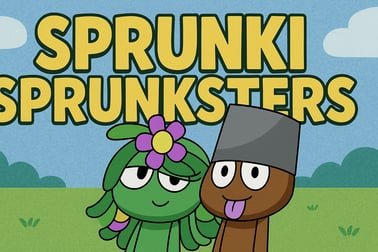
Sprunki Sprunksters is a browser music game where you drag quirky characters, mix sounds, and build unique beats. Play free online with no download.












Sprunki Sprunksters
Introduction to Sprunki Sprunksters
Sprunki Sprunksters is a colorful, browser-based online music mixing game that lets you build your own tracks by combining quirky characters, beats, and sound effects. Inspired by popular music toy games, Sprunki Sprunksters turns your screen into a playful sound studio where every character you drag onto the stage adds a new layer to your song.
This title blends elements of music, rhythm, and light puzzle gameplay. You experiment with different character combinations, discover hidden animations, and gradually learn how to build catchy rhythms that loop perfectly. Because it runs straight in your browser, there’s no download, no account needed, and you can jump into interactive sound creation in seconds.
Whether you’re a curious kid, a casual player, or a music-lover looking for a quick creative break, Sprunki Sprunksters is designed to be intuitive, family friendly, and endlessly replayable. With its drag-and-drop controls, you can go from silence to a full track in just a few clicks.
How to Play Sprunki Sprunksters
Sprunki Sprunksters is simple to learn but surprisingly deep once you start exploring different sound layers. Here’s how to get started step by step.
1. Launch the game in your browser
Open Sprunki Sprunksters on your favorite gaming site in a modern browser like Chrome, Edge, or Firefox. After a short loading screen, you’ll see a row (or grid) of Sprunksters characters at the bottom and an empty stage or lineup area above.
2. Drag characters onto the stage
The core of this browser rhythm game is built around characters that each represent a sound:
- Some provide drum beats and percussion.
- Others add basslines or synth melodies.
- There are characters for vocals, FX, and atmospheric sounds.
Click and drag any character onto an empty slot on the stage. As soon as they’re placed, their sound begins looping in time with the master beat.
3. Build your mix layer by layer
To create a complete track, you combine multiple Sprunksters at once. Because this is a creative beat making game, there are no wrong answers – but some combos will sound tighter and more musical than others. Try this basic approach:
- Start with a drum or rhythm character for a steady beat.
- Add a bass character to fill out the low end.
- Layer in melody or chords on top.
- Finish with vocals or sound effects for flavor.
4. Turn sounds on and off
Click a character already on the stage to remove them and instantly mute their part. This makes it easy to test different vibes, swap instruments, or strip back your mix to just drums and bass. Because everything loops automatically, you can edit in real time while the track keeps playing.
5. Discover special animations and combos
Some character combinations trigger secret animations or mini cutscenes. These are like small rewards for experimenting. You might unlock a spotlight performance, a synchronized dance, or a short musical breakdown if you line up the right group of Sprunksters together.
Sprunki Sprunksters Features
Sprunki Sprunksters stands out among browser rhythm games because it balances accessibility with creativity. These are the key features that make it fun to keep returning to.
Intuitive drag-and-drop music creation
The game is built for instant play: no tutorials, no complex menus. Anyone who can drag and drop can build a track. This makes it approachable for kids while still being entertaining for older players who like to tinker with loops and layers.
Unique sound for every character
Each Sprunkster is essentially its own instrument. As you unlock or cycle through the available cast, you’ll find:
- Rhythm characters – kicks, snares, claps, and percussion.
- Harmony characters – chords, pads, and backing textures.
- Lead characters – hooks, riffs, and melodic phrases.
- Vocal characters – chants, beatboxing, or sung snippets.
- FX characters – whooshes, glitches, ambient noises.
This variety is what makes Sprunki Sprunksters such a rich interactive sound creation toy.
Loop-based rhythm engine
All sounds are synced to a single beat grid, so you never have to worry about playing out of time. The game’s internal rhythm engine keeps everything locked to the groove, which is ideal for new players who want to enjoy music without learning traditional instruments.
Replayable, sandbox-style gameplay
There’s no strict storyline or timer. Instead, Sprunki Sprunksters plays like a sandbox: you start with a blank musical canvas, explore character combinations, then clear the board and try a totally different vibe. It’s the kind of online music mixing game you can dip into for a few minutes or get lost in for an hour.
Family-friendly visuals and sounds
The art style is playful, and the audio design avoids harsh or scary elements, making it a family friendly music game that’s safe for shared screens in living rooms and classrooms.
Discover Sprunki Sprunksters: A Wild Music-Mixing Adventure
Part of the charm of Sprunki Sprunksters is its slightly chaotic, wild energy. The characters don’t just stand still; they groove, dance, and react to the sounds they’re making. As you add more Sprunksters to the stage, the screen transforms into a tiny animated concert.
What starts as a simple loop can quickly evolve into a full performance. You might have:
- A drummer character bouncing to the beat.
- A singer waving their arms as they belt out a hook.
- A glitchy FX creature pulsing in time with the rhythm.
This visual feedback helps new players understand how each layer fits into the overall track. Kids, in particular, love seeing their “band” react when they rearrange members or swap someone out for a new sound.
Because everything updates in real time, Sprunki Sprunksters feels more like playing with a toy band than navigating a traditional menu-based music editor. That sense of immediacy is what makes the adventure feel wild, surprising, and fresh each time.
How to Create Awesome Beats with Sprunksters Characters
Even though there’s no wrong way to play, a few simple techniques can help you turn random sounds into awesome, head-nodding beats.
1. Start with a solid rhythm foundation
Great tracks begin with a clear rhythm. In this creative beat making game, pick one or two drum-focused Sprunksters first. Listen for a pattern that feels steady and not too crowded – this will be the backbone of your mix.
2. Add low-end for groove
Next, add a bass or low synth character. This gives your beat weight and helps the whole loop feel more complete. If the mix sounds muddy, try swapping to a simpler bass character or removing one of the busier drum parts.
3. Layer melodies and harmonies
Once your groove is locked in, experiment with melodic characters. Try these tips:
- Use one main melody and one background harmony at a time.
- If the track feels too busy, remove a character rather than adding more.
- Listen for characters that naturally “answer” each other’s phrases.
4. Spice it up with effects
FX characters are great for transitions and flair. Drop one in to create little moments of surprise – a glitch, echo, or swell that pops out of the rhythm. Too many FX at once can be distracting, so treat them like seasoning in a recipe.
5. Use silence intentionally
Don’t be afraid to remove characters and let the beat breathe. In many browser rhythm games, less is more. For example:
- Strip everything but drums and bass for a “breakdown.”
- Then re-add vocals and melodies together to create a “drop” moment.
Learning to control energy like this will instantly make your beats sound more professional, even within this playful, cartoonish world.
Tips and Tricks to Unlock the Best Sprunki Sprunksters Combos
If you want to go from casual player to seasoned Sprunkster DJ, these tips will help you get more out of each session.
Experiment with character order
Sometimes the order you place characters can matter, especially when you’re aiming for special animations. If you don’t see any reaction from the band, try rearranging which character sits in which slot and listen for subtle changes in the mix.
Focus on theme-based mixes
Pick a theme for each track, such as:
- Chill & ambient – soft drums, smooth pads, minimal FX.
- High-energy dance – punchy drums, strong bass, bright leads.
- Weird & experimental – offbeat percussion, glitch FX, unusual vocals.
Building around a theme keeps your choices coherent and reduces the urge to add every sound at once.
Listen for overlapping frequencies
Even in a casual online music mixing game, two similar characters can clash if they sit in the same musical space. If part of your mix sounds messy, try turning one of the overlapping characters off and see if the track breathes better.
Use trial and error to find secrets
Sprunki Sprunksters often rewards curiosity. Fill the stage, clear it completely, or try combinations of characters that share similar visual styles. Secret combos can lead to:
- Unique visual sequences or camera zooms.
- Special musical variations or remixes.
- Unexpected jokes and character interactions.
Take breaks and come back with fresh ears
Because the loops repeat, your ears can get used to a busy or unbalanced mix without you noticing. Step away for a few minutes, then return and ask: “Does this still sound fun and clear?” If not, remove characters until the track feels snappy again.
Family-Friendly Music Fun: Why Kids Love Sprunki Sprunksters
Sprunki Sprunksters has become a favorite family friendly music game because it’s both playful and empowering. Kids aren’t just tapping buttons; they’re actively shaping sound and seeing instant feedback.
Simple for kids, interesting for adults
Young players can drag characters onto the stage and enjoy the animated chaos. Older kids and parents, on the other hand, can focus on rhythm, layering, and musical structure. It’s rare for a creative beat making game to scale so naturally across age groups.
Encourages creativity and experimentation
There are no scores, timers, or “game over” screens. That removes pressure and invites experimentation. Children can:
- Test how different sounds work together.
- Develop an intuitive sense of rhythm and timing.
- Learn that iteration and trial-and-error are part of the creative process.
Great for shared play and classrooms
Because Sprunki Sprunksters runs in a browser and has clean visuals, it works well for:
- Family game nights on a shared computer or tablet.
- Classroom introductions to rhythm, pattern, and music layering.
- Creative breaks between homework or study sessions.
It’s also a gentle entry point for kids who might later explore more advanced digital audio tools.
Browser Requirements and Controls for Playing Sprunki Sprunksters Online
To get the smoothest experience from this online music mixing game, it helps to know the basic setup and controls.
Recommended browsers
Sprunki Sprunksters is built as an HTML5 web game, so it runs on most modern browsers without plugins. For best performance, use:
- Google Chrome (latest version)
- Microsoft Edge (Chromium-based)
- Mozilla Firefox
- Safari (on macOS or iPadOS)
Make sure JavaScript is enabled and that you haven’t blocked sound autoplay on the site you’re using.
Basic controls (mouse & touch)
- Click or tap a character to select them.
- Drag & drop a character onto the stage to add their sound.
- Click or tap a character already on the stage to remove them.
- Some sites may include play / pause or reset buttons; click these to stop the mix or clear the stage instantly.
The entire control scheme is designed to be friendly for both mouse and touch screens, which makes the game easy to play on laptops, Chromebooks, and tablets.
Where to Play Sprunki Sprunksters
Sprunki Sprunksters is a browser-based experience, so you don’t need to install any software or create an account to enjoy it. It’s typically available on HTML5 gaming portals and dedicated Sprunki fan sites that specialize in music and rhythm titles.
To play safely and reliably:
- Use reputable browser gaming platforms or well-known Sprunki hubs.
- Avoid suspicious download prompts – the game should run directly in the browser.
- Bookmark your favorite site so you can quickly jump back into the game later.
Because it’s not tied to a single device, you can start a session on a desktop at home and later open the same site on a laptop or school computer to keep experimenting with new mixes.
Is Sprunki Sprunksters Safe to Play?
Sprunki Sprunksters is generally considered safe and suitable for a wide range of ages, especially compared to more intense online titles.
Content and visuals
The game features stylized cartoon characters, rhythmic animations, and non-violent interactions. There’s no graphic content, no realistic violence, and no mature themes. That’s why many families and teachers view it as an appropriate family friendly music game for shared spaces.
Online safety considerations
As with any browser game, safety also depends on the site hosting it:
- Choose trusted gaming platforms without aggressive or inappropriate ads.
- Use browser-based ad filters or kid-safe modes if younger children are playing.
- Remind kids not to click external links or download files unrelated to the game.
The game itself doesn’t require chat, voice, or personal data, which reduces common online risks. Most sessions are self-contained: you open the page, create your mix, and close it when you’re done.
Parental guidance
Parents who want an extra layer of protection can:
- Play one or two rounds together first to review any surrounding ads.
- Add the safest site to a child’s bookmarks and encourage using that link only.
- Set reasonable time limits so play stays a fun creative break, not a long binge.
Used thoughtfully, Sprunki Sprunksters can be an excellent entry into interactive sound creation, helping kids explore rhythm, layering, and creativity in a safe, accessible way.
Frequently Asked Questions
What is Sprunki Sprunksters?
Sprunki Sprunksters is a browser-based music game where you drag and drop animated characters to mix sounds, create beats, and build your own tracks.
Do I need to download anything to play Sprunki Sprunksters?
No, Sprunki Sprunksters runs directly in your browser. Just open the game page, wait for it to load, and start mixing music without any download.
Is Sprunki Sprunksters safe and kid-friendly?
Yes, Sprunki Sprunksters is designed as a family-friendly game with cartoon visuals and simple music-making mechanics that are suitable for most ages.
Can I play Sprunki Sprunksters on mobile devices?
In most cases, yes. Sprunki Sprunksters works on modern mobile browsers that support HTML5. For the best experience, use an up-to-date browser and stable internet.
How do I control the characters in Sprunki Sprunksters?
Use your mouse or touchscreen to drag characters into the active slots. Each character adds a different sound or rhythm, and you can combine them to create a full track.