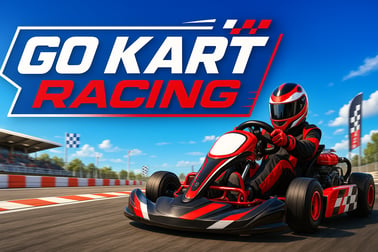
Go Kart Racing lets you drift, boost, and compete on fast 3D tracks. Race AI rivals, master corners, and play instantly in your browser for free.













Go Kart Racing
Overview of Go Kart Racing
Go Kart Racing is a fast-paced online kart racing game you can play instantly in your browser. It mixes arcade-style action with simple controls, colorful 3D tracks, and competitive races against AI or other players. Whether you’re chasing leaderboard times or just want a quick racing break, this free browser racing game is easy to start and hard to put down.
Just load the page, pick your kart, and you’re on the grid in seconds. There are no downloads and no bulky launchers to install. The game runs right inside your browser using modern HTML5 and WebGL tech, delivering smooth 3D kart racing on most laptops, PCs, and even many mobile devices.
The heart of Go Kart Racing is pure arcade fun: drift through corners, nail perfect racing lines, collect boosts, and blast past rivals in a tight sprint to the finish line. If you’re used to classic kart games, you’ll feel at home instantly. If you’re new to the genre, the gentle learning curve and forgiving handling make this a great first online kart racing game.
Go Kart Racing Control Guide
Go Kart Racing keeps controls simple so you can focus on racing strategy rather than key memorization. Exact controls can vary slightly depending on platform, but the typical layout for desktop browsers looks like this:
- Arrow keys / WASD – Steer, accelerate, and brake/reverse
- Spacebar – Use turbo / power-up (if the mode supports it)
- Shift / Ctrl – Drift (helps cornering and sometimes charges boosts)
- Esc / P – Pause the race and open the in-game menu
On mobile devices, Go Kart Racing usually offers on-screen buttons for steering and acceleration. Some versions let you customize those buttons or switch to tilt controls if your device supports it.
Because it’s a browser-based arcade kart simulator, input latency is usually low. For the best feel, play in fullscreen and close other heavy browser tabs. That keeps your frame rate high and your steering responses snappy, which is crucial in tight chicanes and high-speed corners.
Go Kart Racing Features
Even though it’s a lightweight free browser racing game, Go Kart Racing still packs a surprising set of features that keep races exciting:
- Arcade-style handling: Karts are easy to control and forgiving. You don’t need sim-racing experience to slide through corners and keep up with the pack.
- Multiple tracks and layouts: Race on city circuits, seaside roads, stadium-style loops, and twisty technical tracks. Each one asks for a slightly different driving style.
- Multiplayer go kart options: Some versions support online lobbies or quick matches where you can challenge friends or random players around the world.
- AI opponents: If you prefer solo play, you can race against computer-controlled drivers that get tougher on higher difficulties.
- Boosts and power-ups: Depending on the mode, you’ll collect speed boosts, turbo pads, or item-based power-ups to gain an edge.
- Progression elements: Unlock new karts, customize colors, or advance through a ladder of races with increasing challenge.
- 3D visuals in the browser: The 3D kart racing engine delivers smooth animations and track details without a separate install.
- Short race sessions: Most races last just a few minutes, perfect for quick breaks or casual sessions.
Together, these make Go Kart Racing feel more like a full-featured arcade kart simulator than a throwaway mini-game, yet it remains lightweight enough to run on ordinary hardware.
How to Play Go Kart Racing Online in Your Browser
Getting into the action is straightforward, and you don’t need any technical knowledge to enjoy this online kart racing game. Follow these steps for the smoothest experience:
- Open a supported browser: For best performance, use the latest version of Chrome, Edge, Firefox, or Safari. Close unnecessary tabs or background apps if your device is low on memory.
- Load the game page: Visit the Go Kart Racing page on your preferred gaming site. The game will begin loading automatically as a free browser racing game.
- Wait for assets to load: Because it’s a 3D kart racing title, it may take a few extra seconds to load models and tracks. Don’t refresh unless the page is clearly stuck.
- Choose your kart and driver: Pick a kart that fits your style. Some accelerate faster, some have higher top speed, and some drift more easily.
- Select a mode: Decide whether you want single race, time trial, or multiplayer go kart battles, depending on what the current version offers.
- Check the controls: Before the first race, scan the control legend on the loading screen. If the game offers remapping, set keys to what feels natural.
- Race smart, not just fast: Get used to braking before corners, using boost on straights, and defending your line from aggressive rivals.
From that point, you can jump between tracks, raise the difficulty, or switch into online play whenever you’re ready. Because everything runs in your browser, swapping modes or restarting a race is nearly instant.
Game Modes and Tracks in Go Kart Racing
Go Kart Racing can include several different game modes so that both casual players and competitive racers have something to enjoy. Exact offerings depend on the specific platform, but you'll commonly see modes like these:
Single Race
This is the basic mode where you face a grid of AI drivers on a chosen track. You can usually adjust:
- Number of laps
- Difficulty level of opponents
- Weather or time of day in some versions
Single races are a great way to learn each circuit and practice your lines without the pressure of a long championship.
Time Trial
Time Trial mode strips away the chaos and focuses on pure speed. You race alone on the track, often with a ghost representing your best lap. It’s ideal for mastering:
- Braking points
- Drift timing
- Optimal boost usage
If you want to shave tenths off your lap times in this arcade kart simulator, spend time here.
Championship / Career
Some builds of Go Kart Racing offer short championship series. You’ll complete multiple races across different circuits, earning points for each finish position. At the end, standings determine the overall champion.
This is where the game feels most like a structured multiplayer go kart experience, even when playing solo against AI grids.
Multiplayer Races
When available, multiplayer lets you race real players over the internet. Depending on the implementation, you might get:
- Quick Match: Drops you into a lobby and then straight into a race.
- Private Rooms: Host password-protected races with friends.
- Leaderboards: Compare best laps and results globally.
For those who want to treat Go Kart Racing as more than just a casual time killer, multiplayer is where the true competition kicks in.
Track Variety
To keep the racing fresh, Go Kart Racing typically features a mix of track styles:
- Beginner circuits: Wide corners and long straights, perfect for new players.
- Technical tracks: Tight hairpins, chicanes, and complex sequences that reward precision.
- High-speed ovals or stadiums: Emphasize drafting and top speed.
- Themed environments: City streets, forest routes, or coastal roads with unique scenery and lighting.
Because races are short, you can cycle through multiple tracks in a single session and quickly find your favorites.
Tips and Tricks to Win Every Go Kart Racing Match
If you want to dominate in this online kart racing game, raw speed isn’t enough. Use these practical tips to gain an edge in both single-player and multiplayer go kart modes:
1. Learn the Racing Line
The fastest route around a track is rarely the one that hugs the inside at every moment. Aim to:
- Stay wide on corner entry
- Turn in smoothly towards the apex (the tightest point of the corner)
- Drift or power out towards the outside on exit
This keeps your speed higher through the whole bend.
2. Use Brakes, Not Just Drift
It’s tempting in an arcade kart simulator to just drift everywhere, but that can scrub off too much speed. In tighter turns, tap the brake before turning, then use a short drift to rotate the kart if needed. Controlled braking is often faster than sliding the whole way through.
3. Save Boosts for the Right Moment
In modes that include turbo or power-ups, resist the urge to use them immediately. You’ll get more value by:
- Activating boost on the longest straight
- Using it to recover after getting hit or going wide
- Saving one boost to defend your lead on the final lap
Strategic boost use turns small advantages into race-winning gaps.
4. Watch AI Behavior
AI drivers often follow predictable lines. Notice where they brake early, where they hesitate, and where they leave the inside lane open. Plan overtakes for these weak spots instead of trying risky passes everywhere.
5. Adjust Difficulty Gradually
Jumping straight into the hardest setting can be frustrating. Start at an easier level to get a feel for each track, then climb the difficulty ladder until you’re consistently challenged. This step-by-step approach helps you truly master Go Kart Racing rather than just surviving it.
6. Practice in Time Trial
Spending a few minutes in Time Trial before multiplayer can pay off huge. Without other karts in the way, you’ll discover:
- Where to brake later
- Which corners you can take flat-out
- How long you can hold a drift without spinning wide
Once those instincts are locked in, you’ll be much calmer and faster in crowded races.
Controls and Best Settings for Go Kart Racing
Because Go Kart Racing is a free browser racing game, you don’t get the ultra-deep settings of a full PC sim, but there are still a few tweaks that can improve your experience.
Recommended Control Setup
- Keyboard: Stick to either WASD or arrow keys, not a mix. Bind drift and boost to keys near your thumbs (Space, Shift, or Ctrl).
- Gamepad (if supported): Analog sticks make steering smoother. Map triggers for brake and acceleration for finer control.
- Mobile touch: If the game offers different layouts, choose one where steering buttons are easy to reach without blocking the screen.
Best Display & Performance Settings
Look for these toggles in the options menu, when available:
- Graphics quality: If the game stutters, drop from High to Medium or Low. Visual trade-offs are minor compared to smoother inputs.
- Resolution / fullscreen: Fullscreen mode often reduces input lag. Stick close to your screen’s native resolution if your device can handle it.
- VFX and shadows: Turning down heavy effects can dramatically improve frame rate on older laptops.
- Sound levels: Lower music if it distracts you. Engine and tire sounds can help you sense grip loss and drift timing.
Since this is a 3D kart racing title running in a browser, a balanced combination of medium graphics and fullscreen usually gives the best mix of responsiveness and clarity.
Where to Play Go Kart Racing
Go Kart Racing is designed as a free browser racing game, so you can enjoy it on a wide range of devices without installing a separate client. Typically, you can play it on:
- Desktop and laptop browsers: Windows, macOS, Linux with Chrome, Edge, Firefox, or Safari.
- Chromebooks: As long as your school or personal device allows WebGL content.
- Some mobile browsers: Android and iOS browsers that support HTML5 canvas and WebGL can run the game, though performance will vary.
For the best experience, use a desktop browser. That gives you the most consistent frame rates, the cleanest visuals, and access to full keyboard controls — all ideal for an arcade kart simulator that rewards precision.
Play Go Kart Racing Offline
Go Kart Racing is primarily an online kart racing game that runs via your web browser, which means:
- You generally can’t play it fully offline from a browser tab alone.
- The game needs an internet connection to load assets, communicate with servers, handle saves, and enable multiplayer go kart features.
That said, once the page and race are loaded, temporary connection drops may not immediately interrupt a single-player race. However, you should still treat Go Kart Racing as an online-first title. If you need guaranteed offline play, look for a dedicated downloadable version from an official store or developer site, and always avoid any unofficial or pirated copies.
How to Play Go Kart Racing Online in Your Browser
To recap and add a few advanced tips, here’s a streamlined walkthrough to start and improve quickly:
- Launch the game: Open Go Kart Racing in your browser and wait for the loading bar to finish.
- Check your device: Plug in your laptop if battery saver is on; it can throttle performance. On mobile, close heavy background apps.
- Start with an easy race: Pick a beginner track and lower AI difficulty to get comfortable.
- Focus on clean laps: For your first few races, ignore position and concentrate on staying on track and hitting apexes.
- Gradually add challenge: Once you can complete laps without major errors, increase AI difficulty and try different karts.
- Move into multiplayer: After some practice, join multiplayer go kart lobbies (if available) for a real test of your skills.
With this routine, you’ll transition from casual player to consistent front-runner in Go Kart Racing much faster.
Is Go Kart Racing Free and Safe for Kids?
Go Kart Racing is built as a free browser racing game that’s generally family-friendly. There are no realistic crashes, no graphic violence, and no inappropriate themes. Instead, kids and teens get colorful tracks, cartoonish action, and approachable controls.
Cost & Monetization
- Free to play: You can usually start racing without paying anything.
- Ads or optional extras: Some platforms may support the game with ads or optional cosmetic purchases. These aren’t required to enjoy the core gameplay.
Parents may want to supervise younger children to ensure they don’t unintentionally click external ads or attempt purchases without permission.
Safety & Content
From a content perspective, Go Kart Racing is similar to a standard cartoon racing show:
- No blood or gore
- No strong language or adult themes in normal gameplay
- Light competitive tension and fun crashes only
The only extra step to consider is online interaction if the game includes chat or multiplayer lobbies. In those cases:
- Encourage kids to use nicknames rather than real names.
- Turn off chat if the platform allows it, especially for younger players.
- Remind them not to share personal information.
Used sensibly, Go Kart Racing is a safe, fun way for kids and families to enjoy an online kart racing game together. With its quick races, friendly visuals, and simple controls, it’s an accessible entry into the world of 3D kart racing right from the browser.
Frequently Asked Questions
Is Go Kart Racing free to play?
Yes, Go Kart Racing is completely free to play in your browser with no downloads required.
Do I need to create an account to play Go Kart Racing?
No account is required. Just load the game in your browser and start racing right away.
What are the controls for Go Kart Racing?
Use the arrow keys or WASD to steer and accelerate. Some versions may use Space for boost and Shift for drifting.
Can kids play Go Kart Racing safely?
Yes, Go Kart Racing is a family-friendly racing game with cartoon-style action and no violent content.
Can I play Go Kart Racing on mobile devices?
Yes, Go Kart Racing runs in modern mobile browsers on phones and tablets that support HTML5 games.