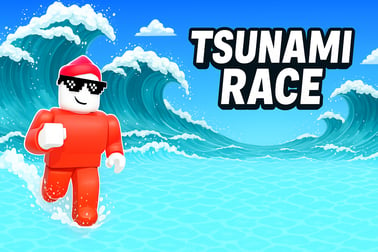
Tsunami Race is a fast-paced online runner. Dodge waves and obstacles, ride vehicles, and race other players to the finish in your browser.












Tsunami Race
Overview of Tsunami Race
Tsunami Race is a fast-paced online runner game where you sprint, slide, and surf to stay ahead of a massive wall of water. The goal is simple: survive the giant wave and cross the finish line before everyone else. Underneath that simple premise, though, is a surprisingly competitive wave survival race that mixes racing, platforming, and arcade chaos into one highly replayable browser racing game.
You'll dodge wrecked boats, leap over debris, and ride vehicles like 4x4 trucks or surfboards while a tsunami chases you from behind. Sometimes it's not even water you're running from—one mode throws giant fruits at you, and another sends you screaming down wild water slides, smashing through rivals and collecting boosters as you go. Whether you're playing solo or jumping into a multiplayer racing game lobby, every round feels like a mini action movie on fast-forward.
Because Tsunami Race runs directly in your browser as a HTML5 arcade running game, there's no download or installation needed. Just click play, pick your character, and you're on the track within seconds. It's ideal for quick sessions, but the competitive nature and multiple game modes make it easy to lose track of time as you chase those first-place finishes.
Tsunami Race Controls
The controls in Tsunami Race are designed to be accessible for all ages, whether you're on a PC, laptop, phone, or tablet. The actual movement is based on dragging or swiping, which makes it feel intuitive right away.
Mouse & Keyboard Controls (PC/Laptop)
- Move left/right: Hold down the left mouse button and drag your cursor left or right.
- Jump / Avoid obstacles: Quickly flick your mouse upward during certain ramps or jump sections (in many layouts, simply staying centered and timing ramps is enough).
- Navigate menus: Use your mouse to click buttons, choose game modes, or select vehicles.
Tsunami Race doesn't rely on traditional keyboard racing controls like WASD or arrow keys. That makes it easy to pick up even if you're not used to PC gaming—if you can move a mouse, you can race.
Touch Controls (Mobile & Tablets)
- Move left/right: Place your finger on the screen and hold and drag left or right.
- Fine adjustments: Small side-to-side movements help you line up coins, boosters, and safe platforms.
- Menus: Tap to select game modes, confirm options, or restart a race.
Because the game was built with mobile-style input in mind, it works extremely well on touch screens. The same responsive input that powers mobile play also makes it feel smooth and snappy in any browser window.
Tsunami Race Game Modes
Tsunami Race keeps things fresh by offering multiple modes, each with its own twist on the wave survival race formula. You'll still be racing against other runners in all of them, but the hazards and pacing change enough to give each mode its own identity.
- Tsunami Race: The classic mode where a gigantic tsunami chases you up the track. Your job is to stay ahead of the wave by reaching higher ground, grabbing vehicles, and outmaneuvering opponents.
- Fruit Run / Fruit Chaos: Instead of a wave, giant fruits come barreling toward you. You'll dodge massive apples, watermelons, and other flying produce while still trying to outrun your rivals. It feels more like a wacky arcade running game, but the same racing instincts apply.
- Water Slides: A high-speed slip-and-slide mode packed with steep drops, curves, and dangerous turns. You race down twisting slides, knock opponents out of the way, and try to control your speed enough to stay on the track.
Each mode appears as a different level type in the overall multiplayer racing game rotation. That means you might outrun a tsunami in one race, then immediately switch to dodging fruit in the next. This variety keeps Tsunami Race from ever feeling repetitive, especially when you're playing in longer sessions.
Where to Play Tsunami Race
Tsunami Race is designed as a browser racing game, which makes it incredibly easy to access. You don't need a powerful gaming PC, expensive console, or big downloads. If your device can open a modern web browser, you're basically ready to play.
Play in Your Browser
- Platforms: Works on most desktop and laptop operating systems (Windows, macOS, some Linux distributions) through any modern browser.
- Recommended browsers: Chrome, Edge, Firefox, Safari, or other Chromium-based browsers.
- No installation: The game runs as an HTML5 online runner game, so everything loads from the page itself.
Because it's built as a web-first experience, Tsunami Race is often embedded on popular gaming portals and arcade sites. You can bookmark your favorite platform and return anytime for a quick race.
Mobile & Tablet Versions
Many platforms also offer Tsunami Race on Android and iOS, either via the browser or as a packaged mobile app. The core gameplay remains the same: drag to move, avoid hazards, and reach the finish line before the wave or the other runners catch you.
If you prefer not to search stores, you can usually access the exact same game simply by visiting a supported game site from your mobile browser. In most cases, the mobile browser version will automatically adapt the controls and layout to your screen size.
Offline Play Availability for Tsunami Race
Tsunami Race is primarily designed as an online runner game, and in most cases, you'll need an active internet connection to play it.
Can You Play Tsunami Race Offline?
- Browser version: Generally requires an internet connection to load assets, connect to servers, and track your progress or multiplayer lobbies.
- Multiplayer racing game elements like leaderboards, lobbies, and live races also depend on being online.
- Certain mobile app versions might cache levels, but you'll usually still need connectivity for full functionality.
If your connection briefly drops mid-race, the game may lag, pause, or disconnect depending on the platform. For the smoothest experience, play Tsunami Race on a stable Wi-Fi or reliable mobile data connection.
How to Play Tsunami Race Online
Once you've loaded Tsunami Race in your browser, getting into a race is quick and straightforward. The game is meant to be pick-up-and-play, but understanding the basic flow will help you survive longer and place higher.
Step-by-Step: Your First Race
- Launch the game: Open Tsunami Race in your browser or mobile device through your preferred gaming site.
- Choose a mode: Select from Tsunami Race (tsunami chase), Fruit Run/Fruit Chaos (flying fruit), or Water Slides, depending on what's available in the rotation.
- Pick a character or skin: Some versions let you choose different racers or cosmetic looks. This doesn't usually affect core stats but makes your runner unique.
- Start the countdown: After a short lobby or waiting period, the race countdown begins—get ready as the camera zooms out over the track.
- Run and react: As soon as the race starts, hold and drag to steer. Stay away from edges and obstacles, and aim for ramps, platforms, and safe high ground.
- Use vehicles and boosters: Grab 4x4 vehicles, surfboards, wings, and other power-ups when you see them. They can save you from the wave or give a huge speed burst.
- Finish strong: Push hard in the final stretch, blocking or bumping opponents while avoiding last-second hazards. Your ranking is set when you cross the finish line or get swallowed by the wave.
Because it's a quick-fire arcade running game, most races only last a minute or two. That makes it perfect for short breaks or back-to-back sessions where you try to improve your placement over time.
Tips to Outrun the Giant Wave and Win the Race
Winning in Tsunami Race isn't just about raw reaction speed. The best players learn how the wave behaves, when to climb to higher ground, and how to use vehicles to their advantage. These tips can help you consistently finish near the front of the pack.
1. Always Track the Wave
- Use the camera and background cues to keep an eye on the tsunami's distance.
- If you notice the water closing in, prioritize height and safety over risky shortcuts.
- In Fruit Chaos, mentally replace the wave with the incoming fruit patterns—treat them as your "chasing hazard" to avoid.
2. Take the High Path Whenever Possible
- Higher paths give you more time to react if the wave surges or a gap appears.
- When you reach forks, platforms, or ramps that lead upward, they're usually safer than sticking to low ground.
3. Don't Ignore Vehicles and Boosters
- Grabbing a 4x4, surfboard, or wings can instantly turn a losing run into a winning one.
- Boosts not only increase speed but often provide extra stability against the wave or obstacles.
- Sometimes it's worth slightly detouring from the main line to pick up a strong power-up.
4. Use Your Opponents as Shields
- In tight spaces, let another player "test" a risky path first. If they get hit, you know to dodge.
- In Water Slides, bumping rivals at corners can slow them more than it slows you, especially if they overcorrect.
5. Practice Smooth Movement, Not Just Speed
- Sharp, jerky movements often lead to missed platforms or clipped obstacles.
- Focus on smooth, predictable arcs as you drag left and right, especially at higher speeds.
- The fastest path is often the cleanest, not the most aggressive.
Over time, you'll start to recognize common level patterns and hazard placements. That knowledge turns Tsunami Race from a chaotic-feeling online runner game into a skill-based wave survival race where your experience really pays off.
Game Modes: Tsunami Run, Fruit Chaos, and Water Slides
Each of Tsunami Race's core modes tweaks the rules just enough to make you adjust your strategy. Knowing what to expect in each mode helps you plan your movement and pick the right power-ups.
Tsunami Run
- Core hazard: A massive, rising tsunami chasing from behind.
- Key strategy: Stay on elevated platforms and grab vehicles that resist the wave.
- Best for: Players who like intense pressure and split-second survival decisions.
Fruit Chaos (Fruit Run)
- Core hazard: Giant fruits hurtling across or down the track.
- Key strategy: Watch for shadow indicators or trajectories so you can dodge before the fruit lands.
- Best for: Players who enjoy dodging projectiles and weaving between moving hazards.
Water Slides
- Core hazard: High-speed corners, drops, and edges that can fling you off the slide.
- Key strategy: Control your line on corners and use bumps to knock opponents off-balance.
- Best for: Fans of traditional racing games who like optimizing racing lines.
All three modes feed into the same competitive ecosystem of this browser racing game, so mastering each one is important if you want to consistently rank at the top of the lobby.
Best Vehicles and Power-Ups for Surviving the Flood
Vehicles and power-ups play a huge role in Tsunami Race. They don't just make you faster—they're often your main defense against the wave and the chaos other players cause.
Core Vehicles
- 4x4 Truck: Great on rough terrain and especially useful in Tsunami Run. Its extra bulk and stability can help you push through shallow water or unstable ground.
- Surfboard: Ideal for sections with water and ramps. The surfboard often provides smooth handling and lets you glide over dangerous patches that might slow others.
- Wings / Glider: Perfect for long gaps and vertical stages. Wings can help you bypass whole chunks of the track if you time your jumps right.
Useful Power-Ups
- Speed Boosts: Short bursts that help you escape the wave or surge past competitors near the finish.
- Shields or Protective Auras: Temporary protection from certain obstacles or impacts, invaluable in Fruit Chaos.
- Coin / Score Multipliers: May not affect position directly, but help you climb leaderboards and unlock cosmetics where supported.
Choosing the Right Tool for Each Mode
- In Tsunami Run, prioritize anything that improves upward mobility or wave resistance: 4x4 and wings are extremely strong.
- In Fruit Chaos, shields and lateral mobility matter most: surfboards and speed boosts help you weave between falling hazards.
- In Water Slides, control is king: vehicles or boosts that stabilize your movement are preferable to raw speed.
If your platform supports progression or unlocks, experiment with different loadouts. You may find that one combination feels perfect for your style across all three modes.
Tsunami Race Controls and Browser Compatibility
Beyond learning how to steer your runner, it's important to make sure your setup runs Tsunami Race smoothly. Because it's a browser racing game, performance depends heavily on your browser and device.
Recommended Browser Settings
- Keep your browser updated: Newer versions of Chrome, Edge, Firefox, and Safari handle HTML5 games more efficiently.
- Enable hardware acceleration: Check your browser settings to ensure hardware acceleration is on for smoother animations.
- Close extra tabs: Too many open tabs can slow down performance, especially on older machines.
Device Compatibility
- Desktop/Laptop: Any reasonably modern computer should handle Tsunami Race easily, even with integrated graphics.
- Tablets: Larger touchscreens offer excellent control for this arcade running game; just be sure to hold the device securely during intense moments.
- Smartphones: The game scales down well; landscape orientation is typically recommended for visibility.
Because the game is lightweight, it's a great choice when you want a quick online runner game that won't hammer your system. As long as your browser supports modern JavaScript and HTML5 canvas features, Tsunami Race should run without any special configuration.
Performance & Troubleshooting
If Tsunami Race isn't running as smoothly as you'd like, a few quick checks and tweaks can usually fix the problem. Here are the most common issues and simple steps to resolve them.
Lag, Stuttering, or Low Frame Rate
- Close background apps: Shut down heavy programs (other browser windows, streaming services, downloads) to free up RAM and CPU.
- Lower display resolution (if available): Some platforms let you adjust quality; choose a medium setting for better performance.
- Switch browsers: If it feels choppy in one browser, try another—Chromium-based browsers often perform best for web games.
Input Delays or Unresponsive Controls
- Check your connection: A weak Wi-Fi signal or unstable mobile data can cause noticeable lag in a multiplayer racing game.
- Use wired peripherals: On desktop, a wired mouse may feel more responsive than a laggy wireless device with low batteries.
- Restart the tab: Reloading the game often clears minor input bugs or memory hiccups.
Game Not Loading
- Disable aggressive ad-blockers for that page: Some filters mistakenly block game scripts.
- Enable JavaScript: Tsunami Race relies on scripts to load and run; make sure they're not blocked.
- Clear cache: If the game previously worked but now doesn't, clearing your browser cache may fix corrupted data.
With these adjustments, you can usually get Tsunami Race running smoothly and enjoy the high-speed, wave-dodging action it's designed for.
Frequently Asked Questions
What is Tsunami Race about?
Tsunami Race is a fast-paced runner where you race other players along a flooded track, avoid giant waves and obstacles, and try to finish in first place.
How do I control my character in Tsunami Race?
On desktop, hold and drag with your mouse to steer your runner. On mobile or tablet, use touch controls and slide your finger to move left or right.
Can I play Tsunami Race for free?
Yes, Tsunami Race is free to play in your browser. You do not need to pay or download anything to start a race.
Do I need to download Tsunami Race?
No download is required. Tsunami Race runs directly in modern web browsers, so you can click play and start running right away.
Is Tsunami Race suitable for kids?
Tsunami Race features cartoon-style racing and mild competitive action with no graphic violence, making it generally suitable for older kids and families.