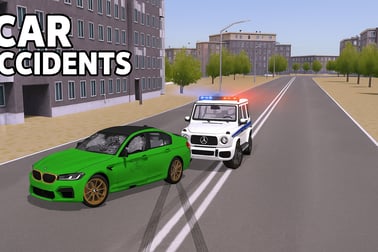
Car Accidents lets you smash, flip, and destroy cars with realistic 3D crash physics. Drive into ramps and obstacles and watch every dent in your browser.














Car Accidents
Overview of Car Accidents
Car Accidents is a free 3D car crash simulator online that lets you do the one thing you should never try in real life: slam vehicles into walls, ramps, hammers, and each other just to see what happens. It’s a realistic car destruction game built around soft-body style damage, crunchy impact sounds, and dramatic slow-motion crashes. Instead of racing for first place, your goal is simple: cause as much spectacular damage as possible.
From long car ramp crash test setups to tight arenas filled with spinning crushers, Car Accidents is all about experimenting with physics. You can send compact cars, muscle cars, or heavier vehicles flying off jumps, tumbling down steep drops, or smashing into solid barriers and traffic. Each hit twists, bends, and rips your car apart in different ways, so no two wrecks look exactly the same.
Because it runs in your browser, you can jump straight into the demolition without downloads or sign-ups. Whether you want to unwind with chaotic crashes, test how a crash would look from different cameras, or chase the highest destruction score, this demolition derby browser game delivers a satisfying dose of high-speed mayhem in a safe, virtual sandbox.
How to Play Car Accidents in Your Browser
Playing Car Accidents is quick and straightforward. Everything loads inside your browser, so you can start wrecking cars within seconds.
- Open the game page
Launch your preferred modern browser (Chrome, Edge, Firefox, or Safari) and open the Car Accidents game page on your favorite gaming portal. Wait for the 3D assets to load fully before you start driving; this helps avoid early stutters.
- Choose a map or crash setup
Most versions of this 3D car crash physics sandbox include several environments: wide test fields, multi-level ramps, obstacle-filled arenas, or looped tracks. Start with a simple ramp or open test zone so you can get used to the handling before moving into heavy-gear crushers and spinning hazards.
- Select your vehicle
Pick from different car types: lighter sports cars, standard sedans, or bulkier vehicles. Lighter cars spin and flip more easily, while heavier ones hit harder and deform more slowly. Try several to see which ones give you the most dramatic destruction shots.
- Drive toward your chosen obstacle
Use the on-screen or keyboard controls (explained later) to accelerate, steer, and line up your crash. Aim at walls, ramps, traffic, or moving objects. The faster you go and the cleaner your angle, the more interesting the impact will look.
- Watch the destruction unfold
When your car collides, the 3D car crash physics engine kicks in. Parts bend, fall off, and scatter across the map. Switch camera angles or rotate the view to enjoy the full chaos, then reset the car to go again.
- Experiment with different crash scenarios
The real fun comes from experimentation: reverse into crushers, drift sideways into barriers, fly off a giant ramp, or stack cars and hit them in chain reactions. Treat it like a playground for physics rather than a traditional racing game.
Core Rules & Systems
Even though Car Accidents feels like a free-form sandbox, it’s built on a few core systems that shape how you play.
Basic “rules” of the crash sandbox
- No laps, no finish line
This isn’t a racing sim with strict win conditions. There’s usually no timer or finish order. Your “success” is based on how wild and satisfying your crashes look, or on how much destruction score you can squeeze out of a single run.
- Physics-driven outcomes
Everything in this realistic car destruction game is driven by 3D physics: your speed, angle, vehicle mass, and where you hit an obstacle all change the damage result. Tiny steering adjustments can create entirely new crash sequences.
- Soft damage vs. total wrecks
Cars don’t just explode on the first touch. You can scrape walls, roll down ramps, and tap obstacles with partial damage, or you can line up a full-speed head-on collision and watch the entire front end crumple.
- Reset instead of respawn menus
When your car is too mangled to move, you don’t get kicked to a lobby. You simply reset or repair the vehicle in place and try a different crash idea from the same map.
Progression and goals
Some builds of Car Accidents include score counters or local challenges, but even when they’re not present, you can create your own mini objectives:
- Try to lose all four wheels in one mega collision.
- See how many rollovers you can pull off from a single ramp launch.
- Attempt a side-swipe crash that tears off only the doors and fenders.
- Challenge friends to beat your biggest-damage run on a specific ramp or obstacle.
This flexible design makes the game simple enough for casual players, but deep enough for anyone who loves experimenting with crash physics.
Car Accidents Features
Car Accidents packs in a range of features meant to enhance realism, replay value, and pure chaos.
Key Features: Realistic Car Damage and Crash Physics
- 3D car crash physics engine
The heart of the game is a physics system that calculates how your car bends, twists, and breaks after every impact. Hits at the front cause different damage than side or rear collisions, giving each crash its own unique visual pattern.
- Dynamic part loss and deformation
Hoods pop up, bumpers snap off, wheels detach, and panels crumple along believable lines. Instead of simple health bars, the damage is visible on the car’s body.
- Multiple vehicles
Switch between different car types that each feel and break a bit differently. Some are nimble but fragile, while others are heavy and absorb more punishment before folding.
- Crash-focused environments
The maps are built specifically for destruction: steep ramps, narrow bridges, concrete walls, spiked barriers, crushers, and moving hazards all invite experimentation.
- Camera options
Rotate the camera freely or switch presets to catch the action from every angle. A good camera move can make even a small collision look cinematic.
- Instant reset
Don’t like how the crash turned out? Repair or reset your car quickly and set up another impact without long loading screens.
Game Modes, Maps, and Destruction Challenges
While the exact list of modes can vary depending on the release you’re playing, Car Accidents generally offers several ways to enjoy 3D crash physics.
Sandbox crash testing
In sandbox-style maps, there’s no pressure and no countdown. You’re free to drive, crash, reset, and repeat at your own pace. These maps usually feature:
- Open flat zones for speed builds and long-distance runs.
- Scattered obstacles like concrete blocks, signs, or low barriers.
- Simple ramps for basic jumps, spins, and flips.
Ramp and drop challenges
Many players come to Car Accidents specifically for dramatic car ramp crash test setups. These focused maps might include:
- Extra-long ramps that give you maximum speed before a huge drop.
- Broken or staggered platforms that force you to aim each jump carefully.
- Multi-level falls where you roll and tumble down a mountainside.
Demolition derby-style arenas
To scratch that demolition derby browser game itch, hop into arenas that focus on close-quarters chaos.
- Enclosed combat bowls where you can repeatedly slam into walls.
- Spinning arms and hammers that smash cars from different angles.
- Traffic or AI vehicles (in some versions) to ram into and create pileups.
Targeted destruction setups
Certain maps are essentially “laboratories” for specific crash types:
- Crusher corridors with escalating pressure and tighter spaces.
- Rotating balls and sticks that tag you with unpredictable hits.
- Wall lines for testing side swipes, rear-end impacts, or head-on collisions at various speeds.
Rotate between these environments to keep your crash experiments feeling fresh and challenging.
Tips to Cause Maximum Damage Without Crashing the Game
Because Car Accidents leans heavily on 3D car crash physics, you can use a few tricks to squeeze more fun out of each session—while keeping your browser running smoothly.
Performance-friendly crash setup tips
- Start with one vehicle
Multiple cars colliding looks awesome, but it’s also heavier on older systems. Begin with solo crash tests and add more traffic only if your device handles it well.
- Build speed gradually
Don’t always slam full throttle immediately. Try medium-speed impacts first to see how your system responds and how the car deforms.
- Aim for concentrated impacts
Hitting sharp corners, narrow pillars, or thick walls often creates more dramatic visible damage than grazing a huge flat barrier.
- Use ramps creatively
Approach ramps at slight angles to trigger rolls and spins. Landing on your roof or side usually looks more intense than a clean four-wheel landing.
Gameplay tricks for bigger, better wrecks
- Combine obstacles
Line up a run that hits a ramp, then a wall, then a moving hazard. Chain reactions are where this realistic car destruction game really shines.
- Experiment with reverse impacts
Backing into obstacles will crush your trunk differently from front collisions. Mix both to tear your car apart from every angle.
- Adjust camera before impact
Set the camera slightly ahead or to the side right before you hit. This not only looks cooler but also lets you see exactly how parts fly off.
- Reset often
Don’t drive a half-broken wreck for too long; fully bent frames may handle oddly. Reset the car when it becomes hard to control so you can focus on new crash scenarios instead of wrestling the steering.
Car Accidents Control Guide
The exact key layout can vary slightly by site, but most browser versions of Car Accidents use a classic driving setup.
Browser Controls and Mobile Controls Explained
Desktop & laptop (keyboard) controls
- W / Up Arrow – Accelerate
- S / Down Arrow – Brake or reverse
- A / Left Arrow – Steer left
- D / Right Arrow – Steer right
- Space bar – Handbrake for tight turns and drifting
- R – Repair or reset the car
- C – Change camera view
- Mouse drag – Rotate the camera around the car (when supported)
- Esc – Pause or open the in-game menu
Mobile & tablet touch controls
On phones and tablets, the interface is typically simplified into on-screen buttons:
- Virtual steering arrows on the left side of the screen.
- Gas and brake pedals on the right for accelerate and reverse.
- A handbrake icon for quick slides and drift-style turns.
- A camera icon to switch perspectives.
- A reset or “repair” button to restore your car instantly.
Most mobile versions also let you drag or swipe on free areas of the screen to rotate the camera, making it easy to frame your best crashes without complicated gestures.
Where to Play Car Accidents
You can play Car Accidents directly in your browser on popular online gaming portals that host driving, simulation, and 3D games. There’s no need to install extra software or create a special account—just open the game page, wait for the loading bar to finish, and start driving.
For the best experience:
- Use a modern browser like Chrome, Edge, Firefox, or Safari.
- Keep only a few tabs open to give the 3D car crash physics more resources.
- Make sure your graphics drivers and browser are up to date, especially on older PCs.
Some portals also offer progressive web app or shortcut options, so you can add Car Accidents to your desktop or home screen and open it like a native app, while it still runs as a browser game in the background.
Is Car Accidents Safe to Play Online?
Car Accidents is designed as a family-friendly crash simulator that focuses on vehicles and physics, not people. There are no visible drivers, no graphic injuries, and no realistic gore—just cars crumpling, bending, and breaking apart. That makes it a relatively safe choice for older kids and teens who enjoy destruction-focused gameplay.
Still, there are a few points to keep in mind:
- Age suitability
The game centers on car crashes, which may be intense for very young children. Parents may want to supervise and decide whether the theme is appropriate based on age and sensitivity.
- In-game ads
Many browser gaming sites fund themselves with advertisements. Use trusted platforms and, if needed, enable family filters or ad-blocking solutions that comply with your household rules.
- No real-money purchases
Typical web versions of Car Accidents don’t require purchases to play, and they don’t simulate any kind of gambling. Always double-check the specific portal’s policies to confirm.
- Online safety basics
If the site includes chat, comments, or community features, remind younger players not to share personal information. The core gameplay itself doesn’t require social interaction—it’s a self-contained single-player crash sandbox.
As long as you stick to reputable gaming websites and basic internet safety habits, Car Accidents is a safe, entertaining way to explore over-the-top car destruction without any real-world risk.
Frequently Asked Questions
What is Car Accidents?
Car Accidents is a browser-based driving simulator focused on realistic car crashes, ramps, and destruction challenges using 3D physics.
Is Car Accidents free to play?
Yes, Car Accidents is free to play in your browser. You can start driving and crashing cars without any purchase.
Do I need to download Car Accidents?
No download is required. Car Accidents runs directly in a supported web browser; just load the game page and start playing.
Can kids play Car Accidents?
Car Accidents is about vehicle damage only and does not show people getting hurt, but parents should decide if crash scenes are suitable for their children.
What controls are used in Car Accidents?
On desktop, you normally use WASD or arrow keys to drive and additional keys for camera and reset. On mobile, virtual buttons appear on the screen.