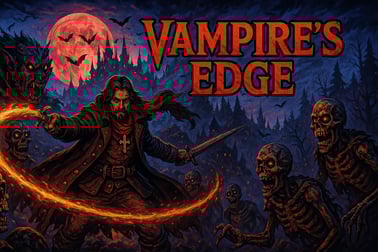
Vampires Edge is a fast-paced vampire runner game. Dodge monsters, avoid deadly traps, and survive the night as long as you can in your browser.











Vampires Edge
Overview of Vampires Edge
Vampires Edge is a fast-paced vampire runner game that throws you into an endless gothic city where the night never ends and danger is always one step ahead. Think classic browser running game action mixed with dark vampire style: you’re sprinting through shadowy streets, automatically attacking monsters while you dodge traps, leap over gaps, and slide under deadly hazards. The goal is simple but intense – survive the endless night survival as long as you can and rack up the highest score possible.
Unlike many runners where you just avoid enemies, in Vampires Edge your character auto-attacks. That means your full focus can stay on movement, timing, and path choices. Every few seconds, the speed ramps up, new monster waves appear, and obstacles spawn in tighter patterns. It’s a bite-sized gothic action arcade experience that’s perfect for quick sessions, but addictive enough that you’ll keep pressing restart to push your best distance a little bit further.
Everything runs directly in your browser, so you can dodge monsters online without downloads or sign-ups. Whether you’re on a short break or grinding for a leaderboard-worthy run, Vampires Edge delivers a smooth, responsive browser running game that stays fun and replayable.
Vampires Edge Control Guide
The controls in Vampires Edge are kept intentionally simple so you can react fast as the pace increases. Since your vampire attacks automatically, every input you make is about survival and positioning.
Basic Keyboard Controls
- Left / Right Arrow Keys – Move between lanes to dodge monsters and traps.
- Up Arrow – Jump over pits, spikes, and low hazards.
- Down Arrow – Slide or duck under high obstacles and overhead traps.
Some versions of the game may support alternative keys:
- W / A / S / D – As an alternative to the arrow keys for movement and jumps.
- Spacebar – Often used as an additional jump key if enabled.
Because the attack is automatic, there’s no separate shoot or strike button. Any monster that gets into your attack range while you’re in the correct lane will be hit, letting you gather experience and score without extra inputs.
Key Features
Vampires Edge is designed as a focused, endlessly replayable vampire runner game with a few standout systems that keep your runs interesting.
- Endless night survival loop – There’s no finish line. The city stretches on forever, and your only job is to stay alive as the speed ramps up.
- Automatic combat – Your vampire handles attacks on its own, so you can concentrate on dodging, lane changes, and reading the next set of obstacles.
- Experience orbs & pickups – Defeated creatures drop glowing experience orbs you’ll want to grab without crashing into the next trap.
- Simple but sharp controls – Tight keyboard input and quick animations keep the gothic action arcade feeling responsive even when things get hectic.
- Gothic visuals – Expect dark alleys, eerie silhouettes, and monsters that fit the theme without being too graphic, suitable for a wide age range.
- Pure browser running game – Play instantly in modern desktop and laptop browsers; no account, no installation, just jump in and run.
Together, these features create a lean, challenging experience that captures the tension of fleeing through a haunted city while still being approachable for casual players.
How to Survive the Night in This Endless Vampire Runner
Surviving more than a few minutes in this vampire runner game takes more than quick reflexes. You’ll need to read patterns, manage risk, and plan your path through the chaos.
Learn the Obstacle Patterns
While the level layout is endless, certain obstacle combinations appear again and again. Spikes followed by a pit, or a low wall paired with an overhead trap, often come in recognizable sequences. The more you play, the easier it becomes to predict what’s coming and respond without panicking.
Pay attention to:
- Common chains – For example, a slide under a barrier is frequently followed by a jump over spikes.
- Monster spawn spots – Monsters often spawn in specific lanes, pushing you toward safer paths.
- Speed breakpoints – At certain distances, the game speed increases noticeably. Be extra cautious right after these moments.
Balance Risk vs. Reward
Experience orbs and pickups are tempting, but not every orb is worth grabbing. In this endless night survival style of play, crashing ends your entire run. Sometimes the best strategy is to skip a risky cluster of rewards and stay alive for the longer term, where score ramps higher.
- Only switch lanes for orbs if you have enough time to return to a safe position.
- Avoid last-second jumps into spaces you can’t fully see yet.
- Remember that survival distance often contributes more to your final score than a single risky pickup.
Stay Centered When in Doubt
In many browser running game designs, the center lane gives you the most flexibility. From the middle, you can quickly dodge left or right and still jump or slide in time. If you’re unsure about what’s coming next, drifting back to the center lane is a safe default strategy.
Controls and Tips to Dodge Traps, Monsters, and Obstacles
Because the action is so fast, even small improvements in how you handle the controls can dramatically increase your survival time in this gothic action arcade runner.
Mastering Movement Timing
- Jump early, not late – Start your jump just before you reach spikes or gaps instead of trying to time it at the last pixel. Early but clean jumps are safer at high speed.
- Slide through, don’t crawl in – When sliding under barriers, begin the slide just before you hit the obstacle so you’re already in motion.
- Lane swaps in open spaces – Change lanes when the path ahead is clear, not when you’re already boxed in by enemies and traps.
Handling Monster Waves
Since your character auto-attacks, dodging monsters online becomes a matter of staying in the lane where you can hit them safely without colliding with something worse.
- Let monsters come to you — don’t chase them into dangerous lanes.
- If a monster is guarded by a trap, prioritize survival and leave it.
- Use side-stepping to clip monsters at the edge of your attack range while you stay clear of hazards.
Short Practice Bursts
To improve quickly, play in short focused bursts rather than marathon sessions. Spend a few runs concentrating on just one skill — for example, timing jumps perfectly — and then move on to another skill, like smart lane changing. This keeps the vampire runner game feeling fresh and helps you build better muscle memory.
Powering Up: Collecting Experience and Boosting Your Score
Every monster you defeat and every orb you collect adds to your experience, which in turn helps boost your score and makes each run feel rewarding. While Vampires Edge is a pure endless runner at heart, smart experience collection can make a noticeable difference.
Experience Orb Basics
As you clear out the undead, they drop small glowing orbs:
- Standard orbs – Common drops that add a small amount of experience.
- Clustered orbs – Groups of orbs that appear after taking down several monsters in quick succession.
The trick is collecting these without breaking your flow. Treat big clusters like optional bonus paths: only go for them if the lane ahead is clearly safe.
Score Multipliers and Long Runs
As in many endless night survival games, your score is strongly tied to distance, with bonuses for defeating monsters and picking up experience. The farther you run without crashing, the better your final score becomes.
- Focus first on staying alive long enough to reach the higher speed tiers.
- Once you’re comfortable, start weaving in more aggressive orb collection.
- Use the early slow section of each run to grab safe orbs and practice tight control.
Setting Personal Score Goals
To keep things fun, set small, achievable targets:
- Beat your previous best distance by a small margin.
- Aim for a certain number of monsters defeated in one run.
- Track how many safe orbs you can grab before the speed fully ramps up.
These mini-challenges turn every session into a quick personal competition, keeping the browser running game loop satisfying even when you’re just playing for a few minutes.
Why This Fast-Paced Gothic Runner Keeps You on Edge
Vampires Edge manages to stay exciting because it constantly pushes you just beyond your comfort zone. There’s always a sense that one more attempt could be the run where everything clicks and you break through to a new high score.
Constantly Rising Tension
The game speeds up over time, turning early, forgiving sections into frantic sprints. That acceleration means the difficulty curve feels natural: beginners can learn the basics at low speed, while experienced players eventually face near-instant reaction checks.
Gothic Atmosphere Without Heavy Gore
Unlike many horror-themed titles, this gothic action arcade experience leans more into spooky style than graphic content. Dark alleys, eerie silhouettes, and creepy creature designs create tension, but the overall tone stays arcade-friendly and suitable for a wide audience.
Instant Restarts and Short Sessions
One of the reasons this vampire runner game is so sticky is how quickly you can try again. A failed run is only a few seconds away from a fresh start, which makes it easy to say “just one more” again and again.
Browser Requirements and How to Play Instantly Online
Vampires Edge is built as a browser running game, so getting started takes almost no effort. You just load it in your browser, hit play, and you’re diving straight into endless night survival.
Recommended Browsers
For the best experience, use a modern, up-to-date browser:
- Google Chrome (latest version)
- Mozilla Firefox (latest version)
- Microsoft Edge (latest version)
- Safari on macOS (latest stable release)
Keep your browser updated to ensure smooth performance, proper input handling, and full support for the game’s graphics engine.
Minimum System Suggestions
- A stable internet connection (even a modest one is fine once the game is loaded).
- At least 4 GB of RAM on desktop or laptop for smooth multitasking.
- A dual-core CPU or better, common in most modern PCs.
How to Play Instantly
- Open your preferred supported browser.
- Navigate to a game portal that hosts Vampires Edge.
- Wait for the game to load fully in the page.
- Check the control instructions on-screen (usually arrow keys or WASD).
- Press the start or play button and begin your run.
Because there are no downloads or installs, you can jump into the action from almost any shared or public computer, making it easy to dodge monsters online whenever you’ve got a spare moment.
Performance & Troubleshooting
Vampires Edge is lightweight, but as with any browser running game, performance can be affected by your system, browser, and background activity. If you experience lag or stuttering, try these quick fixes.
Improve In-Game Smoothness
- Close extra tabs – Streaming video, music sites, and other heavy tabs can steal CPU and memory resources.
- Disable unused extensions – Ad blockers or script-heavy extensions can interfere with browser games.
- Lower other system load – Exit large downloads, video calls, or game launchers running in the background.
Fix Input or Control Issues
- Make sure the game canvas is focused by clicking once inside the game area.
- Check that no other app is capturing your keyboard shortcuts.
- Try a different browser if keys don’t seem to register correctly.
When the Game Won’t Load
- Refresh the page after a short wait.
- Clear your browser cache, then reload.
- Disable VPNs or strict privacy modes temporarily if they block game assets.
Most issues can be solved with a quick refresh or by switching to an updated browser, helping you get back to your endless night survival run in seconds.
Can I Play Vampires Edge Offline?
Vampires Edge is designed primarily as an online browser running game, so an active internet connection is usually required to load and run it.
Online-First Design
- The game is hosted on web servers, so you must be connected to start a session.
- Progress and high scores are often stored in your browser, but some platforms may sync them online.
- Without an internet connection, most players won’t be able to access the game page at all.
Offline Play Considerations
Some browsers can cache assets, but you shouldn’t rely on this for consistent offline gameplay. Vampires Edge isn’t marketed as an offline title, so plan to have a basic connection available whenever you want to play.
If you’re looking for a quick, safe, and stylish vampire runner game that you can load instantly and play in short bursts, Vampires Edge is built exactly for that purpose—an accessible, endlessly replayable gothic action arcade experience you can enjoy right in your browser.
Frequently Asked Questions
What is Vampires Edge?
Vampires Edge is a browser-based action runner where you sprint through a dark gothic world, dodge monsters and traps, and try to survive as long as possible to earn a high score.
How do I play Vampires Edge?
Use the arrow keys on your keyboard to jump over obstacles and slide under barriers. Your character attacks automatically, so you only need to focus on moving, dodging, and staying alive.
Is Vampires Edge free to play?
Yes, Vampires Edge is completely free to play in your browser. There are no downloads required, and you can start a new run anytime.
Can kids play Vampires Edge?
Yes, the game is family-friendly. While it uses a spooky vampire theme, the action is cartoon-style without realistic violence, making it suitable for most ages with parental guidance as needed.
Do I need to install or register to play Vampires Edge?
No installation or account is required. Just open the game in a modern web browser, press play, and start running through the vampire-filled night.