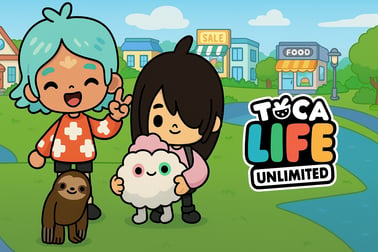
Toca Life Unlimited lets kids design characters, decorate houses, and create stories with everything unlocked. Play free online in your browser.














Toca Life Unlimited
Overview of Toca Life Unlimited
Toca Life Unlimited is a colorful, kid-friendly sandbox where children can decorate houses, dress up characters, and build their own stories in a safe virtual neighborhood. It feels like a mix between a kids house decoration game, a browser dress up game, and a creative world building game all in one. Everything runs directly in the browser, so there’s no need to download apps or install extra software, making it a convenient free online simulation for kids.
Set in a cozy riverside town with multiple homes to furnish, Toca Life Unlimited gives players access to plenty of furniture, outfits, hairstyles, and accessories right from the start. There’s no pressure, no timers, and no complicated rules — kids can simply tap, drag, and drop items to design rooms, customize characters, and act out imaginative everyday scenes.
This relaxed, open-ended play style encourages creativity, storytelling, and exploration. Kids can experiment with interior design, create families or friend groups, and roleplay daily routines in a way that feels playful and safe. If you’re looking for a character customization game that’s easy to pick up and perfectly suited to younger players, Toca Life Unlimited is a great browser-based choice.
Toca Life Unlimited Control Guide
Because Toca Life Unlimited is designed for children, the controls are intentionally simple and intuitive. Whether you’re playing on desktop or mobile, the basic actions stay the same.
Desktop Controls (Keyboard & Mouse)
- Mouse Left Click – Select characters, furniture, clothes, and interactive objects.
- Click & Drag – Move items around rooms, reposition decorations, and drag clothes onto characters.
- Click on Characters – Open outfit options, move them to different spots, or let them interact with the environment.
- Scroll / Drag Screen – Depending on the version, you can drag the background to look around different parts of the house or neighborhood.
- Fullscreen Button (if available) – Click the fullscreen icon on the game frame for a more immersive decorating and dress up experience.
Mobile & Tablet Controls (Touch)
- Tap – Select characters, furniture, clothing, and interactive items.
- Tap & Hold – Pick up furniture or objects to move them.
- Drag with Finger – Place decorations, move characters, rearrange items in rooms.
- Swipe – Scroll around the house or view different areas (if the game version supports side-scrolling scenes).
There are no complex button combinations, no reading-heavy menus, and no fast reflex challenges. That makes it a perfect introduction to browser dress up games and decorating games for younger kids who are still learning how to navigate digital spaces.
Toca Life Unlimited Features
Toca Life Unlimited focuses on open-ended play instead of strict objectives. Its key features are all about creativity, comfort, and freedom.
Unlimited Home Decoration
- Decorate multiple cozy houses along a peaceful river.
- Arrange furniture, kitchen items, beds, plants, and toys anywhere you like.
- Experiment with different room themes: a bright kids’ bedroom, a stylish living room, or a fun party room.
- No locked items or long grind — many browser versions offer most furniture and décor from the start.
Character Customization & Dress Up
- Create and style different characters to live in your houses.
- Choose outfits, hats, accessories, and hairstyles for each person.
- Mix and match looks to create unique families, roommates, or friend groups.
- Great for kids who enjoy character customization games and light fashion play.
Creative World Building & Roleplay
- Set up your town with themed rooms and characters that match your stories.
- Roleplay daily routines like cooking, cleaning, studying, or relaxing.
- Invent imaginative scenes such as parties, sleepovers, or make-believe adventures.
- Everything functions as a creative world building game where there’s no “right” way to play.
Kid-Friendly Sandbox Simulation
- No violence, no scary content, and no competitive pressure.
- Perfect as a free online simulation for kids who like open-ended pretend play.
- Short play sessions work well: kids can jump in, decorate a room, and jump out.
Performance & Troubleshooting
Because Toca Life Unlimited runs in the browser using HTML5, it usually works smoothly on most modern devices. If you or your child runs into issues, these quick checks often help.
If the Game Won’t Load
- Refresh the page – Sometimes a simple reload fixes stuck loading bars.
- Close other tabs – Too many open tabs or apps can slow down the game.
- Update your browser – Use the latest version of Chrome, Edge, Firefox, or Safari.
- Check your internet – A slow or unstable connection can interrupt loading.
If the Game Feels Slow or Laggy
- Lower background activity – Pause video streams, downloads, or other heavy apps.
- Try another browser – Some devices perform better in a different browser.
- Restart the device – Clearing temporary memory often improves performance.
If You Can’t Scroll or Move Around
- Make sure the game frame is clicked or tapped once so it’s active.
- On mobile, use one finger to drag inside the game space, not the page area around it.
- If the version you’re playing has limited areas, it’s possible that only certain rooms are accessible by design.
If problems continue, it usually helps to try the game on a different device (for example, switching from an older phone to a newer tablet or computer).
Can I Play Toca Life Unlimited Offline?
Toca Life Unlimited is typically offered as an online browser game, so you need an active internet connection to load and play it. Unlike installable mobile apps, browser versions don’t usually support true offline play once the tab is closed.
Key points to remember:
- Internet required: You generally need a connection to start and run the game.
- No downloads needed: You don’t have to install anything from an app store.
- Short sessions: Because it runs in the browser, it’s perfect for quick decorating or dress up sessions when you’re online.
If you’re specifically looking for something a child can use during car trips or without Wi‑Fi, you may want to complement this browser version with offline-friendly apps from official stores — but always make sure to download only from trusted, legitimate sources.
Discover a Creative World of Home Design and Roleplay
Toca Life Unlimited turns simple rooms into big storytelling stages. Kids can treat it like a kids house decoration game or lean into roleplay and pretend play.
Design Cozy, Colorful Homes
Every house starts essentially as a blank canvas. Players can:
- Pick where beds, couches, tables, and shelves go.
- Add plants, lamps, toys, and other small decor pieces.
- Experiment with different layouts until the room feels “just right.”
The absence of strict rules makes this a gentle way for kids to explore design ideas. They’re free to clutter a room with toys, line up chairs in silly ways, or create perfectly symmetrical layouts—it’s all about expression.
Act Out Everyday Life
Once rooms are decorated, the roleplay really comes alive. Kids can:
- Move characters into different homes and give them personalities.
- Act out breakfast, bedtime, homework, or playdates.
- Create ongoing stories, like neighbors visiting or families redecorating.
This combination of decorating and storytelling makes Toca Life Unlimited stand out from many other browser dress up games. It’s not just about looks; it’s also about the little stories kids invent as they play.
How to Decorate Houses and Customize Characters
Even very young players can learn how to decorate and customize quickly. The interface is built around tapping, dragging, and dropping.
Step-by-Step: Decorating a Room
- Open the house or room you want to decorate from the main play area.
- Look for furniture icons or a catalog-style panel along the bottom or side.
- Tap an item (like a bed or sofa) to spawn it into the room.
- Drag the item to its ideal spot: against a wall, under a window, in a reading corner, and so on.
- Repeat with tables, chairs, storage, decor, and toys until the room feels complete.
- Rearrange anytime – Kids can move or remove items whenever they want without penalty.
Step-by-Step: Customizing Characters
- Select a character in the scene by tapping or clicking on them.
- Open the wardrobe or clothes panel if the version you’re playing shows outfit options.
- Drag clothes onto the character to instantly change tops, pants, dresses, or accessories.
- Try different hairstyles by selecting hair icons, if available.
- Mix and match styles to create unique looks, from casual outfits to fun, quirky combinations.
Because Toca Life Unlimited works as a character customization game, kids can easily build a cast of characters that fits their stories: a parent, a teacher, a best friend, a pet owner, or a silly neighbor with wild hair and bright clothes.
Tips for Kids to Build Safe and Imaginative Stories
One of the biggest strengths of Toca Life Unlimited is its focus on gentle, imaginative play. Parents and caregivers can use the game as a starting point for creative storytelling and conversations.
Encourage Positive Roleplay
- Suggest stories that involve kindness and sharing: friends visiting and helping each other clean or cook.
- Let kids act out daily routines like bedtime, brushing teeth, or getting ready for school in a fun way.
- Use the game to talk about feelings: “How does this character feel when their room is messy vs. when it’s decorated nicely?”
Use the Game as a Conversation Tool
- Ask your child to describe each room they’ve decorated and why they chose those items.
- Invite them to introduce their characters: names, favorite activities, personalities.
- Encourage them to tell a short story about what’s happening in the house right now.
Keep Play Safe and Healthy
- Set reasonable time limits for screen use, especially for younger children.
- Play together sometimes, so your child can explain their ideas and you can gently guide themes if needed.
- Remind kids that this is a pretend world and not everything needs to be perfect—experimentation is part of the fun.
Used thoughtfully, Toca Life Unlimited becomes more than just a kids house decoration game; it’s a creative tool that supports storytelling, planning, and empathy.
Play on Desktop or Mobile – No Download Needed
One of the biggest advantages of Toca Life Unlimited is that it’s a browser-based experience. That makes it particularly convenient for parents, teachers, and kids.
Playing on Desktop & Laptop
- Open a modern web browser (Chrome, Edge, Firefox, or Safari).
- Visit a reputable gaming site that hosts Toca Life Unlimited.
- Wait for the game to load and click the play button.
- Use the mouse to drag, drop, and decorate with ease on a larger screen.
Desktop play is often best for longer decorating sessions, because the bigger display makes it easier to arrange lots of items and see small details.
Playing on Phones & Tablets
- Use your device’s browser and navigate to a trusted game portal.
- Start the game and allow it a moment to load completely.
- Play with simple taps and drags—perfect for younger kids who are used to touchscreens.
- Rotate your device if needed; most versions are designed primarily for landscape view.
Because there’s no download needed, Toca Life Unlimited works well as a quick, safe free online simulation for kids whether you’re at home, in a classroom, or using a shared family device.
Similar Creative Games to Try After You Play
If your child enjoys decorating houses, dressing characters, and building gentle stories, there are plenty of other browser experiences with similar vibes. Here are some game types to look for next:
- Home & Room Decorating Games – Simple simulations where kids arrange furniture and decor, similar to the home design aspect of Toca Life Unlimited.
- Browser Dress Up Games – Fashion-focused games that let kids style outfits, try different themes, and experiment with color and pattern combinations.
- Creative World Building Games – Kid-friendly titles where players build small towns, cozy neighborhoods, or simple worlds without heavy combat or pressure.
- Light Life Simulators for Kids – Games that focus on daily life, routines, and gentle tasks instead of competition or complex strategy.
Whichever games you explore next, look for the same strengths that make Toca Life Unlimited appealing: easy controls, kid-safe content, and open-ended creative play that encourages children to imagine, design, and tell their own stories.
Frequently Asked Questions
What is Toca Life Unlimited?
Toca Life Unlimited is a creative simulation game where kids can design characters, decorate houses, and build their own little world with all items unlocked.
Is Toca Life Unlimited free to play online?
Yes, this browser version is free to play. You can start the game directly in your web browser without paying or subscribing.
Is Toca Life Unlimited safe for children?
Yes, it is designed for kids with family-friendly content, simple controls, and no violent gameplay, making it suitable for young players.
Can I play Toca Life Unlimited on mobile devices?
Yes, you can play in most modern mobile browsers on phones and tablets, as well as on desktop computers, without installing an app.
Do I need to download anything to play Toca Life Unlimited?
No download is required. The game runs in your browser, so you just press play and wait a short moment for it to load.